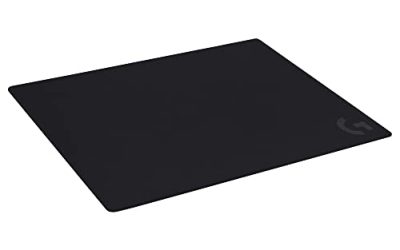
A hard gaming mouse pad changes the feel of every movement before a single setting is touched. Cloth gives way under pressure and adds drag, while a rigid surface lets the mouse feet slide with far less resistance. That difference matters most in fast games, where a flick, a track across a doorway, or a small correction has to land exactly where the hand intended. Choosing badly means fighting the pad instead of the opponent, so the surface, the size, and the way the pad stays put all deserve attention before buying.


This guide is for PC players who already know they want a rigid surface rather than cloth, including FPS players chasing a faster glide, MOBA and strategy players who value consistent tracking, and desk users who want a wipe-clean pad that does not fray. The five pads below were chosen from their names and specs on the Amazon page, covering hard plastic, polycarbonate, and tempered glass, in sizes from compact to large, with different bases and thicknesses.
Top 3 picks at a glance

Quick Picks
As an Amazon Associate we earn from qualifying purchases.
| Product | Best for | Key spec from title |
|---|---|---|
| Logitech G440 Hard Gaming Mouse Pad | Moderate friction on a compact hard surface | Hard gaming mouse pad, optimized for gaming sensors |
| Razer Atlas Tempered Glass Gaming Mouse Mat | Maximum glide on tempered glass | Ultra-smooth micro-etched tempered glass surface |
| Glorious Helios Large Ultra Thin Polycarbonate Hard Mousepad | An ultra-thin hard pad that sticks to the desk | Hard polycarbonate surface, 11 x 13 inches |
| SteelSeries QcK Hard Gaming Mouse Pad Medium | Low-friction hard surface in a medium footprint | Hard polypropylene surface, 320 x 270 x 3 mm |
| Razer Firefly Hard V2 RGB Gaming Mouse Pad | A lit hard pad with balanced control and speed | Micro-textured hard surface, customizable Chroma lighting |
How to Choose
Hard plastic, polycarbonate, or glass
Hard pads are not all the same material, and the material sets the glide. Hard plastic pads such as the Logitech G440 and the SteelSeries QcK Hard give a firm, consistent slide with more stopping control than glass. Polycarbonate, used by the Glorious Helios, is thinner and more flexible, almost flush with the desk while feeling rigid under the mouse. Tempered glass, as on the Razer Atlas, is the fastest of the three, with a smooth micro-etched face and very low friction. Glass also wipes clean easily, but it can feel too slick for players who rely on friction. Decide whether you want speed above all, or a middle ground that still lets you halt the cursor cleanly.
Size and desk space
A hard pad cannot be rolled up or folded, so its footprint has to fit the desk as it is. Measure the clear area beside the keyboard before ordering, and leave room for the full sweep of the arm at the sensitivity used. Low-sensitivity players who move the whole forearm need a wider pad, and the Razer Atlas at 450 x 400 mm or the Glorious Helios at 11 x 13 inches suit that style better. High-sensitivity players who aim mostly from the wrist can use a smaller surface such as the Logitech G440 at 340 x 280 mm. Also check what sits nearby, since a hard edge against a keyboard can catch the wrist during long sessions.
Thickness and wrist height
Thickness changes how high the hand sits above the desk, and on a hard pad that difference is felt immediately. The Glorious Helios is only 0.5 mm thick, so the wrist stays almost level with the desk and the transition from pad to desk is barely noticeable. The SteelSeries QcK Hard Medium measures 320 x 270 x 3 mm, giving a firm, low-profile edge that keeps the wrist close to desk level. Glass pads sit in between, with a solid slab that does not compress. A thicker pad can help when the desk edge is sharp, while a thinner pad suits players who rest the forearm flat and dislike any step up.
Base grip and staying put
A hard pad is useless if it slides across the desk during a fast flick. Look closely at how the underside holds its position, because each design solves the problem differently. The Logitech G440 and the Razer Firefly Hard V2 use a non-slip rubber base, while the Razer Atlas pairs its glass slab with an anti-slip base that keeps the heavy panel in place. The Glorious Helios takes another approach, using a silicone adhesive base that sticks the thin polycarbonate sheet directly to a smooth desk. Adhesive bases hold well on clean, flat surfaces, and rubber bases are more forgiving on textured or slightly uneven desks. Check the desk surface first, then match the base to it.
The 5 Best Options
Logitech G440 Hard Gaming Mouse Pad
The Logitech G440 suits players who want a hard surface without giving up all stopping control. Its moderate friction sits between the drag of cloth and the near-zero resistance of glass, so flicks feel quick while small corrections still have something to work against. The compact 340 x 280 mm size fits desks where a large pad would crowd the keyboard, and the rigid construction keeps the tracking surface flat from edge to edge. It is a sensible first hard pad for someone moving away from cloth, and it also works well as a second pad for a smaller setup or a travel desk.
Specs
- Hard gaming mouse pad with a low-friction surface for fast movement
- Size listed as 340 x 280 mm
- Moderate surface friction
- Non-slip mat
- Optimized for gaming sensors
- Model number 943-000790
Best for: Players switching from cloth who want a faster hard surface with moderate friction and a compact footprint.
Watch out for: Measure the clear desk space first, because the fixed 340 x 280 mm size cannot be trimmed, and confirm the mouse feet are in good condition, since worn feet drag more noticeably on a hard surface.
Razer Atlas Tempered Glass Gaming Mouse Mat
The Razer Atlas is the pick for players who want the fastest glide in this group and are happy to adapt to it. Its tempered glass face is micro-etched for an ultra-smooth feel, so the mouse moves with very little effort and keeps its speed through long sweeps. The large 450 x 400 mm panel gives low-sensitivity players room to aim with the arm, and the glass surface resists dirt and scratches while wiping clean with a cloth. Because glass is heavy and rigid, the pad stays flat and stable, which helps tracking stay consistent across the whole surface.
Specs
- Tempered glass gaming mouse mat
- Ultra-smooth micro-etched surface
- Dirt and scratch-resistant surface
- Anti-slip base
- Quiet mouse movements
- Size listed as 450 x 400 mm
- Model number RZ02-04890100-R3U1
Best for: Low-sensitivity FPS players who want maximum glide on a large tempered glass surface.
Watch out for: Check that the desk can hold a heavy glass slab safely and that the mouse feet are smooth, because glass exposes rough or worn feet more than cloth does.
Glorious Helios Large Ultra Thin Polycarbonate Hard Mousepad
The Glorious Helios Large is built for players who want a hard surface that almost disappears into the desk. At only 0.5 mm thick, the polycarbonate sheet adds almost no height, so the wrist moves from desk to pad without a step. Its 11 x 13 inch size gives more room than a compact pad while still fitting most desks, and the hard surface delivers a fast, uniform glide in both directions. The silicone adhesive base holds the thin sheet firmly on a smooth desk, which matters because a pad this light would otherwise shift during play. It suits players who dislike thick pads and want speed without bulk.
Specs
- Hard polycarbonate surface
- Size listed as 11 x 13 inches
- Thickness listed as 0.5 mm
- Silicone adhesive base
- Water and tear-resistant surface
- Weight listed as 4 ounces
- Model number GH-L
Best for: Players who want an ultra-thin hard pad that sits almost flush with a smooth desk.
Watch out for: Confirm the desk is flat and smooth before buying, because the adhesive base needs a clean surface to grip, and plan where it will sit, since repositioning an adhesive pad takes care.
SteelSeries QcK Hard Gaming Mouse Pad Medium
The SteelSeries QcK Hard Medium fits players who like a hard surface but want a firm, low-profile pad under the wrist. Its hard polypropylene face is engineered for maximum speed and precision, with a low-friction enhanced texture that keeps the mouse moving freely. The medium size, listed as 320 x 270 x 3 mm, balances desk space with enough room for wrist aiming and shorter arm sweeps, while the multi-layer construction gives the pad a solid feel. It is optimized for both optical and laser sensors, so tracking stays consistent across different mice. It is a good middle choice for players who find glass too slick and polycarbonate too flat.
Specs
- Hard polypropylene surface
- Size listed as 320 x 270 x 3 mm
- Low-friction, enhanced surface texture
- Optimized for optical and laser sensors
- Durable multi-layer construction
- Model number 63821
Best for: Players who want a low-friction hard pad with a slim 3 mm profile in a medium size.
Watch out for: Check the 3 mm height against the desk edge and keyboard height, because the firm edge sits lower than a thick cloth pad.
Razer Firefly Hard V2 RGB Gaming Mouse Pad

The Razer Firefly Hard V2 is for players who want a hard pad that also fits a lit setup. Its micro-textured hard surface is tuned for balanced control and speed, between a pure speed pad and a control cloth, so it suits a wider range of games than the fastest glass options. Chroma lighting runs around the edge, and built-in cable management keeps the connection tidy. The non-slip rubber base holds the pad in place during fast movements, and the rigid surface stays flat across the whole tracking area. It works well for players who game and work at the same desk and want the pad to match the lighting.
Specs
- Micro-textured hard surface
- Customizable Chroma lighting
- Built-in cable management
- Balanced control and speed
- Non-slip rubber base
- Size listed as 14 x 10.8 inches
- Material listed as plastic
- Model number RZ02-03020100-R3U1
Best for: Players who want a lit hard pad with balanced glide for mixed gaming and a tidy cable setup.
Watch out for: Confirm there is a free USB port nearby for the lighting and cable, and check the desk depth, because the pad needs room for both the surface and its cable connection.
Which One Fits Your Situation
You play low-sensitivity FPS and sweep with your arm
Choose the Razer Atlas Tempered Glass Gaming Mouse Mat. Its 450 x 400 mm glass surface gives the arm room for wide turns, and the ultra-smooth micro-etched face keeps friction low through long tracking movements. The heavy slab and anti-slip base also keep the pad still when the hand moves fast. Players who stop mainly by lifting the mouse, rather than by dragging against friction, will get the most from it.
You want your first hard pad and a safer change from cloth
Choose the Logitech G440 Hard Gaming Mouse Pad. Its moderate friction makes the move from cloth less abrupt than glass, and the compact 340 x 280 mm size fits desks that cannot take a large panel. The non-slip base and sensor-optimized surface keep tracking predictable while the hand learns the faster glide. It is the least disruptive way to find out whether a hard surface suits how you aim.
Your desk is small, flat, and you hate thick pads
Choose the Glorious Helios Large Ultra Thin Polycarbonate Hard Mousepad. At 0.5 mm thick it adds almost no height, and the adhesive base keeps the 11 x 13 inch sheet fixed to a smooth desk without a bulky rubber layer. The hard polycarbonate face still gives a fast, even glide, so the pad feels like part of the desk rather than an extra layer on top of it.
You want lighting and one pad for gaming and everyday use
Choose the Razer Firefly Hard V2 RGB Gaming Mouse Pad. Its micro-textured hard surface balances control and speed across different game types, and the Chroma lighting ties the desk together visually. Built-in cable management and a non-slip rubber base make it practical for a shared desk, where the pad stays in place all day and the lighting can be set to match the rest of the setup.
Common Mistakes
- Buying a hard pad without measuring the desk, then finding the rigid panel does not fit beside the keyboard.
- Choosing the fastest glass surface for a game that needs frequent hard stops, and then struggling to halt the cursor.
- Ignoring the base type, so a pad slides on a textured desk or an adhesive pad fails to grip a rough surface.
- Keeping worn mouse feet, which drag, catch, and feel far worse on hard plastic or glass than on cloth.
- Picking a thick pad without checking wrist height, then finding the raised edge uncomfortable during long sessions.
Frequently Asked Questions
Is a hard mouse pad better than a cloth pad for gaming?
A hard pad is better for speed and consistency, because its rigid surface adds less drag and does not compress under the mouse. Cloth is better for stopping control and for players who like a softer, more forgiving feel. The right choice depends on whether the player values fast glides or firm stopping power, and on sensitivity used in play.
Do hard mouse pads wear out mouse feet faster?
Hard surfaces can wear mouse feet faster than cloth, especially glass and hard plastic, because the feet slide against a firmer material. Keeping the pad clean, replacing worn feet promptly, and choosing smooth feet helps reduce wear. Players who notice scratching or rough movement should check the feet before blaming the pad.
Can a hard mouse pad be used on any desk?
Most hard pads work on flat desks, but the base matters. Rubber and anti-slip bases handle slightly textured desks, while adhesive bases such as the one on the Glorious Helios need a smooth, clean surface to hold. Glass pads also need a sturdy desk that can support their weight without flexing.
How do I clean a hard gaming mouse pad?
Wipe the surface with a soft, slightly damp cloth to remove dust and skin oils, then dry it fully before playing. Avoid harsh cleaners that could damage the surface coating, and keep liquids away from any lighting cable or USB connection on RGB models. Regular cleaning keeps glide consistent and stops dust from scratching the surface.
Related guides
More from Amazon
Programs that pair well with the guide above. Offers and eligibility are set by Amazon and may change.
Free shipping on eligible items, Prime Video and more. Eligible new members can start with a free trial.
Start a Prime free trialAd-free music streaming. Eligible new subscribers can start with a free trial.
Try Music Unlimited freeA Prime membership for ages 18-24 with a trial period. Eligibility is set by Amazon.
See Prime for Young AdultsAudiobooks and podcasts to listen to on the go. Eligible new members can start with a free trial.
Try Audible freeAs an Amazon Associate we earn from qualifying purchases.