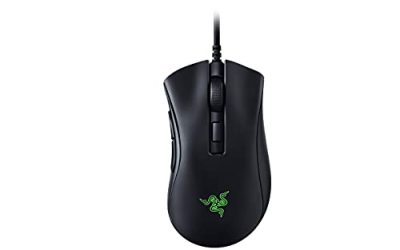
Picking a Razer mouse is rarely about finding a bad one; it is about avoiding the wrong shape. The catalogue splits into families that look similar on a shelf yet behave very differently in the hand: symmetrical Viper shells built for flick shots, the curved DeathAdder line shaped around a resting palm, button-heavy Naga models for ability rotations, and the tiny Orochi for a laptop bag. Choosing between them means matching shell, weight and button layout to your grip and the games you actually play.


This roundup serves competitive shooter players chasing low weight, MMO players who need a grid of thumb buttons, and everyone in between who wants one dependable mouse for mixed genres. Each pick below was selected from the names and specifications published on its Amazon product page, so the sensor, polling and battery figures quoted here come straight from the listings rather than from marketing summaries.
Our Top Picks
- Razer Basilisk V3 Customizable RGB Wired Ergonomic GamingMouse2.96 x 5.12 x 1.67 inches0.2 poundsCheck on Amazon
Top 3 picks at a glance

Quick Picks
As an Amazon Associate we earn from qualifying purchases.
| Product | Best for | Key spec from title |
|---|---|---|
| Razer Viper V3 Pro | Competitive FPS and esports play | 54 g with 8K polling and a 35K DPI optical sensor |
| Razer DeathAdder V3 Pro | Palm-grip players with medium to large hands | 63 g ergonomic shape with a 30K optical sensor |
| Razer Basilisk V3 | Multi-genre players who want buttons and lighting | 11 programmable buttons and a HyperScroll tilt wheel |
| Razer Naga V2 Pro | MMO and MOBA players with heavy rotations | Swappable 2, 6 and 12-button side plates |
| Razer Orochi V2 | Laptop gaming and travel setups | 60 g shell with up to 950 hours of battery life |
How to Choose
Match the shell shape to your grip
Shape decides comfort long before sensor numbers matter. A symmetrical shell such as the Viper V3 Pro suits claw and fingertip grips because both sides mirror each other and the hump sits low and central. The DeathAdder V3 Pro takes the opposite approach: a right-handed ergonomic curve with a higher rear that fills a resting palm. If your fingers drape over the front edge of a symmetrical mouse, you will likely prefer the ergonomic option; if you steer mostly with your fingertips, the flatter profile usually feels more agile.
Decide how much weight you want to move
Every gram shows up during long sessions and fast swipes. The Viper V3 Pro is listed at 54 g, the DeathAdder V3 Pro at 63 g, and both feel noticeably quicker to stop and redirect than the Naga V2 Pro, which sits around 134 g because of its side-plate mechanism and larger frame. Light mice reward low in-game sensitivity and wide arm movements, while a heavier body can feel steadier for high-sensitivity players who make small wrist corrections. Neither is automatically better; the right answer depends on how you move.
Count buttons against the games you play
Button layout is where the Razer families diverge most sharply. A shooter player may only need two thumb buttons for melee and push-to-talk, which the Viper and DeathAdder provide without clutter. The Basilisk V3 raises that to 11 programmable buttons, adding a thumb clutch and tilt-click wheel inputs for shooters with extra binds. The Naga V2 Pro goes furthest, swapping between 2, 6 and 12-button side plates so the same mouse can serve a MOBA one evening and a raid the next. Buy the layout your current games demand, not one you might need someday.
Pick a connection and battery style you can live with
Wireless freedom now comes in several flavours. The Viper V3 Pro and DeathAdder V3 Pro run on Razer HyperSpeed wireless with rechargeable cells, while the Naga V2 Pro adds Bluetooth for a second device. The Orochi V2 instead takes a single AA or AAA battery, trading recharging for months of runtime and easy swaps on the road. A wired pick like the Basilisk V3 removes battery management entirely. Think about whether you would rather plug in a charging cable weekly or keep spare cells in a drawer.
The 5 Best Options
Razer Viper V3 Pro
Built for competitive shooter players, the Viper V3 Pro pairs a symmetrical 54 g shell with Razer’s Focus Pro 35K optical sensor and true 8K polling through the included HyperPolling wireless dongle. Its Gen-3 optical switches register clicks without the debounce delay of mechanical contacts, and the shape stays neutral enough for claw or fingertip grips across medium hand sizes. Players who compete in tactical shooters or fast arena titles get the most from it, since the low weight and high polling ceiling reward precise, repeated flicks more than raw button count.
Specs
- Sensor: Razer Focus Pro 35K optical sensor
- Polling rate: up to 8000 Hz with the HyperPolling wireless dongle
- Switches: Razer Optical Mouse Switches Gen-3
- Weight: 54 g (Black)
- Battery life: up to 95 hours
- Programmable buttons: 8
- Connectivity: Razer HyperSpeed wireless and wired USB-C
- Model: RZ01-05120100-R3U1
Best for: Esports-focused FPS players using claw or fingertip grip.
Watch out for: Running at 8000 Hz drains the battery far faster than the headline figure, and special editions such as Faker or Sentinels versions are separate listings, so confirm you are ordering the standard Black model.
Razer DeathAdder V3 Pro
The DeathAdder V3 Pro keeps the line’s familiar right-handed curve but trims it to 63 g, making it the natural pick for palm and relaxed claw players with medium to large hands. Under the shell sits a Focus Pro 30K optical sensor with Gen-3 optical switches, driven over HyperSpeed wireless for a cable-free desk. Five programmable buttons cover the essentials without crowding the thumb area, and the listed 90 hours of battery life means charging becomes an occasional task rather than a weekly habit. It suits players who found symmetrical mice cramping over long sessions.
Specs
- Sensor: Razer Focus Pro 30K optical sensor
- Switches: Razer Optical Mouse Switches Gen-3
- Weight: 63 g
- Battery life: up to 90 hours
- Programmable buttons: 5
- Connectivity: Razer HyperSpeed wireless
- Model: RZ01-04630100-R3G1
Best for: Palm-grip players with larger hands who play shooters for long stretches.
Watch out for: The shape is right-handed only, and this standard listing polls at 1000 Hz; the 8K HyperPolling dongle is a separate bundle or accessory, so check which version is in the box before ordering.
Razer Basilisk V3
Where the two Pro models strip features away, the wired Basilisk V3 piles them on. Its Focus+ 26K optical sensor is paired with 11 programmable buttons, a HyperScroll tilt wheel that switches between free-spinning and tactile modes, and 11 Chroma RGB lighting zones. The sculpted shell includes a pronounced thumb rest, which helps during long strategy or RPG sessions where the hand stays planted. Because it connects over USB, there is no battery to manage and no wireless hardware adding weight, making it a strong fit for a fixed desk setup that rarely moves.
Specs
- Sensor: Razer Focus+ 26K DPI optical sensor
- Switches: Razer Optical Mouse Switches Gen-2
- Programmable buttons: 11
- Scroll wheel: HyperScroll tilt wheel with free-spin and tactile modes
- Lighting: 11 Razer Chroma RGB zones
- Connectivity: Wired USB
- Model: RZ01-04000100-R3U1
Best for: Multi-genre players who want extra binds, a tilting wheel and lighting at a fixed desk.
Watch out for: It is wired and right-handed only, and a renewed version of this mouse circulates under a different listing, so verify the unit on the page is new before buying.
Razer Naga V2 Pro
The Naga V2 Pro is Razer’s answer for players whose thumb does as much work as their index finger. Three magnetic side plates swap between 2, 6 and 12-button layouts, giving up to 19+1 programmable buttons for MMO rotations, MOBA item actives or productivity macros. A Focus Pro 30K optical sensor and Gen-3 optical switches keep tracking and clicks at the same standard as the flagship models, while the HyperScroll Pro wheel adds adjustable tension. HyperSpeed wireless, Bluetooth and wired modes cover desk and laptop use, with battery life listed up to 300 hours depending on the connection.
Specs
- Sensor: Razer Focus Pro 30K optical sensor
- Switches: Razer Optical Mouse Switches Gen-3
- Programmable buttons: 19+1 with swappable side plates
- Side plates: 2-button, 6-button and 12-button layouts included
- Scroll wheel: Razer HyperScroll Pro wheel
- Battery life: up to 300 hours as listed
- Connectivity: HyperSpeed wireless, Bluetooth and wired
- Weight: approx. 134 g
Best for: MMO and MOBA players who bind long ability rotations to the thumb grid.
Watch out for: At roughly 134 g it is more than twice the weight of the Viper V3 Pro, so fast-paced shooter players will feel the extra mass; confirm all three side plates are listed as included.
Razer Orochi V2

Designed to disappear into a laptop sleeve, the Orochi V2 is a compact symmetrical mouse that runs on a single AA or AAA battery instead of a rechargeable cell. Razer lists up to 950 hours of use over Bluetooth, with HyperSpeed wireless available when lower latency matters in a match. The 5G Advanced 18K DPI optical sensor and second-generation mechanical switches rated for 60 million clicks cover competitive basics, while the roughly 60 g weight keeps it comfortable for fingertip control. It is the one pick here aimed squarely at gaming away from a main desk.
Specs
- Sensor: Razer 5G Advanced 18K DPI optical sensor
- Switches: Razer Mechanical Mouse Switches Gen-2, rated for 60 million clicks
- Weight: 60 g
- Battery life: up to 950 hours
- Battery type: single AA or AAA battery
- Connectivity: Razer HyperSpeed wireless and Bluetooth
- Model: RZ01-03730400-R3U1
Best for: Laptop gamers, travellers and small-handed players who want a compact wireless mouse.
Watch out for: The battery is a replaceable cell rather than a rechargeable pack, the shell may feel short under a large palm, and colour variants carry their own listings, so check the page shows the colour you intend to buy.
Which One Fits Your Situation
You compete in ranked shooters most nights
Take the Viper V3 Pro. Its 54 g shell, symmetrical profile and 8K polling support the quick, repeated aim corrections that tactical and arena shooters demand, and the optical switches keep click response consistent across a long ranked session. Players who grip with their fingertips or a relaxed claw will get the most from its shape.
Your hand aches after long sessions on a flat mouse
The DeathAdder V3 Pro is the safer fit here. Its raised ergonomic curve supports a resting palm instead of forcing the fingers to hover, and at 63 g it stays easy to move despite the larger frame. Medium and large hands benefit most from it; smaller hands should check the listed dimensions first.
Your evenings rotate between raids and shooters
Choose the Naga V2 Pro if abilities and macros dominate your play, since the 12-button plate puts a full rotation under your thumb. If your mix leans toward shooters with a few extra binds, the Basilisk V3 covers that middle ground with 11 programmable buttons and a tilting wheel, without the Naga’s extra weight.
You game on a laptop at home and away
The Orochi V2 suits a mobile setup best. It slips into a bag, pairs over Bluetooth for everyday use, and switches to HyperSpeed when you sit down to play, while the replaceable battery removes any hunt for a charging cable mid-trip. Its compact shell also fits smaller hands that find full-size mice stretched.
Common Mistakes
- Buying by DPI alone, when every mouse here already tracks far beyond what most players set in game.
- Choosing a symmetrical shell for a full palm grip, then blaming the sensor for hand fatigue that the shape caused.
- Ordering a special-edition or renewed listing by accident because several Razer variants share similar product photos.
- Running a wireless mouse at its highest polling setting full time, then being surprised by how quickly the battery empties.
- Picking a 12-button side grid for shooters and leaving most of the buttons unbound while carrying the extra weight.
Frequently Asked Questions
Which Razer mouse is best for FPS games?
For most shooter players, the Viper V3 Pro leads this list because of its 54 g symmetrical shell, Focus Pro 35K sensor and 8K polling option. Players with larger hands who prefer an ergonomic curve should look at the DeathAdder V3 Pro instead, which keeps similar switch and sensor hardware in a palm-friendly shape.
Are Razer optical switches better than mechanical ones?
Optical switches actuate with a light beam rather than metal contacts, which removes debounce delay and the double-click wear pattern that affects mechanical designs. In this lineup the Viper, DeathAdder and Naga use Gen-3 optical switches, while the Orochi V2 uses second-generation mechanical switches rated for 60 million clicks, which remains plenty for everyday play.
How long do these wireless Razer mice last on a charge?
Listed figures vary widely by model and settings. The Viper V3 Pro is rated up to 95 hours and the DeathAdder V3 Pro up to 90 hours, though high polling shortens both considerably. The Orochi V2 stretches to 950 hours on a replaceable AA or AAA cell over Bluetooth, favouring runtime over recharge speed.
Can left-handed players use any of these Razer mice?
The symmetrical shells are the realistic options. Both the Viper V3 Pro and the Orochi V2 use mirrored shapes that a left hand can grip, although their side buttons sit on one side only. The DeathAdder V3 Pro, Basilisk V3 and Naga V2 Pro are sculpted for the right hand and will not sit comfortably in a left-handed grip.
Related guides
More from Amazon
Programs that pair well with the guide above. Offers and eligibility are set by Amazon and may change.
Free shipping on eligible items, Prime Video and more. Eligible new members can start with a free trial.
Start a Prime free trialAd-free music streaming. Eligible new subscribers can start with a free trial.
Try Music Unlimited freeA Prime membership for ages 18-24 with a trial period. Eligibility is set by Amazon.
See Prime for Young AdultsAudiobooks and podcasts to listen to on the go. Eligible new members can start with a free trial.
Try Audible freeAs an Amazon Associate we earn from qualifying purchases.