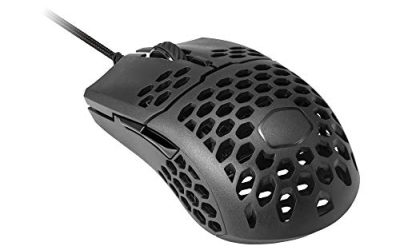
Choosing the best MSI gaming mouse is really a decision about how you want to play without a cable getting in the way, and how much weight your hand is willing to carry through a long session. MSI builds its Clutch lineup around that trade-off: every wireless model here ships with a charging dock, a high-resolution optical sensor, and switches rated for tens of millions of clicks, yet the three mice below differ in size, sensor ceiling, and battery life in ways that matter once you settle into a grip.


This guide is for competitive shooter players who want a light wireless mouse, for smaller-handed gamers who find most ergonomic mice too long, and for anyone building an MSI-themed desk who wants the mouse, lighting, and software to match. Each pick below is drawn from its Amazon listing, with the sensor, weight, battery, and button count taken from the product page rather than from memory.
Quick Picks
As an Amazon Associate we earn from qualifying purchases
| Product | Best for | Key spec from title |
|---|---|---|
| MSI Clutch GM51 Lightweight Wireless | FPS players who want the strongest sensor and longest battery | 26,000 DPI optical sensor, 150-hour battery, charging dock |
| MSI Clutch GM41 Lightweight Wireless | Lightweight wireless play with a proven sensor | 20,000 DPI optical sensor, 80-hour battery, charging dock |
| MSI Clutch GM31 Lightweight Wireless | Smaller hands and ergonomic comfort | 12,000 DPI optical sensor, 110-hour battery, charging dock |
How to Choose
Sensor ceiling and tracking speed
The sensor decides how faithfully the mouse follows fast flicks, and MSI spreads its Clutch wireless models across three different PixArt sensors. The GM51 tops the range with a 26,000 DPI ceiling, 650 IPS tracking, and 50G acceleration, while the GM41 reaches 20,000 DPI and the GM31 stops at 12,000 DPI. In practice, most players set sensitivity far below the maximum, so the ceiling itself matters less than clean tracking at the DPI you actually use. A higher ceiling still signals a newer sensor generation, and it gives headroom if you play on a high-resolution monitor or switch between very low and very high sensitivity across games.
Weight, size, and grip shape
Weight shapes fatigue more than any other number on the box, and the three mice here sit within a narrow band that still feels different in the hand. The GM31 is the lightest at 73 grams and the shortest at 120 mm long, which suits smaller hands and fingertip or claw grips. The GM41 weighs 74 grams but stretches to 130.1 mm, giving palm-grip players more length to rest on. The GM51 is the heaviest at 85 grams, and its wider 65 mm body fills the palm more fully. Before choosing, compare the length and width against the mouse you use now, because a few millimetres of extra length change where your fingers land.
Battery life and the charging dock
All three mice include a charging dock, so the real question is how often you want to think about charging at all. The GM51 leads with up to 150 hours of battery life when RGB lighting is off, the GM31 follows with up to 110 hours, and the GM41 offers up to 80 hours. Each mouse also supports fast charging, so a short break can add hours of play, and all three can run wired through their included cable while they charge. If your desk already holds a dock-friendly spot near the keyboard, the dock turns charging into a habit rather than a chore, and battery anxiety mostly disappears.
Connectivity, buttons, and software
Every pick here connects three ways: 2.4 GHz wireless through a dongle, Bluetooth, and wired through the included cable. That flexibility matters if you move the mouse between a gaming desktop and a laptop, since Bluetooth covers travel without the dongle and the cable covers competitive sessions. Button counts differ slightly, with the GM51 and GM41 offering six buttons and the GM31 offering five programmable buttons, so check whether you need a dedicated DPI button underneath or on top. All three use MSI Center software for DPI steps, lighting, and profiles, so confirm you are comfortable installing it before you buy.
The 3 Best Options
MSI Clutch GM51 Lightweight Wireless
The GM51 is the flagship of this trio, and it suits FPS players who want the newest sensor, the longest battery, and a charging dock without giving up RGB lighting. Its PixArt PAW-3395 sensor tracks up to 26,000 DPI, and the diamond-patterned LightGrips on the sides keep fingers planted during lateral flicks. The 150-hour battery means the mouse can go a week of evening sessions between charges, and the included dock makes topping up as simple as setting the mouse down. Right-handed players with medium to large hands will find the 122 mm body fills the palm well, though the 85-gram weight is the heaviest of the three.
Specs
- Sensor: PixArt PAW-3395 optical sensor, up to 26,000 DPI, 650 IPS, 50G acceleration
- Weight: 85 grams
- Battery: Up to 150 hours with RGB lighting off, 550 mAh battery
- Connectivity: 2.4 GHz wireless, Bluetooth, wired
- Switches: Omron switches rated for 60 million clicks
- Buttons: 6 buttons, 5 programmable plus DPI button underneath
- Lighting: RGB Diamond LightGrips and dragon logo
- Charging: Charging dock included, fast charging
Best for: FPS players who want the strongest sensor and longest battery life in an MSI wireless mouse.
Watch out for: At 85 grams it is heavier than most mice marketed as lightweight, so players who prefer ultralight mice should confirm the weight works for their grip before buying.
MSI Clutch GM41 Lightweight Wireless
The GM41 is the proven middle pick, and it suits players who want a light wireless mouse with a charging dock and a sensor that still handles fast competitive play. Its PixArt PAW-3370 sensor reaches 20,000 DPI through software, and the 74-gram body glides easily across a mousepad during long sessions. The 80-hour battery is shorter than the GM51, yet the dock and fast charging keep downtime brief, and a ten-minute charge adds hours of play. Six buttons give room for a DPI switch and side buttons without crowding the shell, and the diamond-textured sides help the mouse stay steady in a claw grip.
Specs
- Sensor: PixArt PAW-3370 optical sensor, up to 20,000 DPI with software
- Weight: 74 grams without cable
- Battery: Up to 80 hours
- Connectivity: 2.4 GHz wireless, Bluetooth, wired
- Switches: Omron switches rated for 60 million clicks
- Buttons: 6 buttons
- Lighting: RGB Mystic Light
- Charging: Charging dock included, fast charging
Best for: Players who want a light, proven wireless MSI mouse with a dock and a strong sensor.
Watch out for: The battery is the shortest of the three picks, so check that the dock fits your desk layout before relying on it for daily charging.
MSI Clutch GM31 Lightweight Wireless
The GM31 is the smallest mouse here, and it suits players with smaller hands who find full-size ergonomic mice too long or too wide. Its 120 mm length and 73-gram weight make it easy to lift and reposition, and the ergonomic curve supports the palm without forcing the fingers to stretch. The PixArt PAW-3311 sensor reaches 12,000 DPI, which covers the sensitivity range most players actually use, and the 110-hour battery outlasts the GM41 despite the smaller shell. Five programmable buttons keep the layout simple, and the included dock means the mouse charges in the same place it rests between sessions.
Specs
- Sensor: PixArt PAW-3311 optical sensor, up to 12,000 DPI
- Weight: 73 grams
- Battery: Up to 110 hours
- Connectivity: 2.4 GHz wireless, Bluetooth, wired
- Switches: Omron switches rated for 60 million clicks
- Buttons: 5 programmable buttons
- Lighting: RGB Mystic Light
- Charging: Charging dock included, fast charging
- Dimensions: 120 x 64 x 37 mm
Best for: Smaller hands and players who want the lightest, most compact ergonomic MSI wireless mouse.
Watch out for: The 12,000 DPI ceiling is lower than the other two picks, and the five-button layout offers one fewer programmable button, so confirm both fit your games before buying.
Which One Fits Your Situation
A competitive FPS player who wants the best sensor
Pick the GM51 Lightweight Wireless. Its 26,000 DPI sensor, 650 IPS tracking, and 150-hour battery give the most headroom of the three, and the charging dock removes the usual wireless worry about running dry mid-match. The 85-gram weight is the trade-off, so it fits players who value stability and palm support over the lightest possible shell.
A player who wants light wireless play on a proven design
Pick the GM41 Lightweight Wireless. At 74 grams with a 20,000 DPI sensor and six buttons, it covers fast competitive play without the flagship weight, and its dock and fast charging keep it ready between sessions. It is the balanced choice when the GM51 feels too heavy and the GM31 feels too small.
Smaller hands or a compact desk setup
Pick the GM31 Lightweight Wireless. Its 120 mm length and 73-gram weight suit smaller hands and tight desk space, and the ergonomic shape supports long sessions without stretching the fingers. The 110-hour battery is a genuine bonus, outlasting the larger GM41 while the mouse itself stays the smallest of the three.
An MSI-themed desk where everything matches
Pick any of the three, then match the rest of the setup to it, because all three share RGB Mystic Light, MSI Center software, and a charging dock with the same design language. The GM51 makes the strongest visual statement with its diamond LightGrips, the GM41 keeps the look classic, and the GM31 suits a smaller desk where a full-size mouse would crowd the keyboard.
Common Mistakes
- Choosing by DPI ceiling alone instead of checking weight, length, and grip shape against your hand.
- Assuming every Clutch GM51 is the same mouse, when MSI also sells a wired GM51 variant with different weight and polling rate.
- Buying a wireless mouse without a plan for the charging dock, then letting the battery run flat mid-session.
- Ignoring the software requirement, since DPI steps, lighting, and profiles all need MSI Center on Windows.
- Picking the lightest mouse available without testing whether its shorter body leaves your palm unsupported.
Frequently Asked Questions
Which MSI gaming mouse is best for FPS games?
The GM51 Lightweight Wireless is the strongest FPS pick here, with a 26,000 DPI PixArt sensor, 650 IPS tracking, and 150 hours of battery life. Its diamond LightGrips help during fast flicks, and the charging dock keeps it ready between matches. Players who prefer a lighter shell should look at the GM41 instead.
Are MSI Clutch wireless mice good for small hands?
Yes, the GM31 Lightweight Wireless is the best fit for smaller hands, at 120 mm long and 73 grams, with an ergonomic shape that supports the palm. The GM41 is longer at 130.1 mm and suits medium to large hands better, so measure your current mouse before deciding.
Do MSI Clutch wireless mice come with a charging dock?
Yes, all three picks in this guide include a charging dock in the box. The dock charges the mouse between sessions and also stores the wireless dongle, so the mouse is ready to use whenever you sit down to play.
Can I use an MSI Clutch mouse wired as well as wireless?
Yes, each mouse connects three ways: 2.4 GHz wireless, Bluetooth, and wired through the included cable. The wired mode works while the mouse charges, so a flat battery never has to end a session. Check the box contents on the listing before ordering, since the cable length and where the dock sits decide how comfortable wired play feels on your desk.
Related guides
More from Amazon
Programs that pair well with the guide above. Offers and eligibility are set by Amazon and may change.
Free shipping on eligible items, Prime Video and more. Eligible new members can start with a free trial.
Start a Prime free trialAd-free music streaming. Eligible new subscribers can start with a free trial.
Try Music Unlimited freeA Prime membership for ages 18-24 with a trial period. Eligibility is set by Amazon.
See Prime for Young AdultsAudiobooks and podcasts to listen to on the go. Eligible new members can start with a free trial.
Try Audible freeAs an Amazon Associate we earn from qualifying purchases.