Our Short List of 3

- Best for: Players who want the Neo G8’s HDR depth for cinematic games and console play at a lower refresh rate.
- 32-inch 4K UHD screen, 3840 x 2160 resolution
- 165Hz refresh rate with 1ms response time
- 1000R curved VA panel
- Quantum Mini LED backlight with 1,196 local dimming zones

- Best for: Desk setups where a flat 27-inch 4K screen has to serve both gaming and everyday work.
- 27-inch 4K UHD IPS screen, 3840 x 2160 resolution
- 160Hz refresh rate
- Mini-LED backlight with 1,152 local dimming zones
- DisplayHDR 1000
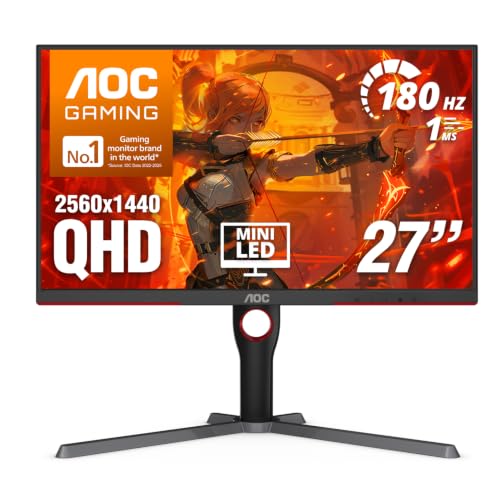
- Best for: Gamers making their first move to Mini-LED on a QHD setup where value matters most.
- 27-inch QHD screen, 2560 x 1440 resolution
- 180Hz refresh rate with 1ms GtG response time
- VA panel with Mini-LED backlight and 336 local dimming zones
- DisplayHDR 1000
All 4 Picks at a Glance
| Product | Specs | Action |
|---|---|---|
| Samsung Odyssey Neo G7 32-Inch 4K 165Hz |
| Check price on Amazon |
| INNOCN 27M2V 27-Inch 4K 160Hz |
| Check price on Amazon |
| AOC Q27G3XMN 27-Inch QHD 180Hz |
| Check price on Amazon |
 KTC M27T20 27-Inch QHD 165Hz |
| Check price on Amazon |
Mini-LED sits between ordinary LED and OLED, and that middle ground is exactly where the buying decision gets tricky. You get brighter HDR highlights and deeper blacks than a standard backlit screen, without the burn-in worry that comes with an emissive panel, but the number of dimming zones, the refresh rate and the panel type vary so much from one listing to the next that two monitors with the same HDR badge can look very different in a dark game scene.
This guide is for PC gamers chasing high refresh rates at 4K, console players who want a bright HDR screen for the living room or desk, and anyone upgrading from a basic monitor to something that makes night scenes and explosions look the way they should. Every product below was chosen from the name and specifications shown on its Amazon product page.
Our Top Picks
Top 3 picks at a glance
Quick Picks
As an Amazon Associate we earn from qualifying purchases
| Product | Best for | Key spec from title |
|---|---|---|
| Samsung Odyssey Neo G8 32-Inch 4K 240Hz | Competitive play at 4K | 4K 240Hz, Quantum Mini LED |
| Samsung Odyssey Neo G7 32-Inch 4K 165Hz | Cinematic HDR gaming | 4K 165Hz, 1000R curved |
| INNOCN 27M2V 27-Inch 4K 160Hz | Compact desk setups | 4K 160Hz, 1,152 dimming zones |
| AOC Q27G3XMN 27-Inch QHD 180Hz | First Mini-LED upgrade | QHD 180Hz, Mini LED |
| KTC M27T20 27-Inch QHD 165Hz | Shared laptop and PC desk | QHD 165Hz, 576-zone Mini LED |
How to Choose
Count the dimming zones, not just the HDR badge
A Mini-LED screen divides its backlight into zones that brighten and dim independently, so the zone count decides how tightly the monitor controls light in dark scenes. A panel with 336 zones can still show a halo around a bright object on a black background, while one with 1,152 or 1,196 zones keeps that glow far smaller. HDR labels such as HDR1000 or HDR2000 describe peak brightness and certification, not zone density, so read the zone count in the listing before anything else. If most of your play happens in dark horror or space games, zones matter more than any other single number.
Match resolution and refresh rate to your hardware
A 4K panel running at 240Hz is the most demanding combination here, and it only makes sense if your graphics card can push frames near that ceiling in the games you actually play. A 4K screen at 160Hz or 165Hz is a more realistic target for most modern cards, while a QHD panel at 165Hz or 180Hz is far easier to drive and still looks sharp at 27 inches. Console players should think in different terms: a 4K screen with HDMI 2.1 covers high-frame-rate console play, while a QHD screen pairs best with a PC. Pick the resolution first, then the refresh rate your hardware can feed.
VA or IPS changes what you see
The two panel types in this guide behave differently even when the backlight is the same. VA panels deliver deeper native contrast, which suits dark rooms and moody games, but their viewing angles are narrower and fast motion can smear slightly. IPS panels keep colours steady when you sit off-centre and respond faster, which suits shared desks and competitive play, though their native contrast is weaker and the Mini-LED backlight has to work harder in dark scenes. Neither type is wrong. Choose VA for a dark room and a centred seat, and IPS for a bright room or a desk where more than one person watches.
Check the ports before you buy
Ports decide what the monitor can actually do with your machines. HDMI 2.1 is the one that matters for 4K console play at high frame rates, while DisplayPort 1.4 is the usual route to the full refresh rate on a PC. A USB-C port with power delivery turns the screen into a one-cable dock for a laptop, and a built-in KVM switch lets one keyboard and mouse serve two machines. Also look at the stand: height, tilt, swivel and pivot adjustments matter more than they seem on a first read, and a VESA mount option gives you an escape route if the included stand does not fit your desk.
The 5 Best Options
Samsung Odyssey Neo G8 32-Inch 4K 240Hz
The Neo G8 is the fastest 4K Mini-LED panel in this guide, pairing a 240Hz refresh rate with a 32-inch 4K screen, a 1000R curve and 1,196 local dimming zones. Quantum HDR2000 pushes highlights far brighter than a standard HDR screen, and FreeSync Premium Pro with G-Sync compatibility keeps fast motion smooth on both major graphics platforms. The matte display cuts reflections in a bright room, and the aggressive curve pulls the edges of the screen into your peripheral vision. It is the pick for a player who refuses to trade resolution for speed.
Specs
- 32-inch 4K UHD screen, 3840 x 2160 resolution
- 240Hz refresh rate with 1ms response time
- 1000R curved VA panel
- Quantum Mini LED backlight with 1,196 local dimming zones
- Quantum HDR2000
- AMD FreeSync Premium Pro and G-Sync compatibility
- Matte display
- DisplayPort and HDMI inputs
Best for: Competitive PC gamers who want 4K resolution at the highest refresh rate available in a Mini-LED panel.
Watch out for: The 1000R curve is aggressive, so check your desk depth and seating distance before ordering, and make sure your graphics card can drive 4K at high frame rates.
Samsung Odyssey Neo G7 32-Inch 4K 165Hz
- Best for: Players who want the Neo G8’s HDR depth for cinematic games and console play at a lower refresh rate.
- 32-inch 4K UHD screen, 3840 x 2160 resolution
- 165Hz refresh rate with 1ms response time
- 1000R curved VA panel
- Quantum Mini LED backlight with 1,196 local dimming zones
Players who want the Neo G8’s HDR depth for cinematic games and console play at a lower refresh rate.
VA viewing angles are narrow, so sit centred in front of the screen, and expect some blooming around bright objects in very dark scenes.
The Neo G7 32-inch shares the Neo G8’s 1,196 dimming zones and Quantum HDR2000, but steps the refresh rate down to 165Hz and keeps the same 1000R curved VA panel. That combination suits cinematic single-player games and films, where HDR depth and contrast matter more than the last few frames per second. Two HDMI 2.1 ports cover console play at 4K, and the height-adjustable stand makes it easier to set the screen at eye level. It is the balanced pick of the Samsung pair: the same HDR engine, aimed at players who value picture quality over maximum speed.
Watch out for: VA viewing angles are narrow, so sit centred in front of the screen, and expect some blooming around bright objects in very dark scenes.
INNOCN 27M2V 27-Inch 4K 160Hz
- Best for: Desk setups where a flat 27-inch 4K screen has to serve both gaming and everyday work.
- 27-inch 4K UHD IPS screen, 3840 x 2160 resolution
- 160Hz refresh rate
- Mini-LED backlight with 1,152 local dimming zones
- DisplayHDR 1000
Desk setups where a flat 27-inch 4K screen has to serve both gaming and everyday work.
Some listings identify this model as 27A6V-P, so confirm the exact model number on the listing before ordering, and check which HDMI version each port uses if you plan console play.
The 27M2V is the compact 4K option here: a flat 27-inch IPS panel with a 160Hz refresh rate, 1,152 Mini-LED dimming zones and HDR1000. The IPS panel keeps colours steady from off-centre seats, which suits a desk that doubles as a workspace, and the USB-C port with 90W power delivery lets a laptop connect with a single cable. HDMI 2.1 covers console play, and the flat screen fits easily on a shallow desk where a curved 32-inch panel would dominate. It is the pick for a smaller desk that still wants full 4K sharpness.
Watch out for: Some listings identify this model as 27A6V-P, so confirm the exact model number on the listing before ordering, and check which HDMI version each port uses if you plan console play.
AOC Q27G3XMN 27-Inch QHD 180Hz
- Best for: Gamers making their first move to Mini-LED on a QHD setup where value matters most.
- 27-inch QHD screen, 2560 x 1440 resolution
- 180Hz refresh rate with 1ms GtG response time
- VA panel with Mini-LED backlight and 336 local dimming zones
- DisplayHDR 1000
Gamers making their first move to Mini-LED on a QHD setup where value matters most.
AOC’s own specification table lists the backlight as WLED with 336-zone local dimming even though its marketing calls it Mini-LED, so know exactly what you are buying, and note the HDMI ports are 2.0, so the full 180Hz needs DisplayPort.
The Q27G3XMN is the entry point into Mini-LED in this guide: a 27-inch QHD panel running at 180Hz with a 336-zone Mini-LED backlight and HDR1000. The VA panel delivers strong native contrast, the 1ms GtG response keeps fast motion clean, and Adaptive-Sync smooths out frame rate dips. AOC backs it with a three-year zero-bright-dot warranty, which is worth noting on a panel where a single stuck pixel would be easy to spot. It is the pick for a first Mini-LED upgrade on a QHD setup.
Watch out for: AOC’s own specification table lists the backlight as WLED with 336-zone local dimming even though its marketing calls it Mini-LED, so know exactly what you are buying, and note the HDMI ports are 2.0, so the full 180Hz needs DisplayPort.
KTC M27T20 27-Inch QHD 165Hz
- Best for: A shared desk where one monitor has to serve a laptop and a desktop PC through USB-C and KVM.
- 27-inch QHD screen, 2560 x 1440 resolution
- 165Hz refresh rate with 1ms MPRT response time
- VA panel with Mini-LED backlight and 576 local dimming zones
- DisplayHDR 1000
A shared desk where one monitor has to serve a laptop and a desktop PC through USB-C and KVM.
The HDMI ports are 2.0, so the full 165Hz refresh rate needs DisplayPort, and the built-in speakers suit casual use rather than replacing separate audio.
The M27T20 pairs a 27-inch QHD panel with a 165Hz refresh rate and a 576-zone Mini-LED backlight, giving it more dimming zones than the AOC at the same resolution. Its strength is connectivity: a USB-C port with 90W power delivery, a built-in KVM switch, built-in speakers and a fully adjustable stand that tilts, swivels, pivots and changes height. That combination suits a desk shared between a laptop and a desktop PC, where one screen and one set of peripherals has to serve both machines without constant cable swapping.
Watch out for: The HDMI ports are 2.0, so the full 165Hz refresh rate needs DisplayPort, and the built-in speakers suit casual use rather than replacing separate audio.
Which One Fits Your Situation
Chasing the highest refresh rate at 4K
Pick the Samsung Odyssey Neo G8. Its 240Hz panel is the only one here that pairs full 4K resolution with that speed, and the 1,196 dimming zones keep HDR highlights bright without washing out dark corners. The 1000R curve suits a dedicated gaming desk where you sit close and centred. Make sure your graphics card can keep up, because a 240Hz screen only earns its place when the frame rate follows.
Bright HDR for cinematic games and films
Pick the Samsung Odyssey Neo G7 32-inch. It carries the same 1,196-zone backlight and Quantum HDR2000 as the Neo G8, so night scenes, neon signs and explosions get the same depth, while the 165Hz refresh rate is an easier target for most hardware. The two HDMI 2.1 ports also make it the natural choice if a console shares the desk with your PC.
A compact 4K screen for a desk that also does work
Pick the INNOCN 27M2V. The flat 27-inch IPS panel fits a shallow desk, the colours hold up from off-centre seats, and the USB-C port with 90W power delivery turns it into a one-cable dock for a laptop. At 160Hz it is fast enough for most games, and the 1,152 dimming zones give HDR content real punch for its size.
First step into Mini-LED without moving to 4K
Pick the AOC Q27G3XMN for pure gaming, or the KTC M27T20 if your desk serves two machines. The AOC runs at 180Hz and carries the three-year zero-bright-dot warranty, while the KTC adds 576 dimming zones, USB-C with 90W power delivery and a KVM switch. Both keep you at QHD, where the refresh rate is easy to drive and the upgrade is easy to feel.
Common Mistakes
- Buying a 4K 240Hz panel without a graphics card that can feed it frames at that speed.
- Judging HDR by the badge alone instead of checking the local dimming zone count in the listing.
- Assuming every HDMI port on a monitor supports 4K high-frame-rate console play, when many are HDMI 2.0.
- Skipping the model number check: the INNOCN 27M2V also appears under the model code 27A6V-P, and AOC’s own table describes the Q27G3XMN backlight as WLED with local dimming.
- Forgetting to measure desk depth for the 1000R curved Samsung panels, which need a close, centred seat to look their best.
Frequently Asked Questions
Is a Mini-LED monitor better than an OLED monitor for gaming?
It depends on what you value most. Mini-LED panels reach higher peak brightness and carry no burn-in worry, which suits bright rooms and long sessions with static menus. OLED panels switch each pixel off individually, so they deliver cleaner blacks and faster response with no blooming. Bright room with fixed menus: Mini-LED. Dark room where blacks matter most: OLED.
Do I need HDMI 2.1 on a Mini-LED gaming monitor?
Only if you plan to play a console at 4K with a high frame rate, since that is the connection that carries the full console signal. PC players reach the highest refresh rates through DisplayPort instead, and a QHD monitor never needs HDMI 2.1 at all. Check the listing for the exact HDMI version on each port, because several monitors here mix HDMI 2.0 and HDMI 2.1 across different inputs.
How many local dimming zones do I need?
More zones mean less blooming around bright objects on dark backgrounds, but the right number depends on what you play. Around 336 zones is an entry point that already beats a standard backlit screen, 576 zones is a clear step up for mixed content, and 1,100 or more zones is where HDR highlights start to look precise in dark scenes. Zone count matters most in horror, space and night-driving games.
Will a Mini-LED monitor work with a PS5 or Xbox?
Yes, through HDMI, and the models here with HDMI 2.1 cover high-frame-rate console play at 4K. Check that the monitor supports variable refresh rate with your console, and confirm the exact HDMI version on the port you plan to use. A QHD monitor also works with a console, but the console will output at a lower resolution, so a 4K panel is the better match for console-first setups.
Related guides
More from Amazon
Programs that pair well with the guide above. Offers and eligibility are set by Amazon and may change.
Free shipping on eligible items, Prime Video and more. Eligible new members can start with a free trial.
Start a Prime free trialAd-free music streaming. Eligible new subscribers can start with a free trial.
Try Music Unlimited freeA Prime membership for ages 18-24 with a trial period. Eligibility is set by Amazon.
See Prime for Young AdultsAudiobooks and podcasts to listen to on the go. Eligible new members can start with a free trial.
Try Audible freeAs an Amazon Associate we earn from qualifying purchases.