The best mouse skates are the ones that match your mouse and your pad, and in this set that means choosing between model-specific sets and universal dots. Four listings are cut for named mice, while the other eight are universal dot packs in PTFE or UPE, mostly sold with glass or cloth pads in mind. For a first swap, a universal pack such as the Attkryy 80-piece set gives you room to experiment. Specs here come from listing titles only, so dimensions, thickness and adhesive type are flagged where missing. Several packs overlap in purpose, and the sections below say which ones you can treat as close substitutes.
Our Top Picks
Top 3 picks at a glance
Twelve skate sets compared
As an Amazon Associate we earn from qualifying purchases at no extra cost to you.





| Model | Key point from title | Price tier | Best for |
|---|---|---|---|
| ELECOM M-S-VM600 | Replacement sole for VM600PE / VM500 | Budget | Owners of those exact mice |
| Pulsar Superglide Type-C | Glass skates for GPro X Superlight 2 | Premium | Superlight 2 owners |
| Hystar Aero Glides | 40 dots, PTFE, for glass pads | Mid-range | Glass pad users |
| TALONGAMES S-1 | 40 x 6.5mm PTFE dots, glass pads | Budget | Light tuning on glass |
| Attkryy 80-piece | 80 x 6mm dots, strong adhesive | Budget | Experimenters and tinkerers |
| X-Raypad Obsidian Air Pro Speed | U-PE universal dots | Mid-range | Durable speed-leaning feel |
| Wallhack UHMW-PE Dot | Universal, cloth and glass pads | Premium | Mixed-pad owners |
| MOSISO 40 Dot, 2 Pack | PTFE, glass and cloth pads | Budget | Spares for two mice |
| Hystar Aero Control | 40 UPE dots, glass pads | Budget | Control-minded glass users |
| Pulsar PTFE 0.6mm | Pure PTFE, for X2 Crazylight | Budget | X2 Crazylight owners |
| TALONGAMES Kumo 48 Dot | 48 x 6mm, cloth pads | Mid-range | Cloth pad users |
| Pulsar Superglide Type-S | Glass skates for Susanto-X | Premium | Susanto-X owners |
Model-specific sets
ELECOM M-S-VM600 Replacement Sole
Made for the VM600PE and VM500 gaming mice, so the shape should follow the original base. The title gives no material or thickness, which leaves glide character as a question for the listing. ELECOM is a known peripheral maker, but check the thickness of the sole against your current feet. A model-matched sole is the safest route if your mouse is one of those two and you simply want the stock feel back.
- Pros: exact fit for named mice; no shape guessing.
- Cons: useless for any other mouse; material not stated.
Who it’s for: owners of the VM600PE or VM500 whose feet have worn out.
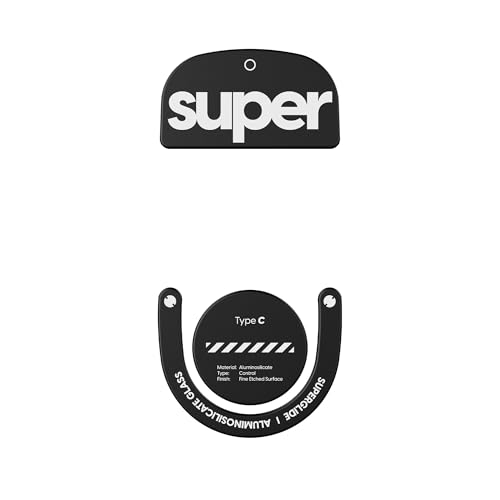
Pulsar Superglide Type-C for G Pro X Superlight 2
Aluminosilicate glass with a micro-textured control surface and rounded edges, sized for the Superlight 2. Glass skates feel quite different from PTFE: fast, with a firm stop. Verify that the cutouts line up with your mouse, because the title names only one model. Glass feet are also less forgiving of drops and grit, so keep the pad clean.
- Pros: rounded edges and a model-matched shape.
- Cons: glass can feel fast, and it costs more than dots.
Who it’s for: Superlight 2 owners who want a deliberate change in feel.
Pulsar Superglide Type-S for Susanto-X
The same glass idea as the Type-C, but cut for the Susanto-X. The title lists no extra specs, so everything else is a question for the listing. Because glass feet are rigid, a poor fit leaves little room for correction, so confirm your exact mouse before ordering. Expect a firm, fast feel, and give it a few days before judging it.
- Pros: tailored to one named mouse.
- Cons: no detail beyond the model name; glass is rigid.
Who it’s for: Susanto-X owners looking for glass feet.
Pulsar PTFE Mouse Skates, 0.6mm, for X2 Crazylight
The title says 100 percent pure virgin PTFE, rounded feet and 0.6mm thickness, made for the X2 Crazylight. Thin feet keep the mouse low, but wear through faster than thicker ones. Pure PTFE is the traditional route and usually the least surprising in feel. A pack for one mouse also means you are paying per application, not per dot.
- Pros: pure PTFE and the lowest price in the set.
- Cons: thin feet wear out sooner, and only one mouse is named.
Who it’s for: X2 Crazylight owners wanting like-for-like replacements.
Universal dot packs
Hystar Aero Glides, 40 Dot
High-density PTFE dots, rounded and polished, sold for glass mousepads. The “for quiet use” wording suggests a smoother feel against hard surfaces, though that is a seller claim. At 40 dots it covers a few mice. Use it on a glass pad only, as the title implies, and treat glide ratings as the seller opinion.
- Pros: polished edges and a glass-pad focus.
- Cons: not aimed at cloth pads; dot size is not stated.
Who it’s for: glass pad owners tuning one or two mice.
TALONGAMES S-1, 6.5mm, 40 Pieces
Round 6.5mm high-density PTFE dots labeled for glass pads, with polished edges and a silent design. The slightly larger dot suits bases where 6mm feels small. Seller claims such as “ultra-smooth” and “high wear resistance” are impossible to check from a title, so read buyer comments on edge finish and adhesive.
- Pros: larger dots and a low price.
- Cons: glass-pad focus; durability claims are unverified.
Who it’s for: buyers who want a simple glass-pad refresh.
Attkryy 80-Piece 6mm Set
Eighty DIY 6mm PTFE dots with curved edges and strong adhesive, priced lowest per dot. That volume is handy for trying layouts on several mice. Strong adhesive helps staying power, but it can make removal harder. Quality control on a no-name set is the usual question, so inspect the dots for burrs and uneven thickness before applying them.
- Pros: best dot count and a lower cost per dot.
- Cons: brand is little known; glue may be hard to remove.
Who it’s for: tinkerers who like trying layouts.
X-Raypad Obsidian Air Pro Speed
Universal U-PE dots from a pad maker, with claims of wear resistance, speed, control and low noise. The listing does not give dot count or size, so check it. U-PE is a different material than PTFE, and many players pick it for toughness. Pad makers know how their surfaces wear, which counts for something.
- Pros: a known pad brand and a hard-wearing material.
- Cons: no size or count in the title; mid-range cost.
Who it’s for: players who want a tougher alternative to PTFE.
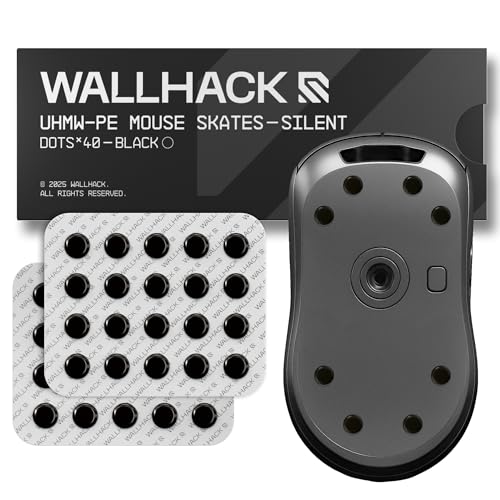
Wallhack UHMW-PE Dot, Universal
Universal UHMW-PE dots for cloth and glass pads, with a claim of customizable speed and control. Being sold for both pad types makes it flexible, which suits anyone who switches. It is one of the pricier universal sets, so the value depends on how long the dots last. Mixed-pad users can keep one set and move it between mice.
- Pros: works with both pad types.
- Cons: higher price among dots; no count in the title.
Who it’s for: people who swap between a cloth and a glass pad.
MOSISO 40 Dot, 2 Pack
PTFE dots with rounded edges for glass and cloth pads, sold as a two-pack. The wording is unclear on whether each pack holds 40 dots, so verify the total count. Either way, a pack of two is practical when you own more than one mouse, or when you want spare dots for a later repair.
- Pros: multi-pack at a modest cost and both pad types.
- Cons: dot count is ambiguous in the title.
Who it’s for: owners of two mice, or anyone wanting spares.
Hystar Aero Control, 40 Dot
Durable UPE dots with rounded edges, described as quiet and controlled. Compared with its sibling, Aero Glides, this version reads slower and more stopping-focused. It is labeled for glass pads, so cloth-pad use is a gamble. A slower, more controlled glide suits precise flicks and tracking in tactical shooters.
- Pros: UPE durability and a control-leaning feel.
- Cons: glass-pad focus; control may feel slow to some.
Who it’s for: glass-pad players who find PTFE too slippery.
TALONGAMES Kumo 48 Dot, 6mm
Forty-eight 6mm dots built for cloth pads, with curved edges, high durability and a low-noise claim. A cloth-specific set is rare here, which makes it the clearest cloth-pad option among the dots. The “high speed” wording is a seller claim, so judge feel for yourself. Cloth pads vary widely in weave, which changes how any dot feels.
- Pros: cloth-pad focus and a generous count.
- Cons: only named for cloth; durability unverified.
Who it’s for: cloth-pad users replacing worn dots.
How we picked these
We gathered listings whose titles clearly describe mouse skates, then sorted them into model-specific sets and universal dots. Nobody on the team used or measured these units. The comparison rests on published specifications, manufacturer documentation and buyer reviews, and claims about glide, silence or wear are seller wording. Where a title gave no size, count or compatibility, we say to check the listing. Price tiers are relative within this set, and we left out exact prices because they move often.
What to look for in mouse skates
Exact fit versus universal dots
Model-specific sets keep the original footprint, which preserves balance and tilt. Universal dots let you arrange feet freely but require care to avoid covering the sensor window. If your mouse is named in a title, the matched set is the low-risk choice.
PTFE, UPE and glass
PTFE is the classic slick material. UPE and UHMW-PE are related polyethylene plastics, usually described as harder-wearing, and glass is the fastest and most rigid. Check the pad type named in the listing, because several sets are labeled for glass pads only.
Thickness and edge finish
Thicker feet last longer but raise the sensor height. Rounded or polished edges reduce catching on cloth seams and make the start of a swipe less scratchy. The Pulsar 0.6mm set is one of the few titles that states thickness. If a listing omits it, ask the seller or read buyer questions, because a thin foot and a thick foot can feel quite different at the sensor.
Cloth versus glass pads
A cloth pad adds friction and texture, so smooth, rounded dots help avoid a scratchy start. A glass pad is slick and hard, so dots designed for it are often polished and sometimes marked as control-oriented to counter the speed. Only a few titles here, namely Wallhack, MOSISO and the cloth-focused Kumo set, say anything about cloth. If you are unsure, start with the more neutral PTFE and adjust later.
Quantity planning
Count before you buy. Assume about six to eight 6mm dots for a typical mouse, so a 40-dot pack covers five or six applications, and the 80-dot set covers ten to twelve. Those figures are estimates, so check your own base. Keep spares for the day one foot gets damaged.
Adhesive and replacement
Strong adhesive stays put but can leave residue when you swap. Clean the base with isopropyl alcohol and allow time to cure. Skates for named mice often include precise cutouts, which makes application quicker. Warm the adhesive gently with a hair dryer on low if old feet refuse to lift, and go slowly to avoid bending the shell.
A short pre-purchase checklist
- Name your mouse model and look it up beside the listing.
- Identify your pad: cloth, hard plastic or glass.
- Work out how many feet you need, using the estimates above.
- Check whether the pack includes spares or an alcohol wipe.
Mistakes buyers make
- Ordering a named-model set for the wrong mouse. Check the exact model, not just the brand.
- Using glass-pad dots on rough cloth. Several titles say glass only, so read the pad line.
- Covering the sensor window. Leave the sensor and screws clear when you place dots.
- Ignoring thickness. Thicker feet change sensor height, which can affect tracking.
- Buying by count alone. More dots do not help if they are the wrong size for your base, so check the diameter too.
- Skipping the clean. Dust under the new feet shortens their life and lets them lift at the edges.
Verdict
If your mouse is named in a listing, the matched set is the best fit. For everyone else, the Attkryy 80-piece set is the flexible budget pick, the MOSISO two-pack suits owners of several mice, and the Wallhack dots suit people who use both pad types. Pulsar’s glass sets are the premium route, but only for the mice they name. Confirm your pad type first.
Related guides
- When I Turn On Record Game In Background On Gamebar. Gamebar Crashes, What Do I Do?
- How To Reduce Background Noise On A Streaming Microphone
- Poly Computer Accessories Company Streaming Evaluation
Frequently asked questions
How many mouse skates do I need per mouse?
Most mice use two to four larger feet or roughly six to eight small round dots, depending on the base shape. A 40-dot pack therefore covers about five or six full applications, and an 80-dot pack about ten to twelve. Those counts are estimates, so measure your mouse base and the original feet first.
Are PTFE skates better than the stock feet?
Often they glide more smoothly and quietly, but it depends on the stock feet and your pad. Many gaming mice already ship with PTFE, so a swap mostly helps when the originals are worn, scratchy or the wrong speed for you. Thicker feet also change the sensor height slightly, which is worth considering.
Can I use glass skates on a cloth pad?
Some glass-style skates are sold for both, and a few of the listings here mention cloth, but others are labeled for glass pads only. Glass skates generally glide very quickly, and rough cloth can wear them or feel scratchy. Read the listing and your pad maker’s notes before committing, and keep the original feet if you want to switch back.
What is the difference between PTFE and UPE or UHMW-PE dots?
PTFE is the slick material most people associate with mouse feet. UPE and UHMW-PE are related ultra-high-molecular-weight polyethylene materials, which sellers often describe as tougher and quieter, sometimes with a little more control. Sellers’ wording varies, so use it as a loose guide, not a guarantee of how a set feels.
How do I apply new skates without damaging the mouse?
Clean the base with isopropyl alcohol, let it dry, and peel the old feet slowly, warming them gently if the adhesive resists. Place the new skates without trapping dust, press for several seconds, and wait a few minutes before use. Take care not to cover the sensor window or screws.
Related guides
- Best Rechargeable Wireless Gaming Mice: Twelve Listings Sorted by Battery and Weight: 10 Compared (2026)
- Best MTG Playmats for Card Tables and Gaming Desks: 9 Compared (2026)
- Best Logitech Gaming Mice: Eight G-Series Listings Sorted by Shape and Connection: 8 Compared (2026)
- Best Ergonomic Gaming Mice: Six Vertical and Contoured Picks for Long Sessions: 6 Compared (2026)