For most podcasters recording in an ordinary, untreated room, a dynamic USB microphone such as the Shure MV7+ (premium), Rode PodMic USB (mid-range) or Samson Q2U (budget) is the safest choice; condenser models such as the Rode NT-USB+, Elgato Wave:3 or HyperX QuadCast suit quiet rooms, streaming and gamers who also want RGB or software routing. The decision comes down to your room, your budget and whether you may upgrade to an XLR setup later.
As an Amazon Associate we earn from qualifying purchases at no extra cost to you.


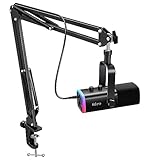

Our Top Picks


Top 3 picks at a glance
At a Glance: USB Microphones for Podcasting
| Microphone | Type | Best for | Key stated features | Limits |
|---|---|---|---|---|
| Shure MV7+ | Dynamic | Serious solo or remote podcasts, untreated rooms | USB-C and XLR outputs, touch panel, companion app with auto level and tone presets, per the maker | Premium tier; needs close mic technique |
| Rode PodMic USB | Dynamic | Mid-range podcast desks, boom arm users | USB-C and XLR outputs, built-in headphone monitoring, compatibility with Rode Connect software according to the maker | Heavy, needs a sturdy arm |
| Samson Q2U | Dynamic | Budget starters, guests, travel | USB and XLR outputs, headphone jack, desk stand and cables in the box | Basic build, less refined sound than premium dynamic models |
| Rode NT-USB+ | Condenser | Quiet rooms, voice-over, music and spoken word | USB-C, headphone monitoring, pop filter included, per the maker | Picks up more room noise than dynamic types |
| Elgato Wave:3 | Condenser | Streamers who use Wave Link mixing | Clipguard protection against peaks, capacitive mute, digital mixer software | USB only; no XLR upgrade path |
| HyperX QuadCast S or QuadCast 2 line | Condenser | Gamers and streamers, multiple pickup patterns | Several pickup patterns on the QuadCast family, tap-to-mute and RGB on some models | Shock mount required; sensitive to desk noise |
Dynamic vs Condenser: the Biggest Decision
A dynamic microphone is less sensitive and is meant to be used close to your mouth. In a bedroom, home office or gaming room with hard surfaces, a PC fan and a mechanical keyboard, it picks up less of the room than a condenser would. That is why podcasting reviewers tend to recommend dynamic models for untreated spaces. A condenser is more sensitive and gives a detailed, open sound, but it also captures echo, keyboard clatter and computer fan noise. If you record in a quiet room with soft furnishings, a condenser can sound excellent. If your PC sits right next to your desk, choose dynamic.
Features That Matter
USB-C, XLR and the upgrade path
Hybrid mics with both USB and XLR output, such as the MV7+, PodMic USB and Q2U, let you plug straight into a PC today and move to an audio interface or mixer later without replacing the microphone. This matters for anyone who might later add a co-host, a mixer or a dedicated recording setup. USB-only models, including the Elgato Wave:3 and HyperX QuadCast, are simpler but have no such route.
Headphone monitoring
A headphone jack on the microphone lets you hear yourself with no delay. This is helpful for podcasters and streamers because delayed monitoring through the operating system can be distracting. Look for models with a zero-latency monitoring output and a dedicated volume knob.
Software and mixing
Shure, Rode and Elgato each offer companion apps. Shure Motiv lets you choose tone presets and auto level modes, and Rode Connect is built for multi-guest recordings. Elgato Wave Link lets you split game, chat and music audio into separate channels, which is popular with streamers. Software is optional on some models and mandatory for advanced features, so read the maker support page for what works without it.
Mounting: boom arm and shock mount
A boom arm lets you position the microphone near your mouth while keeping it off the desk, which reduces keyboard thump. Dynamic podcast mics can be heavy, so check the arm weight rating against the microphone weight listed by the maker. Condenser models usually need a shock mount, which is often included.
Pop filter and technique
Plosives (hard P and B sounds) hurt recordings. Position the microphone slightly off-axis and two to three fingers from your mouth. A foam windscreen or pop filter helps. Many dynamic models include or accept one.
Pickup patterns
Cardioid mode picks up sound in front of the mic and is the right choice for a solo host. Stereo, omnidirectional and bidirectional patterns on some condenser models suit interviews with two people sharing a microphone or recording a room. For most podcasters, cardioid is the only pattern needed.
Picks by Budget Tier
Budget
The Samson Q2U is the long-standing starter recommendation among podcasting guides. It is a dynamic microphone with USB and XLR connectivity, and it ships with a desk stand, a clip and cables according to the maker. Sound is not as polished as with premium dynamic mics, but it is clear for speech and works well for guests who record remotely.
Mid-range
The Rode PodMic USB and the Rode NT-USB+ occupy this tier. The PodMic USB is dynamic, giving broadcast-style sound in untreated rooms. The NT-USB+ is a condenser with a pop filter and a more open voice, best for a quiet space. The Elgato Wave:3 is another mid-range pick, aimed at people who want a clean mixer and capacitive mute for streaming and gaming with voice chat.
Premium
The Shure MV7+ is the most frequently named podcast-first USB mic in 2026 roundups. It is dynamic, with both USB-C and XLR outputs, a touch panel for gain and mute, and an app with auto-level features. Reviewers also note that the premium tier pays off for people who record regularly and want consistent, broadcast-style audio with little editing.
Pick X If… Decision Table
| If you… | Pick | Why |
|---|---|---|
| Record in a noisy or untreated room | Shure MV7+ or Rode PodMic USB | Dynamic design rejects more room sound |
| Want the cheapest decent option | Samson Q2U | USB plus XLR, accessories included |
| Have a quiet room and want a richer voice | Rode NT-USB+ | Condenser clarity with headphone monitoring |
| Stream games and need audio mixing | Elgato Wave:3 | Wave Link mixer, clip protection |
| Want RGB and several pickup patterns | HyperX QuadCast line | Gaming-focused styling, pattern options |
| Plan to move to XLR later | Shure MV7+, PodMic USB or Q2U | Dual outputs avoid replacing the mic |
Compatibility and Setup Notes
- USB microphones appear as audio devices on Windows, macOS and many Linux systems without drivers, but advanced features often need the maker app.
- Use a USB port directly on the motherboard rear panel rather than an unpowered hub. This avoids noise and dropouts.
- Keep the microphone cable away from power cables and the monitor power brick to limit hum.
- Set input gain so that your normal speaking voice peaks at about the middle to upper-middle of the meter, leaving headroom for loud moments.
- In Windows sound settings, disable audio enhancements for the mic input unless you need them; they can add artefacts to recordings.
- For recording with remote guests, use headphones to avoid echo from your speakers feeding back into the mic.
Alternatives to Consider
- XLR dynamic mic and audio interface: Models such as the Shure SM7B family, Rode PodMic and Samson Q9U with a separate interface offer more upgrade flexibility and often better quality, but they cost more in total and take more setup.
- Blue Yeti-type multi-pattern condensers: Still common for casual use and interviews, though dynamic types tend to do better in untreated spaces.
- Headset microphones: Fine for casual chat and game voice, but not intended as a primary podcast microphone.
Common Mistakes to Avoid
Many new podcasters buy a sensitive condenser microphone for a noisy room and then struggle with echo and keyboard noise. Others sit too far from the microphone, which makes the voice thin. Forgetting a pop filter, leaving gain too high, and recording with speakers instead of headphones are further common problems. Set levels before every session, record a short test, and listen back on headphones.
Final Buying Checklist
- Dynamic or condenser, matched to the noise level of your room.
- USB only, or USB plus XLR for a later upgrade.
- Headphone jack with direct monitoring.
- Boom arm or desk stand and a pop filter.
- Companion software on your operating system.
- A spare USB cable, since cable faults are a frequent cause of dropouts.
Good technique, such as speaking close to the microphone and slightly off-axis, improves a recording more than moving up one price tier.
Frequently Asked Questions
Is a USB microphone good enough for a podcast?
Yes. Many successful shows record on USB models, and current hybrid dynamic microphones sound very close to entry-level XLR setups. The room, mic placement and editing matter at least as much as the connection type.
Should I get a dynamic or condenser microphone?
Choose dynamic if your room has echo, a loud PC or street noise. Choose condenser if the room is quiet and treated with soft furnishings. When unsure, dynamic is the safer choice.
Do I need a boom arm?
It is not required, but it lets you place the microphone correctly and reduces desk vibrations. Without an arm, the stand that comes with the microphone works but picks up typing and desk bumps more easily.
Can I use one microphone for streaming and podcasting?
Yes. Many of the models above handle both. Streamers may prefer Elgato Wave:3 or HyperX models for their mixing and muting features, while podcasters often prefer the dynamic options for room rejection.
Why does my recording sound echoey or thin?
This usually means the mic is too far away or the room is reflective. Move closer, record in a smaller space with soft items such as curtains and a rug, and consider a dynamic mic. Software noise reduction can help but cannot fully fix a bad recording.
What is the difference between USB and XLR?
USB connects straight to a computer and contains its own converter. XLR is an analogue connection that needs an audio interface or mixer. XLR gives more upgrade choices, while USB is simpler and cheaper to start.