For most households, the TP-Link RE705X is the Wi-Fi extender reviewers recommend most often; choose the RE815XE if you want a tri-band Wi-Fi 6E extender with a dedicated backhaul, the Netgear EAX15 if you already own a Netgear router, and a Wi-Fi 7 model such as the TP-Link RE655BE only if your router supports Wi-Fi 7 and you can justify the higher tier. For a gaming PC, a wired connection or a mesh system with Ethernet backhaul beats any extender.
As an Amazon Associate we earn from qualifying purchases at no extra cost to you.


Our Top Picks
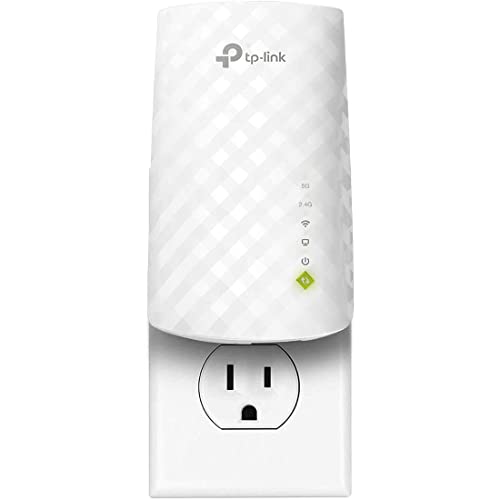
 TP-Link AC1900 WiFi Range Extender RE550WiFi 5, AC19006.4 x 3 x 2.6 inches0.51 PoundsCheck on Amazon

Top 3 picks at a glance
At a Glance: Wi-Fi Extenders Compared
| Model | Best for | Key stated specs | Limits |
|---|---|---|---|
| TP-Link RE705X | Best overall per Engadget | Wi-Fi 6, AX3000; Tom’s Guide cites a 160 MHz channel; OneMesh support | Dual-band shares one radio for backhaul |
| TP-Link RE815XE | Tri-band Wi-Fi 6E | AXE5400; TechRadar calls it quick and good value but big and clunky | Needs a 6 GHz-capable router to benefit fully; large body |
| Netgear EAX15 | Netgear router owners | Wi-Fi 6, AX1800; Smart Home Perfected lists up to 1,500 sq ft coverage and a Gigabit Ethernet port | Slower tier; Tom’s Guide notes a one-year warranty versus two for TP-Link |
| TP-Link RE700X | Value alternative | Wi-Fi 6; named as a lower-cost option by multiple outlets | Lower throughput than the RE705X |
| TP-Link RE655BE | Wi-Fi 7 homes | Tom’s Guide picks it as best overall in its 2026 roundup | Premium tier, near router-level pricing |
| Netgear EAX17 | Reliability | Named by Tom’s Guide for dependable performance | Shorter warranty than TP-Link |
What an Extender Does and Does Not Fix
A Wi-Fi extender picks up your router’s signal and rebroadcasts it into a room with weak coverage. It helps with a single dead zone, such as a garage, a back bedroom or a home office at the far end of the house. It cannot create bandwidth that is not there: a dual-band extender that uses the same radio to talk to the router and your devices typically halves the available throughput. This matters for gaming, where latency and stability count as much as raw speed.
Tri-band models like the RE815XE use a separate radio as a dedicated link to the router, which reviewers report keeps speeds closer to the router’s own. TechRadar says its tri-band Wi-Fi 6E performance is more than a match for some newer dual-band Wi-Fi 7 extenders.
Extender vs Mesh vs Wired
| Option | Strength | Weakness | Best for |
|---|---|---|---|
| Plug-in extender | Lowest cost, quick setup | Halved speed on dual-band, separate or merged networks | One dead zone |
| Mesh system | Seamless roaming, designed as a whole | Higher cost, replaces router | Large homes |
| Powerline adapters | Wired backhaul via electrical wiring | Results depend on home wiring | Rooms with no Ethernet |
| Ethernet cable or MoCA | Best latency and stability | Needs cabling | Gaming PCs and consoles |
If your gaming PC sits in the dead zone, many extenders include a Gigabit Ethernet port that lets the PC connect by cable to the extender, which can be more stable than the PC’s own Wi-Fi adapter. This is a useful fit for desktops without built-in Wi-Fi.
Wi-Fi Standards Explained Simply
- Wi-Fi 6 (AX): The mainstream standard with the best value in extenders. The RE705X and EAX15 use it.
- Wi-Fi 6E: Adds the 6 GHz band, which is less crowded. Requires both the router and your device to support 6 GHz.
- Wi-Fi 7 (BE): Adds wider channels and multi-link operation. Useful if your router is Wi-Fi 7 and your devices support it, though premium extenders cost about as much as a router.
Match the extender to the router and devices you own. A Wi-Fi 6E extender paired with a Wi-Fi 5 router will not unlock 6 GHz, and a PC with an older Wi-Fi adapter will not benefit from newer standards.
TP-Link RE705X: The Reviewer Favourite
Engadget names the RE705X its best overall pick, citing easy setup, strong performance and OneMesh support, which lets it share one network name with a compatible TP-Link router. Tom’s Guide’s earlier review pointed to a 160 MHz channel width and a strong range. Its main downside according to Engadget is its cost relative to cheaper models. Note that Tom’s Guide’s review is older, so treat specifics with caution.
TP-Link RE815XE: Tri-Band Option
The RE815XE is a Wi-Fi 6E AXE5400 extender. TechRadar rates it highly for value and performance but describes the casing as large. If your router has 6 GHz, this model offers the dedicated backhaul that plug-in dual-band units lack. It can block adjacent outlets because of its size, so check your wall socket layout.
Netgear EAX15: Fit for Netgear Routers
Smart Home Perfected ranks the EAX15 first overall, noting that it behaves like mesh under one network name. The maker lists AX1800 speeds and coverage up to 1,500 square feet. Tom’s Guide points out that Netgear’s warranty is shorter than TP-Link’s. It is a good fit if you already use a Netgear router and want integrated roaming.
Placement and Setup Tips
- Place the extender about halfway between the router and the dead zone, where it still receives a strong signal.
- Avoid placing it behind large metal objects, inside cabinets, or next to microwave ovens.
- Use the vendor app for setup and update firmware.
- If your router supports a mesh standard such as OneMesh, use matching products for seamless roaming.
- For consoles or a gaming PC, use the Ethernet port when available.
Pick X If …
| Pick this | If you |
|---|---|
| TP-Link RE705X | want the most consistently recommended Wi-Fi 6 extender |
| TP-Link RE700X | want a lower-cost TP-Link option |
| TP-Link RE815XE | own a Wi-Fi 6E router and want a dedicated backhaul |
| Netgear EAX15 | have a Netgear router and want one-network roaming |
| TP-Link RE655BE | have a Wi-Fi 7 router and want to match it |
| Mesh system or Ethernet | need reliable low latency for a gaming PC |
Alternatives to Consider
- TP-Link RE715X: Technobezz ranks it best overall in its list.
- TP-Link RE315: Named by Technobezz for value.
- Mesh kits: Replace the router with a mesh set for whole-home coverage.
- Powerline Ethernet adapters: A wired option when you cannot run a cable.
Troubleshooting Common Extender Problems
If speeds in the extended area are lower than expected, first confirm the extender is placed where it still receives a strong signal from the router; most models include a signal indicator light for this purpose. Move it closer if the light shows a weak link. If devices keep clinging to the router’s weak signal instead of switching to the extender, a shared network name (as with OneMesh or Netgear’s one-name mode) helps, though some devices roam more eagerly than others.
When the connection drops, update the extender firmware and the router firmware. Check for channel interference from neighbours, and try a different channel on the router if it allows. If a wired link is possible, connect the extender to the router by Ethernet and set it to access point mode, which gives full speed to the extended network and is the best way to get value from one.
Security Basics
- Change the default admin password during setup.
- Use WPA2 or WPA3 security on the main network.
- Keep firmware updated and disable remote management unless you need it.
- Buy extenders from makers that publish firmware updates for several years.
When to Replace the Router Instead
If your router is several generations old, replacing it with a current Wi-Fi 6, 6E or 7 model may remove the dead zone without extra hardware. Also consider moving the router to a more central location, which costs nothing and often helps. An extender is best seen as a targeted fix for a particular room, not a cure for a weak network overall.
Choosing for a Gaming Setup
Gamers care about latency and stability more than peak speed. An extender adds a hop between your device and the router, which can add a few milliseconds and, in congested homes, occasional spikes. If your PC or console is in the extended area, use the extender’s Ethernet port with a cable to the device, which avoids the second wireless hop and usually produces steadier ping than the device’s own Wi-Fi card.
For a PC with a built-in Wi-Fi 6E or Wi-Fi 7 adapter, a tri-band extender or a mesh node with wired backhaul uses the 6 GHz band best. If your gaming PC lacks Wi-Fi, a plug-in extender with an Ethernet port is cheaper than a PCIe Wi-Fi card, and moving the PC to run a long cable is cheaper still.
Check your internet plan as well. An extender cannot exceed your router’s connection, so a modest plan will not benefit from a faster extender. Run a speed test beside the router, then in the dead zone, and compare results before and after installing.
Frequently Asked Questions
Do Wi-Fi extenders slow down my internet?
A dual-band extender that uses one radio for both uplink and downlink typically halves speed in the extended area. Tri-band models with a dedicated backhaul reduce that loss.
Are extenders good for gaming?
They can work for casual gaming, but latency and jitter may rise. For competitive play, use a wired connection, either directly or through the extender’s Ethernet port.
Should I buy an extender or a mesh system?
An extender suits a single dead zone on a budget. A mesh system suits larger homes or multiple dead zones and offers smoother roaming.
Do I need the same brand as my router?
No, but matching brands with a shared standard like OneMesh offers a single network name and easier roaming. Cross-brand extenders usually create a second network name.
Where should I place the extender?
About halfway between the router and the dead zone, in a spot that still gets a strong signal. Placing it in the dead zone itself will just extend a weak signal.
Do I need Wi-Fi 7?
Only if your router and devices support it. Wi-Fi 6 and 6E extenders are enough for most homes and cost less.