Choosing a PCIe Wi-Fi adapter is a fitment decision before it is a speed decision. The card has to match the router standard you already own, sit in a free PCIe x1 slot that a graphics card may be covering, and place its antennas somewhere other than flat against a metal case. Bluetooth adds one more check, because it usually needs a spare internal USB header on the motherboard.
This guide is for owners of wired-only desktops, builders finishing a PC without onboard Wi-Fi, and upgraders replacing an ageing wireless card. Every pick below was chosen from the name and specifications on its Amazon listing, covering Wi-Fi standard, per-band speeds, Bluetooth version, antenna design and stated operating system. The list spans Wi-Fi 6, Wi-Fi 6E and Wi-Fi 7 cards, so the right starting point is the router on your shelf, not the newest standard on a box.
Our Top Picks
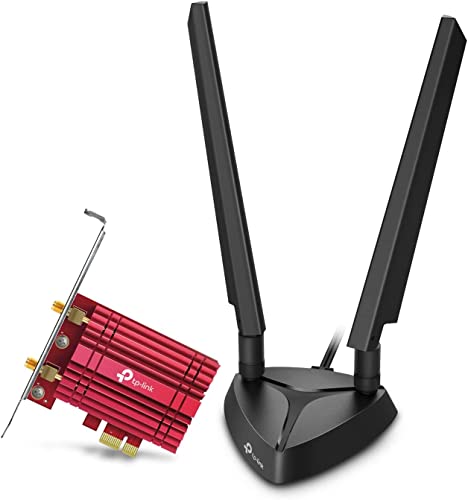 TP-Link WiFi 6E Intel AX210 AXE5400 PCIe WiFi1 Count (Pack of 1)3.75 x 4.76 x 0.85 inches0.59 poundsCheck on Amazon
Top 3 picks at a glance
Quick Picks
As an Amazon Associate we earn from qualifying purchases
| Product | Best for | Key spec from title |
|---|---|---|
| TP-Link Archer TX55E | A Wi-Fi 6 desktop that needs a balanced internal upgrade | Wi-Fi 6 AX3000, Bluetooth 5.2, WPA3, two high-gain antennas |
| TP-Link Archer TXE75E | A Wi-Fi 6E router paired with a Windows 11 desktop | Wi-Fi 6E AXE5400, Intel AX210, Bluetooth 5.3, magnetic antenna base |
| ASUS PCE-AX58BT | A desktop wanting Wi-Fi 6 with two external antennas | Wi-Fi 6 AX3000, Bluetooth 5.0, OFDMA, 2×2 MU-MIMO |
| TP-Link Archer TX3000E | A small case that needs a low-profile bracket in the box | Wi-Fi 6 AX3000, Bluetooth 5.3, magnetized antenna base |
| TP-Link Archer TBE550E | A Windows 11 PC with a Wi-Fi 7 router and years of use ahead | Wi-Fi 7 BE9300, Bluetooth 5.4, multicolor status LED |
How to Choose
Match the Wi-Fi standard and speed class to your router
Start with the router, because the adapter cannot invent a band the router never broadcasts. A Wi-Fi 6 card such as an AX3000 model uses Wi-Fi 6 features only with a Wi-Fi 6 router, a Wi-Fi 6E card needs a 6E router for its 6 GHz band, and Wi-Fi 7 features need a Wi-Fi 7 router. Read speed classes band by band: AX3000 divides into 2402 Mbps on 5 GHz and 574 Mbps on 2.4 GHz, while AXE5400 adds another 2402 Mbps on 6 GHz. Those are link rates under ideal conditions, not promised downloads, so buy the standard your router speaks today unless a router replacement is already planned.
Check the chipset and driver support for your Windows version
The chipset decides which driver your PC will live with, so treat it as a long-term choice rather than a footnote. Several cards here build on Intel modules, including the AX210 inside the Archer TXE75E, and Intel driver packages are the route Windows uses to keep those cards current. Then check the operating system line literally: most listings here name Windows 11 and Windows 10 in 64-bit form, while the Wi-Fi 7 Archer TBE550E states it is not compatible with Windows 10 at all. A card bought for a Windows 10 machine that never upgrades needs the wider support, not the newest badge.
Decide between fixed antennas, a magnetic base, heatsink and bracket
Antenna design decides where the radios end up, and radios trapped behind a steel tower lose to almost everything. Fixed antennas screw straight onto the card bracket, which is tidy but keeps them in the worst spot in many rooms. A magnetized antenna base on a cable, listed for the Archer TXE75E and TX3000E, lets the antennas sit on top of the case in open air. Heatsink-equipped designs spread heat across the card during long transfers. Finally, confirm a low-profile bracket is included if the card is destined for a slim case, because ordering one separately delays the whole install.
Plan for Bluetooth and the internal USB header it needs
Bluetooth on a PCIe Wi-Fi card rarely travels through the PCIe slot itself. On models such as the Archer TXE75E and TX3000E, the listing notes that the Bluetooth function needs its USB cable connected to a motherboard F_USB connector, so a free internal USB 2.0 header is part of the purchase whether the box headline mentions it or not. Count your headers before ordering: front-panel ports and RGB controllers often claim them first. If every header is taken, Wi-Fi will still work, but the headset, controller or mouse you bought the card for will never pair.
The 5 Best Options
TP-Link Archer TX55E

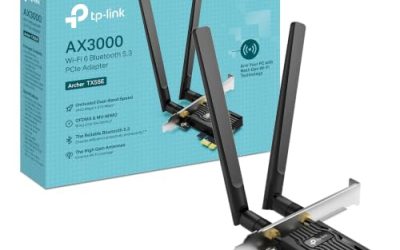
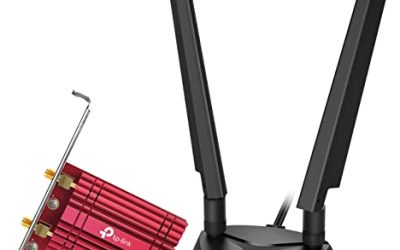
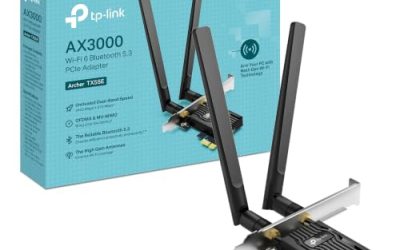
The Archer TX55E is the straightforward Wi-Fi 6 answer for a desktop whose router is also Wi-Fi 6. Its listing pairs the AX3000 class, split between 2402 Mbps on 5 GHz and 574 Mbps on 2.4 GHz, with Bluetooth 5.2, WPA3 and MU-MIMO, driven through two high-gain antennas. Nothing in that set demands a new router, a new Windows version or an unusual slot, which is exactly why it suits the largest group of upgraders. Choose it when the PC lives a room or two from the router and the goal is a clean internal card instead of another dongle hanging off the front panel.
Specs
- Wi-Fi standard: Wi-Fi 6 (802.11ax), AX3000 class
- Speeds from title: up to 2402 Mbps on 5 GHz and 574 Mbps on 2.4 GHz
- Bluetooth: 5.2
- Interface: PCIe adapter for desktop PC
- Antennas: two high-gain antennas
- Security and features: WPA3, MU-MIMO listed
- Operating system listed: Windows 11, 10 (64bit) only
Best for: A Wi-Fi 6 desktop that needs a balanced internal upgrade
Watch out for: The listing limits support to 64-bit Windows 11 and 10, and Bluetooth needs a free internal USB header.
ASIN: B0B1NRGDQ4
TP-Link Archer TXE75E
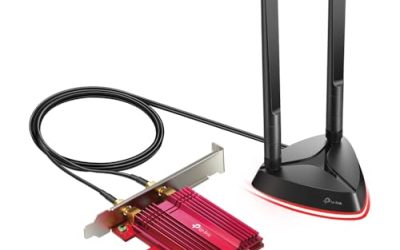
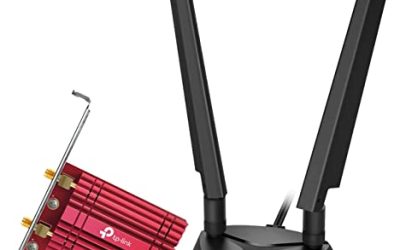
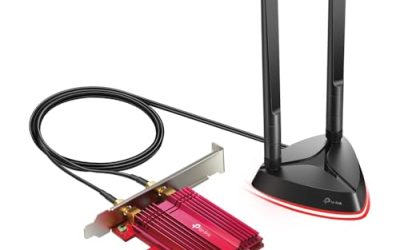
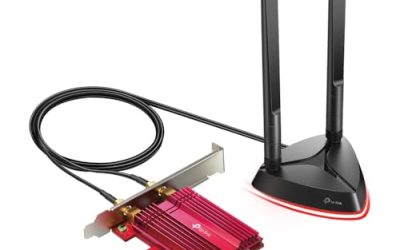
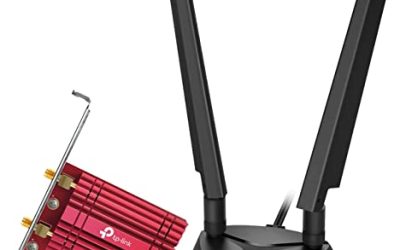
Buyers whose router already broadcasts Wi-Fi 6E should start here. The Archer TXE75E listing centres on an Intel Wi-Fi 6E AX210 chipset in the AXE5400 tri-band class, with 2402 Mbps available on both the 6 GHz and 5 GHz bands, Bluetooth 5.3, WPA3, MU-MIMO and OFDMA. Its magnetic base carries the dual antennas away from the back of the case, which matters because 6 GHz weakens quickly through obstacles. It is the card for a Windows 11 desktop in the same room as a 6E router, or one room away, where that cleaner band can actually stay connected during calls, downloads and game updates.
Specs
- Wi-Fi standard: Wi-Fi 6E (802.11ax), AXE5400 class
- Speeds from title: up to 2402 Mbps on 6 GHz, 2402 Mbps on 5 GHz and 574 Mbps on 2.4 GHz
- Chipset from title: Intel Wi-Fi 6E AX210
- Bluetooth: 5.3
- Antennas: magnetic base with dual antennas
- Features: WPA3, MU-MIMO and OFDMA listed
- Operating system listed: Windows 10 and Windows 11, with 6 GHz use requiring Windows 11
Best for: A Wi-Fi 6E router paired with a Windows 11 desktop
Watch out for: Without a Wi-Fi 6E router this runs as a dual-band card, and Bluetooth needs the USB cable on a motherboard F_USB connector.
ASIN: B09VCVTJV2
ASUS PCE-AX58BT
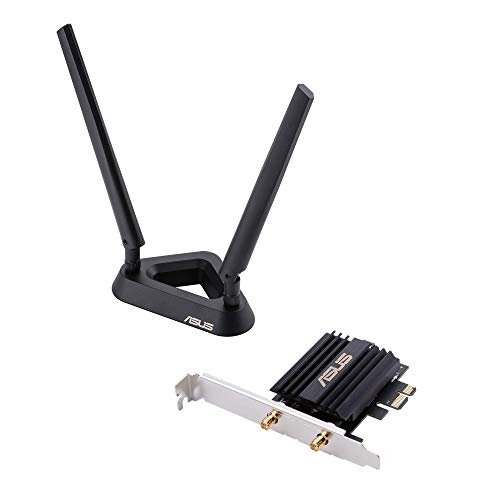
ASUS takes a plainer route with the PCE-AX58BT: Wi-Fi 6 in the AX3000 class, two external antennas, and a feature set built around OFDMA, 2×2 MU-MIMO and WPA3 security. The listing states Bluetooth 5.0, an older version than the TP-Link cards here, which is worth knowing if you pair several wireless peripherals at once. In exchange, the card keeps the decision simple for a desktop on a Wi-Fi 6 router that needs dependable dual-band coverage rather than a 6 GHz band it cannot use. It suits a general home or study PC that streams, downloads and joins calls in a room the router reaches comfortably on 5 GHz.
Specs
- Wi-Fi standard: Wi-Fi 6 (802.11ax), AX3000 class
- Speeds from title: 2402 Mbps on 5 GHz and 574 Mbps on 2.4 GHz
- Bluetooth: 5.0
- Interface: PCIe wireless adapter
- Antennas: two external antennas
- Features: OFDMA, 2×2 MU-MIMO and WPA3 security listed
- Operating system listed: Windows 11, 10 (64bits) only
Best for: A desktop wanting Wi-Fi 6 with two external antennas
Watch out for: Bluetooth is version 5.0 here, and support is limited to 64-bit Windows, so check both before ordering.
ASIN: B07XLP199J
TP-Link Archer TX3000E

The Archer TX3000E covers the practical details that stall installs. Alongside its Wi-Fi 6 AX3000 rating and Bluetooth 5.3, the listing’s box contents include a magnetized antenna base, two high-gain antennas, a low-profile bracket and the Bluetooth header cable, so a slim case and a standard tower are both catered for without extra orders. MU-MIMO and OFDMA are listed for busy networks. That completeness makes it the natural pick for a small-form-factor desktop, a second-hand PC being refurbished, or any build where you cannot be sure which bracket the case needs until the side panel comes off and the slot is measured.
Specs
- Wi-Fi standard: Wi-Fi 6 (802.11ax), AX3000 class
- Speeds from title: up to 2402 Mbps on 5 GHz and 574 Mbps on 2.4 GHz
- Bluetooth: 5.3
- Antennas: magnetized antenna base with two high-gain antennas
- Included in listing: low-profile bracket and Bluetooth header cable
- Features: MU-MIMO and OFDMA listed
- Operating system listed: Windows 11, 10 (64bit)
Best for: A small case that needs a low-profile bracket in the box
Watch out for: Bluetooth only works once the header cable is connected, and driver installation is required from the maker or the included disc.
ASIN: B07ZV2CJL2
TP-Link Archer TBE550E

This is the forward-looking card in the group, and it asks for commitment in return. The Archer TBE550E listing describes a Wi-Fi 7 BE9300 tri-band adapter with Bluetooth 5.4 and a multicolor status LED, rated at 5764 Mbps on 6 GHz, 2882 Mbps on 5 GHz and 688 Mbps on 2.4 GHz. It also states plainly that the card is not compatible with Windows 10, so it belongs only in Windows 11 builds. Pair it with a Wi-Fi 7 router and it becomes the longest-lived option here; pair it with anything older and much of what you paid for stays dormant until the router catches up.
Specs
- Wi-Fi standard: Wi-Fi 7, BE9300 class
- Speeds from title: up to 5764 Mbps on 6 GHz, 2882 Mbps on 5 GHz and 688 Mbps on 2.4 GHz
- Bands: tri-band, 6 GHz, 5 GHz and 2.4 GHz
- Bluetooth: 5.4
- Design: multicolor status LED listed
- Compatibility from title: supports AMD and Intel motherboards
- Operating system listed: not compatible with Windows 10
Best for: A Windows 11 PC with a Wi-Fi 7 router and years of use ahead
Watch out for: Windows 11 is required, and Wi-Fi 7 features need a Wi-Fi 7 router to appear at all.
ASIN: B0D4PDLX6L
Which One Fits Your Situation
Your desktop has no Wi-Fi and the router is Wi-Fi 6
Choose the TP-Link Archer TX55E, or the ASUS PCE-AX58BT if you prefer its two external antennas and ASUS driver route. Both speak the standard your router broadcasts today, add Bluetooth for a headset or controller, and avoid charging you for a 6 GHz band that would never light up. Either card turns a wired-only tower into a complete wireless desktop in one install.
You upgraded to a Wi-Fi 6E router this year
Choose the TP-Link Archer TXE75E. Its Intel AX210 chipset and tri-band AXE5400 rating are built for exactly that router, and the magnetic antenna base helps the 6 GHz band survive outside the router’s own room. Keep the PC on Windows 11, because the listing ties 6 GHz use to that version, and reserve a USB header for Bluetooth.
The PC is a slim office-style case
Choose the TP-Link Archer TX3000E. The low-profile bracket in its box is the difference between a ten-minute install and a second order, and its magnetized antenna base solves the cramped rear panel that slim cases usually have. Its Wi-Fi 6 rating also matches the routers most slim desktops are paired with, so nothing about the choice is wasted.
You are building new and want the card to last
Choose the TP-Link Archer TBE550E if the build runs Windows 11 and a Wi-Fi 7 router is owned or firmly planned. Its BE9300 tri-band rating and Bluetooth 5.4 give it the longest runway here. If the router plan is vague, step down to the TXE75E instead, because a 6E card matched to a real router beats a Wi-Fi 7 card waiting on one.
Common Mistakes
- Buying a Wi-Fi 6E or Wi-Fi 7 card for a router that only broadcasts Wi-Fi 6 bands.
- Assuming a PCIe x1 slot is free without checking whether the graphics card covers it.
- Forgetting the internal USB header that Bluetooth on these cards usually needs.
- Leaving antennas flat against the back of a metal case instead of using the magnetic base.
- Installing a Windows 11-only card in a Windows 10 PC that cannot be upgraded.
Frequently Asked Questions
Is a PCIe card better than a USB Wi-Fi adapter?
For a desktop that stays in one place, usually yes. A PCIe card sits inside the case with full-size external antennas, draws power from the motherboard and never occupies a USB port or gets knocked out of one. USB adapters still win for laptops and for PCs you cannot open, but a fixed tower benefits from the internal card’s antenna size and permanence once it is installed.
Will a PCIe x1 card fit in a larger PCIe slot?
Yes, PCIe x1 cards physically fit and work in x4, x8 and x16 slots, because the smaller connector uses only the first section of the longer slot. What matters more is clearance: a wide graphics card often covers the neighbouring x1 slot entirely. Open the case, identify a slot the card can actually occupy, and check the bracket height against your case before ordering.
Why does Bluetooth need a separate cable inside the PC?
On most of these cards the Wi-Fi radio uses the PCIe connection while Bluetooth travels over USB, so the maker includes a short cable from the card to a motherboard F_USB header. Without that cable the Wi-Fi works normally and Bluetooth simply never appears in Windows. Check that a header is free before buying, especially in compact boards where front-panel wiring already claims the available headers.
Do I need Windows 11 for Wi-Fi 6E or Wi-Fi 7?
For the 6 GHz band, effectively yes on the cards listed here. The Archer TXE75E notes that using 6 GHz requires Windows 11, and the Wi-Fi 7 Archer TBE550E excludes Windows 10 altogether. A Windows 10 PC can still use Wi-Fi 6 cards such as the TX55E or TX3000E on both dual bands, so match the card to the operating system you will actually run.
Related guides
More from Amazon
Programs that pair well with the guide above. Offers and eligibility are set by Amazon and may change.
Free shipping on eligible items, Prime Video and more. Eligible new members can start with a free trial.
Start a Prime free trialAd-free music streaming. Eligible new subscribers can start with a free trial.
Try Music Unlimited freeA Prime membership for ages 18-24 with a trial period. Eligibility is set by Amazon.
See Prime for Young AdultsAudiobooks and podcasts to listen to on the go. Eligible new members can start with a free trial.
Try Audible freeAs an Amazon Associate we earn from qualifying purchases.