
Choosing a wireless MMO mouse is really a decision about your thumb. Moving a full hotbar off the keyboard only works if the side grid sits where your thumb naturally rests, the buttons feel different enough to find blind, and the battery survives a full week of raid nights without a cable rescuing it mid-pull. Sensor ceilings and RGB matter far less than grid layout, connection modes, and how the macros are stored.
This guide is for World of Warcraft, Final Fantasy XIV, Guild Wars 2, and MOBA players who want twelve abilities under one thumb, plus players who split time between an MMO and other genres. Every pick below is a wireless mouse whose Amazon listing publishes a 12-button side grid or an equivalent MMO button array, and the specs quoted come from those product pages.
Top 3 picks at a glance


Quick Picks
As an Amazon Associate we earn from qualifying purchases.
| Product | Best for | Key spec from title |
|---|---|---|
| Razer Naga V2 Pro | Players who swap between MMOs and other genres | 19+1 programmable buttons with swappable side plates |
| Corsair Scimitar Elite Wireless | Raiders who need the grid under their natural thumb rest | 12-button Key Slider side panel, 26,000 DPI |
| UtechSmart Venus Pro RGB Wireless | Long grind sessions between charges | Up to 70 hours battery, 16 programmable buttons |
| Redragon M913 Impact Elite | A first wireless MMO mouse on a tight budget | 12 side buttons, 16,000 DPI |
How to Choose
Grid layout: fixed, sliding, or swappable
Every mouse here puts twelve buttons under your thumb, but how that grid is mounted changes how fast you learn it. A fixed grid is the simplest to build muscle memory on, provided its position matches your grip. Corsair’s Key Slider panel physically slides forward or back, which rescues players whose thumb lands between rows on a fixed layout. Razer instead ships three separate plates, so the same mouse can run a 12-button grid on raid night and a 2-button plate for a shooter. Angled or textured buttons also help: raised, tilted keys are easier to identify by touch than a flat, uniform block.
Battery life and connection modes
Published battery figures only make sense next to the mode they assume. A mouse rated for 150 or 300 hours usually reaches that number over Bluetooth or with lighting off, while the low-latency 2.4 GHz dongle connection you actually raid on drains it faster. Check whether the listing includes a wired mode as well: a USB-C cable that doubles as a charger lets you keep playing through a dead battery instead of ending the session. For most MMO players, the practical test is whether one charge covers a week of evenings on the performance connection, not the headline figure.
Macros, profiles, and software dependence
Twelve buttons are only useful once each one is bound, and on every mouse here the binding, macro recording, and profile management happen in the maker’s Windows software. The questions worth checking on the listing are how many profiles the mouse can hold, whether profiles live on the mouse itself or only in the app, and whether your bindings survive moving to a second PC. Players who raid on a laptop and a desktop, or who play at a friend’s setup, should favor onboard profile storage so the grid travels with the mouse instead of the installation.
Shape, weight, and thumb reach
MMO mice are wide, tall, and heavy by design: the grid, the battery, and the extra switches all add mass, and the listings here run from about 114 g to 132 g. That weight is fine for the low-sensitivity sweeping a hotbar game needs, but the shell still has to fit your hand. Palm grip users generally get the best thumb angle on these shapes, while small hands may find the far row of the grid a stretch. Compare the listed dimensions against your current mouse before ordering, especially its width, since a flared thumb rest changes how the whole hand sits.
The 4 Best Options
Razer Naga V2 Pro

The Naga V2 Pro is the pick for players who refuse to own a different mouse for every genre. Three magnetic side plates are in the box: a 12-button grid for MMO rotations, a 6-button plate for MOBAs and battle royales, and a clean 2-button plate for shooters or desktop work. With the grid fitted, the listing counts 19+1 programmable buttons, and the HyperScroll Pro wheel adds adjustable scroll tension on top. The Focus Pro 30K optical sensor and third-generation optical switches are far beyond what hotbar play demands, but they remove tracking and switch failure from the list of worries.
Specs
- Sensor: Razer Focus Pro 30K optical sensor, up to 30,000 DPI
- Buttons: 19+1 programmable buttons
- Side plates: 3 magnetic swappable plates (12, 6, and 2-button layouts)
- Wheel: HyperScroll Pro wheel with adjustable tension
- Switches: Razer Optical Mouse Switches Gen-3
- Battery: up to 300 hours as listed
- Connectivity: HyperSpeed Wireless, Bluetooth, and wired via SpeedFlex cable
Best for: MMO mains who also play shooters and MOBAs and want one mouse for all of it.
Watch out for: Confirm which connection mode the 300-hour battery figure assumes; the low-latency HyperSpeed mode drains the battery faster.
ASIN: B0BGJTLFN5
Corsair Scimitar Elite Wireless
Corsair’s answer to the thumb-reach problem is mechanical rather than electronic. The patented Key Slider system mounts the 12-button side panel on a rail, and with the included Allen key you can slide the whole grid forward or backward until it sits exactly under your thumb’s resting position. The listing gives you 16 fully programmable buttons in total, a Marksman sensor rated to 26,000 DPI, and iCUE software for macros and profiles. Battery life is listed at up to 150 hours, the longest figure in this roundup, which suits players who charge monthly rather than weekly.
Specs
- Sensor: Corsair Marksman 26K optical sensor, up to 26,000 DPI
- Buttons: 16 programmable buttons
- Side panel: patented 12-button Key Slider, repositionable to fit your hand
- Battery: up to 150 hours
- Software: iCUE compatible for macros and remapping
- Connectivity: SLIPSTREAM wireless, Bluetooth, and USB wired
- Weight: 114 g
Best for: Raid regulars whose thumb misses rows on fixed grids and who want to set the panel position once.
Watch out for: Full macro and profile setup runs through iCUE, so check the listing’s software requirements against your PC before buying.
ASIN: B0CCVYHZ9N
UtechSmart Venus Pro RGB Wireless
The Venus Pro distinguishes its grid by touch rather than position: its 12 thumb buttons are set at varying inclination angles, so the thumb tip can tell one row from the next without looking down. The listing counts 16 programmable buttons overall, including a separate fire button beside the left click, and the PixArt PMW3335 sensor adjusts from 100 to 16,000 DPI in five switchable stages. A 1,000 mAh battery is rated for up to 70 hours of wireless play, and the mouse runs either over the 2.4 GHz nano receiver or plugged in through its USB-C cable.
Specs
- Sensor: PixArt PMW3335 optical sensor
- DPI: 100–16,000 DPI in 5 switchable stages
- Buttons: 16 programmable buttons, including 12 thumb buttons and a fire button
- Polling rate: up to 1000 Hz
- Battery: 1,000 mAh rechargeable, up to 70 hours wireless
- Connectivity: 2.4 GHz wireless via nano USB receiver, USB-C wired
- Lighting: 16M Chroma RGB
- Weight: 4.4 ounces
Best for: Players with larger hands who grind long sessions and want angled buttons they can identify by feel.
Watch out for: This is a large, heavy shell; compare the listed dimensions with your current mouse if your hands are on the smaller side.
ASIN: B07XP4K152
Redragon M913 Impact Elite
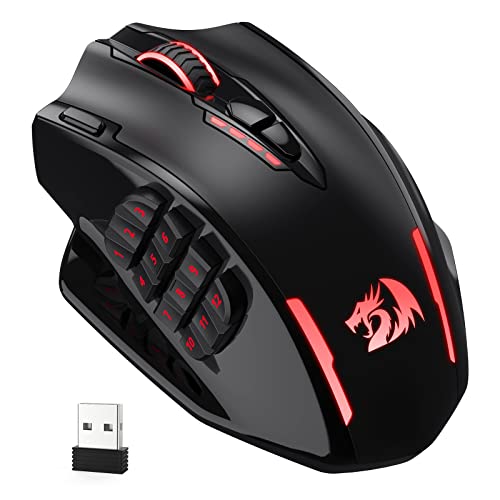
The M913 Impact Elite is the low-cost entry point into wireless MMO play, and Redragon bills it as its first wireless MMO mouse with 12 programmable side buttons. The listing counts 16 programmable buttons in total, five onboard DPI levels running from 1,000 up to 16,000, and a 1000 Hz polling rate with 40G acceleration in either connection mode. Battery life is listed at 45 hours, stretching to about 80 hours in the ECO mode with its low-consumption Pixart 3335 sensor. When the charge runs low mid-session, the same USB-C cable that charges it switches the mouse to wired mode.
Specs
- Sensor: Pixart 3335 optical sensor, up to 16,000 DPI
- Buttons: 16 programmable buttons, including 12 side buttons
- DPI levels: 5 onboard levels (1000/2000/4000/8000/16000)
- Polling rate: 1000 Hz with 40G acceleration
- Battery: 45 hours, up to about 80 hours in ECO mode
- Connectivity: 2.4 GHz wireless and USB-C wired
- Weight: 132 g
Best for: First-time MMO mouse buyers who want the full 12-button grid without paying flagship prices.
Watch out for: The longer battery figure assumes ECO mode with lighting off; with RGB running, expect to charge noticeably more often.
ASIN: B088B3ZM76
Which One Fits Your Situation
You raid on a schedule and your rotation is muscle memory
Pick the Corsair Scimitar Elite Wireless. A fixed commitment to one game is exactly where the sliding Key Slider panel pays off: you position the grid once, build your rotation around it, and the listed 150-hour battery means charging rarely interrupts a raid calendar. The Razer is the fallback if your thumb reach is average and you prefer its plate system.
Your play time splits between an MMO and other genres
Take the Razer Naga V2 Pro. Swapping the 12-button plate for the 2-button plate takes seconds and turns the same mouse into a sensible shooter or desktop mouse, so your sensitivity and grip stay identical across games. None of the fixed-grid mice here can shed their grid when you stop needing twelve extra buttons.
You are trying a thumb grid for the first time
Start with the Redragon M913 Impact Elite. It delivers the complete 12-button layout, onboard DPI switching, and dual-mode wireless at the lowest commitment in this group, so you can learn whether a grid suits your play before spending flagship money. If it clicks, the upgrade path to the Corsair or Razer is straightforward.
You play long sessions away from a charger
Look at the UtechSmart Venus Pro or the Scimitar Elite Wireless. The Venus Pro’s 1,000 mAh cell is rated for 70 hours and its angled thumb buttons stay distinguishable deep into a session, while the Corsair lists the longest battery figure here at 150 hours. Both also work wired over USB-C or USB while they recharge.
Common Mistakes
- Buying a wireless mouse with a standard two-button thumb cluster and expecting it to cover a 12-slot hotbar; check that the listing actually publishes a 12-button grid or MMO array.
- Comparing headline battery hours across brands without checking which connection mode and lighting setting each figure assumes.
- Setting up macros on one PC and assuming they travel; if the profiles live in the software rather than on the mouse, a second computer starts from a blank grid.
- Ordering by sensor DPI when every mouse here already exceeds what MMO camera control can use, while ignoring shell width and thumb reach.
- Leaving the USB dongle in a rear port behind the PC case, then blaming the mouse for dropouts that a front port or extension cable would have fixed.
Frequently Asked Questions
How many side buttons do I actually need for MMO play?
Twelve is the standard because it mirrors the 1-to-= hotbar row your hand already knows from the keyboard, and every mouse here publishes a 12-button grid or plate. Players with simpler rotations can manage with fewer, but a 12-grid mouse still works: unbound buttons simply stay empty until a new ability earns one.
Is 2.4 GHz wireless responsive enough for raiding?
Yes. The mice here report at up to 1000 Hz over their 2.4 GHz connections, the same polling rate as a wired mouse, and MMO ability queues are far more forgiving than competitive shooter flicks. Bluetooth modes are meant for battery saving and desktop use, so keep the dongle connection for actual raid nights.
Do the macros still work if the software is not running?
That depends on where the profile is stored. Mice that save profiles onboard carry their bindings to any PC, while software-dependent setups lose custom macros when the app is closed or absent. Check the listing’s profile and onboard memory wording for the specific model before relying on it at a second machine.
Why are wireless MMO mice so much heavier than FPS mice?
The weight is structural. A 12-button grid adds switches and a reinforced side panel, the battery adds a cell an FPS mouse does not carry, and the wide shell that supports your thumb and ring finger adds material. Listings here run from about 114 g to 132 g, which suits deliberate hotbar play rather than rapid flicking.
Related guides
More from Amazon
Programs that pair well with the guide above. Offers and eligibility are set by Amazon and may change.
Free shipping on eligible items, Prime Video and more. Eligible new members can start with a free trial.
Start a Prime free trialAd-free music streaming. Eligible new subscribers can start with a free trial.
Try Music Unlimited freeA Prime membership for ages 18-24 with a trial period. Eligibility is set by Amazon.
See Prime for Young AdultsAudiobooks and podcasts to listen to on the go. Eligible new members can start with a free trial.
Try Audible freeAs an Amazon Associate we earn from qualifying purchases.









