
The best home theater power conditioners for most systems are the Furman Elite-15 PF i for high-end audio and video, the Furman PL-PLUS C for rack-based installations, the Panamax MR5100 for a feature-rich home theater rack, and the APC H15BLK for straightforward protection with voltage regulation.
A power conditioner cannot improve a weak utility supply, create extra amplifier power, or replace a properly grounded circuit. Its value is more practical: it can divert surges, reduce certain types of electrical interference, provide safer turn-on sequencing, expose wiring or voltage problems, and make a rack easier to manage.
As an Amazon Associate we earn from qualifying purchases at no extra cost to you.


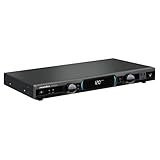
Top 3 picks at a glance
Best Home Theater Power Conditioners Compared
| Model | Best for | Protection and filtration | Useful features | Typical market range |
|---|---|---|---|---|
| Furman Elite-15 PF i | High-current audio/video systems | Series-mode surge protection, linear filtering, voltage monitoring | Power Factor technology, front display, rear outlets, rack ears | Usually $700–$900 |
| Furman PL-PLUS C | Standard equipment racks | Series-mode protection, EMI/RFI filtration | Voltage and current display, pull-out lights, rack installation | Usually $350–$500 |
| Panamax MR5100 | Home theater racks with mixed components | Surge protection, noise filtration, voltage monitoring | Sequential startup, isolated outlet banks, front display | Usually $450–$650 |
| APC H15BLK | Systems that need voltage regulation | Surge protection, EMI/RFI filtering, automatic voltage regulation | Line-voltage display, coax protection, rack-mount form factor | Usually $400–$600 |
| AudioQuest PowerQuest 707 | Large component systems outside a rack | Surge protection and multiple filtration zones | High outlet count, separated filtering sections, non-rack desktop design | Usually $900–$1,300 |
What to Compare Before Buying
Surge rating and protection method
Joule ratings describe how much transient energy a device is designed to absorb, but the number should not be treated as a complete safety score. A conditioner with a very large advertised joule figure may rely on sacrificial metal-oxide varistors that degrade after repeated events. Series-mode protection, used in Furman’s higher-end conditioners, takes a different approach by diverting or suppressing transient energy without placing the same kind of sacrificial component directly across the incoming line.
Look for a clearly stated protection mode, replaceable or diagnostic protection indicators, and a response specification measured in nanoseconds or less. A response-time number alone is not enough: the circuit’s clamping voltage, grounding path, and ability to survive repeated events matter too.
For a home theater, use the conditioner as the final layer. The electrical panel should have appropriate surge protection, and sensitive equipment should share a correctly grounded circuit where practical. Coaxial cable, Ethernet, satellite, and outdoor antenna lines can also bring damaging surges into a system, so protection for connected signal cables may be important.
EMI and RFI filtration
EMI is electromagnetic interference from devices such as switching power supplies, dimmers, and motors. RFI is radio-frequency interference that can enter through power wiring or radiate through the air. Filtration can reduce noise carried on the AC line, but it cannot cure ground loops, poor cable shielding, noisy amplifiers, or interference entering through an unprotected HDMI or coax connection.
For a mixed rack, separated outlet banks are useful. Put the AV receiver, streaming box, disc player, and display on filtered digital outlets, while keeping a power amplifier on a high-current or less-restricted bank. Excessive filtering on an amplifier is not automatically harmful, but a conditioner should not become the bottleneck for a large class-AB or class-D amplifier.
Outlet layout matters more than outlet count
Count the plugs before choosing a model. A typical theater rack may need outlets for a display, AV receiver, power amplifier, subwoofer amplifier, game console, streaming device, disc player, network switch, subwoofer processor, bias-lighting supply, and cooling fan. Twelve outlets can disappear quickly, especially when bulky wall-wart adapters block adjacent sockets.
- Choose front outlets for temporary connections, calibration gear, or headphones.
- Choose rear outlets with enough spacing for large transformer plugs.
- Use isolated banks when digital sources and high-current amplifiers share one conditioner.
- Do not connect a power strip to a conditioner unless the manufacturer explicitly permits it.
- Keep powered subwoofers on a suitably rated outlet; their startup current can be much higher than their average draw.
Voltage monitoring versus voltage regulation
A display that shows incoming voltage is valuable because it reveals an unstable circuit before you start diagnosing the receiver or projector. Monitoring only reports the problem. Automatic voltage regulation attempts to correct moderate sags and rises using transformer taps.
Voltage regulation is most useful when measurements repeatedly fall outside roughly 110–125 volts AC in a nominal 120-volt region, or when lights visibly dim as large appliances start. It is not a substitute for an electrician when voltage is consistently abnormal. Regulation also adds cost, weight, heat, and relay noise, and it does not provide battery backup.
Decision Matrix: Which Type Fits Your Theater?
| Your situation | Recommended type | What to prioritize | Models to consider |
|---|---|---|---|
| AV receiver, console, streaming device, and TV | Compact filtered surge conditioner | Outlet spacing, HDMI/coax protection, clear status light | Panamax or Furman entry-level rack/desktop models |
| Projector, receiver, disc player, and separate amplifier | High-current rack conditioner | Amplifier-friendly outlet bank, current capacity, voltage display | Furman PL-PLUS C or Elite-15 PF i |
| Frequent low or high household voltage | Conditioner with automatic voltage regulation | Regulation range, thermal capacity, alarm behavior | APC H15BLK or a comparable AVR rack unit |
| Large installation with several rack components | Professional rack conditioner | Sequential startup, 15-amp capacity, outlet-bank layout | Furman Elite-15 PF i or comparable commercial model |
| High-end system outside a rack | Large desktop power filter | Filtration zones, outlet spacing, total load rating | AudioQuest PowerQuest 707 |
Worked Power-Budget Example
Suppose a rack contains a 120-watt AV receiver, a 700-watt power amplifier, a 90-watt projector, a 35-watt game console, and 25 watts of networking equipment. The normal combined load is:
120 + 700 + 90 + 35 + 25 = 970 watts.
At 120 volts, that is approximately 970 ÷ 120 = 8.1 amps. The amplifier’s 700-watt figure may be a maximum or short-term rating, and startup current can exceed the average. A 15-amp conditioner has a nominal capacity of 1,800 watts at 120 volts, but it is sensible to leave headroom rather than operate continuously near the limit. This system is reasonable for a 15-amp high-current conditioner, while a second large amplifier or powered subwoofer may justify a separate circuit and careful load calculation.
Do not add every watt number printed on a product label without checking what it represents. Some labels state maximum consumption, some state typical consumption, and some audio amplifiers list output power rather than AC input power.
Rack-Mount Installation Steps
- Verify the circuit. Use an outlet tester or have an electrician check polarity, grounding, and neutral integrity. A conditioner cannot safely correct missing ground.
- Reserve rack space. A 1U conditioner needs one rack unit, but leave ventilation clearance around models with transformers or voltage regulation.
- Place high-current equipment deliberately. Connect amplifiers and powered subwoofer equipment to the outlet bank recommended by the manufacturer, not automatically to the most heavily filtered bank.
- Use sequential startup when available. Turn on sources first, processors next, and power amplifiers last. This reduces speaker thumps and limits simultaneous inrush current.
- Connect signal-line protection. If the unit offers coax or satellite protection, route the incoming line through it before connecting the display or receiver. Do not use a protection port that is incompatible with your service or bandwidth.
- Read the voltage under load. Check the display with the theater idle and while the amplifier or projector starts. A substantial drop points to a circuit or wiring issue, not a missing filter.
Protection Response: What It Can and Cannot Do
A power conditioner can react quickly to a transient on the AC input, but it cannot guarantee survival from a nearby lightning strike. During severe storms, disconnecting equipment from power and signal cables is safer than relying on any warranty or protection circuit. Surge protection indicators should be checked periodically; if the unit reports protection failure, replace or service it immediately.
For everyday interference, listen for a change only after ruling out the common causes. A buzzing subwoofer often indicates a ground loop between cable TV and audio equipment. Test by temporarily disconnecting the coax feed, then use an appropriately rated isolation solution if the coax is the cause. Never defeat the safety ground with a cheater plug.
Frequently asked questions
Can I plug a power strip into a home theater conditioner?
Only if the conditioner’s manufacturer explicitly permits it. The article advises against connecting a power strip otherwise. Before choosing a conditioner, count the components and consider bulky adapters, since they can block neighboring outlets.
Should my powered subwoofer use the conditioner?
It can, but use an outlet rated and recommended for that equipment. A powered subwoofer’s startup current can be much higher than its average draw, so account for it when planning outlet layout and total load.
Will a power conditioner fix a ground loop or noisy amplifier?
No. AC-line filtration cannot cure ground loops, poor cable shielding, noisy amplifiers, or interference entering through an unprotected HDMI or coax connection. A conditioner can reduce certain noise carried on power wiring, but it does not solve every source of interference.
Does a voltage display mean the conditioner regulates voltage?
No. A display may only monitor and report incoming voltage. Automatic voltage regulation attempts to correct moderate sags and rises; monitoring alone does not. If voltage is consistently abnormal, the article recommends consulting an electrician rather than relying on regulation.
Can a conditioner protect equipment connected by HDMI, Ethernet, or antenna cable?
Not unless the relevant signal connection is protected. The article notes that coaxial, Ethernet, satellite, and outdoor antenna lines can bring surges into a system, and that interference can enter through an unprotected HDMI or coax connection. Check whether the conditioner has compatible protection for the connected line.
Bottom Line
Choose the Furman Elite-15 PF i when high-current handling, monitoring, and robust rack protection matter most. Choose the Furman PL-PLUS C for a capable conventional rack conditioner with useful displays and lighting. Choose the Panamax MR5100 when outlet-bank organization and startup control are priorities. Choose the APC H15BLK when measured voltage instability makes automatic regulation worthwhile. For a large non-rack system with extensive filtration, the AudioQuest PowerQuest 707 is a more specialized option.
The best home theater power conditioners are matched to the circuit, load, outlet layout, and actual electrical problem. Start with grounding and power measurements, then select the protection and monitoring features your system can use rather than paying for a large surge number alone.


