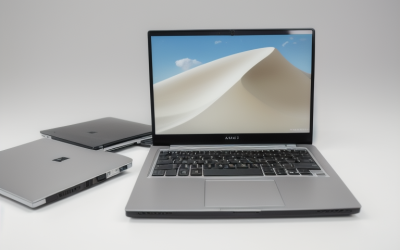
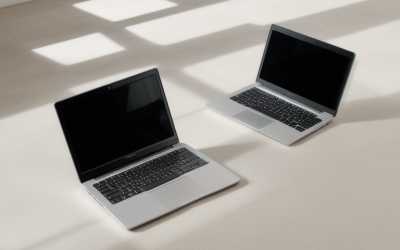
Programming laptops are won on the keyboard, the screen, and the memory, not on graphics power. A comfortable keyboard with good key travel, a sharp 14 to 16-inch display with a taller 16:10 aspect ratio, and 16 to 32 GB of RAM will improve your working day more than any gaming-class GPU. Add a fast multi-core processor and an NVMe drive and you have a machine that handles editors, containers, and test suites without friction.
This guide is for students learning to code, professional developers, and hobbyists who want a dependable machine in 2026. It breaks down which specs actually influence build times, container performance, and comfort over eight-hour sessions, and how the needs of web, mobile, systems, and machine-learning work differ. No models are named, which keeps the advice usable against whatever laptops you are comparing.
What Coding Really Demands
Everyday coding is light on hardware, but the moment you add a modern toolchain the load grows. A code editor with language servers, a browser with dev tools, a local database, a Docker daemon, and a chat application can easily consume 12 GB or more. Compiling large codebases, running test suites, and building containers use all CPU cores, while mobile emulators and virtual machines stress both memory and processor virtualization features.
Because you stare at text for hours, ergonomics matter as much as speed. Screen sharpness, vertical space, key feel, and trackpad quality are not luxuries. They decide whether the machine is pleasant to use or a daily irritation.
Specs That Matter for Developers
RAM: 16 GB Minimum, 32 GB for Heavier Stacks
Sixteen gigabytes handles web development, scripting, and most backend work. Go to 32 GB if you run multiple Docker containers, local Kubernetes tools, Android emulators, or virtual machines. Check whether the RAM is soldered, since upgrading later is impossible in many thin laptops. Developers who rarely multitask can live with 16 GB, but memory pressure is the first thing that slows down a development machine.
CPU Core Count and Efficiency
Choose a processor with 8 or more cores for professional work, with 6 cores acceptable for students and light projects. Compile times, test suites, and builds scale with cores, while editor responsiveness depends on single-core speed. Efficient ARM-based chips offer long battery life and strong performance for many workflows, though you should confirm that your toolchain, Docker images, and virtualization needs support the architecture. Chips with hardware virtualization support are required for emulators.
Storage: Fast NVMe, 512 GB or More
Dependencies, node_modules folders, container images, and build caches consume space at an alarming rate. Choose 512 GB at minimum and 1 TB if you keep multiple projects and images. An NVMe drive speeds up package installs, git operations, and indexing. Avoid laptops that use slow eMMC storage, which is sometimes found in the cheapest machines.
Display: Resolution, Aspect Ratio, and Brightness
A 16:10 or 3:2 aspect ratio shows more lines of code than a 16:9 panel of the same width. Look for at least 1920 by 1200 resolution, with 2.5K or higher giving crisper text. Matte or anti-glare finishes reduce eye strain in bright rooms. Brightness of 300 nits or more suits office and window-side work, and a panel covering 100 percent sRGB is easy on the eyes for design-related front-end tasks.
Keyboard, Ports, and Battery
Look for full-size keys, a proper arrow-key layout, and backlighting. Ports should include at least two USB-C or Thunderbolt connections, one USB-A for older devices, and ideally HDMI for presentations. Battery capacity of 55 watt-hours or more, paired with an efficient chip, can deliver a full workday for editors and browsers, though containers and compiles drain faster.
Spec Targets by Budget Tier
| Component | Budget tier | Mid-range tier | Premium tier |
|---|---|---|---|
| RAM | 16 GB | 16 to 32 GB | 32 to 64 GB |
| CPU | 6 cores | 8 to 10 cores | 12 to 16 cores or top ARM chip |
| Storage | 256 to 512 GB NVMe | 512 GB to 1 TB NVMe | 1 to 2 TB NVMe |
| Display | 1080p, 14 to 15.6 inches | 1200p to 2.5K, 16:10, matte option | 2.8K to 3.2K, high brightness |
| Keyboard | Standard, backlit | Comfortable travel, backlit | Premium travel, spill resistance |
| Battery | 45 to 55 Wh | 55 to 75 Wh | 70 to 99 Wh |
Which Programmer Profile Are You
The Student and Self-Learner
You write scripts, learn algorithms, and build small apps. A 16 GB, 6-core machine with 512 GB of storage and a good keyboard covers every course. Light weight and long battery life matter because you will carry it daily. Spend on the screen and keyboard before anything else.
The Web and Backend Developer
Front-end builds, local servers, databases, and containers define your day. Choose 32 GB of RAM if you use Docker heavily, an 8-core processor, and 1 TB of storage. A taller display and a second monitor through USB-C help productivity.
The Mobile and Systems Developer
Android emulators, iOS toolchains, and compiled languages stress memory and CPU. Get 32 GB of RAM, a high-core-count processor, and fast storage. Confirm the platform supports the tools you need, because iOS development requires a specific operating system.
The Machine Learning and Data Engineer
If you train models locally, add a discrete GPU with at least 8 GB of VRAM and strong cooling. Otherwise, a standard development laptop plus cloud GPUs is simpler and cheaper. Choose 32 GB of RAM for data processing in either case.
Operating System and Tooling Considerations
Pick an operating system that fits your target. Linux and Unix-like systems offer native command-line tooling and container performance. Windows with its Linux subsystem provides a flexible blend and the broadest hardware choice. macOS-based laptops are required for iOS and macOS app builds. Whichever you choose, check hardware compatibility if you plan to install Linux, particularly for Wi-Fi chips, fingerprint readers, and trackpads. A laptop with a bright, matte screen and a quiet fan profile makes long sessions more comfortable.
Comfort Details That Add Up Over a Workday
Developers spend more hours at the machine than most buyers, so small comfort factors compound. Screen flicker from pulse-width modulation can cause headaches for some people, so look for panels described as flicker-free or DC dimming. Fan behavior also matters; a laptop that ramps up during every compile becomes tiring in a quiet office, and a more efficient processor often keeps things calm.
Trackpad quality, hinge stability, and webcam clarity are easy to overlook but affect daily life, especially when pair programming over video. A webcam at 1080p and a microphone array with noise suppression make remote meetings smoother. Fingerprint login and a fast wake from sleep reduce friction when you move between rooms.
Durability and repairability are worth a glance as well. A body that can take a bag commute and a battery or storage drive that is replaceable extend the laptop’s useful life. Software update commitments from the manufacturer also matter, since developers rely on current firmware and security fixes. Finally, consider an external keyboard, mouse, and monitor at your desk. A laptop that connects to all three through one USB-C cable gives you a desktop-grade setup at home with a portable machine for travel.
Longevity deserves a final thought. Programming skills and toolchains change, but a laptop with upgradeable storage, a solid hinge, and a keyboard you enjoy can serve for five years or more. Spending a little extra on RAM and the display at purchase usually beats replacing the whole machine early, and it keeps resale value higher as well.
Common Mistakes
- Paying for a gaming GPU you will not use: Web and backend development rarely need one, and the cost is better spent on RAM and a screen.
- Underbuying memory: Docker, emulators, and an IDE can exhaust 16 GB faster than expected.
- Ignoring the keyboard: Shallow keys and cramped layouts cause fatigue over a full workday.
- Choosing a glossy low-resolution panel: Text looks fuzzy and reflections strain your eyes.
- Overlooking architecture compatibility: Some tools and container images behave differently on ARM chips than on x86.
Before You Buy
- Select at least 16 GB of RAM, and 32 GB for containers or emulators.
- Choose a 16:10 display with at least 1920 by 1200 resolution.
- Confirm NVMe storage of 512 GB or more.
- Check the keyboard layout, key travel, and backlighting.
- Verify ports for monitors, drives, and peripherals.
- Confirm your languages, frameworks, and virtualization tools support the chip and operating system.
Related guides
- When I Turn On Record Game In Background On Gamebar. Gamebar Crashes, What Do I Do?
- How To Reduce Background Noise On A Streaming Microphone
- Poly Computer Accessories Company Streaming Evaluation
Frequently Asked Questions
How much RAM do I need for programming?
Sixteen gigabytes is enough for most web and scripting work. If you run containers, virtual machines, or mobile emulators together with an IDE, 32 GB avoids slowdowns.
Do programmers need a dedicated graphics card?
Generally no. Graphics cards only matter for game development, machine learning, and some GPU computing tasks; integrated graphics handle regular coding without any trouble.
Is a 14-inch laptop too small for coding?
A 14-inch screen works if it has a taller aspect ratio and a sharp resolution, and many developers pair it with an external monitor at a desk. A 15 or 16-inch display offers more room if you code mostly on the laptop itself.
Should I buy an ARM or x86 laptop for development?
ARM laptops offer excellent battery life and quiet operation, and most mainstream tools support them. Choose x86 if you depend on software, drivers, or virtualization setups that are only available for that architecture.