
The best white PC cases for a gaming build are the Lian Li Vector V100 for value, the NZXT H6 Flow for a clean dual-chamber look, and the Corsair 3500X RS ARGB for a panoramic glass showcase. For small builds, the Antec C2M ARGB is a white micro-ATX option.
A white case looks great, but it also shows dust, dyed cables and mismatched parts more than a black one. This guide compares eight white cases by what they do best: airflow, showcase glass or compact size. It also covers white-build planning, so your graphics card, cooler and cables match the case.
Our Top Picks
Top 3 picks at a glance
Our Picks at a Glance
- Best value: Lian Li Vector V100 ATX, white with tempered glass
- Best dual-chamber design: NZXT H6 Flow, white
- Best panoramic showcase: Corsair 3500X RS ARGB, white
- Best for big graphics cards and radiators: ASUS A31 White Edition
- Best compact ATX: Lian Li O11 Vision Compact, white
- Best white micro-ATX: Antec C2M ARGB, white
- Best simple budget ATX: Montech X2 Plus, white
- Best low-cost door-style case: Vetroo AL800, white
Comparison Table: Eight White Cases
| Case | Size | Style | Max GPU (listing) | Radiator (listing) | Fans (listing) |
|---|---|---|---|---|---|
| Lian Li Vector V100 | ATX mid-tower | Tempered glass | 420 mm | 360 mm | Not listed |
| NZXT H6 Flow | ATX, compact | Dual chamber, panoramic glass | Not listed | Not listed | 3x 120 mm |
| Corsair 3500X RS ARGB | ATX mid-tower | Panoramic glass | Not listed | Not listed | 3x reverse |
| ASUS A31 White Edition | ATX mid-tower | Panoramic glass | 380 mm | 360 mm | Not listed |
| Lian Li O11 Vision Compact | ATX, compact | Three-panel glass, back-connect | Not listed | 360 mm top mesh included | Not listed |
| Antec C2M ARGB | Micro-ATX | Panoramic glass | 415 mm | 360 mm | 3 ARGB PWM |
| Montech X2 Plus | ATX mid-tower | Tempered glass | Not listed | Not listed | RGB fans |
| Vetroo AL800 | ATX mid-tower | Door-opening glass | Not listed | Not listed | ARGB and PWM fan |
The table uses what each listing states. Where a figure is not listed, check the maker page for clearances before you buy.
How to Choose a White Case: Three Styles
- Airflow-first: mesh front, several fans, simple layout. Best for hot graphics cards and quiet running.
- Showcase: large glass panels, sometimes on two or three sides. Looks great but can restrict airflow if the front is covered.
- Compact: small footprint, often micro-ATX or a compact ATX, with limited cooler and radiator room.
Decide your priority first. If you want to show off your parts, pick a panoramic design. If you run a hot, high-end graphics card, put airflow first.
Mid-Tower ATX Cases
1. Lian Li Vector V100 ATX: Best Value
As an Amazon Associate we earn from qualifying purchases at no extra cost to you.

The Vector V100 is a white ATX mid-tower with a tempered glass side panel. The listing mentions side I/O USB-C, a dust filter, support for graphics cards up to 420 mm and radiators up to 360 mm, an included GPU bracket, and an RGB LED display platform. The GPU support is generous for this class, and the included bracket helps with heavier cards.
- ATX mid-tower, tempered glass
- Up to 420 mm GPU, 360 mm radiator
- Side USB-C, dust filter, GPU bracket
Best for: value builds with a large graphics card. Skip if: you want fans pre-installed; the listing does not state them.
Pros: long-GPU support; USB-C on the side; GPU bracket included; dust filter. Cons: fan count not listed; check what is included before planning your cooling.
2. NZXT H6 Flow: Best Dual-Chamber Design

NZXT describes the H6 Flow as a compact dual-chamber ATX case with panoramic glass and three included 120 mm fans, tuned for airflow. A dual-chamber layout puts the power supply and cables in a separate section, which keeps the main area clean and makes cable management simpler. The white finish and large glass front make it one of the better-looking cases in this price class.
- Compact dual-chamber ATX
- Panoramic glass
- 3x 120 mm fans included
Best for: clean, airflow-minded builds with a visible interior. Skip if: you need very long graphics cards or lots of drive bays.
Pros: three fans included; panoramic glass; tidy cable layout. Cons: compact interior limits large coolers; GPU and radiator limits are not in the listing.
3. Corsair 3500X RS ARGB: Best Panoramic Showcase

The Corsair 3500X RS ARGB is a white mid-tower with a panoramic glass design. The listing names three pre-installed reverse fans, high airflow, a spacious interior, GPU anti-sag support, removable panels and cable routing aids. Reverse-blade fans let the lighting face the glass while still moving air in the standard direction, which is why they suit a showcase build.
- Panoramic mid-tower
- 3x pre-installed reverse fans
- GPU anti-sag, removable panels
Best for: showcase builds that still want good airflow. Skip if: you dislike RGB lighting.
Pros: three fans included; GPU anti-sag; spacious interior. Cons: glass-heavy design shows every cable; maximum GPU length is not in the listing.
4. ASUS A31 White Edition: Best for Big Cards and Radiators

The ASUS A31 White Edition is an ATX mid-tower with a panoramic design. The listing states support for hidden-connector motherboards, 360 mm radiators and 380 mm graphics cards, and mentions clean cable management. Hidden-connector, or back-connect, motherboards move the power and data connectors to the rear, which makes for a tidy front view.
- ATX mid-tower, panoramic design
- 380 mm GPU, 360 mm radiator
- Hidden-connector motherboard support
Best for: builds with a large GPU and a liquid cooler. Skip if: you want to know the included fan count; it is not in the listing.
Pros: room for big hardware; back-connect support; clean look. Cons: fan details not listed; fewer extras than some rivals.
5. Montech X2 Plus: Best Simple Budget ATX
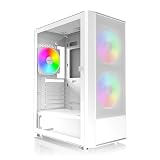
Montech’s X2 Plus is a white ATX mid-tower with RGB fans, a steel frame and a tempered glass side panel. The listing is short, so confirm fan count, clearances and dust filters on the maker page. It is a no-frills option for builders who want a white case without paying for extra features.
- ATX mid-tower, steel frame
- Tempered glass side panel
- RGB fans included
Best for: simple white builds on a tight budget. Skip if: you need exact clearance numbers from the listing.
Pros: low-cost; RGB fans included; steel frame. Cons: thin listing details; fewer premium touches.
6. Vetroo AL800: Best Low-Cost Door-Style Case

The Vetroo AL800 is a white mid-tower ATX with a door-opening tempered glass side panel, an ARGB LED strip, a pre-installed ARGB and PWM fluid dynamic bearing fan, and support for 50 series graphics cards per the listing. The hinged glass door makes it easy to reach the interior without taking the panel off.
- Door-opening glass side panel
- ARGB strip and pre-installed fan
- Listed as supporting 50 series GPUs
Best for: budget builders who like easy interior access. Skip if: you need multiple pre-installed fans.
Pros: hinged glass door; ARGB strip; low cost. Cons: only one fan mentioned; check cooling plan.
Compact and Micro-ATX Cases
7. Lian Li O11 Vision Compact: Best Compact ATX

The O11 Vision Compact is a white compact ATX dual-chamber case with three-panel glass, back-connect support, hidden AIO tube routing and a 360 mm top mesh included. The design keeps the front and side open for a full view of the build. It is a good fit for a clean showcase in a smaller footprint.
- Compact dual-chamber ATX
- Three-panel glass, back-connect support
- 360 mm top mesh included
Best for: compact showcase builds with a liquid cooler. Skip if: you want airflow-first mesh at the front.
Pros: three-panel glass view; hidden tube routing; compact. Cons: glass front limits intake; needs back-connect parts for the cleanest look.
8. Antec C2M ARGB: Best White Micro-ATX

The Antec C2M ARGB is a white micro-ATX case with three PWM ARGB fans, panoramic tempered glass, 360 mm radiator support and 415 mm graphics card support. A micro-ATX build in a case this size gives you a long GPU limit without a big desk footprint.
- Micro-ATX, three ARGB PWM fans
- 415 mm GPU, 360 mm radiator
- Panoramic tempered glass
Best for: small white builds with a large graphics card. Skip if: you need ATX board support.
Pros: three fans; long-GPU support; compact. Cons: micro-ATX only; fewer expansion slots.
Also Consider
HYTE Y70 Touch Infinite in Snow White

A premium dual-chamber ATX case with a built-in 2.5K touchscreen, a 10-fan capacity and a PCIe 4.0 riser cable. It costs far more than the cases above and suits showpiece builds.
ASUS Prime AP202 ARGB White Edition
A micro-ATX mid-tower with three ARGB fans, curved tempered glass, 360 mm radiator and 420 mm GPU support per the listing. A strong option if you want ASUS styling in a small case.
Antec C5 ARGB White
An ATX dual-chamber case with seven ARGB PWM fans, 270 degree tempered glass and back-connect support. A good pick if you want many fans included.
Planning a White Build
A white case is only half of a white build. Matching parts takes planning, and some parts come in limited white versions.
- Graphics card: several makers sell white editions, such as ASUS Dual white cards. Plan the case and card together.
- Motherboard: white boards exist, but a black board in a case with a PSU shroud is hardly visible.
- Cooler and fans: white air coolers and white fans are common. Check that the fan color matches the case.
- Cables: sleeved white extension cables add polish but can be fussy to route.
- Memory: white heat spreaders are easy to find on mainstream kits.
Keeping a White Case Clean
White cases show dust and fingerprints more readily than black ones. Wipe the glass with a microfiber cloth and clean dust filters every month or two. Compressed air or a soft brush handles fan blades. Avoid harsh cleaners on painted steel, since they can dull the finish, and keep the case out of direct sunlight, which can slowly yellow some plastics over many years.
Which Case Fits Which Build? A Quick Matching Table
| Build type | Suggested case | Why | Watch out for |
|---|---|---|---|
| High-end GPU, long card | Lian Li Vector V100, Antec C2M ARGB | 420 mm and 415 mm GPU support in listings | Check power cable bend space |
| Liquid-cooled gaming PC | ASUS A31, Lian Li O11 Vision Compact | 360 mm radiator support | Radiator thickness vs memory height |
| Showcase with RGB | Corsair 3500X RS ARGB, NZXT H6 Flow | Panoramic glass, pre-installed fans | Cable visibility |
| Small desk setup | Antec C2M ARGB | Micro-ATX footprint | Fewer expansion slots |
| Lowest cost | Montech X2 Plus, Vetroo AL800 | Simple white ATX layouts | Few pre-installed fans |
Fan Layout: How Many Fans Does a Gaming Case Need?
Most gaming cases run well with two or three intake fans at the front or side and one exhaust fan at the rear or top. That creates positive airflow, where more air enters than leaves, which also reduces dust because air is pushed out through gaps rather than pulled in.
- Three included fans (NZXT H6 Flow, Corsair 3500X RS, Antec C2M): a good start for a mid-range graphics card. You may add one exhaust fan.
- One included fan (Vetroo AL800 per listing): plan to add two or more fans for a gaming PC with a hot card.
- No fans listed (Lian Li Vector V100, ASUS A31): confirm what comes in the box and budget for fans if none are included.
Static pressure fans work best behind dense mesh, dust filters and radiators. Airflow fans are better for open panels. If you use reverse-blade fans for looks, point them so the airflow still goes in the direction you want, since the blade design changes where the lighting faces, not how air travels.
Dual-Chamber vs Traditional Layouts
A dual-chamber case, such as the NZXT H6 Flow and Lian Li O11 Vision Compact, places the power supply and cabling in a separate section, usually under or behind the motherboard. A traditional layout keeps the power supply at the bottom with a shroud.
- Dual-chamber advantages: better display of parts, simpler tidy-looking cable runs, more space for a 360 mm radiator and fans on the side or top.
- Dual-chamber drawbacks: glass panels can restrict intake, and the power supply sits in a tight space with less airflow.
- Traditional advantages: easier assembly, more drive options in some cases, and often a mesh front with better intake.
Case Assembly Tips for a Clean White Build
- Install the power supply and route its cables first, before fitting the motherboard. This makes tidy routing much easier.
- Mount the processor, cooler and memory on the motherboard outside the case when the cooler allows it.
- Fit the graphics card last and use the case’s bracket or anti-sag support, as on the Lian Li Vector V100 and Corsair 3500X RS ARGB.
- Use fabric or hook-and-loop ties, not thick black cable ties, which stand out against a white interior.
- Trial-fit side glass panels carefully. Tempered glass can chip at the corners if it bumps metal.
- Connect the front-panel USB-C header if your motherboard has one; check the manual because not all boards do.
White Case Questions About Materials
White cases use painted steel, aluminum or plastic parts, and the quality of the finish varies. Powder-coated steel is durable and resists scratches. Plastic trim can mark more easily. Tempered glass is heavier than acrylic and resists scratches, but it must be handled with care. If you often move your PC, favor models with a steel frame, like the Montech X2 Plus, and use two hands on glass panels.
Noise and Thermals: What to Expect
Panoramic glass fronts look striking but can raise graphics card and processor temperatures slightly compared with mesh-front cases. In a mid-range build with a capable cooler, the difference is often small. In a high-end build with a hot card, mesh or vented panels matter more. You can offset a glass front with a good fan curve, extra intake fans on the side or bottom and clean dust filters. Check your fan curve in the BIOS and set it to rise smoothly rather than sharply, which keeps noise down during gaming.
Mixing White Parts: Common Color Mismatches
Even a well-planned white build can show small color differences. Whites from different makers range from warm cream to bright snow, and RGB lighting can tint everything. Keep these points in mind.
- Case versus graphics card: a pure white case and an off-white card can clash. Look at photos of the exact pair before ordering.
- Fans: white fan frames with black blades look fine in most cases, but all-white fans match better.
- Cables: power cables often come in black. Sleeved white extensions fix this, but check compatibility with your power supply.
- RGB color: warm white or a single cool color looks cleaner than rainbow effects in a white interior.
Case Size Terms Explained
Makers use size terms loosely. Mid-tower usually means a case for ATX boards with room for a tall air cooler. Compact ATX means an ATX board in a smaller shell, which often cuts drive bays and cooler height. Micro-ATX cases fit smaller boards and tend to be shorter and narrower. Always check the maker’s stated cooler height, graphics card length and radiator support, since two cases with the same size label can differ by several centimeters.
Do You Need a Power Supply Shroud or Cable Cover?
A shroud hides the power supply and excess cables at the bottom of the case, which keeps the interior neat. Many modern cases include one, and dual-chamber designs hide the supply entirely. If you pick a case without a shroud, plan neat cable routing and consider a white power supply, since the black unit will stand out against a white floor panel. Modular power supplies make this easier because you only connect the cables you use. Whichever you choose, leave a little slack so panels close without pressing on the cables.
How We Chose
This is a research-based guide. We did not use these cases. We compared product listings, maker specification pages and published reviews, and favored cases with clear white finishes, reputable makers and stated clearances for graphics cards and radiators. We limited each brand to two cases and left out renewed or used stock.
White PC Case Buying Guide
Match the case size to your motherboard
ATX mid-towers fit ATX, micro-ATX and Mini-ITX boards. Micro-ATX cases fit micro-ATX and Mini-ITX only. Check your board size before choosing.
Check graphics card clearance
Modern cards can pass 330 mm in length, and many have thick coolers. Compare the card’s length and slot count with the case’s listed maximum. Allow a few millimeters of extra space.
Think about cooling and airflow
Panoramic glass looks great, but a mesh or vented front panel helps airflow. Pre-installed fans save money, and reverse-blade fans keep lighting visible. For a hot graphics card, add at least two intake fans and one exhaust fan.
Plan for radiators
If you want a liquid cooler, check top and front radiator support. A 360 mm radiator needs more room than a 240 mm unit, and tall memory or thick radiators can interfere.
Look at front I/O
USB-C on the front or side panel is now standard on many cases. If you use a headset, check for a combined audio jack or plan to use the rear ports.
Consider back-connect motherboards
Back-connect boards place power and data connectors on the rear of the board. Cases with matching support, such as the ASUS A31 and Lian Li O11 Vision Compact, hide cables completely. They also limit your board choices, so check before you buy.
Frequently Asked Questions
What is the best white PC case for gaming?
The Lian Li Vector V100 is the best value pick. The NZXT H6 Flow and Corsair 3500X RS ARGB are strong choices for style and airflow.
Do white PC cases yellow over time?
Some plastics can yellow with heat and sunlight over many years. Metal cases with a painted finish are less affected. Keep the case out of direct sun to slow any change.
Are white cases harder to keep cool?
No. Color does not affect cooling. Airflow depends on the fans, vents and layout, not on the paint.
Do I need a white graphics card to match a white case?
No, but a black card stands out. Several makers offer white cards, such as ASUS Dual white editions, if you want a matching look.
Is a panoramic glass case bad for airflow?
Not always. Panoramic designs with vented side or top panels and reverse fans can run well, but fully glass fronts restrict intake air.
What size case should I buy for a micro-ATX board?
A micro-ATX case such as the Antec C2M ARGB is the smallest fit. An ATX mid-tower also works and offers more room.
Can I fit a 360 mm radiator in these cases?
Several listings state 360 mm support, including the Lian Li Vector V100, ASUS A31 and Antec C2M. Check front versus top placement in the manual.
Which One Should You Buy?
- Best value for a large GPU: Lian Li Vector V100.
- Clean, airflow-minded: NZXT H6 Flow.
- Showcase with fans included: Corsair 3500X RS ARGB.
- Large GPU plus liquid cooler: ASUS A31 White Edition.
- Compact showcase: Lian Li O11 Vision Compact.
- Small and white: Antec C2M ARGB.
- Lowest cost: Montech X2 Plus or Vetroo AL800.
Sources
- Lian Li, NZXT, Corsair and ASUS case specification pages
- Antec, Montech and Vetroo product pages
- Tom’s Hardware PC case coverage
- TechPowerUp case reviews
Last updated: November 2026
Related guides
More from Amazon
Programs that pair well with the guide above. Offers and eligibility are set by Amazon and may change.
Free shipping on eligible items, Prime Video and more. Eligible new members can start with a free trial.
Start a Prime free trialAd-free music streaming. Eligible new subscribers can start with a free trial.
Try Music Unlimited freeA Prime membership for ages 18-24 with a trial period. Eligibility is set by Amazon.
See Prime for Young AdultsAudiobooks and podcasts to listen to on the go. Eligible new members can start with a free trial.
Try Audible freeAs an Amazon Associate we earn from qualifying purchases.


