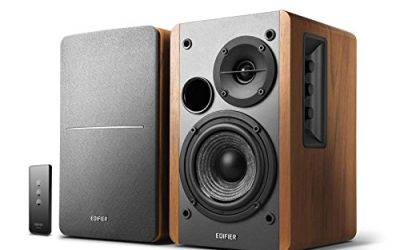
Most video editing is dialogue editing, and the monitor decision that matters is whether voices stay clear and honest at the low volume of a long edit session, a metre or so from your chair. A 6.5-inch woofer is the step where speech gains body and low effects stop sounding thin, without the cabinet size of an 8-inch model taking over the desk. The real choice is matching port placement, inputs, and tuning switches to your room.
This guide is for solo editors in spare rooms, small post suites, and shared edit bays where the desk often sits against a wall. Every model here is a powered nearfield speaker with a 6.5-inch woofer, picked from the names and specifications on its Amazon listing. One honest note up front: all four listings sell a single speaker, so a stereo setup means ordering two.
Top 3 picks at a glance


Quick Picks
As an Amazon Associate we earn from qualifying purchases.
| Product | Best for | Key spec from title |
|---|---|---|
| Kali Audio LP-6 V2 | Desks pushed against a wall | 80W bi-amped; XLR, TRS and RCA inputs |
| JBL 306P MkII | Editors who shift position at the bay | 112W Class-D bi-amped |
| Yamaha HS7 | Dialogue-first, uncoloured monitoring | 6.5-inch cone woofer; 1-inch dome tweeter |
| PreSonus Eris E7 XT | Untreated rooms needing deep tuning | EBM waveguide; 130W Class AB |
How to Choose
Match the Woofer to Your Room and Chair Distance
A 6.5-inch woofer suits the distance most editors actually sit at: roughly an arm’s length to a metre and a half from the screens. In a small room that cone size reproduces dialogue weight and the low thump of transitions without exciting the walls the way an 8-inch driver can. In a larger suite it still holds together at edit-bay distance, though very low effects will roll off. Judge the listed low-frequency figure against your material: interview work forgives a higher cutoff, while trailers and game capture ask for extension into the low forties.
Check Where the Port Fires Before the Desk Goes Against the Wall
Port placement decides how close a cabinet can sit to the wall behind your desk. A front port vents toward you, so the speaker tolerates being pushed back near the wall or onto a shallow desk. A rear port needs breathing room; trap it against drywall and the low end swells, which muddies male voices and footsteps. Many edit desks have no depth to spare, so this single detail can rule models in or out before inputs are even considered. Check the listing’s enclosure description, then measure your desk depth honestly.
Count Inputs Against Your Interface and Other Sources
Your interface decides which inputs matter. Balanced XLR or quarter-inch TRS runs from a proper audio interface reject hum over longer cable runs, which suits a desk with a computer, drives, and lights all sharing power. An RCA input adds a direct route for a laptop headphone output or a playback device without an interface in the chain. One model below has no RCA at all, so an unbalanced source needs an adapter cable there. List every source you plug in weekly, then match the rear panel to that list rather than to a spec sheet ideal.
Use the Tuning Switches Your Room Actually Needs
Room-compensation controls earn their keep in rooms that were never built for audio. Boundary or acoustic-space settings cut the bass build-up that appears when a speaker sits on a desk or near a wall. High-frequency trim helps when a room is bright with glass and bare walls, or dull with heavy soft furnishings. A low-cut filter matters if a subwoofer joins later, or if rumble from street noise keeps creeping into recordings. More switches are not automatically better, but in an untreated spare room they often decide whether dialogue sounds consistent day to day.
The 4 Best Options
Kali Audio LP-6 V2

The LP-6 V2 fits the most common edit-desk problem: no space behind the speakers. Its port fires from the front panel, and the listing describes boundary EQ settings for placement on a desk, on stands, or against a wall, adjusted with DIP switches on the rear. Three inputs, balanced XLR and TRS plus unbalanced RCA, cover both an interface and a direct laptop connection. The second-generation design also targets low self-noise, which matters when the room goes quiet between lines of dialogue and any hiss would sit right under the picture.
Specs
- Woofer: 6.5-inch optimized paper driver
- Tweeter: 1-inch textile soft dome
- Amplification: 80W Class-D bi-amped, 40W low frequency and 40W high frequency
- Frequency range: 47 Hz to 21 kHz, as listed
- Maximum SPL: 115 dB, as listed
- Port: front-firing, low-noise design
- Inputs: XLR, quarter-inch TRS, RCA
- Room controls: boundary EQ plus low and high trim via 8 rear DIP switches
- Dimensions: 10.24 x 8.86 x 14.17 inches
- Weight: 17.6 pounds
- Sold as: single speaker
Best for: editors whose desk backs onto a wall and who switch between an interface and a laptop.
Watch out for: the listing’s own component line is inconsistent about the box contents, so confirm you are ordering one speaker and plan on two for stereo.
JBL 306P MkII
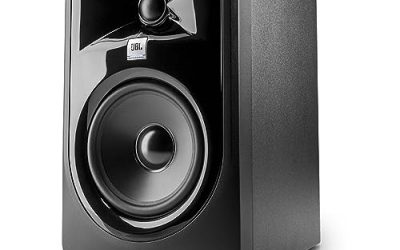
Editors rarely sit perfectly still: they lean in to check a cut, roll back to watch a full sequence, and pull a second chair in for a director. The 306P MkII is built around JBL’s Image Control Waveguide, which the listing credits with detailed imaging and a wide sweet spot, so the stereo picture and dialogue placement hold up across those small movements. Dual Class-D amplifiers give each driver its own 56 watts. It takes balanced connections only, so it assumes an interface is already part of the desk rather than a laptop plugged straight in.
Specs
- Woofer: 6.5-inch low-frequency driver
- Tweeter: 1-inch soft dome
- Amplification: 112W Class-D total, 56W low frequency and 56W high frequency
- Frequency response: 47 Hz to 20 kHz (plus or minus 3 dB)
- Frequency range: 39 Hz to 24 kHz (at -10 dB)
- Crossover: 1,425 Hz, fourth-order acoustic Linkwitz-Riley
- Feature: Image Control Waveguide
- Weight: 13.42 pounds
- Sold as: single speaker
Best for: shared edit bays and editors who move around while watching cuts.
Watch out for: there is no RCA input, and the rear panel expects balanced XLR or TRS cabling from an interface.
Yamaha HS7
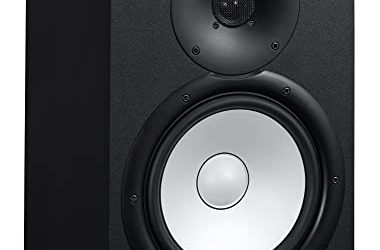
The HS7 is the plainspoken option in this group, a two-way bass-reflex nearfield with a white 6.5-inch cone woofer and a reputation in edit rooms for keeping voices forward and easy to judge. Its rear panel keeps things simple: a level control, a HIGH TRIM switch for the top end, and a ROOM CONTROL switch that steps down output below 500 Hz when walls boost the low mids. Inputs are balanced XLR and TRS phone jacks that also accept unbalanced signals. For dialogue-heavy work where flattering speakers hide problems, that restraint is the appeal.
Specs
- Woofer: 6.5-inch cone
- Tweeter: 1-inch dome
- Amplification: 95W bi-amped, 60W low frequency and 35W high frequency
- Frequency response: 43 Hz to 30 kHz (at -10 dB)
- Crossover: 2 kHz
- Inputs: balanced XLR and TRS phone jack, accepting balanced or unbalanced signals
- Room controls: ROOM CONTROL (0, -2, -4 dB below 500 Hz) and HIGH TRIM (plus or minus 2 dB)
- Dimensions: 8.3 x 13.1 x 11.2 inches
- Weight: 18.1 pounds
- Sold as: single speaker
Best for: documentary, interview, and podcast-to-video editors who want dialogue judged without sweetening.
Watch out for: no RCA input, and the bass-reflex cabinet needs some clearance behind it rather than sitting flush to the wall.
PreSonus Eris E7 XT

The E7 XT brings the deepest set of rear-panel controls here, which suits rooms that fight back. Its Acoustic Space switch compensates for placement against a wall or in a corner, while separate Mid and High controls, each adjustable by six decibels either way, and a Low Cut filter with 80 Hz and 100 Hz settings handle the rest of the contour. The EBM waveguide spreads high frequencies across a listed 100 degrees horizontally while narrowing vertical dispersion, which keeps desk reflections down and widens the usable seat area for two viewers.
Specs
- Woofer: 6.5-inch woven composite
- Tweeter: 1.25-inch silk dome with EBM waveguide
- Dispersion: 100 degrees horizontal by 60 degrees vertical
- Amplification: 130W Class AB bi-amped
- Frequency response: 42 Hz to 20 kHz
- Maximum SPL: 104 dB
- Inputs: balanced XLR, balanced quarter-inch TRS, unbalanced RCA
- Room controls: Acoustic Space (Flat, -2 dB, -4 dB), Mid and High (plus or minus 6 dB), Low Cut (Flat, 80 Hz, 100 Hz)
- Enclosure: front ported
- Weight: 18.5 pounds
- Sold as: single speaker (pack of 1)
Best for: untreated rooms and corner desks where placement is fixed and the speaker has to adapt.
Watch out for: the woven composite woofer measures 6.55 inches in PreSonus documentation, and the many rear controls reward careful setup rather than quick guessing.
Which One Fits Your Situation
A Spare-Room Desk Pushed Flat Against the Wall
Choose the Kali Audio LP-6 V2. The front port keeps low frequencies behaving when the cabinet sits close to drywall, and the boundary EQ settings are chosen for exactly the placements a spare room forces: on the desk, on stands, or near a wall. The RCA input also helps if the editing machine sometimes works without an interface attached.
Two People Watching Cuts From One Desk
Choose the JBL 306P MkII or the PreSonus Eris E7 XT. Both aim for a wide listening area rather than one narrow chair position: JBL through its Image Control Waveguide, PreSonus through a waveguide rated at 100 degrees of horizontal dispersion. Dialogue stays placed between the speakers even when a director sits slightly off to one side.
Dialogue-Heavy Documentary and Interview Work
Choose the Yamaha HS7. Speech sits in the midrange, and this monitor’s flat, unhyped presentation makes it easier to hear compression artefacts, room echo on location audio, and sibilance before a client does. The ROOM CONTROL switch also tames the low-mid build-up that makes male voices sound boxy in small rooms, which is where most interview editing happens.
A Corner Desk in a Room You Cannot Treat
Choose the PreSonus Eris E7 XT. Corners exaggerate bass more than any other placement, and its three-way Acoustic Space switch exists for that problem, backed by mid and high controls for the reflections you cannot remove. The front port adds freedom, since the cabinet does not need open space behind it to breathe.
Common Mistakes
- Ordering a single speaker and expecting stereo: every listing in this guide sells one monitor, so budget and desk space for two.
- Trapping a rear-ported cabinet against the wall, then blaming the speaker for boomy dialogue that placement caused.
- Judging dialogue at loud playback levels; edits are approved at modest volume, so check clarity quietly before anything else.
- Forgetting the input list: a balanced-only monitor and an RCA-only source leave you shopping for adapter cables mid-project.
- Leaving every tuning switch at its default on a desk or in a corner, where boundary settings exist precisely for those spots.
Frequently Asked Questions
Do I Need Two of These, or Is One Enough for Editing?
Buy two. Video sound is mixed in stereo, and a single centre speaker cannot show you panning, stereo music width, or whether dialogue stays anchored when effects move around it. Every model in this guide is listed as one speaker, so a pair means two units, two power outlets, and matching left and right placement at equal distance from your chair.
Is a 6.5-Inch Woofer Enough for Effects and Music Beds?
For nearfield editing, yes, in most rooms. The models here reach into the low forties hertz as listed, which covers dialogue weight, room tone, and most music beds at edit-bay distance. Very deep cinema-style effects will still roll off, so a subwoofer can join later; two of these listings include low-cut filters that make that handover cleaner when the time comes.
Can I Connect These Straight to a Computer Without an Interface?
Two of the four make it easy: the Kali LP-6 V2 and the PreSonus Eris E7 XT both list an RCA input for an unbalanced source such as a laptop output. The Yamaha HS7 and JBL 306P MkII expect balanced XLR or TRS connections, so they pair naturally with an audio interface, which also gives you a physical volume knob within reach.
Front Port or Rear Port for a Desk Against the Wall?
Front port, if the wall is non-negotiable. A front-firing port, like those on the Kali and PreSonus models here, vents toward the listener and tolerates tight placement. A rear port needs open space behind the cabinet to avoid swelling the low end. If a rear-ported model is your pick for other reasons, pull the desk out a few inches and use its room control switch.
Related guides
More from Amazon
Programs that pair well with the guide above. Offers and eligibility are set by Amazon and may change.
Free shipping on eligible items, Prime Video and more. Eligible new members can start with a free trial.
Start a Prime free trialAd-free music streaming. Eligible new subscribers can start with a free trial.
Try Music Unlimited freeA Prime membership for ages 18-24 with a trial period. Eligibility is set by Amazon.
See Prime for Young AdultsAudiobooks and podcasts to listen to on the go. Eligible new members can start with a free trial.
Try Audible freeAs an Amazon Associate we earn from qualifying purchases.