In a small office, a PCIe Wi-Fi card is an infrastructure decision disguised as a small purchase. The right card matches the office router’s standard, fits the compact cases that office desktops usually arrive in, and keeps a headset connected through a day of calls. The wrong one fails quietly: a missing low-profile bracket, a Bluetooth header nobody checked, or a 6 GHz band the office router never had.
This guide is for office managers wirelessly connecting desk PCs, owners refurbishing ex-corporate desktops, and anyone standardising one card across several machines. Each pick comes from the name and specifications on its Amazon listing, covering Wi-Fi standard, band speeds, Bluetooth version, antenna design and system support. The emphasis is on repeatability, a card you can fit to the next desk exactly as you fitted the last one.
Our Top Picks
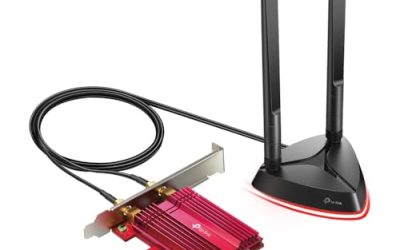
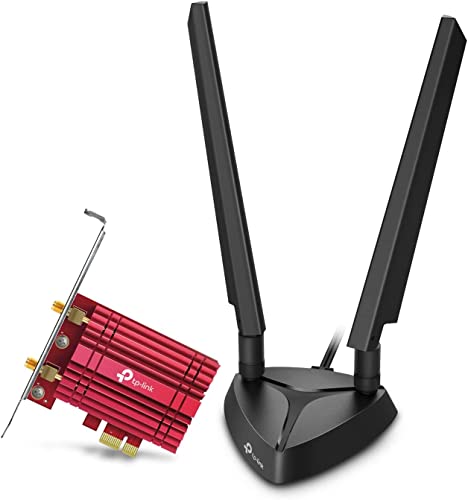 TP-Link WiFi 6E Intel AX210 AXE5400 PCIe WiFi1 Count (Pack of 1)3.75 x 4.76 x 0.85 inches0.59 poundsCheck on Amazon

Top 3 picks at a glance
Quick Picks
As an Amazon Associate we earn from qualifying purchases
| Product | Best for | Key spec from title |
|---|---|---|
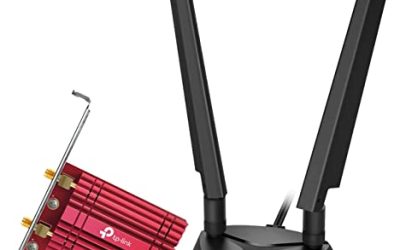
| TP-Link Archer TX3000E | Mixed office cases that need both bracket heights in the box | Wi-Fi 6 AX3000, Bluetooth 5.3, low-profile bracket included |
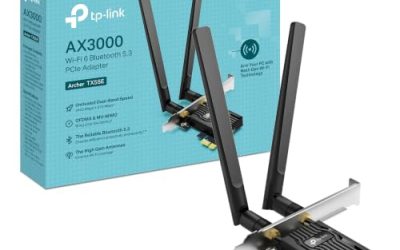
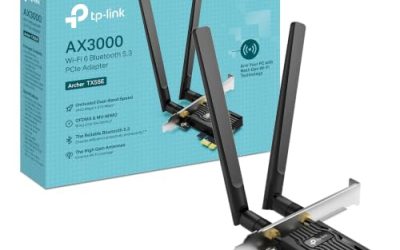
| TP-Link Archer TX55E | A standard office desktop on a Wi-Fi 6 network | Wi-Fi 6 AX3000, Bluetooth 5.2, WPA3, two high-gain antennas |
| ASUS PCE-AX58BT | A quiet desk role built on calls, documents and browsing | Wi-Fi 6 AX3000, Bluetooth 5.0, OFDMA, 2×2 MU-MIMO |
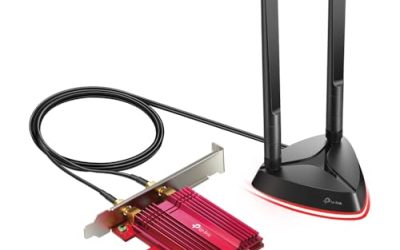
| TP-Link Archer TXE75E | An office that has moved its network to Wi-Fi 6E | Wi-Fi 6E AXE5400, Intel AX210, Bluetooth 5.3, magnetic base |
| TP-Link Archer TBE550E | A new Windows 11 workstation on a Wi-Fi 7 office network | Wi-Fi 7 BE9300, Bluetooth 5.4, multicolor status LED |
How to Choose
Standardise on the standard your office router broadcasts
An office gains nothing from a drawer of mixed standards. Survey the router or access points first: if the network is Wi-Fi 6, an AX3000 card such as the Archer TX55E gives every desk the same dual-band behaviour, the same driver routine and the same troubleshooting steps. Move to Wi-Fi 6E cards only when the access points broadcast 6 GHz, and remember that band reaches a shorter distance, suiting open-plan rooms better than a corridor of closed offices. Wi-Fi 7 belongs in a planned network refresh, introduced with its routers, not desk by desk on impulse.
Check chipset and drivers as a fleet decision, not a single PC
Whoever supports the office will install this driver many times, so the chipset behind the card matters operationally. Intel-based models, including the AX210 inside the Archer TXE75E, follow a familiar Intel driver path that suits managed Windows images. Confirm each listing’s operating system line against the office’s actual machines: most here support 64-bit Windows 11 and 10, while the Archer TBE550E excludes Windows 10 completely. One unsupported legacy PC in the corner can veto the newest card for the whole fleet, unless that machine is scheduled for replacement in the same project.
Fit the card to office cases, brackets and antenna space
Office desktops are often slim, refurbished or tucked into desk furniture, and each trait affects the install. A low-profile bracket must be in the box, as it is with the Archer TX3000E, or half the fleet may not accept the card. Antennas need a plan too: fixed antennas behind a tower under a desk pick up the furniture as much as the network, while a magnetized base lets the antennas sit on the case in the open. Heatsink designs are a quiet plus for machines that run all day. Measure one representative desk before ordering for twenty.
Treat Bluetooth as office equipment, with its header requirement
Bluetooth in an office is not a bonus feature; it carries the headsets for calls, wireless keyboards at hot desks and presentation clickers in the meeting room. Every card here includes it, from version 5.0 to 5.4, but it normally depends on a cable to a motherboard F_USB header. Small office motherboards often expose only one or two internal headers, and front-panel wiring may already use them. Audit one machine of each model you own before committing, because a fleet of cards whose Bluetooth never activates is a support ticket that repeats at every single desk.
The 5 Best Options
TP-Link Archer TX3000E

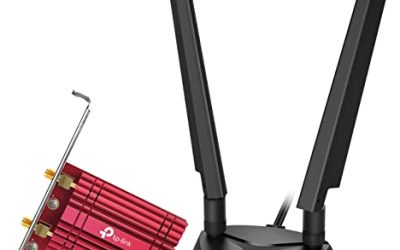
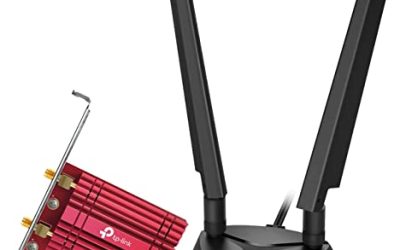
For a mixed fleet of office cases, the Archer TX3000E is the safest standard to adopt. Its listing includes the details installers actually need: a Wi-Fi 6 AX3000 card with Bluetooth 5.3, a magnetized antenna base with two high-gain antennas, a low-profile bracket and the Bluetooth header cable, plus MU-MIMO and OFDMA for a busy office network. Nothing has to be ordered separately for a slim case or a standard tower. Choose it when the office’s PCs came from different suppliers over several years and you want one box that fits whichever machine lands on the bench next.
Specs
- Wi-Fi standard: Wi-Fi 6 (802.11ax), AX3000 class
- Speeds from title: up to 2402 Mbps on 5 GHz and 574 Mbps on 2.4 GHz
- Bluetooth: 5.3
- Antennas: magnetized antenna base with two high-gain antennas
- Included in listing: low-profile bracket and Bluetooth header cable
- Features: MU-MIMO and OFDMA listed
- Operating system listed: Windows 11, 10 (64bit)
Best for: Mixed office cases that need both bracket heights in the box
Watch out for: Plan where each magnetic base will sit, because a crowded desk with a metal monitor stand can still crowd the antennas.
ASIN: B07ZV2CJL2
TP-Link Archer TX55E
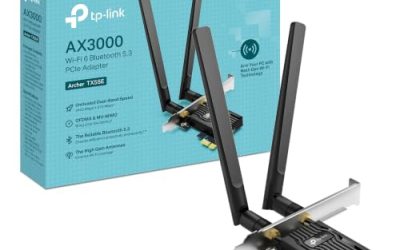
The Archer TX55E is the sensible default for a standard office desktop on a Wi-Fi 6 network. Its listing pairs AX3000 speeds, 2402 Mbps on 5 GHz and 574 Mbps on 2.4 GHz, with Bluetooth 5.2, WPA3 security and MU-MIMO, through two high-gain antennas. WPA3 matters in an office handling client files, provided the router is set to use it. The card asks for a free PCIe slot and 64-bit Windows, nothing more exotic, which keeps deployment boring in the best sense. Pick it for full-height cases where the bracket question is already settled and the network is firmly Wi-Fi 6.
Specs
- Wi-Fi standard: Wi-Fi 6 (802.11ax), AX3000 class
- Speeds from title: up to 2402 Mbps on 5 GHz and 574 Mbps on 2.4 GHz
- Bluetooth: 5.2
- Interface: PCIe adapter for desktop PC
- Antennas: two high-gain antennas
- Security and features: WPA3, MU-MIMO listed
- Operating system listed: Windows 11, 10 (64bit) only
Best for: A standard office desktop on a Wi-Fi 6 network
Watch out for: Fixed rear antennas suit open desk positions; for PCs buried in furniture, the magnetic-base TX3000E is easier to place well.
ASIN: B0B1NRGDQ4
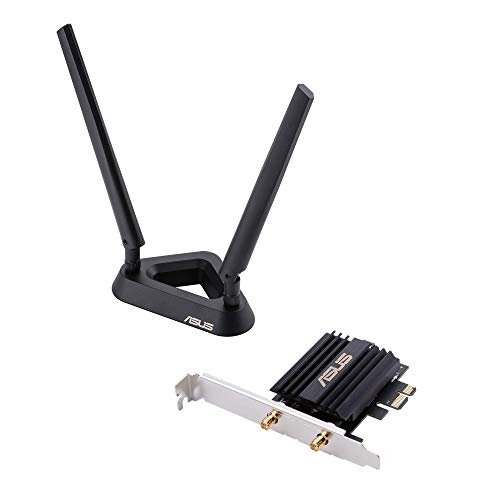
ASUS PCE-AX58BT
The PCE-AX58BT fits the ordinary office desk that lives in documents, browsers and video calls. ASUS lists a Wi-Fi 6 AX3000 adapter with two external antennas, OFDMA, 2×2 MU-MIMO and WPA3, plus Bluetooth 5.0 for a headset or wireless mouse. It does not chase a 6 GHz band the typical small office router lacks, and that restraint is its appeal: every feature it carries is one the existing network can use today. Deploy it where the priority is a calm, known quantity across several identical desks, and where Bluetooth peripherals are simple rather than numerous or brand new.
Specs
- Wi-Fi standard: Wi-Fi 6 (802.11ax), AX3000 class
- Speeds from title: 2402 Mbps on 5 GHz and 574 Mbps on 2.4 GHz
- Bluetooth: 5.0
- Interface: PCIe wireless adapter
- Antennas: two external antennas
- Features: OFDMA, 2×2 MU-MIMO and WPA3 security listed
- Operating system listed: Windows 11, 10 (64bits) only
Best for: A quiet desk role built on calls, documents and browsing
Watch out for: Bluetooth 5.0 is adequate for a headset, but offices standardising on newer multi-device peripherals may prefer a 5.2 or 5.3 card.
ASIN: B07XLP199J
TP-Link Archer TXE75E
An office that has invested in Wi-Fi 6E access points should equip its desktops to use them, and the Archer TXE75E is built for that step. The listing’s Intel AX210 chipset delivers an AXE5400 tri-band connection with 2402 Mbps on 6 GHz and 5 GHz, Bluetooth 5.3, WPA3, MU-MIMO and OFDMA, with a magnetic base for the dual antennas. In an open-plan office, the 6 GHz band moves the busiest desks away from the congestion of neighbouring networks. Keep machines on Windows 11 for that band, and place PCs within a sensible distance of an access point rather than down a corridor.
Specs
- Wi-Fi standard: Wi-Fi 6E (802.11ax), AXE5400 class
- Speeds from title: up to 2402 Mbps on 6 GHz, 2402 Mbps on 5 GHz and 574 Mbps on 2.4 GHz
- Chipset from title: Intel Wi-Fi 6E AX210
- Bluetooth: 5.3
- Antennas: magnetic base with dual antennas
- Features: WPA3, MU-MIMO and OFDMA listed
- Operating system listed: Windows 10 and Windows 11, with 6 GHz use requiring Windows 11
Best for: An office that has moved its network to Wi-Fi 6E
Watch out for: Desks on Windows 10 will not use the 6 GHz band, so align the card rollout with the operating system rollout.
ASIN: B09VCVTJV2
TP-Link Archer TBE550E

The Archer TBE550E belongs in a deliberate office refresh, not a piecemeal upgrade. Its listing describes a Wi-Fi 7 BE9300 tri-band adapter rated at 5764 Mbps on 6 GHz, 2882 Mbps on 5 GHz and 688 Mbps on 2.4 GHz, with Bluetooth 5.4 and a multicolor status LED that gives support staff a quick visual cue. It supports AMD and Intel motherboards, but it is not compatible with Windows 10. Specify it for new Windows 11 workstations bought alongside Wi-Fi 7 access points, where its lifespan justifies the coordination, and leave existing machines on the Wi-Fi 6 cards above.
Specs
- Wi-Fi standard: Wi-Fi 7, BE9300 class
- Speeds from title: up to 5764 Mbps on 6 GHz, 2882 Mbps on 5 GHz and 688 Mbps on 2.4 GHz
- Bands: tri-band, 6 GHz, 5 GHz and 2.4 GHz
- Bluetooth: 5.4
- Design: multicolor status LED listed
- Compatibility from title: supports AMD and Intel motherboards
- Operating system listed: not compatible with Windows 10
Best for: A new Windows 11 workstation on a Wi-Fi 7 office network
Watch out for: Introducing it desk by desk creates a mixed fleet; adopt it with the router and Windows upgrades together.
ASIN: B0D4PDLX6L
Which One Fits Your Situation
Your office PCs are a mix of slim and standard cases
Choose the TP-Link Archer TX3000E as the office standard. The low-profile bracket, Bluetooth cable and magnetic antenna base in its box cover the variations you will meet across a mixed fleet, so one purchase order and one install routine serve every desk. Its Wi-Fi 6 rating also matches the access points most small offices already run, keeping the whole project on one standard.
The network is Wi-Fi 6 and the priority is secure, simple desks
Choose the TP-Link Archer TX55E for full-size cases, or the ASUS PCE-AX58BT where its external-antenna layout suits the desk better. Both list WPA3 and cover the dual bands your router broadcasts, with Bluetooth for call headsets. Standardising on one of them keeps spare cards, drivers and troubleshooting identical across the office, which is worth more day to day than a newer standard nobody broadcasts.
The office upgraded its access points to Wi-Fi 6E
Choose the TP-Link Archer TXE75E for desks within range of those access points, especially open-plan seats carrying calls and large file transfers. Its 6 GHz band relieves the crowded older bands, and the magnetic base helps each desk position its antennas sensibly. Desks in closed side offices may gain little from 6 GHz, so equip those seats with the Wi-Fi 6 standard instead and spend the difference on access point placement.
You are fitting out a new office or a full refresh
Choose the TP-Link Archer TBE550E for the new workstations if Wi-Fi 7 access points and Windows 11 are part of the same fit-out. Bought together, the cards, routers and operating system arrive as one coherent network with the longest useful life. If any of those three pieces is missing from the plan, step back to the TXE75E or TX3000E and refresh the rest first.
Common Mistakes
- Ordering cards before checking whether office cases need low-profile brackets.
- Mixing Wi-Fi standards desk by desk until support and drivers become a patchwork.
- Assuming Bluetooth works without connecting the internal USB header cable.
- Fitting a Wi-Fi 7 card into a Windows 10 machine the listing excludes.
- Placing antennas inside desk furniture and then blaming the office network for weak signal.
Frequently Asked Questions
Should a small office standardise on one Wi-Fi card?
Yes, wherever the cases allow it. One card means one driver package, one spare on the shelf and one set of install steps for whoever maintains the machines. The Archer TX3000E suits mixed fleets because its box includes both bracket heights and a magnetic antenna base. Only split the standard when a genuinely different group, such as Wi-Fi 6E desks near new access points, needs a different card.
Is Wi-Fi 6 enough for a small office network?
For most small offices, yes. A Wi-Fi 6 AX3000 card covers calls, cloud documents, browsing and ordinary file work on both bands, and it matches the routers and access points most offices already own. Wi-Fi 6E helps in dense, open-plan spaces with 6E access points, mainly by moving busy desks to a cleaner band. Judge by congestion and dropped calls, not by the age of the current cards alone.
Why do office headsets fail to pair after a card upgrade?
Usually because Bluetooth was never connected inside the PC. On these cards Bluetooth runs through a cable to a motherboard F_USB header, separate from the PCIe slot that carries Wi-Fi. If that cable is missing, or the header already serves another device, Windows shows Wi-Fi working and no Bluetooth. Open one machine, connect the cable to a free header, and check other desktops for the same omission.
Can these cards go into the office’s oldest PCs?
Only after three checks. The machine needs a reachable PCIe slot, a 64-bit Windows version the listing supports, and a free internal USB header if Bluetooth is required. The Wi-Fi 7 Archer TBE550E excludes Windows 10 entirely, so the oldest machines should take a Wi-Fi 6 card such as the TX55E or TX3000E instead, assuming their slots and brackets fit.
Related guides
More from Amazon
Programs that pair well with the guide above. Offers and eligibility are set by Amazon and may change.
Free shipping on eligible items, Prime Video and more. Eligible new members can start with a free trial.
Start a Prime free trialAd-free music streaming. Eligible new subscribers can start with a free trial.
Try Music Unlimited freeA Prime membership for ages 18-24 with a trial period. Eligibility is set by Amazon.
See Prime for Young AdultsAudiobooks and podcasts to listen to on the go. Eligible new members can start with a free trial.
Try Audible freeAs an Amazon Associate we earn from qualifying purchases.