
Switching to a vertical gaming mouse is really two decisions at once: whether the upright handshake posture will ease the forearm twist that makes your wrist ache mid-session, and whether the mouse underneath that shape still tracks, clicks, and polls like a gaming mouse rather than an office accessory. Angle, sensor, and button layout all pull in different directions here.
This roundup is for players whose wrists complain during long sessions, MMO and strategy players who live on side buttons, and anyone curious whether a vertical shape can survive real games. Every pick below is a true vertical mouse with a gaming sensor and gaming buttons, and each was chosen from the specifications and features published on its Amazon product page.
Top 3 picks at a glance

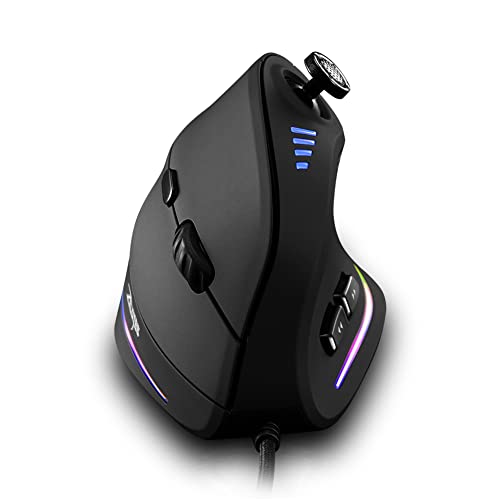
Quick Picks
As an Amazon Associate we earn from qualifying purchases
| Product | Best for | Key spec from title |
|---|---|---|
| Razer Pro Click V2 Vertical | Steepest wrist relief with a flagship sensor | Focus Pro 30K optical sensor |
| Keychron M5 8K | Competitive polling in a milder vertical tilt | PixArt 3950 with 8,000 Hz polling |
| Zelotes C-18 | Wired play with maximum thumb controls | 11 programmable buttons plus joystick |
How to Choose
Match the vertical angle to your wrist
Vertical mice are not one shape. The Razer in this list tilts your hand to 71.7 degrees, close to a true handshake, which removes the most forearm pronation but changes your aim the most. The Keychron M5 sits at 47 degrees, a halfway posture that keeps some familiar flat-mouse feel. Steeper angles generally unload the wrist more, yet they also lengthen the adjustment period. If your pain sits in the forearm, lean steeper; if you mostly want mild relief without relearning your grip, a mid-40s tilt is the gentler first step.
Demand a real gaming sensor
Many vertical mice ship with office sensors capped near 2,400 DPI and slow polling, which feels muddy in shooters. A gaming-grade pick should name its sensor: the Razer runs a Focus Pro 30K optical sensor, the Keychron M5 uses a PixArt 3950, and even the budget Zelotes fits a PixArt PMW3325. Check the maximum tracking speed and polling rate on the product page as well. High polling, such as the M5’s 8,000 Hz modes, keeps cursor motion smooth on high-refresh monitors during fast vertical-mouse swipes.
Count buttons where your thumb lands
On a vertical shell your thumb rests along the side wall, so button placement matters more than raw count. The Zelotes C-18 stacks eleven programmable buttons and a five-direction thumb joystick, which suits MMO rotations and strategy shortcuts. The Razer offers six buttons with up to nine programmable controls through Synapse, while the Keychron keeps a leaner six-button layout. Think about which actions your thumb can reach without regripping: jump, melee, push-to-talk, and DPI shift are the usual candidates worth binding first.
Plan for the aiming adjustment period
Your first sessions on a vertical mouse will feel inaccurate, because aiming now comes from a rotated forearm and different finger angles. Most players need several days of regular play before flicks settle, and low-sensitivity arm aimers usually adapt faster than high-sensitivity wrist aimers. Lower your DPI slightly at first, play aim trainers or PvE modes instead of ranked matches, and keep your old mouse nearby for work. If accuracy still feels wrong after two weeks, the angle is probably too steep or too shallow for your hand.
The 3 Best Options
Razer Pro Click V2 Vertical

The Razer Pro Click V2 Vertical is the pick for players who want the strongest wrist intervention without giving up a flagship sensor. Its 71.7-degree shell is the steepest here, shaped for a natural handshake grip with a base support that lifts the wrist off the desk. Under that shape sits Razer’s Focus Pro 30K optical sensor with glass tracking, HyperSpeed wireless, and mechanical switches rated for 60 million clicks, so it plays like a gaming mouse that happens to stand upright.
Specs
- Vertical ergonomic design angled at 71.7 degrees with base support
- Razer Focus Pro 30K optical sensor, 99.8% resolution accuracy, tracks on glass
- 6 buttons, up to 9 programmable controls via Razer Synapse
- HyperSpeed 2.4 GHz wireless, Bluetooth, or USB-C wired connection
- Battery life up to 6 months; 3 working days from a 5-minute charge
- Razer Chroma RGB with 18-zone lighting and full underglow
- Mechanical switches rated for a 60 million click lifecycle
- Model RZ01-05250100-R3U1
Best for: Players with real forearm ache who still want top-tier tracking and multi-device wireless.
Watch out for: The steep angle has the longest adjustment period here, and the shell only suits right-handed users.
ASIN: B0DVD5RTZ5
Keychron M5 8K
The Keychron M5 8K suits players who want vertical comfort with the least competitive compromise. Its 47-degree tilt is the mildest in this roundup, so your grip changes less dramatically, yet the hardware is pure gaming: a PixArt 3950 sensor pushing 30,000 DPI and 750 IPS, plus an 8,000 Hz polling rate over the 2.4 GHz receiver or cable. At 95 grams it is also the lightest pick here, which helps because vertical mice are steered with more forearm movement than flat ones.
Specs
- Vertical ergonomic shell with a 47-degree tilt and thumb rest
- PixArt 3950 sensor, up to 30,000 DPI and 750 IPS tracking
- 8,000 Hz polling rate in 2.4 GHz and wired modes
- Tri-mode connectivity: 2.4 GHz, Bluetooth 5.1, and USB wired
- Weight: 95 grams
- 600 mAh battery, up to 140 hours in Bluetooth mode
- Programmable buttons and macros through the Keychron Launcher web app
- Right-handed design for Windows and Mac
Best for: FPS-leaning players who want high polling and a flagship sensor in a gentler vertical shape.
Watch out for: This listing is the 8K PixArt 3950 version; a cheaper 3311 variant exists, so confirm the sensor on the listing before ordering.
ASIN: B0F3X9G276
Zelotes C-18
The Zelotes C-18 is built for players who treat a mouse as a control panel. Its upright shell carries eleven programmable buttons and a five-direction thumb joystick that ships mapped to movement keys and can be rebound in software, which MMO and RTS players can turn into camera control or extra ability slots. The PixArt PMW3325 sensor offers five DPI steps up to 10,000, the wired connection polls up to 1,000 Hz, and RGB light belts run along both sides of the matte shell.
Specs
- Vertical ergonomic shape with five-direction thumb joystick
- PixArt PMW3325 optical sensor
- Five DPI steps: 1500, 2500, 4000, 7000, and 10000
- 11 programmable buttons with 128 KB onboard memory for macros
- Polling rate adjustable from 125 to 1000 Hz
- Wired USB connection with a 1.8 m cable
- RGB light strips on both sides
- Weight 165 g; dimensions 110 x 72 x 76.5 mm
Best for: MMO, MOBA, and strategy players who want maximum thumb controls in a vertical grip.
Watch out for: At 165 grams it is heavy for fast FPS swipes, and the programming software is not fully available on Mac.
ASIN: B0894QX7SK
Which One Fits Your Situation
Your wrist hurts after long sessions
Start with the Razer Pro Click V2 Vertical. Its 71.7-degree handshake angle removes the most forearm twist, the base support keeps your wrist from dragging on the desk, and the battery lasts for months between charges. Give yourself a week of casual play before judging the aim change, because the steepest shape also asks the most from your muscle memory.
You play competitive shooters but want relief
The Keychron M5 8K is your compromise candidate. The 47-degree tilt eases wrist posture without turning your grip upside down, while the PixArt 3950 sensor and 8,000 Hz polling keep flicks responsive on a high-refresh monitor. Its 95-gram weight also suits the bigger arm movements a vertical shell encourages during wide turns and quick target switches.
You play MMOs or strategy games for hours
Pick the Zelotes C-18. Eleven programmable buttons and the thumb joystick give your rotation or build order a home without keyboard stretching, and the wired connection means no battery anxiety during raid nights. The upright grip spreads the load across your forearm, which matters more than raw sensor numbers in games where sessions run long and movement is deliberate.
You share one desk between work and play
The Razer earns this spot too, because it connects to up to five devices across HyperSpeed, Bluetooth, and wired modes, so one mouse covers a gaming PC and a work laptop. The Keychron M5 is the alternative if your household mixes Windows and Mac machines, since it pairs over Bluetooth and remembers multiple hosts for quick switching.
Common Mistakes
- Expecting day-one accuracy: vertical aim uses different muscles, so judge the mouse after a week of play, not one match.
- Gripping too tightly: squeezing a vertical shell to stop it tipping causes the very forearm tension you bought it to avoid.
- Keeping flat-mouse DPI settings: a rotated grip changes your effective control, so retest sensitivity instead of copying old numbers.
- Buying an office vertical mouse for gaming: low polling rates and capped DPI feel laggy in shooters even when the shape is comfortable.
- Ignoring hand size and handedness: every pick here is right-handed, and a shell that is too tall or short strains your fingers.
Frequently Asked Questions
Can you actually aim well with a vertical gaming mouse?
Yes, after an adjustment period. Your forearm sits in a neutral handshake position, so aiming shifts toward arm movement and smaller finger corrections. Most players report their flicks feel off for several days, then settle. Starting with the milder 47-degree Keychron M5 shortens that learning curve compared with a near-upright shell like the Razer’s.
Is a vertical mouse good for FPS games?
It can be, provided the sensor and polling rate are gaming-grade. The Keychron M5 pairs its tilt with a PixArt 3950 sensor and 8,000 Hz polling, which suits fast-paced shooters. Heavier, button-heavy models like the 165-gram Zelotes C-18 feel better in slower games where abilities matter more than constant flicking.
How long does the adjustment period last?
Plan on several days to two weeks of regular play. The steeper the angle, the longer it tends to take: the Razer’s 71.7-degree posture is a bigger change than the M5’s 47 degrees. Playing aim trainers, lowering DPI slightly, and avoiding ranked matches during the first week all make the transition less frustrating.
Does a vertical mouse really help wrist pain?
A vertical shape reduces forearm pronation, the twisting motion linked to wrist and forearm strain during long sessions, and it keeps the wrist from resting flat and bent. It is not a medical treatment, and pain that persists deserves professional advice, but many players find the handshake posture noticeably easier across long gaming and work days.
Related guides
More from Amazon
Programs that pair well with the guide above. Offers and eligibility are set by Amazon and may change.
Free shipping on eligible items, Prime Video and more. Eligible new members can start with a free trial.
Start a Prime free trialAd-free music streaming. Eligible new subscribers can start with a free trial.
Try Music Unlimited freeA Prime membership for ages 18-24 with a trial period. Eligibility is set by Amazon.
See Prime for Young AdultsAudiobooks and podcasts to listen to on the go. Eligible new members can start with a free trial.
Try Audible freeAs an Amazon Associate we earn from qualifying purchases.









