If you have ever had a wireless mouse die mid-match and then discovered its charging cable is a proprietary connector you left in another room, you already understand the appeal of USB-C. The best USB C gaming mouse treats charging as a solved problem: the same reversible cable that tops up your laptop and phone also refuels your mouse, and on most models it doubles as a wired connection, so a low battery becomes a ten-second cable swap instead of the end of your session. This guide is for gamers who switch between a desk setup and a laptop bag, players tired of hunting for micro-USB cables in 2026, and anyone who wants one cable standard across their whole kit. Every pick below was chosen from published listing specifications — sensor, weight, battery life, and the USB-C details stated on its product page — and each one’s page confirms USB-C charging or cabling, because that connector is the entire point of this roundup.
As an Amazon Associate, we earn from qualifying purchases.
Our Top Picks
 Logitech G Pro X Superlight 2 Lightspeed WirelessClassic1.57 x 2.5 x 4.92 inches0.1 poundsCheck on Amazon
 Logitech G502 X Plus Wireless RGB Gaming MouseWireless7.1 x 4.6 x 2.7 inches0.84 poundsCheck on Amazon
Top 3 picks at a glance

Quick answer
For most players, the Logitech G Pro X Superlight 2 is the best USB C gaming mouse: it charges over USB-C, weighs just 60 g, runs a HERO 2 sensor rated to 44K DPI with 8 kHz polling, and lasts up to 95 hours per charge. If you want a heavier, feature-loaded mouse for a mix of gaming and productivity, the Logitech G502 X Plus adds 13 controls and up to 120 hours of battery with a USB-C charging cable in the box. Players with a right-hand ergonomic preference should look at the G Pro X Superlight 2 DEX, which keeps the 60 g weight and USB-C charging in an asymmetric shell. MMO players on a different path entirely can consider the UtechSmart Venus Pro, a 126 g wireless MMO mouse with 16 programmable buttons and a USB-C cable for wired mode.
Key takeaways
- USB-C matters less for speed than for sanity: one reversible cable charges your mouse, laptop, and phone, and it lets you keep playing in wired mode while the battery refills.
- All four picks publish USB-C on their listings, but they implement it differently — dedicated charging ports on the Logitech models versus a USB-C cable that also carries the wired-mode signal on the UtechSmart.
- Weight splits this list cleanly: the two Superlight models sit at 60 g for fast flicks, the G502 X Plus lands at 106 g with far more controls, and the Venus Pro is a 126 g MMO brick with a full side-button grid.
- Battery life ranges from up to 70 hours on the Venus Pro to up to 120 hours on the G502 X Plus, so heavy users should still plan a charging habit rather than expect a cable-free month.
The picks
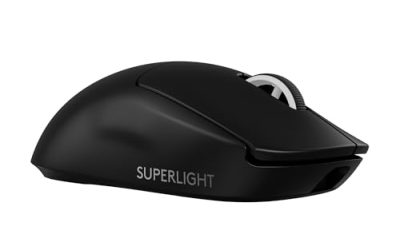
1. Logitech G Pro X Superlight 2
The G Pro X Superlight 2 is Logitech’s flagship esports mouse, and its listing leads with the detail this guide cares about: USB-C charging, stated right in the product title. That means the cable in your laptop bag is also your mouse cable, and the box includes a USB-A-to-C cable for desks that still run older ports. At 60 g, it sits in the ultralight class that competitive FPS players favor for fast, low-fatigue aiming, and the shell keeps the clean, ambidextrous-leaning shape that made the original Superlight a tournament staple.
Performance specs are as strong as the connector story. The HERO 2 sensor is rated to 44K DPI, polling goes up to 8 kHz for players whose PCs and games can take advantage of it, and battery life is listed at up to 95 hours — long enough that charging becomes a weekly background task rather than a daily worry. If you play tactical shooters or any title where aim consistency decides rounds, this is the pick that asks the fewest compromises.
Specs
- Charging: USB-C (USB-A-to-C cable included in the box)
- Weight: 60 g
- Sensor: HERO 2, up to 44K DPI
- Polling rate: up to 8 kHz
- Battery life: up to 95 hours
See the Logitech G Pro X Superlight 2 on Amazon
2. Logitech G502 X Plus
The G502 X Plus is the pick for players who want one mouse to cover ranked matches, MMOs, and a workday of spreadsheets. Its listing confirms a USB-C charging cable in the box, so it plugs into the same charging routine as your other gear, and it runs Logitech’s LIGHTSPEED wireless connection for a cable-free desk the rest of the time. At 106 g it is substantially heavier than the Superlights, and that mass comes with a sculpted right-hand shape built for palm and relaxed claw grips.
Where the G502 X Plus earns its place is controls: 13 of them, including the thumb buttons and dual-mode scroll wheel the G502 line is known for, all remappable for game profiles or productivity macros. The HERO 25K sensor is a generation behind the HERO 2 on paper, but 25,600 DPI of tracking headroom is far beyond what any player uses in practice, and the listed battery life of up to 120 hours is the longest in this roundup. Choose it if your mouse is a tool for everything, not just a weapon for one game.
Specs
- Charging: USB-C charging cable included in the box
- Wireless: LIGHTSPEED
- Sensor: HERO 25K
- Controls: 13 programmable controls
- Weight: 106 g
- Battery life: up to 120 hours
See the Logitech G502 X Plus on Amazon
3. Logitech G Pro X Superlight 2 DEX
The Superlight 2 DEX answers a specific complaint about the original: not everyone wants a symmetrical shell. This version keeps the formula that matters here — USB-C charging, a 60 g weight, up to 8 kHz polling, and up to 95 hours of battery — and reshapes the body into a right-hand ergonomic form that fills the palm and supports the fingers more deliberately. For right-handed players who found the standard Superlight a little too flat or slippery in long sessions, the DEX is the same mouse with a more committed shape.
Under the shell it runs the HERO 2 sensor, so tracking performance matches the flagship rather than a cut-down variant. The DEX makes the most sense for right-handed FPS and battle royale players who aim with a palm or relaxed claw grip and want ultralight speed without giving up ergonomic support. Left-handed players and fingertip-grip players who prefer a neutral shell should stay with the standard Superlight 2 above.
Specs
- Charging: USB-C
- Weight: 60 g
- Shape: right-hand ergonomic
- Sensor: HERO 2
- Polling rate: up to 8 kHz
- Battery life: up to 95 hours
See the Logitech G Pro X Superlight 2 DEX on Amazon
4. UtechSmart Venus Pro RGB Wireless MMO

The Venus Pro comes at USB-C from a different direction: its listing publishes a USB-C cable (1.5 m) that runs the mouse in wired mode, alongside a 2.4 GHz receiver for wireless play. That dual setup means a dead battery never benches you — plug in the same USB-C cable you use for everything else and keep raiding. It is also the only MMO-shaped option here, built around a side panel of programmable buttons for rotations, macros, and keybind-heavy games.
The headline numbers are 16 programmable buttons in total, a PMW3335 sensor rated to 16,000 DPI, and up to 70 hours of battery life. At 126 g it is more than twice the weight of the Superlights, which is normal for the MMO category and irrelevant in games where your thumb does more work than your wrist. RGB lighting rounds out a package aimed squarely at MMO and MOBA players who want wireless freedom with a wired USB-C safety net.
Specs
- Connection: 2.4 GHz wireless plus wired mode over the included USB-C cable (1.5 m)
- Buttons: 16 programmable buttons
- Sensor: PMW3335, up to 16,000 DPI
- Battery life: up to 70 hours
- Weight: 126 g
See the UtechSmart Venus Pro on Amazon
How to choose
Start with the connector itself, because that is why you are here. Confirm the listing actually publishes USB-C — some older wireless mice still charge over micro-USB, and a few use proprietary magnetic docks that strand you when the cable goes missing. Every pick above states USB-C on its page. Next, check what the cable does besides charge: on the Venus Pro, the USB-C cable also carries the wired-mode signal, so you can play through a charge; on the Logitech models, the included USB-C cable handles charging while LIGHTSPEED or the wireless receiver handles the connection, and plugging in for a wired session follows the same one-cable logic. Either way, the practical test is whether the cable already in your bag can rescue a dead mouse — with USB-C, it can.
Then match the mouse to your hand and your games. Weight is the fastest filter: around 60 g favors wrist-and-arm FPS aiming and long sessions without fatigue, while 100 g and up buys you more buttons, bigger batteries, and shapes that suit palm grips. Count the controls you genuinely bind — MMO players can use the Venus Pro’s full grid, while most shooter players never touch more than two side buttons and are better served by the Superlights. Battery life deserves a realistic read too: figures like 95 or 120 hours assume moderate settings, and high polling rates such as 8 kHz drain a battery noticeably faster, so if you run maximum polling, expect to charge more often regardless of which model you pick.
Finally, think about your whole desk rather than the mouse alone. USB-C pays off most when it is your standard: one cable on the desk for the mouse, one in the bag for travel, and no proprietary spares to track. If your laptop only offers USB-C ports, a mouse that charges over USB-C and includes a USB-A-to-C cable, like the Superlight 2, bridges old and new hardware without dongle Tetris for the receiver end of your setup.
Who should skip
Skip this entire category if you play wired full-time and never move your setup — a dedicated wired mouse removes the battery from the equation entirely, and USB-C charging adds nothing you will use. Skip the Superlight models if you rely on a full grid of side buttons for MMO rotations; two side buttons will frustrate you no matter how good the sensor is, and the Venus Pro exists precisely for your use case. Skip the Venus Pro, in turn, if you play competitive FPS: 126 g and an MMO button cluster work against fast, clean flicks. Skip the G502 X Plus if you prefer a symmetrical or left-handed shape, since its shell is committed to right-hand ergonomics — as is the DEX. And if your PC or games cannot use polling rates above 1 kHz, do not pay a premium for 8 kHz capability you will never switch on; spend the difference on the shape and weight that fit your hand instead.
FAQ
Does USB-C charging make a gaming mouse charge faster?
USB-C’s real advantage here is universality rather than raw speed: the same cable charges your mouse, laptop, and phone, and the reversible plug ends the upside-down fumbling of older connectors. Charge times vary by model and battery size, and the bigger practical win is that you can top up from almost any cable or charger you already own instead of a proprietary one.
Can I keep playing while a USB-C gaming mouse charges?
Yes — that is one of the main reasons to want USB-C on a wireless mouse. Plugging in the cable lets you continue in wired mode or keep the wireless connection running while the battery refills, depending on the model. The Venus Pro explicitly runs wired mode over its USB-C cable, and the Logitech picks are designed to be plugged in and used rather than benched during a charge.
Is 8 kHz polling worth it on the Superlight models?
Only if the rest of your setup supports it and you play titles where it is enabled. Higher polling sends position updates more often, which can smooth cursor motion on high-refresh monitors, but it also drains the battery faster than standard rates. Both Superlight models let you run lower rates, so you can treat 8 kHz as an option for ranked sessions and drop back for everyday play.
Why does the MMO pick weigh so much more than the others?
Button hardware and battery capacity add grams. The Venus Pro carries 16 programmable buttons, a full side grid, and a battery rated for up to 70 hours, which lands it at 126 g. In MMO play, where abilities come from the thumb rather than rapid mouse movement, that trade favors controls over lightness — the opposite priority from an esports mouse like the 60 g Superlight 2.
Final verdict
USB-C will not win you a single gunfight, but it quietly removes the most annoying failure mode in wireless gaming: the dead mouse with the wrong cable. For most players, the Logitech G Pro X Superlight 2 is the complete package — USB-C charging, 60 g, a HERO 2 sensor, 8 kHz polling, and 95 hours of battery. Right-handed players who want that same spec sheet in an ergonomic shell should take the Superlight 2 DEX. If your mouse doubles as a productivity tool, the G502 X Plus trades lightness for 13 controls and the longest battery here. And MMO players get a genuinely different answer in the Venus Pro, whose USB-C wired mode and 16 buttons serve a genre the other three ignore. Pick by your games and your grip; the cable, finally, is the same for all of them.
Product and ASIN Reference
| Product | ASIN |
|---|---|
| Logitech G Pro X Superlight 2 | B09NBWL8J5 |
| Logitech G502 X Plus | B092CB69Q4 |
| Logitech G Pro X Superlight 2 DEX | B0DB5JJTC9 |
| UtechSmart Venus Pro RGB Wireless MMO | B07XP4K152 |
Related guides
More from Amazon
Programs that pair well with the guide above. Offers and eligibility are set by Amazon and may change.
Free shipping on eligible items, Prime Video and more. Eligible new members can start with a free trial.
Start a Prime free trialAd-free music streaming. Eligible new subscribers can start with a free trial.
Try Music Unlimited freeA Prime membership for ages 18-24 with a trial period. Eligibility is set by Amazon.
See Prime for Young AdultsAudiobooks and podcasts to listen to on the go. Eligible new members can start with a free trial.
Try Audible freeAs an Amazon Associate we earn from qualifying purchases.