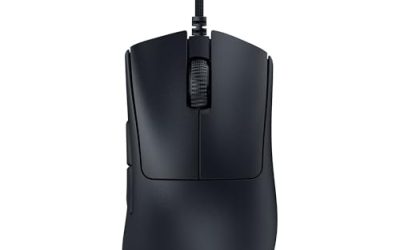
Rust is a game that asks a lot from a mouse. A single session can run for hours, mixing long-range tapping at distant figures, close-quarters panic fights inside a base, and long stretches of farming, building, and sorting loot. The best gaming mouse for Rust has to handle all three without wearing out your hand or letting you down in a fight you cannot afford to lose. It needs a sensor that tracks cleanly at the sensitivity you actually play at, buttons that stay crisp after thousands of clicks, and a shape that still feels comfortable when the raid runs past midnight.
This guide looks at four gaming mice that fit Rust well, from a button-heavy wired workhorse to an ultralight wireless option. Every pick below is a gaming mouse sold on Amazon US, chosen for the way Rust is actually played rather than for a spec sheet alone.
Our Top Picks


Top 3 picks at a glance

How to Choose a Gaming Mouse for Rust
Rust rewards a different set of priorities than a fast round-based shooter. Before you pick, think about how you spend most of your time in the game.
Sensor accuracy at low sensitivity
Most Rust players run a low sensitivity so they can control recoil and land precise taps at range. That means the sensor has to track flawlessly during long, slow swipes across a large mousepad, without acceleration, smoothing, or spin-outs. Every mouse in this guide uses an optical sensor from a major maker with a high ceiling, so the sensor will not be the limiting factor. What matters more is that the sensor holds up at the DPI you use day to day, and that you can switch between a low aiming sensitivity and a higher one for navigating menus and inventory with a dedicated DPI button.
Buttons you can bind without thinking
Rust gives you a lot to bind: weapon slots, meds, building plan, hammer, torch, and voice chat. A mouse with several programmable side buttons lets you keep your left hand on movement keys while your thumb handles healing, swapping tools, or toggling a flashlight. Button count matters, but placement matters more. Side buttons should sit where your thumb rests naturally, with enough separation that you do not press the wrong one in a firefight. The mice below range from five buttons to eleven, so you can choose between a clean, light shell and a control-heavy layout.
Weight and shape for long sessions
Raids, farming runs, and base building stretch across hours, and a heavy mouse adds up over that time. Lighter mice reduce wrist fatigue during long aiming sessions, while a slightly heavier mouse can feel steadier for players who anchor their wrist and aim with small movements. There is no single right weight. Palm-grip players usually want a fuller shell with support under the whole hand, while claw and fingertip players often prefer a smaller, lighter body they can lift and reposition quickly. Check the length and width of a mouse against your hand before you commit, and remember that a shape that feels fine for twenty minutes can feel very different after four hours.
Wired reliability or wireless freedom
A wired mouse never needs charging and never drops a connection at the worst moment, which is why many Rust players still prefer a cable. Modern wireless gaming mice, however, use low-latency 2.4 GHz links that feel identical to wired in play, and they remove cable drag entirely. If you go wireless, battery life matters: a mouse rated for dozens of hours per charge will survive a full weekend of play, while a mouse that needs charging every night becomes one more thing to manage. Either choice works well in Rust, so pick the one that fits your desk and your habits.
Durability under heavy clicking
Rust involves a huge amount of clicking. Farming nodes, breaking barrels, and holding a spray all add up to far more clicks per hour than most games demand. Look for switches rated for tens of millions of clicks and a build that does not develop wobble in the main buttons or the scroll wheel. A mouse with onboard memory is a bonus, since it keeps your bindings and DPI steps saved on the mouse itself when you move between computers.
The Picks
Logitech G502 HERO

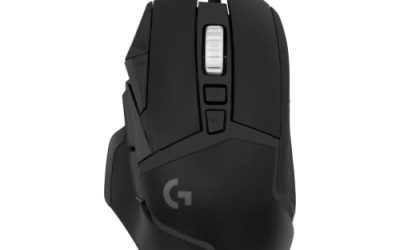
Logitech G502 HERO High Performance Wired Gaming Mouse
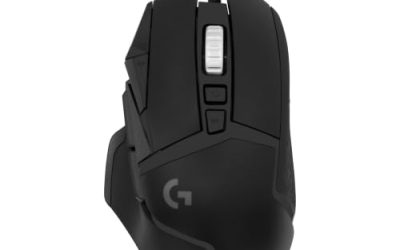
The G502 HERO is the button-heavy option in this group, and it suits Rust players who want every bind within thumb reach. It carries eleven programmable buttons, including a cluster of side buttons and a dedicated sniper button that drops sensitivity while held, which helps when you need to line up a long shot and then return to normal sensitivity in one motion. The HERO 25K sensor tracks up to 25,600 DPI with no smoothing or acceleration, and the dual-mode scroll wheel switches between a notched mode for weapon selection and a free-spin mode for scrolling through long inventories.
A tunable weight system ships with five 3.6-gram weights, so you can shift the balance toward the front or the rear and add heft if the stock feel is too light for your taste. The shape is a full right-handed ergonomic shell that fills a palm grip well, with a thumb rest and textured side grips. Onboard memory stores up to five profiles on the mouse, so your Rust bindings travel with you. The braided cable is long enough for most desks, and the mouse connects over a wired USB link, so there is nothing to charge.
This mouse is a good fit for players who build, farm, and fight in equal measure and want a single mouse that covers all of it. It is also a strong choice for players who use a low sensitivity and like a heavier, planted feel. The trade-offs are size and weight: at around 121 grams before you add any weights, it is the heaviest mouse here, and the right-handed shape will not suit left-handed players. Players with small hands may find the shell too long, and the sheer number of buttons takes a few sessions to learn by feel.
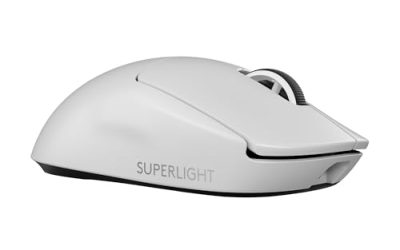
Logitech G Pro X Superlight
Logitech G Pro X Superlight Wireless Gaming Mouse
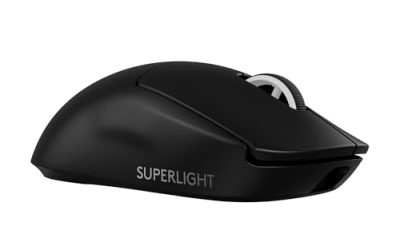
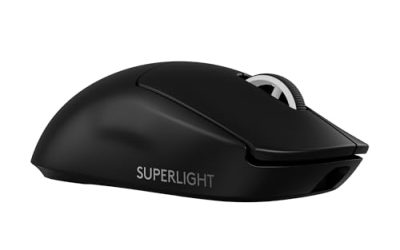
The Pro X Superlight takes the opposite approach: strip away everything that is not needed and make what remains as light as possible. It weighs under 63 grams, which makes long flicks and repeated repositioning noticeably easier on the wrist during extended raids. The HERO 25K sensor matches the G502 for tracking quality, and the LIGHTSPEED wireless link reports at 1,000 Hz, so the connection feels wired in play. Battery life is rated at up to 70 hours, enough for a full week of heavy sessions before a recharge, and the mouse charges over a USB cable.
With five programmable buttons, this is a minimalist layout: two main clicks, two side buttons, and a scroll click. That suits Rust players who keep most binds on the keyboard and want the mouse to do one thing extremely well, which is aim. The symmetrical shape works for claw and fingertip grips and for right-handed palm players with medium hands, and the zero-additive PTFE feet glide smoothly on cloth pads. There is no RGB lighting and no weight tuning, which is the point: nothing extra to manage.
This mouse is a good fit for players who prioritize aim above all else and who play Rust like a shooter first and a survival game second. It is also a strong choice for players who already own a large mousepad and use arm aiming. The trade-offs are the button count and the shape. Five buttons leave little room for extra binds, so players who want meds, building tools, and weapon swaps on the mouse will feel the limit. The low, symmetrical shell can feel small in a large palm grip, and the wireless design means keeping a charging cable nearby.
SteelSeries Rival 5
SteelSeries Rival 5 Gaming Mouse
The Rival 5 sits between the two extremes, with nine programmable buttons in a comfortable ergonomic shell. Five quick-action side buttons sit under the thumb, including a toggle switch that works well for a bind you hit constantly, such as swapping to a healing item or toggling a tool. The TrueMove Air sensor tracks up to 18,000 CPI with 400 IPS tracking speed and 40G acceleration, which covers the fast swipes and sudden stops of a close fight. Golden Micro IP54 switches are rated for 80 million clicks and resist dust and moisture, a useful trait for a mouse that will see heavy use.
At 85 grams, the Rival 5 is light enough for quick aiming without feeling insubstantial, and the ergonomic right-handed shape supports claw and fingertip grips with a gentle curve under the palm. Ten-zone RGB lighting runs through the SteelSeries Engine software, where you can also set DPI steps, polling rate, and macros. The super mesh cable is soft and flexible, which keeps drag low for a wired mouse, and the lift-off distance is tuned for low-sensitivity play.
This mouse is a good fit for Rust players who want more binds than a five-button mouse allows without jumping to a full MMO-style layout. It is also a strong choice for players who mix Rust with other genres, since the nine-button layout adapts well to MOBAs and battle royales. The trade-offs are the wired-only connection and the right-handed shape. There is no wireless version of this exact model, and left-handed players will need to look elsewhere. The RGB lighting is bright and attractive, but players who prefer a plain desk setup may want to turn it down.
Razer Viper Ultimate Mercury White with RGB Charging Dock
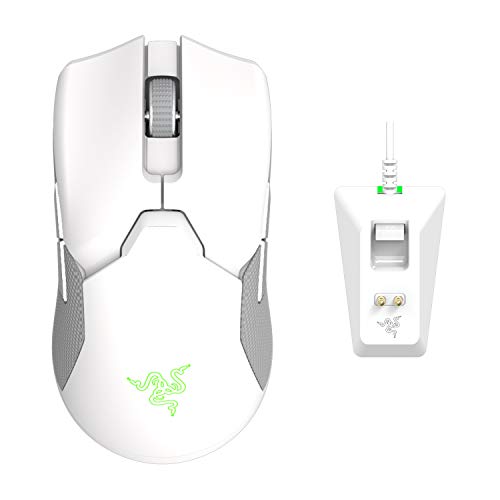
Razer Viper Ultimate Lightweight Wireless Gaming Mouse with RGB Charging Dock, Mercury White
The Viper Ultimate pairs a proven ambidextrous wireless mouse with a charging dock, which solves the one chore wireless mice introduce. The mouse itself weighs 74 grams and uses a Focus+ 20K optical sensor with eight programmable buttons, optical switches rated for fast, crisp clicks, and a HyperSpeed wireless link. Battery life is rated at up to 70 hours, and when a session ends you set the mouse on the dock instead of hunting for a cable. The dock also carries Chroma RGB lighting that matches the rest of a Razer setup.
The ambidextrous shape works for left- and right-handed players and suits claw and fingertip grips, with side buttons on both flanks. That symmetry is useful in Rust, where quick repositioning and lifting the mouse happen constantly during building and looting. The Mercury White finish stands out on a dark desk and resists showing dust, and the dock doubles as a display stand that keeps the mouse visible and charged. The mouse stores profiles onboard, and the Synapse software handles DPI stages, polling rate, and button assignments.
This mouse is a good fit for players who want wireless freedom without ever thinking about charging, and for left-handed players who are often ignored by ergonomic designs. It is also a strong choice for anyone who likes a clean desk, since the dock replaces a loose cable. The trade-offs are the dock itself, which takes up desk space, and the eight-button layout, which is generous but not as bind-heavy as the G502 HERO. The white finish will show grime over time if you eat at your desk, and the ambidextrous shape offers less palm support than a sculpted ergonomic shell.
Comparison
| Mouse | Connection | Sensor ceiling | Buttons | Weight | Battery life | Standout trait |
|---|---|---|---|---|---|---|
| Logitech G502 HERO | Wired | 25,600 DPI | 11 | About 121 g | Not applicable | Most binds, tunable weights |
| Logitech G Pro X Superlight | Wireless | 25,600 DPI | 5 | Under 63 g | Up to 70 hours | Lightest in this group |
| SteelSeries Rival 5 | Wired | 18,000 CPI | 9 | 85 g | Not applicable | Quick-action side toggle |
| Razer Viper Ultimate | Wireless | 20,000 DPI | 8 | 74 g | Up to 70 hours | Charging dock included |
Frequently Asked Questions
What DPI should I use for Rust?
Most Rust players settle somewhere between 400 and 1,600 DPI with a low in-game sensitivity, because that combination gives fine control for recoil and long-range taps while still allowing fast turns. The right number depends on your mousepad size and your grip, so begin low, play a few sessions, and adjust in small steps rather than copying someone else’s exact settings.
Is a wired or wireless mouse better for Rust?
Both work well. Wired mice never need charging and never drop a connection, which some players prefer during long raids. Modern wireless gaming mice use low-latency links that feel identical in play, and their batteries last for days of heavy use. Choose wired if you dislike charging, and wireless if you dislike cable drag.
How many buttons do I need for Rust?
Five buttons cover the basics, and many players are happy with that. Nine to eleven buttons are better if you want healing items, building tools, and weapon slots on the mouse so your left hand stays on movement keys. More buttons help only if you can reach each one without looking, so shape and placement matter as much as the count.
Does mouse weight matter in Rust?
Yes, over long sessions. A lighter mouse reduces wrist fatigue during hours of farming and raiding, while a heavier mouse can feel steadier for players who aim with the wrist. Most players land somewhere in the middle, and the right weight is the one that still feels comfortable after several hours.
Can I use the same mouse for Rust and other games?
Yes. Every mouse in this guide is a general-purpose gaming mouse, and the traits that help in Rust, such as a clean sensor, durable switches, and comfortable shape, carry over to other shooters and survival games. If you also play MMOs, a mouse with more buttons, such as the G502 HERO or the Rival 5, adapts more easily.
Conclusion
The best gaming mouse for Rust is the one that matches the way you actually play. If you want maximum control and every bind within thumb reach, the Logitech G502 HERO is the most capable pick in this group, with eleven buttons and a weight system you can tune to your hand. If aim is your priority and you want the lightest possible mouse, the Logitech G Pro X Superlight removes everything that slows you down. The SteelSeries Rival 5 is the balanced middle ground, with nine buttons and a comfortable shape that suits long sessions. And the Razer Viper Ultimate with its charging dock is the easiest wireless mouse to live with, since it is always charged and ready when you sit down.
Whichever you choose, spend your first few sessions dialing in sensitivity and bindings before you judge it. A mouse earns its place in Rust over hours of play, not in the first ten minutes, and the right setup is the one that still feels good when the raid runs long.
Disclosure: As an Amazon Associate, we may earn from qualifying purchases.
Related guides
More from Amazon
Programs that pair well with the guide above. Offers and eligibility are set by Amazon and may change.
Free shipping on eligible items, Prime Video and more. Eligible new members can start with a free trial.
Start a Prime free trialAd-free music streaming. Eligible new subscribers can start with a free trial.
Try Music Unlimited freeA Prime membership for ages 18-24 with a trial period. Eligibility is set by Amazon.
See Prime for Young AdultsAudiobooks and podcasts to listen to on the go. Eligible new members can start with a free trial.
Try Audible freeAs an Amazon Associate we earn from qualifying purchases.