For PC gaming, the WD My Passport SSD is the only drive in this family that loads games at solid state speed, with NVMe reads up to 1,050 MB/s over USB 3.2 Gen 2. The My Passport and My Passport Ultra hard drives spin on mechanical platters, so they load far more slowly and belong in library storage, archived titles, and backup duty rather than active play.

As an Amazon Associate we earn from qualifying purchases
Our Top Picks
Top 3 picks at a glance
Quick Comparison
| Product | Best for | Key spec from title |
|---|---|---|
| WD My Passport SSD 1TB | Playing installed games from the drive | NVMe SSD, up to 1,050 MB/s read, USB 3.2 Gen 2 |
| WD My Passport Ultra 4TB | A big parked library with a metal shell | 4TB hard drive, USB-C and USB 3.1 |
| WD My Passport 5TB | Bulk game storage and backups | 5TB hard drive, USB 3.1 and USB 3.0 |
| WD My Passport Ultra for Mac 4TB | Mac-formatted storage you plan to reformat | 4TB hard drive, USB-C and USB 3.1 |
The Best Options
WD My Passport SSD 1TB
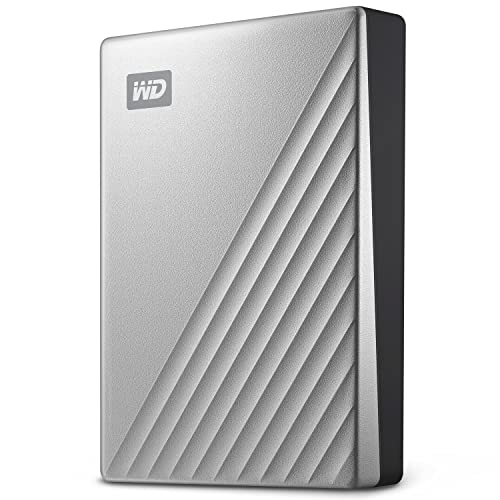
This is the one My Passport drive built for playing games rather than parking them. NVMe flash inside a pocket-size metal shell delivers reads up to 1,050 MB/s, so level loads, texture streaming, and patch installs feel close to an internal drive on many rigs. A USB-C port with a USB-A adapter in the box covers both newer and older gaming PCs, and the shock resistant build shrugs off the bumps of a bag carried between home, dorm, and LAN nights.
Specs
- Capacity: 1TB solid state drive
- Model: WDBAGF0010BGD-WESN
- Read speed: up to 1,050 MB/s
- Write speed: up to 1,000 MB/s
- Interface: USB 3.2 Gen 2, USB-C
- In the box: USB Type-C to Type-C cable and Type-C to Type-A adapter
- Password protection with hardware encryption
- Drop resistant up to 6.5 ft (1.98 m), shock and vibration resistant
- Item weight: 46 grams
Best for: Gamers who want to install and play current titles from an external drive without long load screens.
Watch out for: Your PC needs a USB 3.2 Gen 2 port to reach the headline speeds; an older USB port caps the drive well below them.
ASIN: B08F2G1XPH
WD My Passport Ultra 4TB
The Ultra trades speed for room and a tougher shell. Four terabytes of spinning storage hold a deep bench of games you rotate through, and the anodized metal cover feels a step up from plain plastic when the drive rides in a backpack. It arrives formatted for Windows, includes a USB-C to USB-A adapter for older machines, and adds scheduled backup software for save folders and clips. Loads run at hard drive pace, so treat it as a library you copy from, not a drive you play from daily.
Specs
- Capacity: 4TB mechanical hard drive
- Model: WDBFTM0040BSL-WESN
- Form factor: 2.5 inches
- Interface: USB-C and USB 3.1, USB 3.0 compatible
- In the box: portable hard drive, USB cable, USB-C to USB-A adapter, quick install guide
- Password protection with 256-bit AES hardware encryption
- Formatted for Windows
- Enclosure: refined metal cover, silver
- Warranty: 3-year limited warranty
Best for: Players with a large rotating library who want durable, roomy storage for games between sessions.
Watch out for: It is a spinning drive, so open-world titles installed here will load slowly; move the game you play nightly onto an SSD.
ASIN: B07GK2PC5V
WD My Passport 5TB
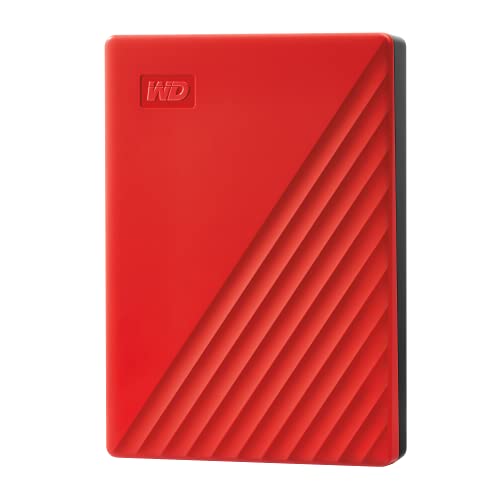
When the library keeps growing, raw capacity does the heavy lifting, and this plain My Passport offers the most room in the family here. Five terabytes swallow huge install footprints, recorded sessions, and a full backup of your documents and save data in one slim enclosure. The bundled software handles scheduled backups and password protection, and the USB-A cable in the box plugs into almost any gaming PC without an adapter hunt. Speed stays at mechanical levels, which suits storage and archiving far more than active play.
Specs
- Capacity: 5TB mechanical hard drive
- Model: WDBPKJ0050BRD-WESN
- Form factor: 2.5 inches
- Interface: USB 3.1 and USB 3.0 compatible
- In the box: portable hard drive, SuperSpeed USB-A cable (5 Gbps), quick guide, backup and device management software
- Backup software with defense against ransomware
- Password protection with hardware encryption
- Color: red
- Item weight: 0.46 pounds
Best for: Hoarders of big installs who need one roomy drive for a parked library, clips, and backups.
Watch out for: Confirm the color and capacity on the listing before ordering, since this model line spans several sizes that look alike in photos.
ASIN: B085P17XND
WD My Passport Ultra for Mac 4TB
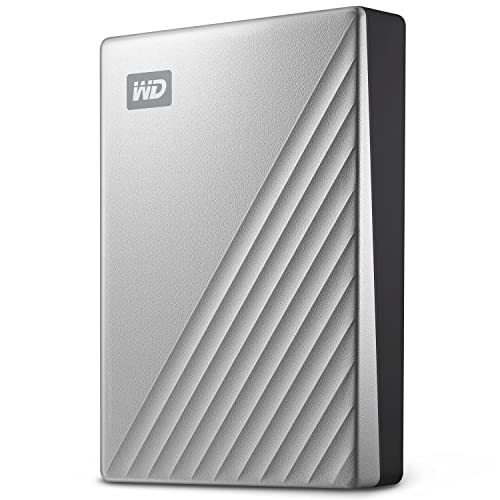
This sibling of the Ultra line ships formatted for Mac, which makes it a deliberate pick rather than a default one for a Windows gaming rig. The hardware mirrors the Windows Ultra: a 4TB spinning drive in a metal enclosure with USB-C, hardware encryption, and an adapter for older ports. A downloadable HFS+ driver lets Windows read and write it, and a full reformat turns it into ordinary PC storage. Buy it when you split time between a Mac and a gaming PC, or when you find this listing and plan to reformat on day one.
Specs
- Capacity: 4TB mechanical hard drive
- Model: WDBPMV0040BSL-WESN
- Form factor: 2.5 inches
- Interface: USB-C and USB 3.1 compatible
- Formatted for Mac, with a downloadable HFS+ driver for Windows
- Password protection with hardware encryption
- Enclosure: metal, silver
- Item weight: 8.16 ounces
- Warranty: 3-year limited warranty
Best for: Players who share one drive between a Mac and a Windows gaming PC and accept a setup step.
Watch out for: It will not work as simple plug-and-play storage on a Windows PC out of the box; plan on the driver or a reformat first.
ASIN: B07GKBT14V
What Matters Most
Flash versus spinning platters
Everything in this family splits along one line: flash or platters. The My Passport SSD reads up to 1,050 MB/s, while the hard drive models move data at mechanical pace, a gap you feel in load screens, world streaming, and patch installs. Pick flash for any game you launch often. Pick a hard drive when the job is holding many games cheaply in space terms, keeping backups, or staging installs you later move onto internal storage for play.
Port speed on your PC
An external drive can only run as quickly as the port it plugs into. The My Passport SSD needs a USB 3.2 Gen 2 port to reach its listed read speeds; a plain USB 3.0 port trims that ceiling hard, and USB 2.0 turns it into a crawl. Before buying, check the port labels on your motherboard or laptop, and prefer a rear motherboard port over a front panel hub for a cleaner, steadier link during long transfers.
Capacity planning
Modern game installs sprawl. A single flagship title can pass 100 GB, and patches pile on top, so a 1TB SSD fills faster than most players expect. Think in roles rather than one magic number: a smaller SSD for the handful of games in active rotation, and a 4TB or 5TB hard drive as the vault behind it. That pairing keeps load times short where they matter and avoids deleting a favorite every time a new release lands.
Handling and protection
Portable drives live rough lives in bags, drawers, and coat pockets. The My Passport SSD lists drop resistance up to 6.5 feet plus shock and vibration resistance, while the spinning models have moving parts that dislike knocks while running. Hardware encryption with a password guards save data and personal files if a drive goes missing. Whichever model you pick, eject it properly in Windows before unplugging, and keep a second copy of anything you cannot replace.
Frequently Asked Questions
Can I play games directly from a My Passport hard drive?
Yes, Windows and launchers will run games from one, but load times stretch well beyond SSD pace because the platters and heads move mechanically. It works fine for older or lighter titles. For demanding current games, copy the install onto the My Passport SSD or an internal drive and keep the hard drive for storage.
Why does the My Passport SSD feel slower on my older PC?
The drive needs a USB 3.2 Gen 2 port to reach its listed 1,050 MB/s reads. Older USB 3.0 and USB 2.0 ports cap throughput far lower, no matter how quick the flash inside is. Check your port spec, plug into the quickest port you have, and use the cable included in the box.
How much space do I need for a gaming library?
Count your current installs, then double the total. A rotation of five or six big titles fits a 1TB SSD, while a 4TB or 5TB hard drive holds a broad back catalog plus recordings and backups. Buying headroom now beats juggling deletions later, since game sizes keep climbing with each release cycle.
Does the Ultra for Mac model work on a Windows gaming PC?
It can, with a step in between. The listing includes a downloadable HFS+ driver so Windows can read and write the Mac formatting, or you can reformat the drive to a Windows file system and use it as plain storage. Out of the box, though, it is set up for Mac, so plan that setup time before a download night.
Are these drives safe to carry every day?
The SSD model is the hardiest traveler, with listed drop resistance and no moving parts. The hard drive models travel fine while powered off and padded, but avoid moving them mid-transfer. Set the password protection on whichever you carry, since encryption guards your files if the drive is lost.
Related guides
More from Amazon
Programs that pair well with the guide above. Offers and eligibility are set by Amazon and may change.
Free shipping on eligible items, Prime Video and more. Eligible new members can start with a free trial.
Start a Prime free trialAd-free music streaming. Eligible new subscribers can start with a free trial.
Try Music Unlimited freeA Prime membership for ages 18-24 with a trial period. Eligibility is set by Amazon.
See Prime for Young AdultsAudiobooks and podcasts to listen to on the go. Eligible new members can start with a free trial.
Try Audible freeAs an Amazon Associate we earn from qualifying purchases.