A beginner gaming monitor should be a 24-inch Full HD display with a refresh rate of 144Hz or higher, a fast response time, and adaptive sync support. That combination keeps motion smooth, text readable, and setup simple without asking a new player to learn display settings first. The four monitors in this guide meet that brief, and each one suits a slightly different desk, game library, and daily routine.


This guide is for first-time PC gamers, console players moving to a desk, and students who want one screen for games, classes, and streaming. Every monitor below was chosen from its Amazon title and listed specifications, with screen size, resolution, refresh rate, panel type, response time, sync support, and connections taken only from those Amazon listings.
Top 3 picks at a glance
Quick Picks
As an Amazon Associate we earn from qualifying purchases
| Product | Best for | Key spec from title |
|---|---|---|
| LG UltraGear 24GN600-B | A first monitor with clear colour and smooth motion | 24-inch Full HD IPS, 144Hz, 1ms |
| ASUS TUF Gaming VG249Q1A | Fast-paced games and darker scenes | 23.8-inch Full HD IPS, 165Hz, 1ms |
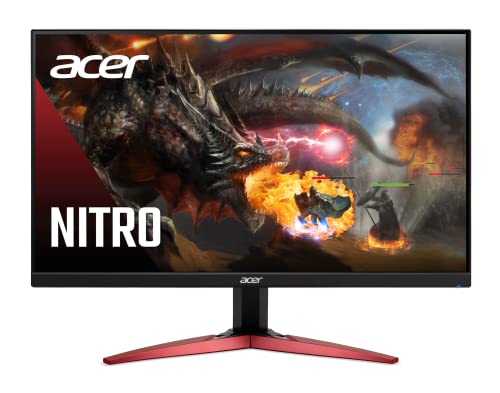
| Acer Nitro KG241Y Sbiip | A compact desk with a slim-frame screen | 23.8-inch Full HD VA, 165Hz, 1ms |
| Sceptre IPS E248B-FPT168 | Simple setup with built-in speakers | 24-inch Full HD IPS, 165Hz, FreeSync |
How to Choose
Start With Size and Resolution That Fit Your Desk
A 24-inch Full HD screen is the easiest starting point for a beginner because it keeps text readable, game menus clear, and the whole display inside a normal field of view. Measure your desk before you order, and leave room for a keyboard, a mouse mat, and a headset stand. A larger screen can look impressive, yet it pushes the picture edges into your peripheral vision on a shallow desk. Full HD also places less demand on an entry-level graphics card than a higher-resolution panel, so games are more likely to run smoothly. If your desk is narrow, a 23.8-inch model gives you almost the same viewing area in a slightly smaller frame.
Refresh Rate and Response Time for Smooth Motion
Refresh rate is how many times the screen can draw a new image each second, and response time is how quickly a pixel can change. A 144Hz panel already feels much smoother than a standard 60Hz office screen when you turn, aim, or scroll. A 165Hz panel adds a little more headroom for fast action, although the difference from 144Hz is smaller than the jump from 60Hz. Look for a listed response time of 1ms in the Amazon title or specification table, because that figure is tied to reduced blur in quick movement. Match the monitor to the frame output your PC or console can sustain, since a high refresh rate only helps when the system can keep up.
Panel Type and Colour for Long Sessions
Panel type shapes how a game looks from different angles and how colours hold up during long sessions. An IPS panel is a strong beginner choice because it keeps colours steady when you shift position, lean back, or share the screen with someone beside you. A VA panel can give deeper-looking dark scenes, which suits horror games, space games, and night driving, although viewing angles can narrow sooner. Check whether the Amazon listing names HDR support or a wide colour feature, and treat those as useful extras rather than the main reason to buy. For a first monitor, consistent colour, comfortable brightness, and a clear picture matter more than chasing the most vivid specification listed.
Ports, Stand, and Sync for Your PC or Console
Before you settle on a monitor, check the ports on your PC or console and compare them with the monitor listing. Most beginner models in this guide list DisplayPort and HDMI, and DisplayPort is the usual route to the highest listed refresh rate on a PC. Adaptive sync, listed as AMD FreeSync Premium on several models here, helps the monitor and graphics card stay in step so tearing and stutter are less noticeable. Also look at the stand: tilt adjustment helps you set a comfortable viewing angle, while a VESA mount option leaves the door open for an arm later. Confirm the port layout in the listing, then plan where the monitor, console, and PC will sit.
The 4 Best Options
LG UltraGear 24GN600-B
The LG UltraGear 24GN600-B is a calm, straightforward first gaming monitor for someone who wants smooth play and a clear picture without a long list of settings to learn. Its IPS panel keeps colours steady across the screen, and the 144Hz refresh rate makes movement in racing, adventure, and shooter games feel noticeably smoother than a standard display. The three-sided borderless design also helps the screen feel larger than its frame, which suits a tidy desk or a dual-screen plan later. It is a sensible pick for a student or new PC gamer who will use the same monitor for games, study, and streaming.
Specs
- 24-inch Full HD (1920 x 1080) IPS display
- 144Hz refresh rate
- 1ms (GtG) response time
- AMD FreeSync Premium
- HDR10
- 3-side virtually borderless display
Best for: A first gaming monitor for smooth play, study, and streaming on one screen.
Watch out for: Check the stand adjustment and port layout against your desk setup before ordering.
ASIN: B08PHKNNRY
ASUS TUF Gaming VG249Q1A
The ASUS TUF Gaming VG249Q1A suits a beginner who plays fast-paced games and wants extra help seeing detail in darker scenes. Its 165Hz refresh rate and 1ms response time support quick turns and tracking, while Extreme Low Motion Blur and Shadow Boost are listed features aimed at clearer motion and brighter shadows. The IPS panel keeps the image consistent when you lean in during a tense round, and FreeSync Premium helps keep the picture steady when frame output varies. Built-in speakers are listed too, which is handy if you do not yet own separate speakers. It suits a new player who wants a monitor that can grow with faster games.
Specs
- 23.8-inch Full HD (1920 x 1080) IPS display
- 165Hz refresh rate, supports 144Hz
- 1ms response time
- Extreme Low Motion Blur
- AMD FreeSync Premium
- Shadow Boost
- VESA mountable
- DisplayPort and HDMI
- Built-in speaker
Best for: Fast-paced games where quick motion and dark-scene detail matter.
Watch out for: Confirm which connection reaches the listed 165Hz refresh rate on your PC or console.
ASIN: B08LCN9PGW
Acer Nitro KG241Y Sbiip
The Acer Nitro KG241Y Sbiip is a good fit for a beginner with a compact desk who still wants a fast, modern gaming screen. Its VA panel and ZeroFrame design keep the focus on the game rather than a thick border, and the 165Hz refresh rate with a 1ms (VRB) response time supports smooth motion in shooters and racers. AMD FreeSync Premium helps the display stay in step with your graphics card, and the listed connections include one DisplayPort 1.2 and two HDMI 2.0 ports, so a PC and a console can share the same screen. It suits a first setup where space is tight and switching devices stays simple.
Specs
- 23.8-inch Full HD (1920 x 1080) VA display
- 165Hz refresh rate
- 1ms (VRB) response time
- AMD FreeSync Premium
- ZeroFrame design
- 1 x DisplayPort 1.2 and 2 x HDMI 2.0
Best for: A compact desk setup shared between a PC and a console.
Watch out for: VA viewing angles can narrow sooner than IPS, so set the screen squarely in front of you.
ASIN: B0B6DFG1FQ
Sceptre IPS E248B-FPT168

The Sceptre IPS E248B-FPT168 is the simplest option in this guide for a beginner who wants to plug in and start playing. Its IPS panel gives a clear Full HD picture, and the listed refresh rate reaches 165Hz through DisplayPort and 144Hz through HDMI, so the connection you use shapes the top speed. Built-in speakers remove one extra purchase from a first setup, and the listed FPS and RTS display modes offer preset looks for different game types without manual tuning. Eye Care features are listed too, useful for long homework and gaming sessions. Choose it for a plain, practical first monitor with few decisions after unboxing.
Specs
- 24-inch Full HD (1920 x 1080) IPS display
- 165Hz refresh rate through DisplayPort, 144Hz through HDMI
- AMD FreeSync
- Eye Care features
- FPS and RTS display modes
- Built-in speakers
- DisplayPort and HDMI
Best for: A simple first setup with built-in speakers and preset game modes.
Watch out for: Use DisplayPort to reach the listed 165Hz refresh rate, since HDMI tops out lower on this model.
ASIN: B088VMY23M
Which One Fits Your Situation
First-Time PC Gamer on a Small Desk
Pick the Acer Nitro KG241Y Sbiip if your desk is tight and you want a fast screen that does not dominate the room. Its 23.8-inch size and slim frame leave more room for a keyboard and mouse, while the 165Hz refresh rate and FreeSync Premium support keep motion smooth. The two HDMI ports also make it easy to add a console later without swapping cables every time.
Console Player Moving to a Desk Setup
Pick the LG UltraGear 24GN600-B if you are moving from a television to a desk and want a clear, steady picture for console and PC games. The IPS panel holds colour well from a normal seated position, and the 144Hz refresh rate is a clear step up from a standard television or office screen. Its borderless design also looks tidy beside a console and a laptop.
Story and Strategy Player Who Values Colour
Pick the ASUS TUF Gaming VG249Q1A if you spend more time in story games, strategy games, and dark atmospheric worlds than in ranked matches. The IPS panel keeps colours consistent, Shadow Boost helps with darker scenes, and the 165Hz refresh rate still supports faster moments when they arrive. It is a balanced screen for long sessions across many game types.
Beginner Who Wants the Simplest Setup
Pick the Sceptre IPS E248B-FPT168 if you want the fewest extra decisions and the fewest extra parts. Built-in speakers handle sound straight away, the FPS and RTS modes give you ready-made picture presets, and the IPS panel keeps the image clear for games and schoolwork alike. Connect it through DisplayPort on a PC to reach its listed top refresh rate.
Common Mistakes
- Buying a screen that is too large for a shallow desk, so the edges sit outside comfortable view.
- Using the wrong port and never reaching the refresh rate listed in the Amazon title.
- Ignoring panel type, then finding colours shift when you lean back or move sideways.
- Forgetting to check adaptive sync support against your graphics card before ordering.
- Placing the monitor too high or too close, which causes neck strain during long sessions.
Frequently Asked Questions
What size monitor should a beginner choose?
A 24-inch Full HD monitor is the best starting point for most beginners because it fits a normal desk, keeps text readable, and suits a wide range of games. A 23.8-inch model is almost identical in viewing area and can fit a tighter space. Go larger only when your desk is deep enough to sit at a comfortable distance.
Is 144Hz enough for a beginner?
Yes, 144Hz is enough for a beginner and already feels much smoother than a standard 60Hz screen in most games. A 165Hz panel adds a little more smoothness for fast action, but the step from 60Hz to 144Hz is the one you will notice most. Pair the monitor with a PC or console that can sustain high frame output.
Do I need a DisplayPort cable for a gaming monitor?
DisplayPort is the usual way to reach the highest refresh rate listed for a PC, while HDMI can top out lower on some beginner models. Check the Amazon listing for the port list and the refresh rate tied to each connection. Then confirm the ports on your PC or console and choose the connection that matches the refresh rate you want.
Can one beginner gaming monitor work for school and games?
Yes, a 24-inch Full HD gaming monitor works well for school, streaming, and everyday computer use as well as games. The same clear picture and smooth scrolling that help in games also help with documents, video lessons, and browsing. A model with built-in speakers or an IPS panel is especially handy when one screen must cover study and play.
Related guides
More from Amazon
Programs that pair well with the guide above. Offers and eligibility are set by Amazon and may change.
Free shipping on eligible items, Prime Video and more. Eligible new members can start with a free trial.
Start a Prime free trialAd-free music streaming. Eligible new subscribers can start with a free trial.
Try Music Unlimited freeA Prime membership for ages 18-24 with a trial period. Eligibility is set by Amazon.
See Prime for Young AdultsAudiobooks and podcasts to listen to on the go. Eligible new members can start with a free trial.
Try Audible freeAs an Amazon Associate we earn from qualifying purchases.