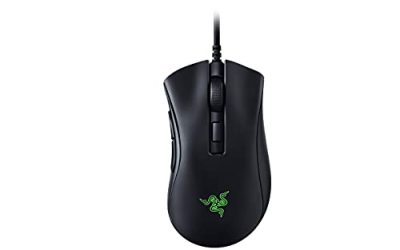
A gaming mouse bought for a child has a different job from one bought for an adult. Small hands cannot wrap a full-size shell, heavy mice tire young wrists during longer sessions, and a layout covered in extra buttons invites accidental presses mid-game. The best gaming mouse for kids is a real gaming mouse — a proper sensor, responsive buttons and a cable or wireless link that keeps up — scaled down in size, weight and complexity so a child can actually control it.


This guide is for parents choosing a first gaming mouse for a child roughly between seven and thirteen, and for families replacing a bundled office mouse that was never built for games. Every pick below is a standard gaming model from a known maker, selected because its published dimensions, weight and button count suit smaller hands. The picks are based on manufacturer specifications and Amazon US listing details, not on novelty shapes or toy styling, so the numbers in each section can be checked against the listing before you buy.
Disclosure: As an Amazon Associate, we earn from qualifying purchases. Product details and availability can change; check the Amazon listing before you buy.
Our Top Picks
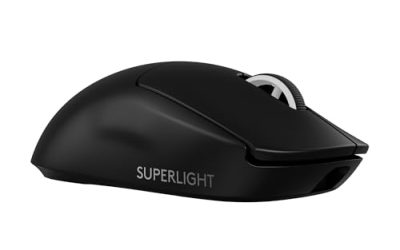
- Logitech G203 Wired Gaming Mouse for Laptop &One Name1.5 x 2.45 x 4.59 inches0.14 poundsCheck on Amazon
Top 3 picks at a glance
Quick picks at a glance
| Product | ASIN | Best for |
|---|---|---|
| Logitech G203 LIGHTSYNC | B07YN82X3B | First wired gaming mouse for smaller hands |
| Logitech G305 LIGHTSPEED | B07CMS5Q6P | Cable-free play with very long battery life |
| SteelSeries Rival 3 | B08176SM7C | Light wired pick with durable main buttons |
| Glorious Model O- (Minus) | B07VMM5LKH | Older kids who play fast-paced shooters |
What matters most when buying a gaming mouse for a child
Shell size comes first. Length is the measurement that decides whether a child can reach the front buttons without stretching. The mice in this guide run from about 117 to 121 mm long, which suits small to medium hands. Anything in the 125 to 132 mm range is an adult shell and will push a child’s grip too far back.
Weight affects control and fatigue. A mouse between roughly 58 and 99 grams is manageable for a child. Lighter models are easier to stop precisely at the end of a swipe, which matters in aiming games, while slightly heavier wireless models trade some of that ease for freedom from a cable.
Simple button layouts beat button counts. Six buttons — left, right, wheel click, a sensitivity button and two thumb buttons — is plenty for a child. Grids of twelve side buttons belong on adult MMO mice and mostly cause mis-clicks for beginners.
Durability is a stated spec, not a guess. Look for a published click lifespan for the main switches and a shell without fragile moving parts. One pick below carries a 60 million click lifespan figure for its primary buttons, which is the kind of figure worth comparing.
Cable or battery is a family decision. Wired mice never need charging and cannot be lost as easily, but the cable drags. Wireless mice keep the desk clear; a model running on a single AA battery for a stated 250 hours means months between battery swaps rather than nightly charging routines a child will forget.
Grip style will change as they grow. Most children start with a palm or relaxed claw grip. A symmetrical shell with a low, gentle hump works with either, which is why all four picks here use safe, neutral shapes rather than aggressive ergonomic moulding.
Logitech G203 LIGHTSYNC
ASIN: B07YN82X3B — View on Amazon US
| Spec | Detail |
|---|---|
| Dimensions | 116.6 × 62.15 × 38.2 mm |
| Weight | 85 g |
| Sensor | Gaming-grade optical, up to 8,000 DPI |
| Buttons | 6 programmable buttons |
| Connection | Wired USB |
| Extras | LIGHTSYNC RGB lighting, on-board memory |
The G203 LIGHTSYNC is the smallest shell in this guide at 116.6 mm long, and that is exactly why it leads the list for younger children. The shape is a classic symmetrical design with a low profile, so a small hand can sit over it in a palm grip or lift the fingers into a claw grip without the back of the mouse pushing into the palm. At 85 grams it is light enough for controlled stops but heavy enough not to feel hollow or skittish on the pad.
Why it fits kids. Six buttons is the right amount: two thumb buttons for one or two in-game actions, a button behind the wheel that steps through sensitivity levels, and nothing else to hit by accident. The listing notes on-board memory, so a sensitivity setup saved once stays on the mouse. The LIGHTSYNC lighting band is the part most children will care about, and it needs no separate hub or batteries.
Trade-offs. It is wired only, so cable management on a small desk matters. The 8,000 DPI ceiling is lower than the other picks, although in practice children play far below that figure, and the sensor is a gaming-grade part rather than an office sensor.
Best for / Skip if. Best for a first gaming mouse for a younger child on a desktop PC. Skip it if the setup is a laptop used in several rooms, where the wireless pick below is easier to live with.
Logitech G305 LIGHTSPEED
ASIN: B07CMS5Q6P — View on Amazon US
| Spec | Detail |
|---|---|
| Dimensions | 116.6 × 62.15 × 38.2 mm |
| Weight | 99 g with AA battery fitted |
| Sensor | HERO optical, 200 to 12,000 DPI |
| Buttons | 6 programmable buttons |
| Connection | LIGHTSPEED wireless USB receiver, 1 ms report rate |
| Battery | Up to 250 hours on one AA battery |
The G305 uses the same compact shell dimensions as the G203 but removes the cable. For a child, the headline figure is the battery: Logitech states up to 250 hours of continuous play from a single AA battery, so the mouse works for months of after-school sessions before anyone needs to think about power. The USB receiver stores inside the mouse body, which reduces the chance of the small dongle being lost when the mouse travels between rooms.
Why it fits kids. The shape and six-button layout are identical in spirit to the wired pick — simple, symmetrical and easy to learn — while the HERO sensor tracks at up to 12,000 DPI with a 1 ms wireless report rate, so there is no performance penalty for cutting the cord. At 99 grams with the battery fitted it is the heaviest pick here, but the weight sits in a small shell that young hands can still move accurately.
Trade-offs. There is no Bluetooth and no wired fallback mode; if the receiver is lost, the mouse cannot connect. The battery is a replaceable AA rather than a rechargeable cell, which some families will see as a plus and others as a chore.
Best for / Skip if. Best for children gaming on a laptop or a PC across the room from a TV. Skip it if your child is very young and likely to misplace a small wireless mouse — the wired G203 stays attached to the desk.
SteelSeries Rival 3
ASIN: B08176SM7C — View on Amazon US
| Spec | Detail |
|---|---|
| Dimensions | 120.6 × 67 × 37.9 mm |
| Weight | 77 g without cable |
| Sensor | TrueMove Core optical, up to 8,500 CPI |
| Buttons | 6 programmable buttons |
| Connection | Wired, 1.8 m rubber cable |
| Switch lifespan | 60 million clicks for the main buttons |
The Rival 3 is slightly longer than the two Logitech picks at 120.6 mm, which makes it the natural step up for an older child or one with bigger hands. It is also the lightest wired option here at 77 grams. SteelSeries publishes a 60 million click lifespan figure for the split-trigger main buttons, the clearest durability figure in this guide, and the shell uses a simple matte finish with no fragile panels.
Why it fits kids. The TrueMove Core sensor is built for 1-to-1 tracking, so the cursor follows the hand without built-in acceleration confusing a child who is still learning mouse control. Six buttons keep the layout uncluttered, and the three-zone RGB lighting is controlled in simple zones rather than per-key complexity. The 1.8 m cable is long enough for a tower PC sitting on the floor beside a desk.
Trade-offs. The sensor ceiling of 8,500 CPI is the lowest here on paper, though it is well beyond what a child will use. The shape is right-handed in feel despite the near-symmetrical outline, so left-handed children should look at the ambidextrous Glorious pick instead.
Best for / Skip if. Best for older kids who are outgrowing a compact mouse and play daily. Skip it for left-handed players or for a cable-free desk.
Glorious Model O- (Minus)
ASIN: B07VMM5LKH — View on Amazon US
| Spec | Detail |
|---|---|
| Dimensions | 120 × 63 × 36 mm |
| Weight | 58 g |
| Sensor | Pixart 3360 optical, up to 12,000 DPI |
| Buttons | 6 buttons |
| Connection | Wired, flexible Ascended cord |
| Switches | Omron mechanical, rated 20 million clicks |
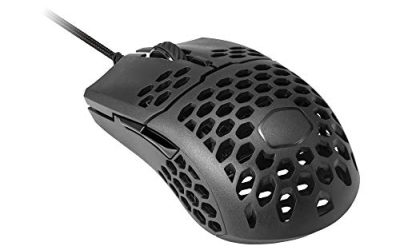
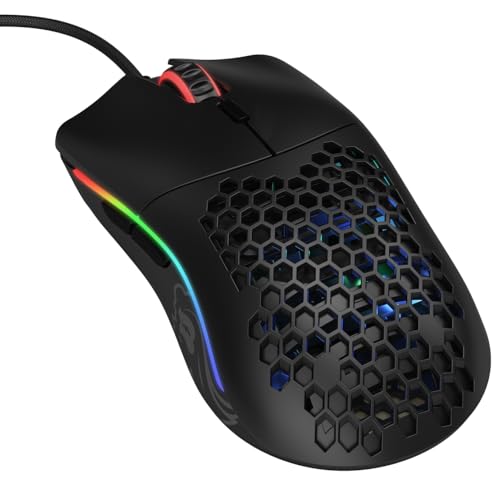
The Model O- is the Minus version of Glorious’s ambidextrous shape, sized for small and medium hands and built down to 58 grams — by far the lightest pick in this guide. That weight comes from the honeycomb shell, and it changes how the mouse feels in fast games: quick flicks and stops take noticeably less effort, which suits older children who have moved on to competitive shooters and already have reliable mouse control.
Why it fits kids. The Pixart 3360 sensor is a proven gaming sensor with a 12,000 DPI ceiling, the PTFE feet glide with very little friction, and the braided Ascended cord is soft enough that it rarely pulls against a movement. Because the shell is ambidextrous with buttons on the left side only, it works for right-handed fingertip and claw grips and remains usable for left-handed children who click with the left hand and do not need thumb buttons.
Trade-offs. The open honeycomb shell lets in dust and crumbs, which is a genuine consideration for a child’s desk, and it needs an occasional blast of air to stay clean. The 20 million click switch lifespan is lower than the Rival 3’s figure. This is also the least forgiving shape here for a full palm grip.
Best for / Skip if. Best for older kids and young teens playing fast-paced games who find standard mice sluggish. Skip it for younger children, where the sealed shells above are easier to keep clean and the simpler G203 is a calmer starting point.
How to choose between these picks
Start with hand size and desk setup rather than features. For a younger child at a fixed desktop, the G203 LIGHTSYNC is the default answer: smallest shell, no battery to manage, nothing to lose. If the mouse will move between a laptop, a bedroom and a living-room TV, the G305 trades a little weight for wireless freedom and a battery that lasts for months.
If your child is ten or older, plays every day and is starting to complain that a small mouse feels cramped, the Rival 3’s longer shell and published 60 million click lifespan figure make it the durability-first choice. If the complaint is the opposite — that mice feel slow and heavy in shooters — the Model O- is the specialist pick, provided the open shell will be kept reasonably clean.
Left-handed children narrow the field quickly: the Model O- is the only true ambidextrous shell here. For everyone else, any of the four will track properly in games; the differences that matter are size, weight and whether a cable is acceptable.
Setting up a child’s first gaming mouse
Set the sensitivity in the game, not just in Windows, and start lower than you think: a setting that lets your child turn their character around with one comfortable sweep of the forearm is a sensible baseline. Most of these mice ship with a button that steps through preset sensitivity levels, so show your child which button that is and agree one setting for everyday play, so the pointer speed in schoolwork applications stays predictable too.
Give the mouse room to move. A pad at least 30 cm wide keeps a low-sensitivity setup from running off the edge mid-game, and it protects the desk surface from the mouse feet. Route a wired cable with a little slack looped behind the monitor so it cannot snag on the desk edge. For the G305, keep a spare AA battery in the desk drawer and show your child where the receiver stores inside the mouse before it ever gets lost.
Finally, set a cleaning habit early: a quick wipe of the shell and feet once a week keeps glide consistent, and for the honeycomb Model O-, a short burst of compressed air clears the openings without opening the mouse.
FAQ
What size gaming mouse should a child use?
Look for a shell around 115 to 122 mm long and under 100 grams. All four picks here fall in that window. A mouse that is too long forces the fingers to stretch for the front buttons, which tires the hand and makes clicks less accurate.
Is a wireless gaming mouse safe and practical for kids?
The wireless pick here, the G305, uses a standard USB receiver with a 1 ms report rate and runs up to 250 hours on one AA battery, so there is no nightly charging routine to manage. The practical risks are losing the receiver or the mouse itself, which is why a wired model suits younger children.
How many buttons does a child need on a gaming mouse?
Six is enough: left and right click, the wheel click, a sensitivity button and two thumb buttons cover movement, actions and one or two game abilities. Large button grids are designed for adult MMO players and mostly add accidental presses for beginners.
Does a higher DPI number make a mouse better for kids?
No. DPI is the maximum sensitivity the sensor can report, and children typically play at settings far below the ceilings listed here, which range from 8,000 to 12,000. Sensor quality, shape and weight matter far more than the headline number.
Can these mice also be used for schoolwork?
Yes. All four are standard USB mice that work for everyday computing as soon as they are plugged in, and their sensitivity buttons make it easy to slow the pointer down for precise tasks like drawing or editing.
Conclusion
For most families, the Logitech G203 LIGHTSYNC is the right first gaming mouse for a child: the smallest shell in this guide, a simple six-button layout and no battery to think about. Choose the G305 LIGHTSPEED when the desk needs to stay cable-free or the mouse travels with a laptop. Step up to the SteelSeries Rival 3 for an older child who needs a longer shell and the strongest published durability figure, and pick the Glorious Model O- for the young player who has outgrown beginner mice and wants the lightest, fastest option here. Every recommendation is grounded in the dimensions, weights and sensor figures the makers publish, so measure your child’s current mouse, compare the numbers, and the right choice usually picks itself.
Related guides
More from Amazon
Programs that pair well with the guide above. Offers and eligibility are set by Amazon and may change.
Free shipping on eligible items, Prime Video and more. Eligible new members can start with a free trial.
Start a Prime free trialAd-free music streaming. Eligible new subscribers can start with a free trial.
Try Music Unlimited freeA Prime membership for ages 18-24 with a trial period. Eligibility is set by Amazon.
See Prime for Young AdultsAudiobooks and podcasts to listen to on the go. Eligible new members can start with a free trial.
Try Audible freeAs an Amazon Associate we earn from qualifying purchases.