Call of Duty rewards the player who acquires a target first, lands the first accurate burst, and repositions before the return fire arrives. A slow sensor, a mushy click, or a heavy shell can turn a winnable gunfight into a lost one, especially in close-quarters maps and fast Warzone rotations where every millisecond of tracking matters. The right mouse will not replace aim training, yet it removes the hardware friction that makes good aim feel inconsistent from one match to the next.


This guide is for Warzone players who need steady tracking at range, multiplayer players who live in close-quarters fights, and ranked players who want a light, reliable mouse for long sessions. The four mice below were chosen from the names and specifications shown on their Amazon product pages, with an emphasis on sensor quality, polling rate, weight, click response, and wireless stability for Call of Duty.
Our Top Picks
- Logitech G Pro X Superlight 2 Lightspeed WirelessClassic1.57 x 2.5 x 4.92 inches0.1 poundsCheck on Amazon
Top 3 picks at a glance

Quick Picks
As an Amazon Associate we earn from qualifying purchases.
| Product | Best for | Key spec from title |
|---|---|---|
| Logitech G Pro X Superlight 2 | Competitive multiplayer and ranked play | 60g, 44k DPI sensor, 8kHz report rate |
| Razer Viper V3 Pro | Esports-style flick aim and claw grip | 54g, 35K DPI sensor, 8K polling |
| Razer DeathAdder V3 Pro | Palm grip and larger hands | 63g, Focus Pro 30K sensor, 90 Hr battery |
| Logitech G502 X Lightspeed | Extra buttons for loadouts and scorestreaks | HERO 25K sensor, LIGHTFORCE switches |
How to Choose
Sensor accuracy matters more than maximum DPI
Call of Duty aim depends on clean, predictable tracking rather than an enormous DPI number. A modern optical sensor should track without smoothing, acceleration, or spin-outs during fast flicks, and it should hold its line when you make small micro-adjustments on a distant target. Most players settle between 400 and 1600 DPI with a low in-game sensitivity, so look for a sensor that stays accurate at those settings. The mice in this guide use sensors rated from 25K to 44K DPI, which gives plenty of headroom, but the real test is whether tracking feels identical at the start and the end of a long swipe.
Polling rate and wireless latency shape responsiveness
Polling rate describes how often the mouse reports its position to the computer, and a higher rate can make movement feel smoother and more immediate. A 1000 Hz mouse reports every millisecond, which is already fast, while 8000 Hz models report far more often and can feel slightly more connected during rapid strafing and tracking. That advantage only matters if the wireless link stays stable, so a dedicated 2.4 GHz receiver matters more than Bluetooth for Call of Duty. Wired mode through USB-C is a useful fallback when interference appears, and it also keeps you playing while the battery charges.
Weight and shape decide how long your aim stays sharp
A lighter mouse changes direction faster and puts less strain on the wrist during repeated flicks, which is why competitive models cluster around 54 to 63 grams. Weight alone is not enough, though, because a shape that fights your grip will tire your hand and make small corrections harder. Symmetrical mice suit claw and fingertip grips, while ergonomic right-handed shells suit palm grips and larger hands. Hold the shape in mind before chasing the lowest gram count, and remember that a heavier mouse with the right shape can still aim better than an ultralight mouse that never feels secure.
Clicks, buttons, and battery life affect every gunfight
Call of Duty firefights are decided by the first clean click, so optical or hybrid optical-mechanical switches that actuate quickly and resist double-clicking are worth prioritising. Side buttons should sit where your thumb can reach them without shifting your grip, and they are useful for mounting, tactical equipment, or changing stance. Extra buttons help in Warzone when you want quick access to plates, killstreaks, or ping commands, but too many buttons can cause accidental presses in close fights. Battery life matters too, because a mouse that dies mid-match is worse than a slightly heavier one, so check the rated hours at your polling rate.
The 4 Best Options
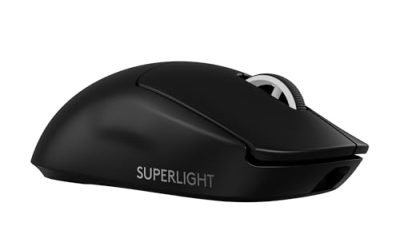
Logitech G Pro X Superlight 2
The Superlight 2 is the safe competitive pick for Call of Duty players who want a proven shape, a very light body, and no distractions. Its symmetrical shell suits claw and fingertip grips, and the low weight makes repeated flicks between angles feel less tiring over a long ranked session. With only five programmable buttons, it keeps the layout simple, so your thumb stays focused on aiming rather than hunting for extra controls. This is the mouse to choose when you want consistency above all else and you already know that a minimal, no-frills design suits your hand.
Specs
- 60g pro-grade lightweight design
- HERO 2 sensor up to 44,000 DPI
- Up to 8kHz report rate
- LIGHTFORCE hybrid switches
- 5 programmable buttons
- USB-C charging
- 888 IPS tracking speed
- Wireless Lightspeed connectivity for PC and Mac
Best for: Ranked and competitive multiplayer players who want a light, simple, proven shape.
Watch out for: Confirm the colour and included receiver in the listing before ordering, since separate colour variants are sold under different listings.
ASIN: B09NBWL8J5
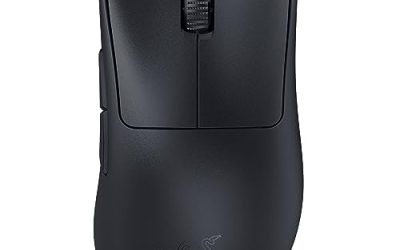
Razer Viper V3 Pro
The Viper V3 Pro is built for players who flick hard, reset fast, and rely on precise crosshair placement in close-quarters fights. At 54 grams it is the lightest mouse in this guide, and its symmetrical shape works well for claw and fingertip grips that need quick lateral movement. The 8K polling dongle is included, so the high report rate is available without a separate purchase, and the long battery rating helps it survive long Warzone evenings. It has no RGB lighting to add weight or distraction, which keeps the focus squarely on speed and tracking.
Specs
- 54g lightweight symmetrical design
- Focus Pro 35K DPI optical sensor
- 8K polling with included HyperPolling dongle
- Gen-3 optical switches
- 8 programmable controls
- Up to 95 hours of battery life
- Wireless connectivity for PC
Best for: Aggressive multiplayer players who flick between targets and prefer a light symmetrical mouse.
Watch out for: Check whether the listing includes the 8K HyperPolling dongle, because polling performance depends on that receiver.
ASIN: B0CW25XR5R
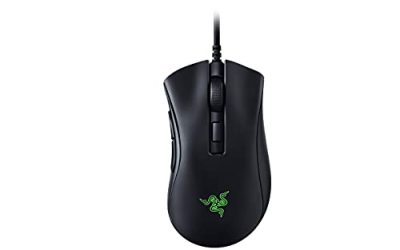
Razer DeathAdder V3 Pro
The DeathAdder V3 Pro suits Call of Duty players with larger hands or a palm grip who find small symmetrical mice cramped during long sessions. Its ergonomic right-handed shell fills the hand more fully, which can steady aim during sustained tracking at medium range and reduce fatigue in Warzone. At 63 grams it remains light for an ergonomic mouse, and the Focus Pro 30K sensor gives clean tracking for both fast turns and careful long-range adjustments. Five programmable buttons keep the layout uncluttered, so accidental presses are less likely when you tense up in a close fight.
Specs
- 63g ultra-lightweight ergonomic design
- Focus Pro 30K optical sensor
- Gen-3 optical switches
- HyperSpeed wireless connectivity
- 5 programmable buttons
- Up to 90 hours of battery life
- USB-C charging
Best for: Palm-grip players and larger hands who want an ergonomic shape for long Warzone sessions.
Watch out for: Confirm the polling rate in the listing you choose, since the standard model and the HyperPolling dongle bundle are sold as separate listings.
ASIN: B0B6XZLNHQ
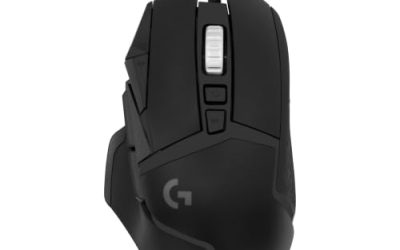
Logitech G502 X Lightspeed
The G502 X Lightspeed is the pick for Call of Duty players who want one mouse for shooting, looting, and managing Warzone loadouts without reaching for the keyboard. Its ergonomic right-handed shape and thumb rest suit palm and claw grips, while thirteen programmable controls give room for mounting, equipment, pings, and scorestreaks. The dual-mode scroll wheel switches between free spin and ratcheting steps, which helps when scrolling through weapons or inventory quickly. It is heavier than the ultralight models here, yet that trade-off buys versatility that pure esports mice deliberately leave out.
Specs
- HERO 25K gaming sensor
- LIGHTFORCE hybrid optical-mechanical switches
- LIGHTSPEED wireless connectivity
- 13 programmable controls
- Up to 140 hours of battery life
- USB-C charging
- Dual-mode scroll wheel with infinite scroll toggle
- PowerPlay wireless charging capable
Best for: Warzone players who want many programmable buttons and long battery life in one ergonomic mouse.
Watch out for: Check the weight and right-handed-only shape before ordering, and confirm that PowerPlay charging needs a separate compatible pad.
ASIN: B092CRH1RX
Which One Fits Your Situation
You play ranked multiplayer and want the most consistent aim
Choose the Logitech G Pro X Superlight 2. Its 60-gram body, HERO 2 sensor, and simple five-button layout remove variables that can distract you during ranked matches. The symmetrical shape suits the claw and fingertip grips that many competitive players use, and the high report rate keeps tracking feeling immediate when you swing between angles on small maps.
You play aggressively and flick between close-range targets
Choose the Razer Viper V3 Pro. At 54 grams it changes direction faster than the other mice here, and the included 8K polling dongle supports the rapid reporting that fast flick aim benefits from. Its symmetrical shape and Gen-3 optical switches suit players who snap onto targets, reset, and snap again without pausing to reposition their hand.
You have larger hands or play long Warzone sessions
Choose the Razer DeathAdder V3 Pro. The ergonomic right-handed shell supports a palm grip through long matches, and the 63-gram weight stays light enough for repeated turns without tiring your wrist. With up to 90 hours of battery life, it is less likely to need charging in the middle of a session than a mouse tuned purely for maximum polling.
You want one mouse for Warzone, loadouts, and everyday use
Choose the Logitech G502 X Lightspeed. Thirteen programmable controls let you map equipment, pings, and stance changes within thumb reach, while the long battery life and ergonomic shape suit extended play. The HERO 25K sensor and LIGHTFORCE switches keep it capable in gunfights, even though it is heavier than the dedicated esports models above.
Common Mistakes
- Choosing the highest DPI setting instead of a comfortable DPI and in-game sensitivity that you can control consistently.
- Buying an ultralight mouse that does not fit your grip, then blaming the sensor when your hand cramps or slips.
- Ignoring polling rate and wireless mode, then playing on Bluetooth or a crowded receiver and wondering why movement feels delayed.
- Mapping too many actions to side buttons and triggering equipment or stance changes by accident in close fights.
- Forgetting to check battery life at high polling rates, where rated hours can drop sharply compared with the standard setting.
Frequently Asked Questions
What DPI should I use for Call of Duty?
Most Call of Duty players use 400 to 1600 DPI with a low to medium in-game sensitivity, because that range gives fine control for tracking without making small movements jump across the screen. Start at 800 DPI, adjust sensitivity until a full comfortable swipe turns you roughly 180 degrees, and then practise with that setting for several matches before changing it again.
Is an 8000 Hz polling rate worth it for Call of Duty?
An 8000 Hz polling rate can make tracking feel smoother and slightly more responsive, especially during fast strafing and flicks. The difference is subtle compared with a stable 1000 Hz connection, and it can reduce battery life noticeably. It is worth having if the dongle is included, but shape, weight, and sensor quality matter more.
Should I use a wired or wireless mouse for Call of Duty?
A modern wireless mouse with a dedicated 2.4 GHz receiver performs well for Call of Duty and removes cable drag during fast movements. Use wired mode through USB-C when you notice interference, when the battery is low, or when you want the most consistent connection in a tournament-style session. Bluetooth is better kept for desktop use rather than competitive play.
How heavy should a Call of Duty mouse be?
Most competitive players prefer 54 to 65 grams, because lighter mice change direction faster and tire the wrist less during repeated flicks. Heavier mice around 100 grams can still work well if the shape fits your grip and you value extra buttons or battery life. Test the shape first, then treat weight as the tiebreaker between two mice that both feel comfortable.
Related guides
More from Amazon
Programs that pair well with the guide above. Offers and eligibility are set by Amazon and may change.
Free shipping on eligible items, Prime Video and more. Eligible new members can start with a free trial.
Start a Prime free trialAd-free music streaming. Eligible new subscribers can start with a free trial.
Try Music Unlimited freeA Prime membership for ages 18-24 with a trial period. Eligibility is set by Amazon.
See Prime for Young AdultsAudiobooks and podcasts to listen to on the go. Eligible new members can start with a free trial.
Try Audible freeAs an Amazon Associate we earn from qualifying purchases.