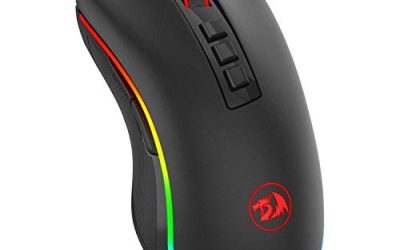
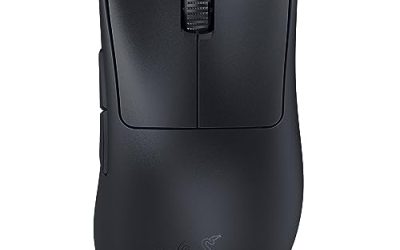
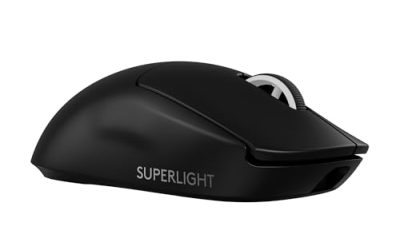
Our Short List of 3

- Best for: Beginners who want many buttons and room to grow.
- Sensor: HERO 25K optical, up to 25,600 DPI
- Buttons: 11 programmable buttons
- Scroll wheel: Dual-mode hyper-fast with tilt left and right
- Weight: 121 grams, plus five 3.6-gram tuning weights

- Best for: Beginners who want a proven comfortable shape.
- Sensor: 6,400 DPI optical sensor
- Buttons: 5 programmable buttons
- Switches: Razer mechanical switches, 10 million-click life
- Weight: 96 grams

- Best for: Smaller hands and players who want color on a budget.
- Sensor: 8,000 DPI gaming-grade optical sensor, 200 to 8,000 DPI
- Buttons: 6 programmable buttons
- Polling rate: 1000 Hz
- Weight: 85 grams
All 4 Picks at a Glance
| Product | Specs | Action |
|---|---|---|
| Logitech G502 HERO |
| Check price on Amazon |
| Razer DeathAdder Essential |
| Check price on Amazon |
| Logitech G203 LIGHTSYNC |
| Check price on Amazon |
 Corsair Harpoon PRO RGB |
| Check price on Amazon |
A first gaming mouse should make games feel easier, not add a new thing to learn. The best beginner mice plug in and work right away, fit the hand without strain, and track smoothly enough that missed shots come from aim, not hardware. They also keep the button layout simple, so a new player can find every control without looking down. This guide gathers five wired mice that do exactly that, each one a solid pick for someone building a first gaming setup.
Every mouse below comes from a major brand with software that is easy to learn, and every one of them works with Windows and macOS through a standard USB connection. We focused on comfort, simple setup, and honest value, leaving out ultralight esports shells and mice that demand hours of tuning before they feel right. Pick the shape that fits your hand, and the rest of this guide will help you match the details.
Our Top Picks
- Logitech G203 Wired Gaming Mouse for Laptop &One Name1.5 x 2.45 x 4.59 inches0.14 poundsCheck on Amazon

Top 3 picks at a glance
Quick Picks
As an Amazon Associate we earn from qualifying purchases
| Product | Best for | Key spec |
|---|---|---|
| Logitech G502 HERO | Button-heavy control | HERO 25K sensor up to 25,600 DPI |
| Razer DeathAdder Essential | Classic comfort | 6,400 DPI optical sensor, 96 grams |
| Logitech G203 LIGHTSYNC | Small hands and color | 8,000 DPI sensor, 85 grams |
| SteelSeries Rival 3 | Light and simple | TrueMove Core sensor, 77 grams |
| Corsair Harpoon PRO RGB | Plug-and-play value | 12,000 DPI sensor, 85 grams |
How to Choose
Comfort and Shape
Shape matters more than any number on the box, because a mouse that fights your hand will tire you out long before a match ends. Palm grip players need a taller shell with room for the whole hand, while claw and fingertip players do better with a shorter, lighter body that lets the fingers steer. Try to match the mouse length to your hand: a shell around 120 mm suits most medium hands, and smaller hands feel more at home near 115 mm. A contoured right-handed shape helps new players settle in fast, while a plain symmetrical shell suits players who switch grips often. A mouse that feels awkward in the first minute rarely feels better later.
Sensor and Sensitivity
The sensor decides how faithfully the mouse follows your hand, and beginners do best with a sensor that tracks cleanly at everyday speeds. Any modern optical sensor from a major brand handles casual and ranked play well, so do not chase the biggest DPI number on the shelf. Most new players settle between 400 and 1600 DPI, changing it in small steps until aiming feels natural. A polling rate of 1000 Hz keeps the cursor smooth, and that figure is standard on every mouse in this guide. What matters most is steady tracking without jumps or spin-outs when you flick across the pad.
Buttons and Software
Two side buttons cover the basics for most beginners: one for a common action, one for a second. Extra buttons help in games with many abilities, but a crowded shell can slow a new player down, so six buttons is a sweet spot for a first mouse. The software matters just as much. Good companion apps let you change DPI steps, reassign buttons, and save settings with a few clicks, and they stay out of the way once setup is done. Look for software with a clear layout and saved profiles, so your settings survive a move to another computer. Avoid mice whose apps demand an account before they let you change a single setting.
Weight and Cable
Weight changes how a mouse feels during long sessions, and lighter is usually easier for a beginner. A mouse near 80 grams feels quick without feeling flimsy, while one near 120 grams can feel steady for players who like a planted hand. Tuning weights, when included, let you add heft in small steps until the balance feels right. Every mouse here is wired, which keeps things simple: no battery to charge, no wireless dropouts, and no pairing step. A flexible cable matters more than it sounds, because a stiff cord can tug the mouse during fast swipes. Keep the cable free of desk edges and let it hang with a little slack.
The 5 Best Options
Logitech G502 HERO
- Best for: Beginners who want many buttons and room to grow.
- Sensor: HERO 25K optical, up to 25,600 DPI
- Buttons: 11 programmable buttons
- Scroll wheel: Dual-mode hyper-fast with tilt left and right
- Weight: 121 grams, plus five 3.6-gram tuning weights
Beginners who want many buttons and room to grow.
The 121-gram body feels heavy for small hands, and some owners report double-click issues over time.
The G502 HERO is the most feature-packed mouse in this guide, and it suits a beginner who wants room to grow. Eleven programmable buttons cover abilities, weapon swaps, and shortcuts without forcing a move to the keyboard, while the dual-mode scroll wheel flips between precise steps and free spinning for long documents and inventory lists. The HERO 25K sensor tracks up to 25,600 DPI with no smoothing, and five tuning weights let the mouse feel heavier or lighter to match your hand. Onboard memory stores up to five profiles, so settings travel with the mouse.
Razer DeathAdder Essential
- Best for: Beginners who want a proven comfortable shape.
- Sensor: 6,400 DPI optical sensor
- Buttons: 5 programmable buttons
- Switches: Razer mechanical switches, 10 million-click life
- Weight: 96 grams
Beginners who want a proven comfortable shape.
Lighting is a single green color rather than full RGB, and settings live in software rather than on the mouse.
The DeathAdder Essential is the classic first gaming mouse, and its strength is a shape that feels right from the first hour. The ergonomic right-handed shell has guided the hands of new players for more than a decade, and the five-button layout keeps things simple: two main clicks, a scroll click, and two thumb buttons for common actions. A 6,400 DPI optical sensor tracks cleanly at the sensitivities most beginners use, and Razer Synapse 3 handles DPI steps and button changes without a steep learning curve. At 96 grams it sits in a comfortable middle ground.
Logitech G203 LIGHTSYNC
- Best for: Smaller hands and players who want color on a budget.
- Sensor: 8,000 DPI gaming-grade optical sensor, 200 to 8,000 DPI
- Buttons: 6 programmable buttons
- Polling rate: 1000 Hz
- Weight: 85 grams
Smaller hands and players who want color on a budget.
The compact shell can feel cramped for large hands, and the rubber cable can drag on the desk.
The G203 LIGHTSYNC is the smallest and friendliest mouse in this guide, and it fits smaller hands better than any other pick here. Its compact egg-shaped shell weighs 85 grams and works well for claw and fingertip grips, while the 8,000 DPI sensor covers every sensitivity a beginner is likely to try. Six programmable buttons give room for a few shortcuts without clutter, and LIGHTSYNC RGB adds color across three zones through Logitech G HUB. Onboard memory keeps your settings on the mouse, so they follow you to another computer.
SteelSeries Rival 3
The Rival 3 is the lightest mouse in this guide at 77 grams, and its simple shape makes it easy to pick up and play. The TrueMove Core sensor tracks 1-to-1 up to 8,500 CPI, which is more than enough for learning aim in shooters and other fast games. Six programmable buttons cover the essentials, and switches built for 60 million clicks give the mouse a long working life. Three-zone Prism RGB lighting adds color without any setup fuss, and SteelSeries Engine software keeps DPI and button changes simple. The ergonomic right-handed shell suits claw and fingertip grips best.
Specs
- Sensor: TrueMove Core optical, 100 to 8,500 CPI
- Buttons: 6 programmable buttons
- Switches: Mechanical switches, 60 million-click life
- Weight: 77 grams
- Polling rate: 1000 Hz
- Lighting: 3-zone Prism RGB
- Tracking: 300 IPS, 35G acceleration
- Cable: 1.8 m rubber cable
Best for: Beginners who want a light mouse with a clean, simple layout.
Watch out for: The rubber cable feels basic next to braided cords, and the small shell may feel tight for large hands.
ASIN: B08176SM7C
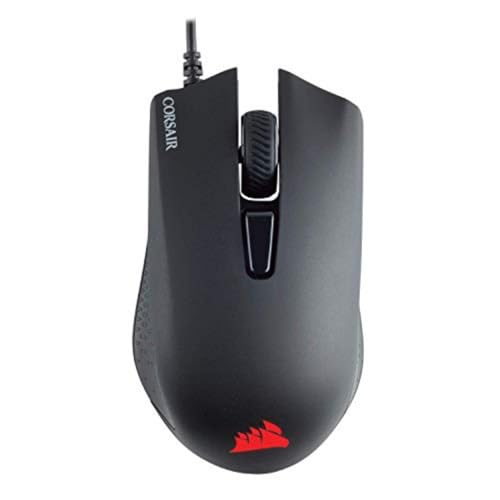
Corsair Harpoon PRO RGB
- Best for: Beginners who want a plug-and-play mouse with no setup fuss.
- Sensor: 12,000 DPI optical sensor
- Buttons: 6 programmable buttons
- Switches: Omron switches, 20 million-click life
- Weight: 85 grams
Beginners who want a plug-and-play mouse with no setup fuss.
Wired only, and six buttons may feel limiting for games with many abilities.
The Harpoon PRO RGB is the easiest mouse in this guide to begin with, because it works the moment you plug it in. No driver install stands between you and your first game, and the contoured shape with rubber side grips holds steady during long sessions. A 12,000 DPI optical sensor tracks smoothly across the sensitivities beginners use most, and six programmable buttons cover common actions without clutter. At 85 grams it stays light enough for quick flicks, and iCUE software is there when you want to change lighting or reassign a button later.
Which One Fits Your Situation
You want the simplest first mouse
The Harpoon PRO RGB and the DeathAdder Essential are the two easiest mice here. Both work as soon as they plug in, with no tuning needed before the first game. The Harpoon suits players who like a light, contoured grip, while the DeathAdder suits players who want a proven ergonomic shell. Either one lets a new player focus on the game instead of the gear.
You have small hands or a light grip
The G203 LIGHTSYNC and the Rival 3 are the best fits for smaller hands. Both weigh under 90 grams and measure near 120 mm long, so they stay easy to lift and steer. The G203 adds colorful lighting and onboard memory, while the Rival 3 is the lighter of the two and keeps its button layout to the essentials. Players with large hands should look at the G502 HERO instead, since its taller shell fills the palm better.
You play many kinds of games
The G502 HERO is the pick for players who jump between shooters, strategy, and role-playing games. Its eleven buttons hold enough shortcuts for ability-heavy games, and the tuning weights let the mouse feel steady for aiming or light for fast turns. The DeathAdder Essential is a solid second choice here, with a comfortable shape that works across genres even though it carries fewer buttons.
You want color and a low learning curve
The G203 LIGHTSYNC and the Rival 3 both bring color without complexity. The G203 lights up three zones through G HUB, and the Rival 3 lights up three zones through SteelSeries Engine, so either one brightens a desk with a few clicks. Both mice keep their button counts low and their shapes simple, which means less time in settings and more time playing. The Harpoon PRO RGB is a third option here, with lighting through iCUE and the simplest setup.
Common Mistakes
- Buying the highest DPI number instead of the shape that fits your hand.
- Choosing a mouse with more buttons than you will use, then fumbling for the right one mid-game.
- Setting sensitivity far too high on day one, then fighting the cursor instead of learning aim.
- Ignoring the cable, then wondering why the mouse drags during fast swipes.
- Skipping the software setup, then missing DPI steps and button changes that make the mouse yours.
Frequently Asked Questions
Do I need a high DPI number as a beginner?
No. Most beginners aim best between 400 and 1600 DPI, and every mouse in this guide tracks cleanly in that range. A bigger maximum DPI looks impressive on the box, but it does not make aiming easier. Pick a comfortable shape first, then change sensitivity in small steps until your aim feels natural.
Is a wired mouse better than a wireless mouse for a first gaming mouse?
For most beginners, yes. A wired mouse needs no charging, no batteries, and no pairing step, so it works every time you plug it in. Wireless mice have become excellent, but they add charging habits and a higher learning curve to a first setup. Begin with wired, learn what shape and weight you like, and consider wireless later once you know your preferences.
How many buttons does a beginner need?
Five or six buttons cover nearly every game a beginner plays. Two main clicks, a scroll click, and two thumb buttons handle shooting, aiming down sights, and common actions. More buttons help in games with many abilities, but they take time to learn and can cause misclicks early on. Grow into extra buttons once the basics feel automatic.
Can I use a gaming mouse for school or office work too?
Yes. Every mouse in this guide works as a normal computer mouse for browsing, documents, and classwork. The extra buttons can hold handy shortcuts like copy, paste, or switching windows, and the smooth sensors make long study sessions easier on the wrist. Just remember that RGB lighting and game profiles are optional extras, not requirements for everyday use.
Related guides
More from Amazon
Programs that pair well with the guide above. Offers and eligibility are set by Amazon and may change.
Free shipping on eligible items, Prime Video and more. Eligible new members can start with a free trial.
Start a Prime free trialAd-free music streaming. Eligible new subscribers can start with a free trial.
Try Music Unlimited freeA Prime membership for ages 18-24 with a trial period. Eligibility is set by Amazon.
See Prime for Young AdultsAudiobooks and podcasts to listen to on the go. Eligible new members can start with a free trial.
Try Audible freeAs an Amazon Associate we earn from qualifying purchases.