The Apple Studio Display is the monitor Apple designs to sit next to a Mac, and the current Amazon listing keeps that focus narrow and clear. It is a 27-inch 5K Retina panel with a built-in 12MP Center Stage camera, a three-microphone array, a six-speaker sound system, and Thunderbolt 5 connectivity with 96W of host charging. The verdict up front: for Mac users who want pixel-perfect scaling, a webcam and speakers good enough to skip extra desk gear, and a single-cable connection to a MacBook or Mac desktop, this is one of the most complete desk displays you can buy. For Windows-first users, high-refresh gaming, or anyone who needs HDMI or DisplayPort inputs, it is the wrong tool, and this review explains why.
This review rests on the product’s Amazon listing and the specifications Apple publishes for it. It is not a practical benchmark report, so every performance statement below traces back to a published specification: resolution, brightness, color gamut, camera hardware, speaker configuration, port selection, and stand mechanics. Where the listing sells the same display in more than one configuration, those variants are named explicitly so you can match the exact listing to the exact hardware.
Quick Picks
As an Amazon Associate we earn from qualifying purchases.
| Product | Best for | Key spec |
|---|---|---|
| Apple Studio Display – Standard Glass, Tilt- and Height-Adjustable Stand | Mac desks that need height adjustment | 27-inch 5K Retina, 5120-by-2880, Thunderbolt 5 |
| Apple Studio Display – Nano-Texture Glass, Tilt-Adjustable Stand | Bright rooms with glare problems | 27-inch 5K Retina, nano-texture glass, Thunderbolt 5 |
Both listings are the same Apple Studio Display model. They differ only in the front glass finish and the stand fitted at the factory, which is why this review covers one product with two configuration listings rather than two separate monitors.
How to Choose
Decide the glass finish before anything else
The display ships with standard glass, which carries an anti-reflective coating, or with nano-texture glass, which etches the surface at the nanometer level to scatter light and cut reflections further. The glass is fixed at purchase and cannot be changed later. If your desk faces windows or sits under strong overhead lighting, nano-texture is the safer long-term choice. In a controlled room, standard glass keeps the image slightly crisper at close viewing distances and is the configuration most buyers should pick.
Pick the stand you will live with
There are three mounting configurations: a tilt-adjustable stand, a tilt- and height-adjustable stand, and a VESA mount adapter. The tilt stand adjusts from -5 degrees to +25 degrees and nothing more. The height-adjustable version adds 105 mm of travel on a counterbalancing arm. The VESA version has no stand at all and mounts to any 100 x 100 mm arm or wall mount, in landscape or portrait. None of these can be swapped after purchase without a service visit, so choose based on your desk setup today, not the one you imagine building later. If you already own a monitor arm you like, the VESA configuration is the cleanest path.
Confirm your Mac is compatible
The Studio Display is built for Macs, and the listing’s compatibility notes tie its full feature set, including Center Stage and Desk View, to Apple silicon Macs and recent Intel models running current macOS versions. The connection is Thunderbolt, and the display draws its video signal over that single cable. Windows PCs with Thunderbolt ports can drive the panel as a basic display in many cases, but the camera features, True Tone behavior, and firmware update path are designed around macOS, so Windows-first buyers should treat this as a Mac accessory rather than a general-purpose monitor.
Count the ports against your desk gear
The current listing generation provides Thunderbolt 5 connectivity, with an upstream port that connects to your Mac and delivers up to 96W of charging power, plus downstream ports for peripherals such as external drives, an Ethernet adapter, or a second device you want to charge. There is no HDMI and no DisplayPort input. If your setup includes a game console, a Windows tower without Thunderbolt, or a capture device that expects HDMI, plan on keeping a second display or a separate hub workflow, because this panel will not take those signals directly.
Weigh the built-in camera and audio honestly
Most standalone monitors ship with no camera, no microphones, and speakers that are an afterthought. The Studio Display builds in a 12MP Ultra Wide camera with Center Stage framing and Desk View, a three-mic array tuned for voice clarity, and a six-speaker system with force-cancelling woofers and Spatial Audio playback. If you take video calls daily and listen to music or video at your desk, these built-ins can replace a webcam, a USB microphone, and a set of desktop speakers. If you already own dedicated gear you prefer, you are paying for hardware you will rarely use, and that should factor into the decision.
Full Review
Apple Studio Display
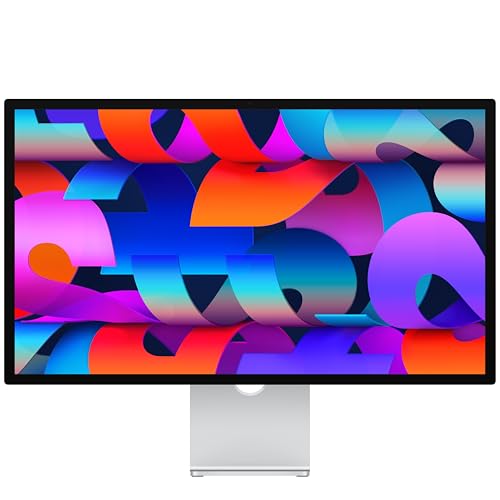
The first thing the specifications make clear is that the panel is the product. The 27-inch 5K Retina display runs at 5120-by-2880 resolution with 218 pixels per inch, which is the density macOS is tuned for: at the default scaled setting, text and interface elements render at the same physical size as a lower-resolution screen while drawing on the full pixel grid, so edges stay sharp instead of slightly soft. Brightness is rated at 600 nits, support extends to one billion colors, and the panel covers the P3 wide color gamut with True Tone, which adjusts white point to match ambient light. For photo editing, interface design, video work in P3 pipelines, and long days of reading text, those numbers translate into a screen that is easy on the eyes and consistent with the built-in displays on modern MacBook Pro and iMac models.
The refresh rate is 60Hz, and that single figure defines the display’s limits for gaming. There is no adaptive sync branding, no high-refresh mode, and no HDMI input for consoles. On gamingpcsi we look at a lot of panels built around speed; this one is built around density and color instead. Strategy games, simulation titles, and casual play look superb at 5K, but competitive players who chase high frame rates should pair their Mac or PC with a dedicated gaming monitor and treat the Studio Display as a work screen. Judged on what it claims to be, a color-accurate creative and productivity display, the specification sheet is strong. Judged as a gaming panel, it was never entered in that race.
Build quality follows Apple’s usual pattern. The enclosure is aluminum, the bezels are slim and even, and the whole unit has the dense, single-piece feel of Apple’s other displays. With the tilt-adjustable stand it stands 18.8 inches tall and weighs 13.9 pounds; the tilt- and height-adjustable version weighs 16.9 pounds because of the counterbalancing arm mechanism. The stand attaches permanently in the configuration you order, and the VESA configuration replaces it with a mount adapter that keeps the panel just 1.2 inches deep. Cable management is minimal by design: one Thunderbolt cable runs from the back of the display to your Mac, and that cable also carries the 96W charging power that keeps a MacBook Pro topped up while you work.
The camera system is the feature that separates this display from most rivals. The 12MP Ultra Wide camera supports Center Stage, which pans and zooms digitally to keep you framed as you move, and Desk View, which uses the wide field of view to show your face and an overhead view of your desk at the same time. For tutors, presenters, and anyone who demos physical products or sketches on calls, Desk View replaces a second overhead camera. The three-mic array is specified for voice isolation on calls and recordings, and in a typical home office it removes the need for a separate USB microphone for meetings, classes, and podcast-style voice work at a desk.
Audio gets similar attention. The six-speaker system pairs high-excursion woofers with force-cancelling drivers so the thin enclosure can produce bass without buzzing against the desk, and it supports Spatial Audio with Dolby Atmos playback for music and video. The practical result, per the stated design, is a display that can fill a small room with sound for video and casual listening, which is rare in the monitor category. It will not replace a proper pair of bookshelf speakers for critical listening, but it removes the default assumption that monitor audio is unusable.
Connectivity on the current listing generation centers on Thunderbolt 5. One upstream port connects to the host Mac and delivers up to 96W of power, enough for any Mac notebook Apple sells. Downstream ports let you plug storage, input devices, or a phone into the display itself, turning it into a small docking station that wakes and sleeps with the screen. The box includes the display with your chosen stand or mount adapter and a 1 m Thunderbolt 5 Pro Cable; nano-texture configurations also include a polishing cloth, which is the only cloth Apple approves for cleaning that glass. Firmware updates arrive through macOS when the display is connected to a Mac, another reminder that this product lives inside Apple’s ecosystem.
Specs
- Display: 27-inch 5K Retina, 5120-by-2880 at 218 ppi
- Brightness: 600 nits
- Color: P3 wide color, support for one billion colors, True Tone
- Refresh rate: 60Hz
- Camera: 12MP Ultra Wide with Center Stage and Desk View
- Audio: three-mic array, six-speaker system with Spatial Audio
- Ports: Thunderbolt 5 upstream with 96W host charging, plus downstream USB-C and Thunderbolt ports for peripherals
- Stands: tilt-adjustable (-5 to +25 degrees), tilt- and height-adjustable (105 mm travel), or VESA mount adapter (100 x 100 mm)
- Glass options: standard glass with anti-reflective coating, or nano-texture glass
- In the box: display with chosen stand or adapter, Thunderbolt 5 Pro Cable (1 m), polishing cloth with nano-texture models
Best for: Mac users who want a single-cable desk setup with a sharp 5K panel, a genuinely good webcam and microphone, and speakers that make external audio gear optional.
Watch out for: The stand and glass are fixed at purchase, there are no HDMI or DisplayPort inputs, and the 60Hz panel is not aimed at high-refresh gaming. Windows users get a basic display experience without the camera features and update path that justify the design.
Which One Fits Your Situation
If you work at a fixed desk with a monitor arm already installed, the VESA configuration is the fit: you keep your arm’s full range of motion, including portrait rotation for code or documents, and the panel sits as close to the wall as the mount allows. If your desk is a simple table and your chair height is set once and forgotten, the standard tilt stand covers most people, provided the screen lands near eye level without books or risers underneath it.
If two people share the same desk, or you alternate between sitting and a standing desk converter, the tilt- and height-adjustable stand earns its place. The 105 mm of travel and counterbalanced arm make small adjustments effortless, which matters more over a year of daily use than it does in a showroom. That is the configuration listed first in this review, and it is the one we would point most buyers toward.
If your room has a window behind your chair or bright ceiling lights, nano-texture glass is the configuration to prioritize, even over the stand upgrade, because reflections are the one flaw you cannot fix later with accessories. And if your work is Windows-based, or your evenings are competitive gaming sessions, the honest answer is that a different monitor fits your situation better, no matter which configuration of this one you pick.
Common Mistakes
- Ordering the tilt-only stand and discovering your desk sits too low, then stacking the display on books instead of choosing the height-adjustable or VESA configuration at purchase.
- Choosing standard glass for a sunlit room and fighting reflections every afternoon, when nano-texture exists specifically for that lighting.
- Expecting to plug in a console, a Windows PC without Thunderbolt, or a capture card, when the panel accepts only a Thunderbolt video signal.
- Cleaning nano-texture glass with a generic microfiber cloth or household cleaner instead of the included polishing cloth, which can damage the etched surface.
- Assuming the built-in speakers replace a home theater or studio monitors for critical listening, rather than treating them as excellent desk audio.
- Buying it primarily for high-refresh gaming, when the 60Hz specification and input selection were designed for creative and office work.
Frequently Asked Questions
Does the Apple Studio Display work with a Windows PC?
It can light up as a display from many Windows machines with Thunderbolt output, but the listing positions it as a Mac display. Center Stage, Desk View, True Tone behavior, brightness control from the keyboard, and firmware updates all run through macOS. If your main machine is a Windows PC, a general-purpose 5K or 4K monitor serves you better.
What is the difference between the two ASINs in this review?
They are the same Apple Studio Display model sold as separate configuration listings. One listing is standard glass with the tilt- and height-adjustable stand; the other is nano-texture glass with the tilt-adjustable stand. The panel, camera, microphones, speakers, and ports are identical. Pick by glass finish and stand, not by performance.
Can I change the stand later?
Not as a user swap. The stand or VESA adapter is fitted to the configuration you order, and changing it requires an Apple service appointment with the correct replacement part. That is why the stand decision deserves real thought before ordering, especially if you might adopt a monitor arm later.
Does the Studio Display charge a MacBook?
Yes. The upstream Thunderbolt connection delivers up to 96W of power, which covers the charging needs of every Mac notebook in Apple’s current lineup, including the larger MacBook Pro models under load. One cable carries video, data, camera and audio signals, and power.
Is the Studio Display good for gaming?
For slow-paced, visually rich games, the 5K panel looks excellent. For anything competitive, the 60Hz refresh rate and the lack of HDMI or DisplayPort inputs make it a poor fit. It is a creative and productivity display first, and this review scores it on that basis.
The Apple Studio Display succeeds by being complete rather than configurable: a reference-grade 5K panel, a camera and microphone setup that embarrasses most webcams, speakers worth using, and one cable to a Mac. Choose the glass for your room, choose the stand for your desk, and it settles into a Mac setup and disappears, which is exactly what a great monitor should do.
Related guides
More from Amazon
Programs that pair well with the guide above. Offers and eligibility are set by Amazon and may change.
Free shipping on eligible items, Prime Video and more. Eligible new members can start with a free trial.
Start a Prime free trialAd-free music streaming. Eligible new subscribers can start with a free trial.
Try Music Unlimited freeA Prime membership for ages 18-24 with a trial period. Eligibility is set by Amazon.
See Prime for Young AdultsAudiobooks and podcasts to listen to on the go. Eligible new members can start with a free trial.
Try Audible freeAs an Amazon Associate we earn from qualifying purchases.