Our Short List of 3

- Best for: The reader who came for this exact mouse — a flat, light Bluetooth mouse that slips into a laptop sleeve, pairs without a dongle, and matches a Surface-style setup.
- Brand: Microsoft
- Model: KGY-00001
- Color: Silver
- Connection: Bluetooth, no cords or dongle required

- Best for: Travelers who want the quietest clicks in the bag — a slim Bluetooth mouse that switches between a laptop and a tablet and will not disturb a quiet carriage or meeting room.
- Brand: Logitech
- Series: M350s
- Model: 910-007168
- Color: Black

- Best for: The gaming reader who travels — a pocketable wireless mouse with a real gaming sensor and mechanical switches that still runs for months on a single battery.
- Brand: Razer
- Series: Orochi V2
- Model: RZ01-03730100-R3U1
- Color: Classic Black
All 5 Picks at a Glance
| Product | Specs | Action |
|---|---|---|
| Microsoft Surface Mobile Mouse (Silver) |
| Check price on Amazon |
| Logitech Pebble Mouse 2 M350s (Black) |
| Check price on Amazon |
| Razer Orochi V2 (Classic Black) |
| Check price on Amazon |
 Logitech MX Anywhere 3S (Graphite) |
| Check price on Amazon |
 Logitech M240 Silent (Graphite) |
| Check price on Amazon |
This review looks at the Microsoft Surface Mobile Mouse on its own terms and against four portable wireless mice that compete for the same spot in a laptop bag. The real decision is whether a slim 2018 Bluetooth mouse that needs no dongle still earns that spot, or whether a newer rival with quieter clicks, a rechargeable battery, multi-device switching or a gaming-grade sensor serves daily travel better. Each pick below is a compact wireless mouse sold on its own listing, so the comparison stays in one class.
The picks serve commuters who pair a mouse with a thin laptop, hybrid workers moving between a desk and a kitchen table, students working in quiet libraries, and gamers who want a second mouse for the road. Every mouse here was chosen from the name and specifications published on its Amazon page, with connection type, battery approach, size and tracking details taken from the listing rather than from brand marketing or outside reviews.
Our Top Picks
Top 3 picks at a glance
Quick Picks
As an Amazon Associate we earn from qualifying purchases
| Product | Best for | Key spec from title |
|---|---|---|
| Microsoft Surface Mobile Mouse (Silver) | The exact mouse under review | Bluetooth, no dongle needed |
| Logitech Pebble Mouse 2 M350s (Black) | Quiet clicks on the move | Silent Touch quiet clicks |
| Razer Orochi V2 (Classic Black) | Gaming on the road | 18K DPI optical sensor |
| Logitech MX Anywhere 3S (Graphite) | Premium all-surface tracking | 8K DPI, tracks on glass |
| Logitech M240 Silent (Graphite) | A low-cost bag spare | 18-month battery life |
How to Choose
Connection type and pairing
Start with how the mouse connects, because that decides what it can pair with and what it leaves behind. A Bluetooth-only mouse frees every USB port and needs no receiver to lose in a bag, which suits modern laptops with few ports. A mouse with a 2.4 GHz mode as well adds a fallback for desktops or older machines without Bluetooth. Multi-device switching matters if the same mouse moves between a laptop and a tablet during the day. Check the listing’s stated compatibility too, since a mouse aimed at Windows may still pair with macOS, Chrome OS or iPadOS, and the listing is the place that confirms it.
Size, shape and hand fit
Travel mice trade palm support for portability, so the shape question is how long the mouse stays in the hand each day. A very flat shell slides into a laptop sleeve and works well for short sessions, short hops between meetings and fingertip control. A slightly taller sculpted shell supports the hand better through a full workday but takes more bag space. Ambidextrous shapes suit either hand and shared family laptops, while right-handed sculpted designs fit one hand only. Compare the listed dimensions and weight where the listing states them, and treat a compact shell as a short-session tool if large hands or long days are the norm.
Battery approach and life
Every pick here powers itself differently, and the right choice depends on how the mouse gets used away from home. Replaceable batteries keep a mouse running for months and recover instantly with a spare cell, but they add a small errand when the cell dies mid-trip. A rechargeable mouse removes that errand and charges from the same USB-C cable as the laptop, yet it is useless while flat unless it can work wired. Stated battery life varies widely between listings, from a year to well over it, so compare the figures each listing actually prints rather than assuming the class is uniform.
Tracking, clicks and extra controls
Tracking decides where the mouse works and how precise it feels. Higher DPI figures and any-surface sensors keep a cursor steady on glass desks, glossy tables and other surfaces that defeat basic optical tracking, while a fixed office-grade DPI is fine on a desk mat. Click noise matters in libraries, shared offices and late-night rooms, and several listings here state a measured reduction in click sound. Extra controls such as programmable buttons, a customizable middle button and fast scrolling help with long documents and spreadsheets. Match these features to the actual work instead of paying for a gaming sensor that only ever moves a cursor through email.
The 5 Best Options
Microsoft Surface Mobile Mouse (Silver)
- Best for: The reader who came for this exact mouse — a flat, light Bluetooth mouse that slips into a laptop sleeve, pairs without a dongle, and matches a Surface-style setup.
- Brand: Microsoft
- Model: KGY-00001
- Color: Silver
- Connection: Bluetooth, no cords or dongle required
The reader who came for this exact mouse — a flat, light Bluetooth mouse that slips into a laptop sleeve, pairs without a dongle, and matches a Surface-style setup.
A 2018 design — no USB-C charging (it runs on replaceable batteries), no side buttons and no multi-device switching; the very flat shape gives little palm support on long days; sold per color on separate listings, so confirm the Silver KGY-00001 listing is the one in the cart.
The anchor of this review is Microsoft’s own travel mouse, sold here in Silver as model KGY-00001. Its pitch is simplicity: a light, flat Bluetooth mouse that pairs with a Windows laptop with no cords and no dongle to keep track of. The listing states a 12-month average battery life on replaceable batteries, which suits a mouse that lives in a sleeve and comes out for short sessions. There are no side buttons and no multi-device switching, and the design dates from 2018, so the question is whether the clean, minimal shape still beats newer rivals that add quieter clicks or rechargeable power.
Watch out for: A 2018 design — no USB-C charging (it runs on replaceable batteries), no side buttons and no multi-device switching; the very flat shape gives little palm support on long days; sold per color on separate listings, so confirm the Silver KGY-00001 listing is the one in the cart.
Logitech Pebble Mouse 2 M350s (Black)
- Best for: Travelers who want the quietest clicks in the bag — a slim Bluetooth mouse that switches between a laptop and a tablet and will not disturb a quiet carriage or meeting room.
- Brand: Logitech
- Series: M350s
- Model: 910-007168
- Color: Black
Travelers who want the quietest clicks in the bag — a slim Bluetooth mouse that switches between a laptop and a tablet and will not disturb a quiet carriage or meeting room.
The flat pebble shape is minimal support for large hands or all-day desktop use; Bluetooth-only pairing (the Logi Bolt receiver is a separate purchase on this listing family); confirm the Black 910-007168 variant — every color is a separate ASIN.
Logitech’s Pebble Mouse 2 M350s, sold here in Black as model 910-007168, takes the same slim idea and updates it around quiet work. Its Silent Touch clicks are stated to reduce click noise by 90 percent, and Easy-Switch pairing lets it move between devices such as a laptop and a tablet. A customizable button adds a shortcut layer the anchor lacks. The shell is deliberately pebble-flat and lightweight, which keeps it bag-friendly but minimal under the palm. For buyers comparing it directly with the Surface Mobile Mouse, the Pebble is the newer, quieter take on the same flat travel shape.
Watch out for: The flat pebble shape is minimal support for large hands or all-day desktop use; Bluetooth-only pairing (the Logi Bolt receiver is a separate purchase on this listing family); confirm the Black 910-007168 variant — every color is a separate ASIN.
Razer Orochi V2 (Classic Black)
- Best for: The gaming reader who travels — a pocketable wireless mouse with a real gaming sensor and mechanical switches that still runs for months on a single battery.
- Brand: Razer
- Series: Orochi V2
- Model: RZ01-03730100-R3U1
- Color: Classic Black
The gaming reader who travels — a pocketable wireless mouse with a real gaming sensor and mechanical switches that still runs for months on a single battery.
Battery-life figure is the listing’s headline maximum and depends on the wireless mode used; the small shell suits fingertip/claw grips, not palm-grip desktop play; no charging cable routine — it uses a replaceable battery (AA or AAA slot, per the model design), so carry a spare.
The Orochi V2 is the gaming entry in this travel class, sold in Classic Black as model RZ01-03730100-R3U1. Razer built it as a mobile gaming mouse, so it pairs a compact, ultra-lightweight shell with a 5G Advanced optical sensor rated at 18K DPI and mechanical switches. It also offers two wireless modes, HyperSpeed 2.4 GHz and Bluetooth, which covers gaming laptops and port-poor ultrabooks alike. The listing’s headline battery figure runs up to 950 hours, and power comes from a replaceable battery. For a gaming-PC audience, this is the pick that treats travel as a place to keep playing rather than a pause.
Watch out for: Battery-life figure is the listing’s headline maximum and depends on the wireless mode used; the small shell suits fingertip/claw grips, not palm-grip desktop play; no charging cable routine — it uses a replaceable battery (AA or AAA slot, per the model design), so carry a spare.
Logitech MX Anywhere 3S (Graphite)
- Best for: The premium travel pick — one compact mouse that tracks on a hotel glass desk, scrolls fast through long documents, and recharges over USB-C instead of eating spare batteries.
- Brand: Logitech
- Model: 910-006925
- Color: Graphite
- Connection: Bluetooth, with Logi Bolt receiver support
The premium travel pick — one compact mouse that tracks on a hotel glass desk, scrolls fast through long documents, and recharges over USB-C instead of eating spare batteries.
The most expensive class of pick here; right-handed sculpted shape only; the Graphite, Pale Grey and for-Mac versions are separate listings with separate ASINs — confirm 910-006925 before buying.
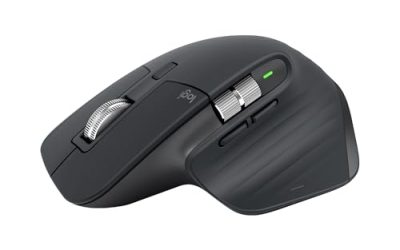
The MX Anywhere 3S is the premium compact pick, sold in Graphite as model 910-006925. Its 8K DPI sensor is stated to track on virtually any surface, glass included, which is exactly the surface a hotel desk or cafe table tends to offer. Quiet clicks, programmable buttons and a MagSpeed fast-scrolling wheel bring desktop-grade controls into a travel shell, and charging is over USB-C, so it tops up from the laptop’s own cable instead of consuming spare batteries. Bluetooth pairing plus Logi Bolt receiver support covers most laptops. It costs more than the rest of this list, and the shape is right-handed only.
Watch out for: The most expensive class of pick here; right-handed sculpted shape only; the Graphite, Pale Grey and for-Mac versions are separate listings with separate ASINs — confirm 910-006925 before buying.
Logitech M240 Silent (Graphite)
- Best for: The simple, low-cost travel spare — a small silent Bluetooth mouse to keep permanently in the laptop bag so the main desk mouse never has to travel.
- Brand: Logitech
- Model name: M240 Silent
- Model number: 910-007113
- Color: Graphite
The simple, low-cost travel spare — a small silent Bluetooth mouse to keep permanently in the laptop bag so the main desk mouse never has to travel.
Bluetooth only — a desktop without Bluetooth cannot use it; 1000 DPI fixed tracking is office-grade, not gaming-grade; compact ambidextrous shell is tight for large hands; no side buttons.
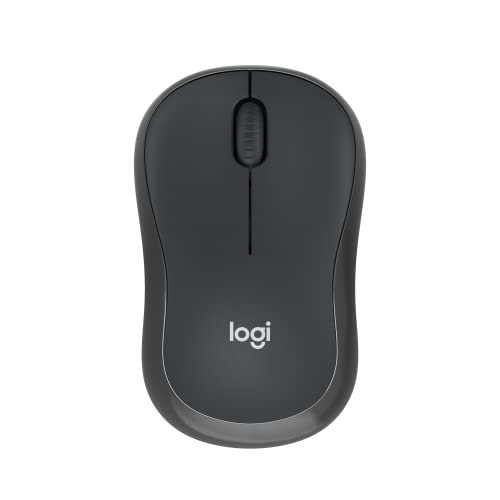
The M240 Silent, sold in Graphite as model 910-007113, is the straightforward spare: a compact Bluetooth mouse with silent clicks and an 18-month battery life, with the battery pre-installed and auto sleep to stretch it further. The listing states a 90 percent reduction in click sound and smooth tracking at a 1000 DPI maximum, which is office-grade rather than gaming-grade. At 3.9 x 2.36 x 1.54 inches and 2.6 ounces, it is small enough to live permanently in a laptop bag. Compatibility spans Windows, macOS, ChromeOS, Linux and iPadOS, so it can stand in for almost any machine in the house.
Watch out for: Bluetooth only — a desktop without Bluetooth cannot use it; 1000 DPI fixed tracking is office-grade, not gaming-grade; compact ambidextrous shell is tight for large hands; no side buttons.
Which One Fits Your Situation
Working from trains, cafes and hot desks
Unpredictable surfaces and close neighbours define this work, so tracking and click noise matter more than raw speed. A mouse whose listing promises any-surface tracking keeps the cursor steady on glass and glossy tables, while quiet clicks keep the peace in a carriage or shared space. Bluetooth pairing avoids leaving a receiver in a shared desk. The MX Anywhere 3S and the Pebble Mouse 2 M350s fit this pattern best, one for its sensor and one for its silence.
Splitting time between a laptop and a tablet
A mouse that serves two devices has to move between them without a fresh pairing ritual each time. Multi-device switching, like the Easy-Switch pairing on the Pebble Mouse 2 M350s, turns that move into a button press. Check the listing’s compatibility lines before buying, since tablet operating systems such as iPadOS and Android appear on some listings and not others. A slim shell helps too, because this mouse rides along all day rather than sitting on one desk.
Gaming away from the main desk
Travel gaming asks a small mouse to do a big mouse’s job. The Orochi V2 answers with a gaming sensor, mechanical switches and a 2.4 GHz mode for responsive play, while its Bluetooth mode covers office work on the same trip. Its compact shell suits fingertip and claw grips, so palm-grip players should expect an adjustment. Carrying a spare battery keeps the headline battery life from becoming a mid-trip errand at the worst moment.
Keeping a spare mouse in the bag
A bag spare should be cheap to forget about and ready the moment the main mouse fails. Long stated battery life, a pre-installed battery and auto sleep make the M240 Silent close to maintenance-free, and its small shell takes almost no room. The Surface Mobile Mouse plays a similar role for Windows users who want the sleeve-flat shape. Either way, a spare that pairs over Bluetooth needs no receiver slot in the bag and no port on the laptop.
Common Mistakes
- Assuming every color of a mouse shares one listing — colors are sold on separate listings with separate codes, so check the exact color and model number in the cart before ordering.
- Buying a Bluetooth-only mouse for a desktop that has no Bluetooth, then discovering it needs a receiver the listing never included.
- Expecting a flat travel shell to support the palm through full workdays — compact mice are short-session tools, and long days call for a taller shape.
- Repeating battery or sensitivity figures from reviews or old packaging instead of the figures the current listing actually states, since listings change between revisions.
- Leaving the spare mouse in the bag for a year without checking its battery, so the backup is flat on the one day it is needed.
Frequently Asked Questions
Does the Surface Mobile Mouse need a USB receiver?
No. Its listing describes a Bluetooth connection with no cords or dongle required, so it pairs directly with a compatible Windows 10 or later laptop or PC. That makes it a clean fit for laptops with few ports, since nothing has to plug in and nothing small and losable travels with it. The trade-off is that a machine without Bluetooth has no fallback way to connect this mouse.
Can these mice work with a tablet as well as a laptop?
Several can, based on their listings. The Pebble Mouse 2 M350s lists iPadOS and Android among its supported systems alongside Windows and macOS, and the M240 Silent lists iPadOS as well. The Surface Mobile Mouse is the exception: its listing states Windows 10 or later only. Always match the tablet’s operating system against the compatibility line on the exact listing being bought, because support varies by model.
Which of these mice recharge instead of using replaceable batteries?
Only the MX Anywhere 3S charges over USB-C, per its listing. The Surface Mobile Mouse, Orochi V2 and M240 Silent run on replaceable or pre-installed batteries, with stated lives from 12 months to 18 months and, for the Orochi V2, up to 950 hours. The Pebble Mouse 2 listing captured here states no battery figure. Decide which routine suits the trip before buying.
Is a compact travel mouse comfortable for full workdays?
For most people, only up to a point. Flat shells like the Surface Mobile Mouse and the Pebble Mouse 2 give little palm support, fine for short sessions but tiring across an eight-hour day. The sculpted MX Anywhere 3S supports the hand better while staying compact. Many people keep a travel mouse for the road and a full-size mouse at the desk instead.
Related guides
More from Amazon
Programs that pair well with the guide above. Offers and eligibility are set by Amazon and may change.
Free shipping on eligible items, Prime Video and more. Eligible new members can start with a free trial.
Start a Prime free trialAd-free music streaming. Eligible new subscribers can start with a free trial.
Try Music Unlimited freeA Prime membership for ages 18-24 with a trial period. Eligibility is set by Amazon.
See Prime for Young AdultsAudiobooks and podcasts to listen to on the go. Eligible new members can start with a free trial.
Try Audible freeAs an Amazon Associate we earn from qualifying purchases.