Our Short List of 3

- Best for: Competitive players who want a light, symmetrical wireless mouse with a high-end sensor.
- 60g pro-grade design
- HERO 2 sensor with 44,000 DPI
- 8kHz report rate
- LIGHTFORCE hybrid switches

- Best for: Left-handed players and shared setups where the mouse must work equally well for either hand.
- True ambidextrous build
- Up to 4 customizable and switchable magnetic side buttons
- HERO 2 sensor with 44K DPI
- LIGHTSPEED wireless
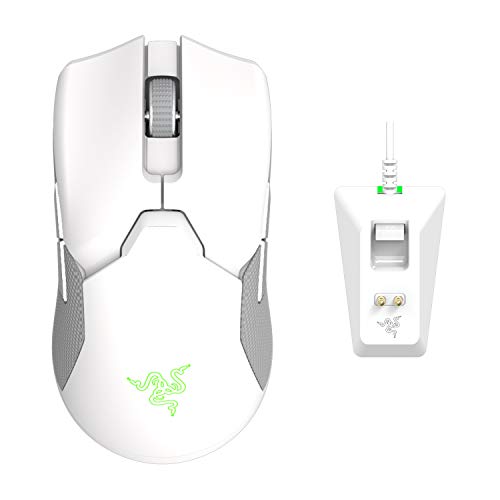
- Best for: Desk players who want an ambidextrous wireless mouse that charges on a dock between sessions.
- Ambidextrous design for left- and right-handed users
- 20K DPI optical sensor
- 74g lightweight body
- Optical mouse switches
All 3 Picks at a Glance
| Product | Specs | Action |
|---|---|---|
| Logitech G PRO X Superlight 2 |
| Check price on Amazon |
| Logitech G PRO 2 Lightspeed |
| Check price on Amazon |
| Razer Viper Ultimate |
| Check price on Amazon |
Choosing an ambidextrous wireless gaming mouse is really a choice about symmetry that works for both hands. A shape that looks balanced on a product page can still feel wrong once your thumb rests on a side button, your ring finger drags on a curved edge, or your palm slides forward during a long match. Wireless freedom adds another layer, because connection stability, sensor tracking, and battery endurance all have to hold up while the mouse moves fast and changes direction without warning.
This guide is for left-handed players, right-handed players who prefer a symmetrical shell, and anyone who shares a setup with someone who uses the opposite hand. It is also for fingertip and claw grip players who want a narrow, even body rather than a sculpted right-handed curve. The four mice below were chosen from Amazon titles and specifications, with attention to shape, sensor capability, switch design, programmable controls, and wireless connection.
Our Top Picks
- Logitech G Pro X Superlight 2 Lightspeed WirelessClassic1.57 x 2.5 x 4.92 inches0.1 poundsCheck on Amazon
Top 3 picks at a glance
Quick Picks
As an Amazon Associate we earn from qualifying purchases
| Product | Best for | Key spec from title |
|---|---|---|
| Logitech G PRO X Superlight 2 | Fast competitive play with a symmetrical shell | 44k DPI sensor, 8kHz report rate |
| Razer Viper V3 Pro | Long sessions with a light symmetrical body | 35K DPI optical sensor, 95 Hr battery |
| Logitech G PRO 2 Lightspeed | Switching between left-hand and right-hand use | 44K DPI sensor, switchable magnetic side buttons |
| Razer Viper Ultimate | Desk play with a charging dock included | 20K DPI optical sensor, RGB charging dock |
How to Choose
Start with the shape, not the sensor
A symmetrical outline does not guarantee comfort for both hands, so look at where the side buttons sit and how the sides curve. Some ambidextrous mice place buttons on both sides, while others offer buttons on one side only and rely on software to remap them. A narrow waist helps fingertip players lift and reposition quickly, while a slightly wider middle gives palm players more contact. If you play with your left hand, check whether the side buttons can move or be removed, because a fixed button under your ring finger can cause accidental clicks during tense moments.
Match the sensor to your movement style
High maximum DPI numbers matter less than clean tracking at the sensitivity you actually use. A strong modern sensor should hold its line during fast flicks, recover quickly after a lift, and stay steady during slow, precise aiming. Players who use a low sensitivity and sweep across a large pad need a sensor that handles long, fast strokes without skipping. Players who use a high sensitivity and small movements need fine control at the low end. Look for the sensor name and polling capability in the Amazon listing, then match those details to the way your hand already moves.
Think about weight and balance
Weight changes how a mouse starts, stops, and lifts, and balance matters as much as the total number. A light mouse can feel quick during flicks, yet it can also feel harder to control if the weight sits toward the rear. A slightly heavier shell can feel steadier during tracking, especially for players who rest part of their palm on the mouse. Check the listed weight, then think about where your grip puts pressure. Fingertip players often prefer a lighter body, while claw players may accept a little more mass in exchange for stability.
Check buttons, battery, and charging
Side buttons, main switches, and battery life shape daily use more than most buyers expect. Count the programmable buttons and confirm whether they sit on both sides or only one. Optical or hybrid switches can change click feel and durability, so note the switch type named in the listing. Battery life matters for players who forget to plug in, and a charging dock or USB-C charging can make the routine simpler. A mouse with a dock stays ready on the desk, while a mouse with a long battery span suits travel and shared setups.
The 4 Best Options
Logitech G PRO X Superlight 2
- Best for: Competitive players who want a light, symmetrical wireless mouse with a high-end sensor.
- 60g pro-grade design
- HERO 2 sensor with 44,000 DPI
- 8kHz report rate
- LIGHTFORCE hybrid switches
Competitive players who want a light, symmetrical wireless mouse with a high-end sensor.
The symmetrical shell has no sculpted thumb rest, so players who lean on a contoured grip may need time to adjust.
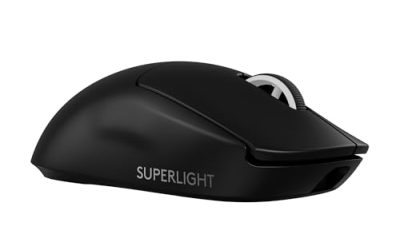
The Logitech G PRO X Superlight 2 suits players who want a clean symmetrical shape without extra bulk or a sculpted side. Its low-profile body supports fast movement and stable control, and the five programmable buttons give enough room for common in-game actions without crowding the sides. The HERO 2 sensor and high report rate support quick flicks and precise tracking, while LIGHTFORCE hybrid switches aim for a crisp click feel. USB-C charging keeps the setup simple, and the lightweight build helps during long sessions when the hand moves constantly.
Razer Viper V3 Pro
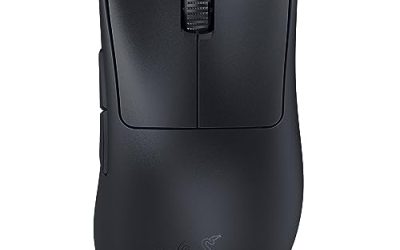
The Razer Viper V3 Pro is built around a symmetrical body that aims for balance and control during fast, precise play. Its light frame helps the hand change direction quickly, and the eight programmable controls give room for abilities, weapons, and utility commands. The optical sensor supports high DPI tracking, while the high polling capability supports smooth cursor movement during rapid flicks. Gen-3 optical switches provide a distinct click response, and the long battery span supports extended play without frequent charging.
Specs
- Symmetrical design
- 54g lightweight body
- 35K DPI optical sensor
- 8K polling
- Gen-3 optical switches
- 8 programmable buttons
- 95 Hr battery
- Wireless esports gaming mouse
Best for: Players who want a very light symmetrical mouse for fast aiming and long sessions.
Watch out for: The slim symmetrical body may feel small for players with large hands who prefer a fuller palm fill.
ASIN: B0CW25XR5R
Logitech G PRO 2 Lightspeed
- Best for: Left-handed players and shared setups where the mouse must work equally well for either hand.
- True ambidextrous build
- Up to 4 customizable and switchable magnetic side buttons
- HERO 2 sensor with 44K DPI
- LIGHTSPEED wireless
Left-handed players and shared setups where the mouse must work equally well for either hand.
Unused magnetic button slots need care during setup, so confirm the button layout before a first match.
The Logitech G PRO 2 Lightspeed stands out because its ambidextrous design is built for real left-hand and right-hand use. Up to four magnetic side buttons can be switched and customised, so a left-handed player can place controls where the thumb actually rests instead of accepting a mirrored layout that never quite fits. The HERO 2 sensor supports high DPI tracking, LIGHTSPEED wireless supports a stable connection, and LIGHTFORCE switches support a consistent click. USB-C charging rounds out a mouse that adapts to the hand rather than forcing the hand to adapt.
Razer Viper Ultimate
- Best for: Desk players who want an ambidextrous wireless mouse that charges on a dock between sessions.
- Ambidextrous design for left- and right-handed users
- 20K DPI optical sensor
- 74g lightweight body
- Optical mouse switches
Desk players who want an ambidextrous wireless mouse that charges on a dock between sessions.
The dock needs a clear spot on the desk, so measure the space before placing it beside a keyboard and pad.
The Razer Viper Ultimate pairs an ambidextrous shape with a charging dock, which makes it a strong choice for a fixed desk setup. Its design was created for left- and right-handed users, with programmable buttons on both sides, so either hand can reach the controls without stretching. The optical sensor supports high DPI tracking, the optical switches support a fast click response, and the included RGB charging dock keeps the mouse topped up between sessions. The light body and wireless connection support quick movement without a cable dragging across the pad.
Which One Fits Your Situation
You play with your left hand
Pick the Logitech G PRO 2 Lightspeed. Its switchable magnetic side buttons let you build a left-hand layout instead of working around buttons placed for a right-handed thumb. The ambidextrous shell, HERO 2 sensor, and LIGHTSPEED wireless support steady aim, while USB-C charging keeps the routine simple. This is the most direct match for a left-handed player in this group.
You want the lightest mouse for fast flicks
Pick the Razer Viper V3 Pro. At 54g, it changes direction with little effort, and the symmetrical body keeps the balance even during rapid flicks. The 35K DPI optical sensor and 8K polling support smooth tracking, while the 95-hour battery span means long sessions rarely end with a low-battery warning. It suits fingertip and claw players who value speed.
You want a proven symmetrical shape for competition
Pick the Logitech G PRO X Superlight 2. Its low-profile symmetrical body, HERO 2 sensor, and 8kHz report rate support fast, controlled play, while the five programmable buttons cover the essentials without clutter. The 60g build feels light without feeling fragile, and USB-C charging fits a modern desk. It is a steady choice for ranked play.
You want a dock and buttons on both sides
Pick the Razer Viper Ultimate. Its ambidextrous design places programmable buttons on both sides, so either hand can use them, and the RGB charging dock keeps the mouse ready on the desk. The 20K DPI optical sensor, optical switches, and 70-hour battery support regular play, while the 74g body stays light enough for quick movement.
Common Mistakes
- Choosing a mouse only because the outline looks symmetrical, without checking whether the side buttons sit on both sides or only one.
- Ignoring grip style and picking a narrow shell for a palm grip, or a wide shell for a fingertip grip.
- Setting DPI far above the level actually used, then blaming the sensor for shaky aim.
- Forgetting to plan charging, so a wireless mouse runs low during a match instead of resting on a dock or cable.
- Assuming every ambidextrous mouse suits the left hand, when some models still place key controls for right-handed use.
Frequently Asked Questions
What makes a gaming mouse truly ambidextrous?
A truly ambidextrous mouse has a symmetrical shell and controls that work for either hand. The best designs place side buttons on both sides or let the buttons move, so a left-handed player does not lose access to key commands. Shape alone is not enough; button placement and software remapping decide whether the mouse works in practice.
Is a wireless ambidextrous mouse good for competitive play?
Yes, when the wireless connection, sensor, and polling capability are built for fast play. Modern wireless mice in this group use high polling and strong optical sensors, which support smooth tracking during flicks and tracking. A stable connection and a charged battery matter more than the cable itself.
How many side buttons do I need on an ambidextrous mouse?
Most players do well with two to four side buttons for common actions such as abilities, melee, or voice chat. More buttons can help in complex games, yet they can also cause accidental clicks if they sit under the wrong finger. Choose a layout that matches your grip and your game.
Can I use an ambidextrous mouse with either hand on the same computer?
Yes, if the shape is symmetrical and the buttons can be remapped or moved. The Logitech G PRO 2 Lightspeed is the clearest example here, because its magnetic side buttons can be arranged for left-hand or right-hand use. Other models may need software changes to swap the primary click.
Related guides
More from Amazon
Programs that pair well with the guide above. Offers and eligibility are set by Amazon and may change.
Free shipping on eligible items, Prime Video and more. Eligible new members can start with a free trial.
Start a Prime free trialAd-free music streaming. Eligible new subscribers can start with a free trial.
Try Music Unlimited freeA Prime membership for ages 18-24 with a trial period. Eligibility is set by Amazon.
See Prime for Young AdultsAudiobooks and podcasts to listen to on the go. Eligible new members can start with a free trial.
Try Audible freeAs an Amazon Associate we earn from qualifying purchases.