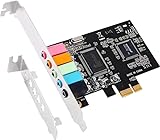
Low profile sound cards exist for one reason: the case is small. Slim desktops, home theater PCs, and office towers shipped with half-height slots leave no room for a standard bracket, so a card that looks perfect on paper simply will not seat. The decision this keyword implies is therefore physical before it is sonic. You need to confirm the slot type, the bracket height, and whether the card ships with the shorter plate, and only then compare chips and outputs.
This guide is for anyone upgrading the audio in a compact PC in 2026, whether the onboard jacks buzz, the front panel died, or an old system needs a clean optical or analog path. The seven cards below split into two groups: inexpensive 5.1 cards built around a common budget chip, and two higher-fidelity options with a better converter or a recognized brand. A fully mismatched listing, a FireWire card, was left out because it is not a sound card. Read each product description for what is physically in the box, since two cards with the same chip can differ in bracket, cables, and the number of jacks on the rear plate.
Our Top Picks
Top 3 picks at a glance
Quick Picks
As an Amazon Associate we earn from qualifying purchases at no extra cost to you.





| Product | Best for | Key spec from the title |
|---|---|---|
| Optimal Shop PCIe 5.1 | Cheapest slim-case fix | CMI8738 chip, low profile bracket |
| Fervit PCIe 5.1 | Basic surround for old PCs | 3D stereo surround, low profile bracket |
| Creative Sound Blaster Audigy Fx Pro | Recognized brand upgrade | Hi-Res PCIe, surround sound |
| Padarsey PCIe 5.1 | Windows 7 era machines | CMI8738, Windows 7 listed |
| GLOTRENDS ST113 | Hi-Fi listening | ES9018K2M DAC, isolated optical output |
| Luejnbogty 5.1 | Low-cost spare card | PCI-E, low profile bracket, 32/64 bit |
| EBTOOLS 5.1 | Noise-conscious builds | Noise balance elimination, low profile bracket |
How to Choose
Confirm PCI versus PCIe before anything else
Plain PCI and PCI Express use different connectors, and they are not interchangeable. Every card in this guide is listed as PCIe, so it needs a PCI Express slot such as an x1 slot. Open the case or check the motherboard manual first. A slim office PC that only has a legacy PCI slot cannot use any of these seven, no matter how appealing the low profile bracket sounds.
Check the bracket and the slot height
A low profile bracket is a half-height metal plate, usually around 80 millimeters tall, designed for slim chassis. Cards that list one, such as the Optimal Shop, Fervit, Luejnbogty, and EBTOOLS, are the safest bets for small cases. Cards that do not mention a short bracket in the title may ship with only the full-height plate, so confirm what is in the box before you drill, bend, or force anything into a slim chassis.
Compare chip and output type
The CMI8738 chip on four of these cards is an older, inexpensive design that suits basic 5.1 analog output and light gaming. A converter such as the ES9018K2M listed on the GLOTRENDS suggests a cleaner path for stereo music and an optical output for receivers. For plain headphones and stereo speakers, a clean analog path matters more than channel count. Surround labels mean little without matching speakers. If you own a pair of desktop speakers, the stereo output quality decides everything, so a card with a better converter is a smarter purchase than a card with more jacks.
Look at driver and operating system support
Budget CMI8738 cards often target older Windows versions, and some titles name Windows 7 only. Newer Windows installs may rely on generic drivers with limited features. A driver-free setup, as the GLOTRENDS title describes, avoids that hunt. Where budget models cut corners: shielding against case noise, software control panels, and long-term driver updates.
The 7 Best Options
Optimal Shop PCIe 5.1 Sound Card
This is a straightforward, inexpensive internal card for a slim PC that needs working audio. The title lists 5.1 channels, a low profile bracket, the CMI8738 chip, and 32/64 bit compatibility with Windows. It suits someone rescuing an older office machine, where the aim is working speakers and a microphone rather than studio sound. Typical use is a family PC, a school lab machine, or a back-office terminal where a few clear voices and system sounds are all anyone asks of the hardware.
- Strength: a low profile bracket is named in the title, easing installation in slim cases.
- Strength: 32/64 bit support covers older and newer Windows installs.
- Trade-off: the CMI8738 chip is a basic design with no listed Hi-Res support.
Skip it if you want high-quality stereo music playback.
Fervit PCIe Sound Card 5.1
Fervit uses the same chip class and the same low profile promise, but pitches 3D stereo surround and broad compatibility. It is a sensible alternative if the Optimal Shop is unavailable, and it targets buyers building a small home theater PC who only need to run basic 5.1 speakers from an old receiver or desktop set. Because the listing is so close to its siblings, compare delivery time and return terms before comparing features, and keep the original packaging in case the bracket does not seat on the first try.
- Strength: low profile bracket and PCI Express fit small modern cases.
- Strength: 3D stereo surround labeling suits casual movie and game use.
- Trade-off: it is nearly identical to other CMI8738 cards, so differences are small.
Skip it if you want a recognized brand’s driver support.
Creative Sound Blaster Audigy Fx Pro
The only card from a major sound brand in this group, and its listing stresses Hi-Res PCIe audio, surround sound, and clean audio as a PC upgrade. It suits buyers who want a software suite and long-running driver support, not just a chip on a board. The title does not name a low profile bracket, so confirm it ships with one if your case is slim. For a tower with room to spare, it is the card that most clearly promises a proper upgrade over onboard audio, especially for someone who enjoys tuning surround and clean-audio features in software.
- Strength: brand support and Hi-Res audio are headlining features.
- Strength: surround sound is positioned for gaming and movies.
- Trade-off: bracket height is not stated, so slim cases need verification.
Skip it if your chassis only accepts half-height plates and you cannot confirm one is included.
Padarsey PCIe 5.1 Internal Sound Card
Padarsey is another CMI8738 board, but its title calls out Windows 7, which signals a target audience of legacy desktops. It lists 3D stereo audio over a PCI Express adapter. It is a quiet-money pick for old towers where a motherboard audio chip has failed. Think of a workshop computer running legacy software that cannot be upgraded, where the goal is simply to restore speaker output without reinstalling the whole system.
- Strength: explicit Windows 7 mention reassures owners of older systems.
- Strength: simple PCIe install requires no external power.
- Trade-off: the title does not mention a low profile bracket.
Skip it if you run a modern operating system or a slim chassis.
GLOTRENDS ST113 PCIe Sound Card
The ST113 is the audiophile-leaning option, pairing an ESS SABRE32 ES9018K2M DAC with driver-free setup and an isolated optical output. It suits a listener who wants clean stereo for headphones or a DAC-driven speaker system in a compact PC, and who cares more about conversion quality than surround channels. It is also the logical option for someone pairing a compact PC with a receiver, since the optical path keeps the signal away from noisy internal circuitry.
- Strength: a dedicated DAC chip points toward cleaner stereo playback.
- Strength: an isolated optical output suits receivers and soundbars.
- Trade-off: the title does not state a low profile bracket or surround channels.
Skip it if you need 5.1 analog outputs or have a very tight half-height case.
Luejnbogty 5.1 Internal Sound Card
Luejnbogty is a pure budget play: a 5.1 internal card with a low profile bracket, 3D stereo, a CMI8738 chip, and 32/64 bit support. It makes sense as a spare for a repair drawer or a secondary PC where audio is a convenience, not a priority. Technicians who refurbish office desktops will recognize the type: a cheap card that restores speaker output so the machine can be handed back with every port working.
- Strength: a low profile bracket is named, so it fits slim cases.
- Strength: the PCI-E connector matches modern boards.
- Trade-off: it offers few features beyond the basics.
Skip it if sound quality is a priority.
EBTOOLS 5.1 PCIe Sound Card
EBTOOLS adds a noise balance elimination claim to the usual 5.1 and low profile bracket recipe, which targets users troubled by electrical hum inside crowded cases. It suits a compact build where the video card sits close to the audio slot and interference is a worry. A listener who hears faint whine when the graphics card is busy is the person this feature wording is trying to reach, though the claim is unverified.
- Strength: the noise-elimination claim addresses a common complaint.
- Strength: it lists a low profile bracket and 32/64 bit compatibility.
- Trade-off: the noise claim has no stated measurement behind it.
Skip it if you want a verifiable specification such as a named DAC.
Which One Fits Your Situation
Slim office PC with dead onboard audio
The Optimal Shop PCIe 5.1 is the most direct fix: low profile bracket, familiar chip, and a modest outlay.
Small home theater PC feeding a receiver
The GLOTRENDS ST113 and its isolated optical output give the cleanest digital handoff in this group.
Older Windows 7 machine
Padarsey names Windows 7 directly, so it is the least risky choice for a legacy build.
You want a known brand and software
The Creative Audigy Fx Pro suits you, provided you verify the bracket height first.
Common Mistakes
- Buying a PCIe card for a board that only has plain PCI slots.
- Assuming every card includes a half-height bracket without reading the listing.
- Paying for 5.1 channels when only headphones or two speakers are connected.
- Ignoring operating system support on cards that name only Windows 7.
- Expecting a budget chip to beat a dedicated DAC for music.
Related guides
- When I Turn On Record Game In Background On Gamebar. Gamebar Crashes, What Do I Do?
- How To Reduce Background Noise On A Streaming Microphone
- Poly Computer Accessories Company Streaming Evaluation
Frequently Asked Questions
Can I use a PCIe sound card in a PCI slot?
No. The connectors differ in shape and signaling. You need a free PCI Express slot, usually x1, for any card on this list.
What does low profile mean for a sound card?
It means the bracket is half height for slim cases. Cards with a full-height plate may need a replacement bracket to fit.
Is a dedicated sound card still worth it?
For noisy onboard audio or a failed jack, yes. For ordinary headphones on a modern motherboard, the gain is small. A card makes the most sense in older or compact systems where the onboard codec is poor, the jacks are damaged, or the front panel wiring is unreliable.
Do these cards support optical output?
Only the GLOTRENDS ST113 lists an isolated optical output in its title. Check the port list on the others before assuming digital connections.