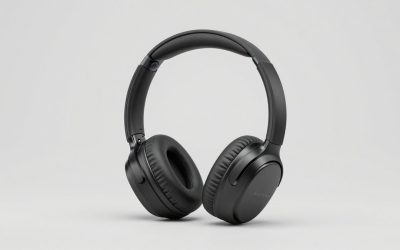
When someone searches for sound cards for djing, they rarely mean the PCIe card inside a gaming tower. They mean an external box that gets music out of a laptop to a mixer, speakers, and headphones, ideally with a way to cue the next track in private while the crowd hears the current one. That second job, separate headphone and master outputs, is what actually distinguishes DJ audio hardware from a basic USB dongle.
The products in this 2026 shortlist land in two camps. Four are compact live sound cards that blend audio interface, mixer, and effects for streamers who also spin sets, and one is a beginner DJ controller with a built-in sound card. None of these is a club-grade interface, so the guide is honest about who each one suits. Judgments come from the listed specs only; nothing here is based on measured performance. Read it as a map of product types: if you already own a controller, you may only need the streaming tools, and if you own neither, the controller is the place to begin learning the craft before adding effects.
Our Top Picks
Top 3 picks at a glance
Quick Picks
As an Amazon Associate we earn from qualifying purchases at no extra cost to you.



| Product | Best for | Key spec from the title |
|---|---|---|
| SINWE Live Sound Card | Podcast and live streaming with effects | Audio interface with DJ mixer effects and voice changer |
| Facmogu F998 | Streaming and studio-style mixing | DJ mixer effects, voice changer sound effects |
| Mini live sound card mixer | Portable setup on a tight desk | 16 effects, voice changer, noise reduction, Bluetooth |
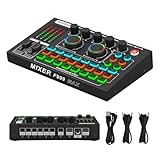
| F999MAX Live Sound Card | Streamers who like visual feedback | Metal body, indicator panel, RGB lighting |
| Hercules DJControl Inpulse 200 | Learning to mix with real controls | USB DJ controller, 2 tracks, 8 pads, sound card |
How to Choose
Separate cue and master outputs
Real DJing needs two audio paths: one to the room and one to your headphones for previewing the next track. A controller with a built-in sound card is designed for that split, as is any interface with a dedicated headphone out and cue control. A live sound card for streaming usually sends the same mix everywhere, so check the title or manual for how monitoring and headphone routing work before assuming a DJ workflow. If you cannot find the answer, treat the unit as a performance box for announcements and effects rather than a mixing tool, and keep expectations aligned with that role.
Controls versus effects
Platter-style jog wheels, crossfader, and pads are physical hardware that teach beatmatching and transitions. Voice changer buttons, sound effect banks, and noise reduction belong to the streaming world and are helpful for party hosts, karaoke nights, and mobile DJs doing announcements. Decide whether you want to practice mixing technique or get a fun, all-in-one party tool, because few products here do both well. A bedroom learner and a party host need different things, and mixing the two goals usually leads to buying the wrong box.
Software and platform compatibility
A DJ controller usually works with a specific piece of software and often includes a download or tutorials. A live sound card is typically class-compliant and plugs into a computer or phone without much setup, but confirm the exact devices named in the listing. If you have a Mac, a thin laptop with USB-C, or a phone, check for the right cable before relying on the connection. A short cable that fits a laptop’s actual port saves a frustrating trip back to the shop before a planned party.
What to ignore
Ignore claims of professional studio quality when the title lists a handful of effect presets and no sample rate or bit depth. Lighting and metal bodies change how a unit looks on a desk, not how it sounds. Sample rate and bit depth, when listed, are worth reading, but a missing figure is not proof of poor sound. Also ignore any promise of replacing a full club rig; this is entry-level equipment for practice, bedroom sets, and small events. Budget hardware also tends to cut corners on headphone amplifier power, so a loud room may need external headphones with higher sensitivity.
The 5 Best Options
SINWE Live Sound Card
The SINWE is presented as a live sound card audio mixer and podcast audio interface with DJ mixer effects and a voice changer, meant for podcast production and streaming. It suits creators who want a single compact box on the desk for talking, effects, and light music mixing without assembling separate gear. Hosts of a weekly podcast or radio-style stream will appreciate having one device to learn rather than a tangle of cables and a mixing app.
- Strength: combines audio interface, mixer, and effects in one device.
- Strength: DJ mixer effects are named directly in the title.
- Trade-off: it is designed around streaming, so the DJ workflow is limited compared with a controller.
Skip it if you want jog wheels, pads, or a dedicated cue workflow for learning to mix. Mobile DJs who need deep control over transitions will outgrow it quickly.
Facmogu F998
The F998 is another live sound card audio mixer aimed at streaming and podcasting, with studio-style equipment branding, DJ mixer effects, and voice changer sound effects. It fits people who run a casual stream with music beds, jingles, and the occasional character voice.
- Strength: DJ mixer effects and voice changer sounds in one box.
- Strength: audio interface role means one cable handles input and output.
- Trade-off: the title lists no sample rate or bit depth, so fidelity claims remain unverified.
Skip it if you plan to use it as a serious interface for recording music, or if you want hardware to teach beatmatching. A trained DJ will find the effect banks more novelty than craft, and the lack of platters or pads means transitions rely on software.
Mini live sound card mixer
This unbranded mini mixer board lists 16 effects, a voice changer, noise reduction, and Bluetooth, aimed at live streaming and podcasts. It is the small, travel-friendly pick for someone who wants the idea of a mixer without devoting desk space to a large device. It is plausible for a mobile host doing announcements at a small event, where setup speed matters more than a deep control surface.
- Strength: compact size with 16 effects and Bluetooth in the title.
- Strength: noise reduction listed for noisy rooms.
- Trade-off: unbranded, so long-term support is unknown.
Skip it if you want a recognized maker or a controller with real DJ hardware. It is also a poor fit for a permanent studio, where a larger layout makes quick changes easier. Unbranded gear also leaves you without a clear support path if the unit misbehaves on event night.
F999MAX Live Sound Card
The F999MAX describes itself as a professional audio mixer with noise reduction, a metal body, an indicator panel, an audio interface, a voice changer, and RGB lighting effects. It targets streamers who care about both function and a visually active desk. The indicator panel can help you see levels and mode changes at a glance, which is handy for a streamer who looks at a camera instead of the hardware.
- Strength: metal body and indicator panel suggest a sturdier build than plastic minis.
- Strength: audio interface plus voice changer and noise reduction.
- Trade-off: professional is a marketing word here, since the title gives no technical specs to confirm it.
Skip it if RGB is a distraction in your setup or if you need DJ-specific controls like jog wheels. Anyone planning to perform live should still check how the headphone output and monitoring behave. Metal housing adds weight on the desk, so it fits a fixed setup better than a backpack.
Hercules DJControl Inpulse 200
The Inpulse 200 is a USB DJ controller for beginners, with two tracks, eight pads, a built-in sound card, and included software and tutorials. It is the only product here that teaches the actual craft of mixing with physical controls, so it is the best fit for aspiring DJs. Learners can practice cueing, looping with pads, and blending two tracks, then move to a bigger controller later with the same basic habits.
- Strength: real DJ controls for two decks and eight pads.
- Strength: the sound card is integrated, so the controller works as a single device.
- Trade-off: it is a controller, so it is not a general-purpose streaming interface.
Skip it if you want a podcast mixer, a voice changer, or a sound card that serves as a general interface for recording and calls. Anyone who wants a dedicated microphone input for streaming should confirm what the controller offers before ordering.
Which One Fits Your Situation
You want to learn beatmatching
The Hercules DJControl Inpulse 200 is the clear choice because it provides two-deck control, pads, and a built-in sound card in one purchase, plus software and tutorials.
Streaming with music beds and voice effects
The SINWE or the Facmogu F998 offers DJ mixer effects and voice changer sounds alongside an audio interface and a straightforward desktop footprint, which suits streaming and podcast hosts who want a loud, playful voice for show intros and transitions.
Cramped desk or travel
The mini live sound card mixer is the smallest option and lists Bluetooth, noise reduction, and 16 effects.
Desk that doubles as a showpiece
The F999MAX adds an indicator panel, a metal body, and RGB lighting to the interface and voice changer package.
Common Mistakes
- Buying a PCIe gaming sound card when the real need is external DJ monitoring.
- Assuming a streaming mixer includes a proper cue channel for headphones.
- Paying for RGB or a metal body instead of useful input and output options.
- Expecting voice changer buttons to teach actual mixing technique.
- Skipping the software compatibility check for a controller before buying, then finding that your operating system or preferred app is not supported.
Related guides
- When I Turn On Record Game In Background On Gamebar. Gamebar Crashes, What Do I Do?
- How To Reduce Background Noise On A Streaming Microphone
- Poly Computer Accessories Company Streaming Evaluation
Frequently Asked Questions
Do I need a sound card to DJ with a laptop?
You need a way to separate cue and master audio. A controller with an integrated sound card or an interface with two stereo outputs handles that. The laptop headphone jack alone usually cannot, because it carries a single stereo pair that both the crowd and you would hear. A split path is the cheapest fix and makes practice sessions far less frustrating.
Is a live sound card enough for DJing?
For casual sets, yes, if monitoring works for you. For beatmatching practice or club use, a dedicated controller or interface is a better route. Think of the live cards as party and broadcast tools that borrow DJ language for their effects.
Why does the controller include a sound card?
So that headphones and speakers can receive different mixes without extra hardware. That is the key convenience for beginners, and it is why the controller costs more in setup time than it does in cables.
Can I use these with a phone?
Some live sound cards list Bluetooth or phone use, but a DJ controller normally needs a computer. Check each listing for the devices named, and confirm the right adapter if your phone has only a USB-C port.