
Gaming from the sofa changes what a mouse has to survive. There is no desk edge to brace against, the surface under the sensor might be a lap desk, a cushion or the arm of the couch itself, and the PC or TV sits far enough away that a weak wireless link starts dropping inputs. The real decision is which mouse keeps tracking and stays connected in that loose, shifting setup without forcing you back to a desk.
This guide is for living-room players running a PC through the TV, armchair MMO fans who need buttons more than raw speed, and casual players who share one machine between games and streaming apps. Every pick is wireless, and each one earned its place from the sensor, connection and battery details published on its Amazon product page rather than from headline DPI figures alone.
Our Top Picks


Top 3 picks at a glance
Quick Picks
As an Amazon Associate we earn from qualifying purchases
| Product | Best for | Key spec from title |
|---|---|---|
| Razer Basilisk V3 Pro | Full-featured gaming from the sofa | Focus Pro 30K optical sensor |
| Logitech MX Master 3S | Difficult surfaces and relaxed browsing between games | 8K DPI Darkfield sensor, tracks on glass |
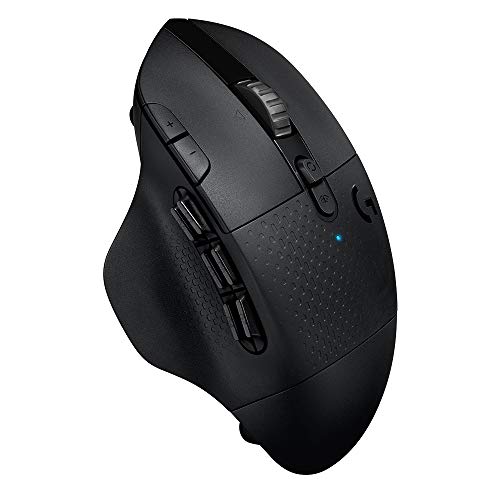
| Logitech G604 Lightspeed | MMO and RPG play with many bound commands | 15 programmable controls |
| Logitech G305 Lightspeed | A simple, light mouse for casual couch sessions | HERO sensor, 250-hour battery on one AA |
| Razer Orochi V2 | Small hands and the longest time between battery swaps | Up to 950 hours on Bluetooth |
How to Choose
Check the wireless link and where the receiver can sit
Distance is the first couch problem. A 2.4 GHz gaming link such as Logitech Lightspeed or Razer HyperSpeed answers in about a millisecond, which keeps shooters feeling direct even across a room, but the receiver still needs a clear path to the mouse. Models that bundle a USB receiver extender cable, like the G604 below, let you run the dongle toward the sofa instead of leaving it behind a metal PC case under the TV. Bluetooth is the useful fallback: slower, yet handy for menus, launchers and turn-based games when the dongle is plugged into another machine.
Match the sensor to the surface you actually have
Most gaming sensors assume a mousepad. On a couch you might play on a lap desk, a wooden side table, a glass-topped coffee table or fabric, and each surface treats an optical sensor differently. Named sensor technologies matter here: Logitech’s Darkfield in the MX Master 3S is specified to track on glass at least 4 mm thick, and Razer’s Focus Pro line is marketed with tracking on glass as well. A standard gaming sensor such as Logitech’s HERO tracks happily on a lap desk or hard tray, but glossy glass and loose fabric can defeat it, so pair the sensor to the surface instead of hoping.
Pick a shape that works without a desk to lean on
At a desk, your forearm rests on the surface and a light mouse feels easy. Reclined on a sofa, your wrist often floats or rests on a cushion, and a fuller palm shape with a thumb rest gives your hand something stable to hold during long sessions. Heavier, sculpted mice such as the Basilisk V3 Pro and MX Master 3S suit that relaxed posture. Players who move the mouse with their fingertips on a small lap tray may prefer the opposite: a compact, low shell like the Orochi V2 that can be repositioned in a few centimetres of space.
Plan the battery routine before it interrupts a session
Couch mice die at the worst moment because charging cables live at the desk. Two routines work. Rechargeable models such as the Basilisk V3 Pro and MX Master 3S need a cable within reach of the sofa; the MX Master 3S softens this with a one-minute quick charge rated for three hours of use. AA-powered mice such as the G305, G604 and Orochi V2 trade charging for swapping: keep a spare cell in the side table and you are playing again in seconds, and their rated runtimes run from 240 hours to several months per battery.
The 5 Best Options
Razer Basilisk V3 Pro

This is the pick for players who want a full gaming feature set without giving anything up for the sofa. The right-handed shell is wide and supportive, with a thumb rest that keeps your hand settled while your arm rests on a cushion. Its Focus Pro 30K sensor is marketed with tracking on glass, which makes it more forgiving of side tables and lap desks than most gaming sensors, and the HyperScroll wheel flips between ratcheted steps and free spinning for long inventory or map scrolls. HyperSpeed wireless handles fast games, while Bluetooth covers menus and slower titles with better battery life.
Specs
- Sensor: Razer Focus Pro 30K optical sensor
- Sensitivity: 100 to 30,000 DPI
- Max speed and acceleration: 750 IPS, 70 G
- Connectivity: Razer HyperSpeed wireless, Bluetooth, wired USB-C
- Battery life: up to 90 hours on HyperSpeed, up to 100 hours on Bluetooth
- Buttons: 11 programmable
- Switches: Razer Optical Mouse Switches Gen-3, rated for 90 million clicks
- Scroll wheel: 4-way HyperScroll tilt wheel
- Weight and size: 112 g; 130 x 75.4 x 42.5 mm
- On-board memory: 5 profiles
Best for: Sofa players who still play fast-paced games and want one mouse for every genre.
Watch out for: Confirm a live offer before ordering, since the listing data seen for this ASIN is not recent; the charging dock and wireless charging puck are sold separately, and heavy RGB use shortens the rated battery life.
ASIN: B0B6Y3XYFG
Logitech MX Master 3S
Choose this one when the surface is the problem. Its Darkfield sensor is specified to track on glass of at least 4 mm thickness, so a glass coffee table or glossy side table stops being a dead zone, and Logitech rates the wireless operating distance at 33 feet, comfortably room-scale. The tall, sculpted shell fills the palm in a reclined posture, quiet clicks keep late-night sessions discreet, and the thumb wheel plus gesture button help when the same mouse steers streaming apps between games. It is a comfort and versatility pick rather than an esports tool.
Specs
- Sensor: Darkfield high precision, 200 to 8,000 DPI
- Tracking: works on glass with a minimum thickness of 4 mm
- Connectivity: Bluetooth and Logi Bolt USB receiver
- Wireless operating distance: 33 ft (10 m)
- Battery: rechargeable Li-Po, up to 70 days per charge; one minute of USB-C charging gives about three hours of use
- Buttons: 7, plus a thumb wheel and gesture button
- Scroll wheel: MagSpeed electromagnetic scrolling
- Weight and size: 141 g; 124.9 x 84.3 x 51 mm
Best for: Mixed gaming and media control on awkward surfaces like glass tables and couch arms.
Watch out for: Order the Standard Edition on this ASIN, which includes the Logi Bolt receiver; a separate Bluetooth Edition listing ships without any receiver. The listing publishes no gaming polling rate, so competitive shooter players should pick a Lightspeed or HyperSpeed model instead.
ASIN: B09HM94VDS
Logitech G604 Lightspeed
MMO and RPG players lose the most when they leave the desk, because their rotations live on thumb buttons. The G604 answers with six thumb buttons inside 15 programmable controls, so abilities, mounts and potions stay under one thumb while you lean back. Its dual connectivity is built for a living room: Lightspeed gives a 1 ms link for combat, Bluetooth stretches one AA battery to months for strategy games and desktop use, and a toggle switches between the two hosts. The box also includes a USB receiver extender cable, which helps the dongle reach past the TV stand toward your seat.
Specs
- Sensor: Logitech HERO 16K, 100 to 16,000 DPI
- Max speed: over 400 IPS
- Connectivity: Lightspeed wireless at 1000 Hz (1 ms) and Bluetooth, with a host toggle
- Battery life: up to 240 hours in Lightspeed mode, up to 5.5 months in Bluetooth mode, on one AA battery
- Controls: 15 programmable, including 6 thumb buttons
- Scroll wheel: dual-mode metal hyper-fast wheel with tilt inputs
- Weight and size: 135 g with AA battery; 130 x 80 x 45 mm
- Included: Lightspeed receiver, USB receiver extender cable, AA battery
Best for: MMO, MOBA and RPG players who bind many commands and play long sessions from an armchair.
Watch out for: Listing copy mixes the original HERO 16K naming with a higher figure reached through a later software update, so check which sensor description the current page shows; this is an older model, so confirm a live offer from a seller you trust.
ASIN: B07QN369XX
Logitech G305 Lightspeed
The G305 keeps couch gaming simple. It is a small, light shell with no cable, no charging routine and no lighting to drain the battery: one AA cell is rated for 250 hours of continuous play, and the USB receiver stores inside the body so it does not get lost between rooms. The HERO sensor and 1 ms Lightspeed link are proper gaming hardware, so casual shooters and platformers still feel responsive on a lap desk or hard tray. Six programmable buttons cover the basics, and onboard memory keeps your sensitivity setting when you move between a PC and a laptop.
Specs
- Sensor: Logitech HERO, 200 to 12,000 DPI
- Max speed: 400 IPS
- Connectivity: Lightspeed wireless USB receiver, 1 ms report rate in Performance mode
- Battery life: up to 250 hours of continuous gameplay on one AA battery; Endurance mode extends it further
- Buttons: 6 programmable, with on-board memory
- Weight and size: 99 g with battery; 116.6 x 62.15 x 38.2 mm
- Receiver storage: built into the mouse body
- Model number: 910-005280
Best for: Casual couch players who want a light, low-fuss mouse that just works on a tray or lap desk.
Watch out for: There is no Bluetooth, so the receiver must stay within range of your seat; plug it into a front port or an extender rather than the back of a PC under the TV. The HERO sensor is not specified for glass, so give it a solid surface.
ASIN: B07CMS5Q6P
Razer Orochi V2

Small hands and small surfaces are where big ergonomic mice fall apart, and the Orochi V2 is built for exactly that corner of the couch. The compact ambidextrous shell weighs under 60 grams before its battery, so fingertip movements on a narrow lap desk or book-sized tray stay controlled. Battery life is its headline: Razer rates up to 425 hours on HyperSpeed for real gaming and up to 950 hours on Bluetooth, from a single AA or AAA cell, so a spare in the drawer covers a year of evenings. The 18K sensor is older-generation gaming hardware, yet entirely adequate at TV distance.
Specs
- Sensor: Razer 5G Advanced 18K optical sensor, up to 18,000 DPI
- Connectivity: Razer HyperSpeed wireless and Bluetooth
- Battery life: up to 425 hours on HyperSpeed, up to 950 hours on Bluetooth
- Battery type: one AA or AAA battery
- Switches: 2nd-gen Razer mechanical switches, rated for 60 million clicks
- Weight and size: under 60 g excluding battery; about 108 x 60 x 38 mm
- Shape: ambidextrous, compact mobile form
Best for: Players with smaller hands, tight lap-desk space, or a mouse that travels between couch and bag.
Watch out for: The headline weight excludes the battery, so expect it to feel heavier with an AA fitted; the listing data seen is not recent, so confirm a live offer before ordering. The small shell can cramp a full palm grip for larger hands.
ASIN: B0916N2LPZ
Which One Fits Your Situation
Playing on a lap desk over your knees
A lap desk gives you a flat, hard surface, which suits standard gaming sensors, but space is tight and your wrist angle changes as the desk shifts. The G305 Lightspeed fits this setup well: it is light, compact and happy on a tray surface, with a battery that lasts months of evenings. If your hands are small or the desk is narrow, the Orochi V2 takes even less room and is easier to lift and re-centre in short strokes.
Leaning back through long MMO and RPG sessions
When a session runs for hours, button access and palm support matter more than flick speed. The G604 Lightspeed is the natural fit, with six thumb buttons for rotations and a Bluetooth mode that stretches battery life between raids. The Basilisk V3 Pro is the alternative when you also want a free-spinning wheel for long menus and a sensor that tolerates the side table when the lap desk goes away mid-session.
One living-room PC shared between games and streaming
A shared TV machine needs a mouse that browses as well as it plays. The MX Master 3S covers both roles: its Darkfield sensor keeps working on the coffee table, the MagSpeed wheel flies through streaming catalogues, and quiet clicks suit a room where other people are watching. Keep its receiver in a front port so the 33-foot rated range covers the whole sofa, including the far corner seat.
Fast shooters played from the sofa
Competitive games from the couch are a compromise, but the link and sensor should not be the weak points. The Basilisk V3 Pro brings a 1 ms-class HyperSpeed connection, a sensor rated to 750 IPS and optical switches, which is the closest this list gets to desk-grade response. Give it a hard tray rather than bare fabric, keep the receiver on an extender near your seat, and accept that posture, not hardware, is now the limiting factor.
Common Mistakes
- Leaving the USB receiver in the back of a PC under the TV, where the case and stand block the signal and cause stutters that get blamed on the mouse.
- Assuming any optical sensor will track on a glass coffee table or bare sofa fabric, when only specific sensor lines such as Darkfield and Focus Pro are specified for glass.
- Buying a tiny travel mouse for a full palm grip, then fighting cramps through long sessions because the shell never supports the hand.
- Forgetting the charging cable’s location: a rechargeable mouse that lives on the couch needs a cable on the couch side of the room, not at the desk.
- Judging couch mice by maximum DPI, when link stability, surface tolerance and shape decide far more at TV distance.
Frequently Asked Questions
How far from the PC can a couch gaming mouse reliably work?
It depends on the link and the room. The MX Master 3S listing rates its wireless operating distance at 33 feet, which covers most living rooms. Gaming receivers using Lightspeed or HyperSpeed are happiest with a clear path, so run the included extender cable or a front USB port toward the sofa instead of hiding the dongle behind the machine.
Can I play directly on the sofa cushion without a lap desk?
Only some sensors tolerate it. Loose fabric moves under the mouse and confuses most optical sensors, so a lap desk, hard tray or side table is the safer base. The exceptions are the surface-focused picks here: the MX Master 3S Darkfield sensor is specified even for glass, and the Basilisk V3 Pro’s Focus Pro sensor is marketed with glass tracking, though a firm surface still tracks more consistently.
Is Bluetooth good enough for couch gaming?
For menus, launchers, turn-based strategy and slower adventure games, yes, and it rewards you with far longer battery life: the Orochi V2 is rated up to 950 hours on Bluetooth against 425 on HyperSpeed. For shooters and anything reaction-based, switch to the 2.4 GHz gaming link, where Lightspeed and HyperSpeed models report in about a millisecond.
Should I choose a rechargeable mouse or one that takes AA batteries?
Pick based on where you sit. Rechargeable models like the Basilisk V3 Pro and MX Master 3S are convenient if a USB-C cable lives near the sofa, and the MX Master 3S adds a one-minute quick charge. AA models such as the G305, G604 and Orochi V2 suit players who would rather swap a cell from the side-table drawer than wait for a charge.
Related guides
More from Amazon
Programs that pair well with the guide above. Offers and eligibility are set by Amazon and may change.
Free shipping on eligible items, Prime Video and more. Eligible new members can start with a free trial.
Start a Prime free trialAd-free music streaming. Eligible new subscribers can start with a free trial.
Try Music Unlimited freeA Prime membership for ages 18-24 with a trial period. Eligibility is set by Amazon.
See Prime for Young AdultsAudiobooks and podcasts to listen to on the go. Eligible new members can start with a free trial.
Try Audible freeAs an Amazon Associate we earn from qualifying purchases.









