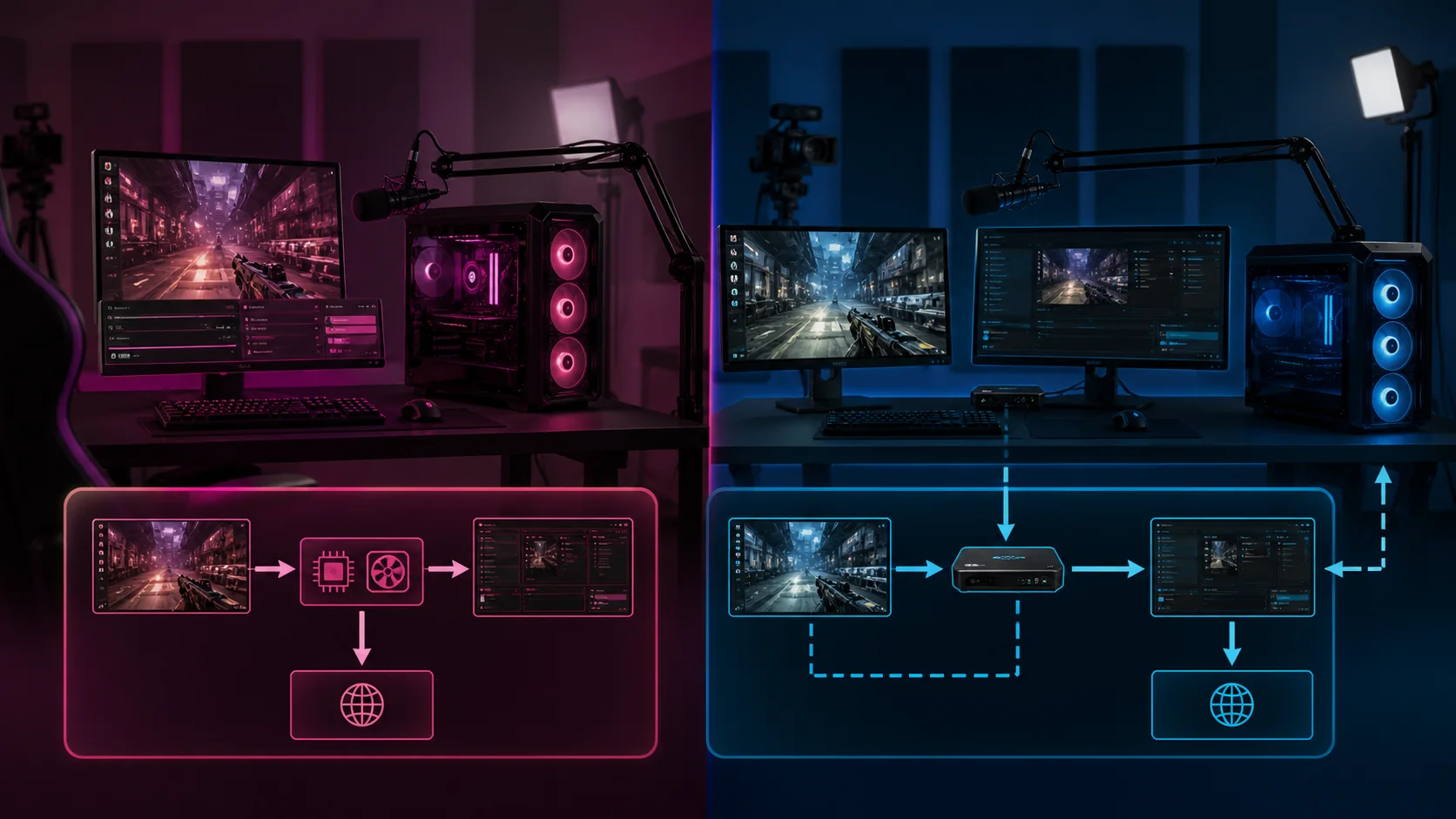
Single PC streaming uses one computer to both run your game and encode the stream, typically costing $0 extra if you already have a gaming PC with hardware encoding, at the cost of 10-20% FPS impact. Dual PC streaming adds a second computer dedicated to encoding, connected via a capture card, costing $500-1,200+ more but largely eliminating that FPS loss. Most streamers should start with single PC and upgrade only if a specific bottleneck appears.
Our Top Picks
 EMEET Piko 4K Webcam for Streaming2.2 x 1.69 x 0.87 inches2.2 x 1.69 x 0.87 inches0.8 poundsCheck on Amazon


Top 3 picks at a glance

How each setup actually works
Single PC streaming runs your game, OBS, and the encoder all on the same machine, sharing CPU, GPU, and RAM resources between rendering the game and compressing the video feed for broadcast, which is why encoding has a measurable performance cost on this setup.
As an Amazon Associate we earn from qualifying purchases at no extra cost to you.






Dual PC streaming splits these tasks across two machines: a gaming PC that only renders the game, and a second streaming PC that receives that video and audio feed through a capture card, then handles encoding and broadcasting entirely independently of the gaming PC’s resources.
The capture card is the physical bridge between the two machines in a dual-PC setup, typically connecting via HDMI or DisplayPort from the gaming PC’s output to the capture card, which is installed in or connected to the streaming PC as an input device.
Hardware encoding (NVENC, AMF, QuickSync) on a single PC setup narrows the performance gap significantly compared to older software-only encoding approaches, since the encoding work happens on dedicated silicon rather than competing directly with the game for CPU cycles.
Some streamers use a hybrid approach: a single powerful PC with a capture card installed internally, capturing its own output in a loop, which technically counts as single-PC hardware but functions similarly to dual-PC in terms of resource allocation for the encoding process specifically.
Understanding which resources each approach actually shares or separates is the foundation for evaluating the cost, performance, and complexity tradeoffs covered in the rest of this comparison, rather than treating “dual PC is better” as a blanket assumption.
Cost comparison
The cost gap between single and dual PC streaming isn’t just the price of a second computer; it includes the capture card, potentially a second monitor, keyboard, and mouse for the streaming PC, and additional desk space and cabling to connect everything.
| Setup component | Single PC | Dual PC (additional cost) |
|---|---|---|
| Second PC (budget-adequate) | Not needed | $400-800 |
| Capture card | Not needed | $130-400 |
| Extra peripherals/cabling | Not needed | $50-150 |
| Total added cost | $0 | $580-1,350 |
This range assumes building a budget-adequate second PC rather than a matching high-end machine; the streaming PC’s job (encoding, running chat and alert software) doesn’t require anywhere near the GPU power of the gaming PC, keeping this cost more contained than a full duplicate build.
Weighing this cost against the FPS recovery covered next is the core decision point; for streamers already comfortable with their single-PC frame rate, this spend delivers a real but sometimes marginal practical benefit relative to its price.
Performance impact on game framerate
Single PC streaming with NVENC hardware encoding typically costs 10-20% of your game’s frame rate at 1080p60 output, based on tracked benchmarking across common GPU generations, with the exact figure varying by game engine and how CPU-bound versus GPU-bound the specific title is.
Single PC streaming with x264 software encoding costs more, commonly 20-30% or higher in CPU-intensive games, since x264 competes directly with the game for CPU cycles rather than using the GPU’s separate hardware encoder, making preset selection (covered in our OBS settings guide) critical on this path.
Dual PC streaming recovers most of this lost performance since the gaming PC no longer performs any encoding work; the gaming PC’s frame rate with a capture card attached is typically within 1-3% of its frame rate with no streaming setup at all.
The FPS impact on single PC setups is most noticeable in CPU-bound games (strategy titles, simulation games, some competitive shooters at very high frame rates) where the CPU is already the limiting factor before encoding is added into the mix.
GPU-bound games (most modern AAA titles at high graphical settings) show a smaller relative FPS impact from single-PC NVENC encoding specifically, since the encoding load falls on dedicated hardware separate from the GPU’s rendering cores in most recent GPU generations.
These are estimated ranges based on typical configurations, not measurements of your specific hardware; actual impact should be confirmed by comparing your own game’s frame rate with and without streaming active using the same settings, as covered in our research methodology section below.
Encode quality at the same bitrate
At an identical bitrate, encoding quality depends more on encoder choice and preset than on whether the setup is single or dual PC; a single PC using x264 at a slow preset can outperform a dual PC using NVENC, and vice versa, depending on configuration.
The practical advantage dual PC setups offer for quality is headroom: a dedicated streaming PC can run x264 at a slower, higher-quality preset (medium or slow) without the CPU load competing against a game, something a single-PC setup running the same preset generally can’t sustain.
Modern NVENC implementations have narrowed the historical quality gap with x264 considerably, meaning a single-PC setup using recent-generation NVENC often produces visually comparable results to a dual-PC x264 setup at commonly used streaming bitrates (4,500-8,000 kbps).
The quality difference becomes more visible at lower bitrates (under 4,000 kbps) where encoder efficiency matters more, and less visible at Twitch’s typical bitrate ceiling, where both approaches produce reasonably close results for most viewers on standard internet connections.
Viewers watching on mobile devices or smaller windows are less likely to notice encoder-quality differences than viewers watching full-screen on a large monitor, which is worth factoring in when deciding how much value a marginal quality improvement actually delivers for your specific audience.
Testing both approaches with identical bitrate and resolution settings, then comparing recorded output side by side, gives a more reliable answer for your specific content than general claims about which encoder or setup produces better quality in the abstract.
Capture card requirements for dual PC
Capture cards vary primarily by maximum supported resolution and frame rate, latency (pass-through delay), and connection type (internal PCIe card versus external USB device), with pricing scaling accordingly from roughly $130 for a basic 1080p60 model to $400+ for 4K-capable cards.
Internal PCIe capture cards generally offer lower latency and higher maximum throughput than external USB capture devices, making them the better choice for streamers running higher resolutions or frame rates, though they require a free PCIe slot and more involved installation.
External USB capture cards are more convenient, portable, and easier to install, making them a reasonable choice for 1080p60 streaming specifically, though budget USB models can introduce more encoding pass-through latency than a comparable internal card.
Match your capture card’s supported resolution and frame rate to your gaming PC’s actual output, not your streaming target; capturing at 1440p144 from the gaming PC (even if streaming out at 1080p60) requires a capture card rated for that higher throughput to avoid dropped or corrupted frames.
Check pass-through latency specifications specifically if you plan to use the capture card’s pass-through feature to view your own gameplay on the streaming PC’s monitor, since higher-latency cards can introduce a noticeable, distracting delay between input and on-screen response.
HDCP restrictions occasionally interfere with capture from certain sources (some game consoles, some copy-protected content), which is generally not a concern for PC gaming capture but worth verifying if your dual-PC setup will also capture from non-PC sources.
Latency and sync between two machines
Dual PC setups introduce a small amount of additional latency compared to single-PC NVENC encoding, typically under 100 milliseconds from the capture card’s pass-through and processing, which is generally imperceptible to viewers but can matter for the streamer’s own monitoring setup.
Audio sync between the two machines requires careful setup, since audio and video can arrive at slightly different points in the pipeline; OBS’s Audio Sync Offset setting, adjustable per source, corrects for this by delaying or advancing audio relative to the captured video feed.
Network-based dual PC setups (streaming the gameplay feed over a local network connection rather than a direct capture card cable) introduce more latency and potential instability than a direct capture card connection, making a wired capture card setup the more reliable default approach.
Testing sync using a clear audio-visual cue, like clapping on camera while capturing both the direct game audio and the microphone audio, makes it straightforward to identify and correct any offset before it becomes a persistent, distracting issue during live streams.
Chat and alert visibility on the gaming PC becomes a separate consideration in dual-PC setups, since chat now lives on a physically different machine; many streamers use a phone, tablet, or a small secondary monitor connected to the gaming PC to keep chat visible while playing.
Elena Marchetti, Streaming & Creator Editor, tests latency and audio sync on new dual-PC configurations using a dual-PC streaming rig with capture-card benchmarking and audio measurement tools before recommending a specific capture card or cabling approach.
Complexity and setup time tradeoffs
Single PC setups are meaningfully simpler to configure and maintain, since there’s only one machine’s drivers, software updates, and settings to manage, reducing the number of potential failure points before and during a live stream.
Dual PC setups add real ongoing complexity: two sets of drivers to keep updated, a capture card’s own software and firmware, network or cable connections between the machines, and generally more troubleshooting surface area when something goes wrong mid-stream.
Initial setup time for a dual-PC configuration commonly runs several hours longer than a single-PC setup, factoring in physical cable routing, capture card driver installation, and the additional testing needed to confirm audio sync and pass-through latency are configured correctly.
Troubleshooting a dual-PC issue during a live stream is harder than troubleshooting single-PC, since the problem could originate on either machine, the capture card itself, or the connection between them, compared to a single machine where the scope of possible causes is narrower.
Desk space and cable management become practical considerations with a second PC, particularly for streamers with limited room; a dual-PC setup effectively requires planning for two full workstations rather than one, even if the second PC’s monitor and peripherals are minimal.
For streamers newer to broadcasting generally, the added complexity of a dual-PC setup can itself become a distraction from building content and audience, which is a real, if less quantifiable, cost worth weighing against the technical performance benefits.
Who should choose which setup
Single PC streaming is the better starting point for nearly all new streamers, particularly those testing content direction and audience fit before investing further, given that most modern gaming PCs with NVENC handle single-PC streaming with acceptable FPS impact.
Dual PC streaming makes the most sense for streamers running CPU-intensive games at high settings on capable but not top-tier CPUs, where the 10-20% single-PC encoding cost meaningfully affects a frame rate they specifically need to keep high for competitive or visual reasons.
Streamers who want to run x264 at slower, higher-quality presets without any FPS compromise on the game itself are also strong candidates for dual PC, since this preset flexibility is difficult to achieve on a single machine without a very high core-count CPU.
Budget-conscious streamers, or those uncertain about their long-term streaming commitment, are generally better served starting with single PC and a hardware encoder, reserving the dual-PC investment for after a consistent schedule and audience justify the added cost and complexity.
Streamers already producing separate recorded content (video editing, highlight clips) alongside live streaming sometimes find dual-PC setups useful beyond just streaming, since the second machine can handle editing or rendering tasks during non-streaming hours as well.
Reviewing our guide to the best PC for streaming alongside this comparison helps clarify whether a single capable machine or a two-machine setup better fits your specific budget and content goals before making a purchase decision.
Upgrading from single to dual later
Moving from single to dual PC later is a common and reasonable path, since it lets you confirm your streaming commitment and content direction on a single-PC setup before committing the additional budget a second machine requires.
Repurposing an older PC you already own as the dedicated streaming machine is a cost-effective way to test dual-PC streaming without the full expense of a new build, as long as it meets the CPU requirements for your intended encoder settings.
Adding a capture card to an existing single-PC setup is usually the first purchase in this upgrade path, since it’s the one component that has no equivalent use in a single-PC configuration and needs to be added regardless of what second PC you eventually use.
Plan the transition around a lower-stakes period (between regular stream days, or during a short break) rather than attempting to configure a new dual-PC setup for the first time immediately before a scheduled, announced stream.
Keep your single-PC OBS configuration backed up or documented before switching, since reverting to single-PC streaming temporarily (during dual-PC troubleshooting, for example) is much faster if your prior working settings are still readily available.
Budget for the capture card and second PC as separate purchases rather than requiring both simultaneously; a capture card connected to a modest interim second PC still delivers most of the FPS-recovery benefit while you save toward or plan a more capable dedicated streaming machine.
Frequently asked questions
How much FPS do I lose streaming on a single PC?
Typically 10-20% at 1080p60 with NVENC hardware encoding on a mid-to-high-end GPU, though this varies by game and CPU. Using x264 software encoding on a single PC without adequate CPU headroom can push the loss higher, sometimes 25-30% in CPU-intensive titles.
Do I need a capture card for dual PC streaming?
Yes, a capture card is required to bring your gaming PC’s video and audio output into your streaming PC for encoding and broadcast. Budget capture cards start around $130-150, with higher-throughput models supporting 1440p or 4K capture costing $200-400.
Is dual PC streaming worth it for a casual streamer?
Generally not. The added cost ($500-1,200+) and setup complexity mainly benefit streamers running CPU-intensive games at high settings while wanting zero encoding-related FPS impact. Casual or variety streamers with modern hardware and NVENC encoding rarely notice enough difference to justify the investment.
What GPU or CPU do I need for a dedicated streaming PC?
A streaming PC doesn’t need a powerful GPU since it isn’t rendering games, but it does benefit from a strong multi-core CPU (8+ cores) if you plan to use x264 at slower presets. A mid-range CPU paired with a capture card handles most dual-PC encoding workloads comfortably.
Does dual PC streaming reduce stream latency?
Not necessarily; dual PC setups can actually add a small amount of latency (typically under 100ms) from the capture card’s video pass-through and processing, compared to single-PC NVENC encoding. The benefit is preserved game FPS, not reduced end-to-end stream delay.
Related guides
- Best Tablets for Artists: Drawing & Design Picks: 6 Compared (2026)
- How Many Gigabytes of Backup Storage do Creators Need? Size Guide With Measurements
- What to Look for in Creator Storage Backup Systems: What Actually Matters
- Best Battery Powered Lights for Outdoor Creators: Compared and Ranked: 8 Compared (2026)