
Recording into an iPad is one of the easiest ways to turn a spare bedroom, kitchen table, or compact home office into a capable vocal booth. The iPad keeps the setup small, quiet, and portable, but its built-in microphone is not the right tool for a close-miked voice, acoustic instrument, or professional interview. An XLR interface gives you a proper microphone connection, usable monitoring, and—in the right model—phantom power for condenser microphones.
The challenge is choosing a device that fits the way you actually record. Some people need a tiny adapter for voice notes on location; others want an interface that can handle vocals and an instrument at a desk. This guide to the best compact XLR interfaces for iPad recording ranks four distinct options by their intended use, connection style, monitoring features, and value. Product compatibility can depend on your iPad model, operating system, cable, and recording app, so confirm the current connection requirements before buying in 2026.
As an Amazon Associate we earn from qualifying purchases at no extra cost to you. Product prices and availability are accurate as of the date shown and are subject to change.

Top 3 picks at a glance
IK Multimedia iRig Pre 2 mic preamp Adapter Interface for iPhone, iPad,...Kmise USB Audio Interface, Computer Recording Audio Interfaces with 48V Phantom Power... Native Instruments 23770 Traktor Audio 2 DJ Audio Interface
Quick Picks
| Product | Best for | Price |
|---|---|---|
| IK Multimedia iRig Pre 2 | Portable XLR microphone recording | $59.99 |
| Kmise USB Audio Interface | Budget-minded desktop recording | $29.99 |
| Native Instruments Traktor Audio 2 | DJ-oriented audio routing | $285.99 |
| Tascam iXZ | Simple mic and instrument capture | Price not listed |
How We Picked
A compact iPad interface has to solve more than one problem. First, it needs the right physical input for the source you plan to record. For a typical vocal microphone, that means XLR. For a condenser microphone, phantom power matters. For spoken-word work, a headphone output is especially useful because it lets you monitor your voice and listen for room noise, handling sounds, or plosives before a take is ruined.
We also considered the intended recording environment. A pocketable mic preamp adapter makes more sense for interviews, travel, and quick voice capture than a larger desktop-style USB interface. Conversely, a USB interface may be the better fit for a dedicated home recording station where you switch between vocal, guitar, and podcast tasks. Finally, we weighed the stated price against the feature set without claiming unverified sound-quality measurements or lab-test results.
The 4 Best Picks
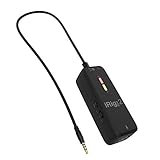
1. IK Multimedia iRig Pre 2 — Best Overall for Portable XLR Recording
The IK Multimedia iRig Pre 2 is the most directly suited option here for creators who want to plug an XLR microphone into an iPad without building out a larger desktop rig. It is designed as a mic preamp adapter interface for iPhone, iPad, Android, iOS, and DSLR cameras, and it includes an XLR connector, headphone output, and +48V phantom power. That combination makes it a practical choice for mobile vocal tracking, interviews, field recording, and simple podcast work. Skip it if your priority is a traditional USB desktop interface for a permanent multi-purpose workstation.
- Pro: XLR input supports a proper microphone-based recording setup.
- Pro: +48V phantom power broadens microphone options.
- Con: Its adapter-style format may not suit buyers who prefer a conventional desktop interface.
2. Kmise USB Audio Interface — Best Budget Pick
The Kmise USB Audio Interface is the value-focused choice for a small home setup centered on vocals, podcasting, or guitar recording. Its stated USB Type-C connection and 48V phantom power make it appealing for iPad users who want an affordable route to microphone recording while keeping their desk uncluttered. At $29.99, it costs substantially less than the other listed products with a stated price, so it is a sensible starting point for a first interface. Skip it if you need a purpose-built mobile adapter or want clearly stated iPad-specific connection details before purchasing.
- Pro: The $29.99 price makes it the most accessible listed option.
- Pro: 48V phantom power supports condenser-microphone setups.
- Con: Buyers should verify iPad and cable compatibility for their exact setup.
3. Native Instruments Traktor Audio 2 — Best for DJ-Focused Users
The Native Instruments 23770 Traktor Audio 2 is best approached as a specialist pick for users whose iPad audio workflow overlaps with DJ use. Its positioning as a DJ audio interface separates it from the microphone-first designs in this roundup. That can be an advantage if your priority is cueing, playback management, or integrating an iPad into a performance-oriented setup. At $285.99, it is also the premium-priced selection here, making it harder to justify for simple vocal recording alone. Skip it if an XLR microphone input and phantom power are non-negotiable requirements.
- Pro: DJ-oriented design suits performance-centered audio workflows.
- Pro: A focused option for buyers already working with DJ gear and software.
- Con: It is not the most direct choice for an XLR microphone-based iPad rig.
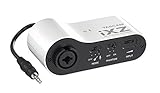
4. Tascam iXZ — Best for Straightforward Mic or Instrument Recording
The Tascam iXZ is a simple option for iPad, iPhone, and iPod Touch users who want to record either a microphone or an instrument without making the setup feel overly technical. Its mic-and-instrument focus is useful for singer-songwriters, voiceover beginners, and musicians who alternate between spoken recordings and direct instrument capture. The product name identifies it as an interface for Apple mobile devices, which makes its intended use clear. Skip it if you need a listed current price before narrowing your shortlist, or if you specifically want a USB Type-C interface.
- Pro: Supports both microphone and instrument-oriented recording needs.
- Pro: Designed for iPad, iPhone, and iPod Touch use.
- Con: No price is listed, which makes value comparisons less straightforward.
Buying Guide
Choose the Input That Matches Your Microphone
If you own a standard studio or stage microphone, start with XLR. XLR is the connection type most commonly associated with dedicated microphones and is the key requirement behind this roundup. The iRig Pre 2 explicitly includes an XLR connector, while the other products serve different mixes of microphone, instrument, USB, or DJ-oriented needs. Before purchasing, look closely at the exact input type rather than assuming every compact audio device accepts the same microphone cable.
Also think about whether you will record only a voice or several source types. A vocalist recording narration may want a simple microphone-focused adapter. A singer-songwriter may prefer an option intended for both mic and instrument recording. A DJ, meanwhile, may benefit more from performance-oriented routing than from a mic preamp.
Decide Whether You Need Phantom Power and Headphone Monitoring
Condenser microphones commonly require phantom power, so this is a feature worth identifying before you buy. The IK Multimedia iRig Pre 2 lists +48V phantom power, and the Kmise USB Audio Interface lists 48V phantom power. That makes both relevant choices for buyers planning to use a condenser microphone. If you use a microphone that does not require phantom power, the feature may still be useful for future flexibility, but it should not outweigh a poor fit in connection type or workflow.
Headphone monitoring is equally important for spoken-word recording. A headphone output lets you hear what is happening while you record, which can help you catch audible problems early. The iRig Pre 2 specifically lists a headphone output. For any other model, verify the monitoring arrangement and how it works with your recording app and iPad before placing an order.
Plan the Whole iPad Connection Chain
An interface is only one part of the system. Your iPad model, its port type, the cable you own, any required adapter, your microphone, headphones, and recording app all need to work together. The Kmise model is identified as USB Type-C, while the Tascam iXZ is identified for iPad, iPhone, and iPod Touch. Those descriptions are helpful starting points, but they are not a substitute for checking the connection details of your exact device.
For the smallest possible kit, an adapter-style solution is usually easier to pack and deploy. For a desk-based recording corner, a USB interface can be more natural because it keeps the workflow centered around a single recording station. Avoid choosing solely by price: a lower-cost interface that requires extra adapters or does not fit your microphone can become the less convenient option.
Our Verdict
For most people seeking the best compact XLR interfaces for iPad recording, the IK Multimedia iRig Pre 2 is the strongest all-around choice. Its XLR connector, +48V phantom power, and headphone output address the core needs of a compact mobile microphone setup, and its $59.99 price remains approachable for serious hobbyists and creators.
The Kmise USB Audio Interface is the best budget alternative at $29.99, particularly for buyers building an inexpensive recording station and willing to verify the connection setup. Choose the Tascam iXZ when a straightforward mic-and-instrument interface for Apple mobile devices is the goal. The Native Instruments Traktor Audio 2 is the most specialized option, best reserved for DJ-focused workflows rather than buyers whose main task is recording an XLR microphone.
FAQ
Can I connect an XLR microphone directly to an iPad?
Usually, you need an interface or mic preamp adapter between the microphone and iPad. An option such as the IK Multimedia iRig Pre 2 provides an XLR connector intended for that purpose. Confirm that the interface, cable, and your specific iPad can connect correctly.
Do I need 48V phantom power for iPad recording?
You need phantom power if your microphone requires it, which is common with condenser microphones. The iRig Pre 2 lists +48V phantom power, and the Kmise USB Audio Interface lists 48V phantom power. If your microphone does not need phantom power, focus instead on input compatibility and monitoring.
Which option is best for podcasting on an iPad?
The iRig Pre 2 is the clearest podcasting choice because it combines an XLR connector with a headphone output and +48V phantom power. The Kmise USB Audio Interface is also worth considering for budget-conscious podcasters who want a USB Type-C option and can confirm compatibility with their iPad setup.
What is the least expensive interface in this roundup?
The Kmise USB Audio Interface has the lowest listed price at $29.99. The IK Multimedia iRig Pre 2 is listed at $59.99, while the Native Instruments Traktor Audio 2 is listed at $285.99. No price is listed for the Tascam iXZ.
Related guides
- Best Usb Dynamic Microphones for Untreated Rooms: Tested and Ranked: 8 Tested (2026)
- Acoustic Foam vs Bass Traps for Voice Recording: Which Is Right for Your Home
- Nas vs External Ssd for Footage Backup: Which Is Right for Your Home
- Boom Arm vs Desk Stand for Broadcast Microphone: Which Is Right for Your Home


