The best key light for streaming for most people is the Elgato Key Light. It is a Wi-Fi controlled LED panel rated at 2800 lumens, with an adjustable color temperature from about 2900K to 7000K, a desk clamp and an app that lets you set brightness and warmth from your computer or phone. That makes it the simplest way to get even, flattering light on your face without a full lighting kit. If your desk is small or you want a monitor-mounted light, the Logitech Litra Glow is the compact choice, and if you prefer a larger panel with a remote and a lower outlay, the NEEWER GL25B and GL25C offer 25 watts of output and desk stands. Ring-style lights from Weilisi, UBeesize, NiceVeedi and LitONES suit tight desks and calls, while the NiceVeedi two-pack covers streamers who want a stand-mounted pair. Whichever you choose, place the light slightly above eye level and about 45 degrees off to one side, then check the preview before you go live.
Our Top Picks
 Logitech for Creators Litra Glow Premium LED Streaming3.6" x 3.6" x 1.1"1.71 x 3.56 x 14.41 Inches0.85 poundsCheck on Amazon


Top 3 picks at a glance

Top 3 Picks
Best Overall: Elgato Key Light
The Elgato is a purpose-built streaming panel with 2800 lumens, a wide color temperature range, Wi-Fi control and a desk clamp. It is the strongest all-round pick for a streamer who wants to set the light once and adjust it from software.
Best Value Panel: NEEWER 25W GL25B Streaming Key Light
The GL25B offers 25 watts, a 12.9 inch panel, a desk stand and a 2.4G remote, per the listing. It gives you a real key light with easy control at a lower step than premium panels, which makes it a good fit for first-time streamers.
Best for Small Desks and Monitors: Logitech Litra Glow
The Litra Glow is a USB-powered light with a monitor mount, a stated color range of 2700K to 6500K and Logitech’s TrueSoft diffusion. It is much less powerful than a panel, but it is compact, tidy and well-suited to a close-up webcam view.
Quick Comparison
| Product | Best for | Key specs |
|---|---|---|
| Elgato Key Light | Best overall panel | 2800 lumens, about 2900-7000K, Wi-Fi control, desk clamp |
| Weilisi 10.2 in Desk Ring Light | Compact desk lighting | 10.2 in ring, C-clamp, flexible adjustable arm, 360 degree rotation |
| Logitech Litra Glow | Monitor-mounted light | USB powered, 2700K-6500K, TrueSoft diffusion |
| NiceVeedi 2-Pack LED Video Light Kit | Two-light stand setup | 2800-6500K, dimmable, tripod stands, phone holder |
| NiceVeedi 14 in Soft Streaming Light | Large soft desk ring | 14 in, 2700K-6500K, CRI 97+, flexible arm, remote |
| NEEWER GL25B 25W Key Light | Value panel with remote | 25W, 12.9 in, desk stand, 2.4G remote |
| UBeesize 10 in Desk Ring Light | Simple clamp ring | 10 in ring, multi-angle arm, C-clamp, inline control |
| LitONES Ring Light for Laptop and Monitor | Eye-friendly diffused fill | Diffused LED ring, clips to laptop, monitor or desk |
| NEEWER GL25C RGB Key Light | Color effects and app control | 25W, 2500 lux at 0.5 m, 2900-7000K, CRI 95+/TLCI 97+, RGB |
How We Chose
We chose and ranked these lights by comparing their listed brightness, color temperature range, color accuracy claims, size, mounting method and control options, then judging them against standard video lighting practice. We did not run light meter readings, camera comparisons or any other measurements of our own, so every number here is a manufacturer claim and real results will depend on your room and camera. Our criteria were output and size relative to a desk setup, adjustable color temperature, stated color rendering such as CRI and TLCI, the way the light is mounted and how stable it is, control by app, remote or inline dial, how soft and even the light is likely to appear on a face, and how clearly the listing describes the product. Where a listing omits details such as power input or exact output, we describe the spec class and ask you to confirm the rest on the product page.
1. Elgato Key Light – Best Overall Streaming Panel
As an Amazon Associate we earn from qualifying purchases at no extra cost to you.
The Elgato Key Light is a flat LED panel described as a professional 2800 lumen studio light, with a desk clamp in the box. Elgato lists 160 LEDs behind an opal diffuser, an adjustable color temperature from about 2900K to 7000K, and Wi-Fi control through the Control Center app on a computer or phone. Together with its panel size of roughly 14 by 10 inches, that makes it a true key light rather than a small fill light, and the reason it appears in so many streaming setups.
Key specs
- Output: 2800 lumens
- Color temperature: about 2900K to 7000K
- Control: Wi-Fi via the Control Center app
- Panel size: roughly 13.8 x 9.8 x 1.4 inches
- Power: wall power, up to about 45 watts
- Mount: desk clamp supplied, with threads for other mounts
The strength of this light is control. You can save a warm preset for evening streams and a cooler one for daytime, then change them without touching the panel. Because it connects over Wi-Fi, check that your home network offers a 2.4GHz band for initial setup. The panel is large and bright enough to sit about 2 to 3 feet from your face, which gives soft, even light across the face and reduces the harsh shadows that a small light creates.
Plan the mounting carefully. The clamp suits most desk edges, but the panel weighs close to 3 pounds, so tighten it fully and check that the arm does not drift. A boom arm gives more freedom than a clamp, and Elgato’s panel has threads for other mounts. Because the light runs on wall power, route the cable cleanly and use the supplied adapter. Do not stare into the panel at full brightness, and if you are sensitive to bright light or flicker, start at a low level and increase slowly.
Who should skip it: players with a very small desk, anyone who streams in a space with weak Wi-Fi and wants simple knob control, and people who only need a light for occasional calls. If you buy it, set it up once with the app, save two or three presets for different times of day and keep the Wi-Fi band in mind during the first connection. A second Elgato panel is a common upgrade later, since the app can control more than one light, so you can build a key and fill pair from the same family.
Pros
- Strong 2800 lumen output suits real key light use
- Wide, adjustable color temperature range
- App control and presets
- Large soft panel with an included desk clamp
Cons
- Larger than a ring light and needs desk space
- Needs wall power and a network for the best control
- One panel only, so shadows may remain on the opposite side
- Initial setup requires the companion app
Next to the NEEWER GL25B, the Elgato offers app control and a more polished ecosystem, while the NEEWER relies on a remote and a stand. Next to the Logitech Litra Glow, it is far brighter and bigger but also more of a commitment. If you want two lights, the NiceVeedi two-pack is a stand-based alternative.
2. Weilisi 10.2 Inch Desk Ring Light with Stand – Best for Compact Desk Lighting

The Weilisi is a 10.2 inch ring light on a flexible arm with a C-clamp, described as rotating 360 degrees and adjustable in height for a home office desk. A ring light’s circular shape wraps light evenly around the lens, which fills in the face and gives a bright round catchlight in the eyes. At this size, it works best for close seating, video calls and talking-head streams where the camera is within a couple of feet.
Key specs
- Ring diameter: 10.2 inches
- Mount: C-clamp on a flexible arm
- Adjustment: 360 degree rotation and adjustable height, per the listing
- Use: home office, desk, video calls and streaming
- Output and color temperature range: confirm on the product page
The flexible arm is the main convenience. You can bring the ring close to your face for a soft look or swing it out of the way when you are done. Be careful with a gooseneck arm, since some flexible arms sag over time under the weight of the head. A shorter reach reduces sag, and tightening the clamp avoids shifting.
A 10 inch ring is small, so it produces a harder, more localized light than a large panel. For that reason, keep it close, around 1.5 to 2 feet from your face, and use the lowest comfortable brightness. Ring lights can leave a bright reflection in glasses, so place the ring just off to one side or higher than usual. If you wear glasses, tilt the light slightly down and to the side to push the reflection out of the lenses.
Check the product page for output rating, color temperature range, whether the light dims smoothly and the power source, which is usually USB for lights this size. Use a good USB adapter and do not cover the back of the ring, since LEDs need airflow.
Who should skip it: anyone who needs enough output to overpower a bright window, and streamers who want precise color control with a remote. A good habit is to clamp the ring to the side of the desk instead of the back, so the arm is shorter and steadier. Check the glare in your glasses and on your monitor before going live, and move the ring a few inches until the reflections disappear. Confirm the power source, the dimming range and the warranty on the product page.
Pros
- Compact and quick to clamp onto a desk
- Flexible arm allows precise positioning
- Even, circular catchlight
- Good for close-up streams and calls
Cons
- Small size gives a harder light than larger panels
- Arm can droop over time
- Can reflect in glasses
- Key specs such as brightness need to be checked on the product page
Beside the UBeesize 10 inch ring, the Weilisi is very similar in size and mounting, so the choice depends on controls and color details. Beside the NiceVeedi 14 inch ring, it is smaller and gives a less soft look. For a stronger key light, move up to the NEEWER or Elgato panels.
3. Logitech Litra Glow – Best for Small Desks and Monitor Mounting

The Logitech for Creators Litra Glow is a small, square LED light in graphite that sits on top of a monitor or on a tripod thread. Logitech lists a color temperature range from 2700K to 6500K, a maximum output around 250 lumens, a color rendering index of 93 and its TrueSoft diffusion, which is designed to produce soft, even light without harsh glare. It connects with a USB cable for power and is controlled by switches on the back or through Logitech software on a computer.
Key specs
- Output: about 250 lumens maximum, per Logitech
- Color temperature: 2700K to 6500K
- Color rendering: CRI 93, per Logitech
- Power and control: USB, with desktop software and rear controls
- Mount: adjustable monitor mount with standard tripod threading
- Size: about 3.6 inches square and roughly 3.5 ounces
Output is the figure to understand. At roughly a tenth of the Elgato’s lumen rating, the Litra Glow is not a studio light. It is built to lift your face above a dim room or balance a bright window, and it works best when you sit 1.5 to 3 feet from it. For a streamer in a room with decent ambient light and a webcam, that is often enough. In a dark room or at a long distance, the light will look weak, and the camera will add noise as it tries to compensate.
The strengths are design and convenience. It is small enough to disappear from the shot, powered through a single cable and tidy on top of a display. Because it hangs above the monitor, the light comes from straight ahead, so it is flatter than a light placed off to one side. If you want more shape in your face, mount it on a small tripod or arm and move it to a 30 to 45 degree angle. Keep the cable routed so it does not pull on the monitor mount, and confirm the USB requirements on the product page.
Who should skip it: anyone who streams in a dark room, sits more than about 3 feet from the screen or wants to light a second person. The light is a fill and a gentle boost, not a replacement for a panel. Setup tips: attach the mount to the top of the monitor, tilt the light a little downward and use the software to set the color temperature close to the room lighting. If you use it with a tripod, keep the legs clear of the desk, and confirm which USB ports and operating systems are supported on the product page.
Pros
- Very small and tidy on a monitor
- Soft diffusion with a stated CRI of 93
- Powered by USB, so no wall adapter
- Software and manual control options
Cons
- Much lower output than panel lights
- Front-on position can look flat
- Works only at close distances
- Needs a USB 3.0 port, per Logitech’s requirements
Compared with the UBeesize and Weilisi ring lights, the Litra Glow looks cleaner and uses a more accurate stated color rendering, but it is also less adjustable in position. Compared with the Elgato, it trades power for convenience. Choose it when your desk is small and your room is already reasonably bright.
4. NiceVeedi 2-Pack LED Video Light Kit – Best Two-Light Stand Setup

This NiceVeedi kit includes two dimmable LED lights with a 2800K to 6500K range, two tripod stands that extend to 73 inches according to the listing, and phone holders. Two lights are the practical way to build a proper lighting scheme: one as the main key light, and the other as a fill or a background accent to even out shadows. For a streamer who wants to move beyond a single panel, a kit like this opens up the standard key and fill layout.
Key specs
- Quantity: two LED lights
- Color temperature: 2800K to 6500K, dimmable
- Stands: two tripod stands, up to 73 inches
- Extras: phone holders, per the listing
- Use: streaming, photography, video and conferencing
With two lights, the classic arrangement is a key light at about 45 degrees to one side, slightly above eye level, and a dimmer fill on the opposite side or lower down to lift the shadows. A common ratio is for the fill to be about half the brightness of the key. Because both lights share the same color range, you can match them easily, and keeping both at 5600K or both at 4000K avoids a color cast.
The stands give a big advantage: you can place the lights on the floor or at the sides of the desk and raise them to head height without clamping anything. The downside is floor space. Tripod stands are bulky, and cables can become a trip hazard, so tape them down or route them along a wall. Make sure the stand legs are fully open and the stands are on a flat surface, and weigh down the base if you have pets or kids.
Because the listing names the kit without a lumen rating, treat these as moderate-output lights for a close desk setup. Check the product page for power input, output, any flicker information and whether a remote or dimmer is included. Position the lights so they do not shine directly into your eyes, and use diffusion if the beam feels harsh.
Who should skip it: players who have only a small desk corner, those who dislike stands and cables and anyone who wants a plug-and-play single light. To build a clean layout, put the key light about a meter from your face and the fill farther away on the other side, then adjust until the shadow under your nose and chin looks soft rather than harsh. Hide the cables with tape or a cable cover. Check the product page for the output, power rating and stand weight limit before you buy.
Pros
- Two lights allow a key and fill layout
- Stands extend high and adjust easily
- Wide color temperature range with dimming
- Phone holders add flexibility for mobile streaming
Cons
- Stands and cables take floor space
- Output is not stated in the listing name
- More setup than a single clamp-on light
- Needs two power outlets or a strip
Compared with the Elgato Key Light, this kit gives you two sources and flexibility, but each light is probably less powerful. Compared with NEEWER panels, it is a more traditional photography-style kit. It suits streamers who have the space and want a three-point style layout.
5. NiceVeedi 14 Inch Soft Streaming Light – Best Large Soft Desk Ring

The NiceVeedi 14 inch light is a dimmable desk ring with a clamp, a flexible arm and a modular design, offering a 2700K to 6500K range and a CRI of 97 or higher according to the listing, and a remote. It is one of the larger ring-style lights here, and the greater surface area means softer light than the 10 inch rings. It suits a streamer who prefers the look of a ring light and wants a more flattering, wide source close to the camera.
Key specs
- Size: 14 inch soft light
- Color temperature: 2700K to 6500K
- Color rendering: CRI 97+, per the listing
- Mount: clamp with a flexible arm
- Control: remote, per the listing
- Design: modular, per the listing
The CRI claim matters for skin tones. A color rendering index of 97 or higher is a high figure, and it should render skin and clothing more naturally than a basic LED. As with all manufacturer claims, treat it as a stated number and confirm the measurement conditions on the product page. High CRI lights are also less likely to look sickly or washed out under a webcam, which can exaggerate color errors.
A 14 inch diffuse surface is a big step up from the 10 inch rings. Larger sources wrap light around your face and reduce hard shadows. Positioning is key: place the ring just above the camera, or off to one side and slightly higher, aimed at your face rather than your screen. A ring directly in front of the lens gives a flat look and a ring-shaped reflection in glasses, so angle it.
The remote is helpful because you can change brightness and color without leaning over to the light. The modular design may let you reconfigure the head, but check the product page to see what it allows. Make sure the flexible arm and clamp can hold the weight of a larger head, and use the lowest brightness that looks clean so the light does not tire your eyes during long sessions.
Who should skip it: players who want a flat panel that can sit off to the side without looking like a ring, and anyone with a small desk where a 14 inch head would block the view. Mount it as close to the camera as the desk allows, then angle it a little to one side so the reflection in glasses moves out of the way. Keep the arm length short to avoid sag, tighten the clamp fully and read the product page for the output rating, remote range and power requirements.
Pros
- Large 14 inch surface gives soft light
- CRI 97+ claim for natural skin tones
- Remote control and wide color temperature range
- Clamp and flexible arm suit desks
Cons
- Bigger head can sag on a flexible arm
- Takes up more desk and visual space
- Output rating is not in the listing name
- Ring reflections can show in glasses
It sits between the small UBeesize and Weilisi rings and the larger NEEWER panels. Compared with the small rings, it gives better softness and a higher stated CRI. Compared with the NEEWER GL25B, it is more of a ring-style fill, while the NEEWER is a flat panel with more shaping control.
6. NEEWER 25W 12.9 Inch GL25B Streaming Key Light – Best Value Panel with Remote

The NEEWER GL25B is a 25 watt, 12.9 inch streaming key light that ships with a desk stand and a 2.4G wireless remote, according to its listing. It is a flat, edge-lit style of panel meant to sit beside a monitor and light your face from an angle. Compared with a ring light, a panel like this provides more directional light and a softer falloff, which gives your face a bit more shape on camera.
Key specs
- Power rating: 25 watts
- Panel size: about 12.9 inches
- Mount: desk stand included
- Control: 2.4G wireless remote, per the listing
- Use: streaming key light
- Color range and output figures: confirm on the product page
The remote is a quiet advantage. Many panels have only a rear knob, which means leaning over to adjust brightness or color during a stream. A remote lets you tweak the light from your seat, which is useful when your room light changes through the day. Two things to check on the product page are the color temperature range and whether the panel is bi-color, since that decides how well it matches your room lighting.
Edge-lit panels like this usually use a diffuser that spreads light from LEDs around the edge, producing a smooth surface without visible dots. Smooth diffusion is easier on the eyes and on camera than bare LED beads. Place the panel about 2 to 3 feet from your face at a 30 to 45 degree angle, slightly above eye level, and balance it with a dimmer light on the other side if you want to soften shadows.
Use only the supplied power adapter or one that matches the rating on the product page. Do not cover the back of the panel, because LEDs and drivers need airflow, and unplug it when you leave it unattended for long periods. A desk stand is convenient, but it takes space, so check how much room you have beside the monitor. If the stand wobbles, place it on a flat surface and keep cables away from the legs.
Who should skip it: streamers who want app scenes and color effects, and anyone who needs a very compact light. If you buy it, try the remote from your normal seating position, because wireless remotes sometimes lose range behind a monitor. Set brightness at a level where your skin looks natural on camera without clipping, and keep the panel clear of fabric or cables that block the vents. Confirm the color range and the remote batteries on the product page.
Pros
- 25 watt panel gives a true key light role
- Remote control for quick changes
- Desk stand included
- Edge-lit panels give smooth, even light
Cons
- Stand takes desk space
- Needs wall power
- No app control mentioned in the listing name
- Exact color range should be verified
Compared with the GL25C, the GL25B drops RGB color effects and app control but keeps the core brightness and the remote. Compared with the Elgato, it lacks the Wi-Fi ecosystem but has a similar panel concept. Choose it if you want a straightforward key light without the extras.
7. UBeesize 10 Inch Desk Ring Light with Stand – Best Simple Clamp Ring Light

The UBeesize ring is a 10 inch desk ring light on a multi-angle adjustable arm with a C-clamp and an inline control, per the listing. It is aimed at home offices, video calls and streaming, which fits the typical desk setup where the camera is within two feet of your face. Simplicity is the appeal: clamp it to the desk, bend the arm and adjust the brightness with the inline control.
Key specs
- Ring diameter: 10 inches
- Mount: C-clamp on a multi-angle adjustable arm
- Control: inline controller on the cable, per the listing
- Use: home office, video calls and streaming
- Output and color range: confirm on the product page
An inline control is a small dial or button set on the power cable, which keeps the light head free of controls. It is convenient but fixed to the cable, so you will reach for it on the desk rather than adjust from across the room. Make sure the cable is long enough to reach both the controller and a USB port or outlet without strain.
A 10 inch ring is small, so keep it close and aim it slightly off center. Ring lights have a particular advantage for faces: they fill shadows under the eyes and nose, which can look flattering on camera. They also create a bright ring-shaped reflection in the eyes, which some viewers like. If you wear glasses, tilt the ring down and to the side, because reflections in lenses can be distracting.
The multi-angle arm can fold into different positions, which makes the light easy to adjust for calls and then fold away. Arms like this are rarely rigid, so check for droop at full extension and keep the head weight in mind. Tighten the clamp against a solid desk edge, and use a protective pad if the desk has a delicate finish.
Who should skip it: anyone with a glossy desk that might scratch under a clamp, and streamers who need a color-adjustable key light. Use a thin pad between the clamp and the desk, and keep the cable controller within reach. A tip for glasses wearers is to angle the ring slightly above the camera and push it to one side, which keeps the reflection out of the lenses. Verify the power source, the color range and the brightness steps on the product page before you decide.
Pros
- Compact and quick to set up
- Multi-angle arm folds out of the way
- Inline control keeps adjustments simple
- Good fit for calls and close-up streams
Cons
- Small size produces harder light than panels
- Arm can sag at full extension
- Controller is fixed to the cable
- Brightness and color specs need confirming
It is almost interchangeable with the Weilisi 10.2 inch ring, so choose based on arm design and controls. Compared with the NiceVeedi 14 inch ring, it is smaller and gives less softness. For better shaping and output, consider a panel like the NEEWER GL25B.
8. LitONES Ring Light for Laptop, Monitor and Desk – Best Eye-Friendly Diffused Fill

The LitONES is a diffused LED ring light described as eye-caring and designed to clip on a laptop, monitor or desk. The listing name gives few specifications, so think of it as a lightweight fill light for calls and close streaming rather than a primary key light. It suits someone who wants a small amount of even light to lift their face on a laptop or a monitor webcam, without building a whole lighting setup.
Key specs
- Type: diffused LED ring light
- Mounting: laptop, monitor or desk, per the listing
- Design focus: eye-caring diffusion
- Output, color range and power: confirm on the product page
Diffusion is the core idea. A diffuser spreads the points of light from the LEDs into a smooth surface, which reduces glare and makes the light easier to look at. The phrase eye-caring is a marketing term, not a medical claim, so treat it as a description of a soft design. If you are sensitive to bright or flickering light, use the lowest comfortable brightness, take breaks and look away from the light periodically, and ask an eye-care professional if you have concerns.
Clip-on ring lights are useful when the desk is full. They attach to the top of a laptop or monitor, so the light comes from near the camera. That produces even, front-on light that fills in shadows, but it can look flat because there is no angle. If you want more depth, add a second light from the side, even a simple lamp with a warm bulb, to give your face some shape.
Check the product page for the power source, which is usually USB, the clip size and whether it fits a thick monitor bezel. Make sure the clip does not scratch the screen frame, and route the cable so it does not tug on the laptop. Because the listing is brief, look at user-supplied photos on the product page for real-world size and brightness, and compare the stated specs with the other lights in this guide.
Who should skip it: streamers who need a real key light for a dim room, and people who want accurate color control. A clip-on ring is best as a light boost in rooms that already have some lighting. Check that the clip fits your screen thickness, try it against your camera preview at several brightness levels and compare with the lights above if the image looks flat. The product page should state the power input and the control type, so confirm those before buying.
Pros
- Light and easy to clip on
- Diffused design is gentle on the eyes
- Works with laptops and monitors
- Good for calls and quick fill light
Cons
- Listing name gives few specifications
- Likely lower output than panels
- Front-on light can look flat
- Clip fit depends on your device
It is closest to the Logitech Litra Glow in role, though the Logitech lists more detail, including color temperature and a stated CRI. Compared with the UBeesize and Weilisi rings, it clips on rather than clamping to a desk, so it saves desk space but offers less positioning. For streams that run for hours, a larger source such as the NiceVeedi 14 inch or a panel will usually look better.
9. NEEWER GL25C RGB Streaming Key Light – Best for Color Effects and App Control
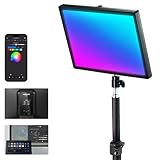
The NEEWER GL25C is an RGB version of the GL25 streaming key light, with app and PC control, 25 watts of power, a stated 2500 lux at 0.5 meters, a color temperature range from 2900K to 7000K and CRI 95+ and TLCI 97+ figures, according to the listing. It uses an edge-emitting design and is described as silent, which suggests fanless operation. It suits streamers who want a key light that can also act as a colored accent, matching a game or brand color.
Key specs
- Power rating: 25 watts
- Output: about 2500 lux at 0.5 meters, per the listing
- Color temperature: 2900K to 7000K, plus full RGB color
- Color accuracy: CRI 95+ and TLCI 97+, per the listing
- Control: app and PC control
- Design: edge-emitting panel described as silent
The lux figure helps with planning, because light falls off with the square of distance. If the panel delivers 2500 lux at 0.5 meters, then at 0.75 meters it delivers about 2500 x (0.5 / 0.75)^2, or roughly 1100 lux. At 1 meter, it is about 625 lux. Many webcams and cameras produce clean images with a few hundred lux on the face, so a distance of 0.75 to 1 meter should be plenty for a close desk setup. Moving the light twice as far reduces the brightness to a quarter, so you can fine tune the look just by sliding it back.
The color accuracy figures matter for faces. CRI measures how faithfully a light renders a set of color samples, and TLCI is a similar measure designed for video cameras. Figures above 95 are generally considered very good. As with all manufacturer numbers, confirm the details on the product page. The RGB mode adds options for backlights and mood, but for the key light role use the white range and keep colors for secondary lights.
Software control is the other advantage. App and PC control let you save scenes and adjust from the computer. Check which operating systems and connection type the app uses, since some require Bluetooth or a wireless dongle. Use the supplied power adapter, keep the back of the panel clear for airflow and do not look directly into the panel at full brightness.
Who should skip it: players who want a stripped-down light with a knob and nothing else, and anyone sensitive to bright panels who would prefer a lower-output ring. Before going live, set the white balance on your camera to match the panel, since RGB panels in white mode still benefit from a matched camera setting. Keep the light at least 0.75 meter from your face and dim it if you notice eye strain. Verify the app compatibility and connection method on the product page.
Pros
- High stated brightness and color accuracy figures
- Full RGB plus a wide white range
- App and PC control for scenes
- Silent edge-emitting design, per the listing
Cons
- More complex than a simple knob or remote
- RGB features add little if you only need white light
- Requires wall power and desk space
- App compatibility should be checked before buying
Next to the GL25B, the GL25C adds RGB and software control at the same power rating, so pick it if you will use color. Next to the Elgato Key Light, it offers similar roles with a different ecosystem, and the Elgato has a more established streaming software integration. If you only need a white key light, the GL25B or Elgato may be simpler.
How to Choose a Key Light for Streaming
A key light is the main light on your face. It should be brighter than anything else lighting you, soft enough to flatter skin and placed so that it shapes your features instead of flattening them. The choices below walk through brightness, softness, color and mounting, with numbers you can apply to your own desk.
Understand lumens, lux and watts
Lumens measure the total light a source emits. Lux measures how much of that light lands on a surface, so it depends on distance. Watts measure power use, not brightness, and different LED designs convert watts to light differently. A listing that states lux at a given distance, like 2500 lux at 0.5 meters, tells you more about real brightness on your face than a watt figure alone.
Worked example: the inverse square rule
Light falls off with the square of distance. Take a light that gives 2500 lux at 0.5 meters.
- At 0.5 m: 2500 lux
- At 0.75 m: 2500 x (0.5 / 0.75)^2 = about 1110 lux
- At 1.0 m: 2500 x (0.5 / 1.0)^2 = 625 lux
- At 1.5 m: 2500 x (0.5 / 1.5)^2 = about 280 lux
Many cameras produce a clean image with a few hundred lux on the face, so a sensible key light placement is 0.75 to 1 meter away. A smaller light such as the Logitech Litra Glow, at roughly a tenth of a panel’s lumen rating, needs to be much closer to give the same effect. The practical lesson is that you do not need to chase maximum brightness. A 25 watt panel placed at 1 meter can match or beat a weaker light at half that distance, with softer shadows and less glare in your eyes.
Size and softness
Bigger sources produce softer light. A 14 inch ring or a 13 inch panel placed close to your face wraps light around your features and reduces hard shadows. A 10 inch ring or a small square light is more like a spotlight at the same distance. If you want the most flattering look, choose a larger panel or use diffusion, and place it at an angle instead of straight on.
Color temperature and color accuracy
Color temperature is measured in kelvins. Lower numbers are warm and orange, while higher numbers are cool and blue. Daylight is roughly 5600K, and household bulbs range from about 2700K to 4000K. Set the key light close to the dominant light in the room, or turn the room lights off, so you do not get mixed colors on your face. CRI and TLCI measure how accurately a light shows colors. Figures of 95 or higher are strong, but they are manufacturer claims and should be confirmed on the product page.
Placement
- Put the key light at about 30 to 45 degrees to one side of the camera.
- Raise it slightly above eye level and angle it down.
- Place a dimmer fill on the opposite side if shadows look too heavy.
- If you wear glasses, move the light higher and farther to the side to push reflections out of the lenses.
- Avoid placing the light behind the screen glare path or directly in front of the camera lens.
Mounting and desk space
Clamps and flexible arms save desk space but can sag. Stands and tripods are stable but occupy floor or desk area. Monitor-mounted lights are the tidiest, but they limit your angle. Measure your desk edge thickness against the clamp’s opening, and check the maximum weight of the arm. Heavier panels such as the Elgato need a solid clamp or a boom arm.
Decision matrix
| Your situation | Best match | Why |
|---|---|---|
| Want the most polished streaming panel | Elgato Key Light | 2800 lumens, app control, desk clamp |
| Want a panel with a remote and a stand | NEEWER GL25B | 25W, 2.4G remote, desk stand |
| Want color effects and software scenes | NEEWER GL25C | RGB, app and PC control, CRI 95+ |
| Tiny desk, bright room | Logitech Litra Glow | Monitor mount, USB power |
| Prefer a soft ring look close to the lens | NiceVeedi 14 inch | Large ring, CRI 97+, remote |
| Simple clamp ring for calls | UBeesize 10 inch or Weilisi 10.2 inch | Compact and adjustable arms |
| Want two lights for key and fill | NiceVeedi 2-Pack kit | Two dimmable lights and tripod stands |
| Laptop or monitor clip-on fill | LitONES ring light | Clips on, diffused design |
Safety and comfort
Use the power adapter that came with the light, or one that matches the rating on the product page. Keep vents clear, do not wrap the light in fabric and unplug it when you leave for long periods. Avoid staring into LED panels at full brightness. If you are sensitive to bright or flickering light, start at a low setting and take breaks. Make sure clamps are tight and stands are on a stable surface, and route cables where they will not catch your feet.
Common mistakes
- Placing the light directly in front of the face, which flattens features.
- Mixing a warm room lamp with a cool key light and ending up with two skin tones.
- Setting the light at maximum brightness when a lower setting at a greater distance would look better.
- Choosing a small light and sitting too far from it.
- Forgetting to check that the arm or clamp can hold the weight.
Frequently Asked Questions
What is the difference between a key light and a ring light?
A key light is the main directional light on your face, often a flat panel placed at an angle. A ring light is a circular source usually placed near the lens, which fills shadows evenly but can look flat. Many streamers use a ring as a simple fill and a panel as the key.
How bright should a streaming key light be?
Aim for a few hundred lux on your face, which many panels can reach at 0.75 to 1 meter. Brightness matters less than softness and placement. Start at a moderate level and raise it only until the camera image looks clean.
What color temperature should I use?
Choose a value that matches the dominant light in the room. Around 5000K to 5600K looks like daylight, while 3200K to 4000K suits warm indoor lighting. If you turn off other lights, any consistent setting that looks natural on your camera works.
Is CRI important for streaming?
Yes, because a higher color rendering index usually means more natural skin tones. Figures of 95 or higher are generally considered strong. These are manufacturer claims, so check the product page and look at your own camera preview.
Where should I place the light relative to my camera?
Place it about 30 to 45 degrees to one side and slightly above eye level, aimed at your face. This gives gentle shadows that show shape. Avoid putting it directly behind the camera if you want more depth in the image.
Can I use two lights?
Yes. A common setup is a key light on one side and a dimmer fill on the other, with the fill at about half the brightness. The NiceVeedi two-pack is built for this, and you can also pair a panel with a ring.
Will a key light reflect in my glasses?
It can. Raise the light, move it further to the side and tilt it down so that the reflection falls outside the lenses. A larger, softer source often makes reflections less distracting.
Are RGB lights worth it for streaming?
They are useful if you want accent colors or scenes that match a game or brand. For the key role, the white range matters more. If you only need white light, a simpler panel is easier to use.
Our Recommendation by Situation
If you want one dependable light and have room for a panel, choose the Elgato Key Light, or the NEEWER GL25B if you want a remote and a simpler setup. For color scenes and software control, the NEEWER GL25C adds RGB to the same 25 watt concept. If your desk is tiny and your room is bright, the Logitech Litra Glow is the tidy choice. Ring lights from NiceVeedi, UBeesize, Weilisi and LitONES suit calls and close-up streams, with the 14 inch NiceVeedi giving the softest look. If you want a proper key and fill layout, the NiceVeedi two-pack provides two lights and stands. Check the output, power and mounting details on each product page before you decide.