Table of Contents

16 sections 36 min read

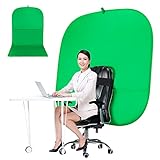
The best green screen for streaming for most people is the Emart 5 by 6.5 foot Green Screen Backdrop Kit, which pairs a wrinkle-prone but easy-to-clean fabric panel with a T-shaped stand and six clamps, so you can set up a clean chroma key behind a desk without extra hardware. If you need more width because you move around, sit far from the camera or share the frame with another person, the Hemmotop 8 by 7.5 foot kit is the bigger option. Streamers who would rather skip a stand altogether can look at the collapsible panels from RAUBAY and Emart, or at the chair-mounted screens that clip to the back of a seat. One practical rule applies to every product here: a green screen only works well when it is flat, evenly lit and placed a few feet behind you, so budget time for lighting and smoothing the fabric as much as for choosing the screen itself.

Our Top Picks

  1. Cosmos 1 Pc Green Screen Backdrop 43 in43 inches diameter43 x 43 x 0.1 inches0.7 pounds
    Check on Amazon
  2. Emart 5x6.5ft Green Screen Backdrop Kit with T-Shape5x7FT78 x 78 x 0 Inches6.2 Pounds
    Check on Amazon
  3. Hemmotop Wider Green Screen Backdrop with Stand8x7.5ft95.67 x 89.96 x 0.1 Inches5 Pounds
    Check on Amazon
  4. 【Wider Style】 RAUBAY 78.7 x 82.7in Large CollapsibleWider (78.7 x 82.7in)22.1 Pounds
    Check on Amazon
  5. EMART Green Screen58x74in19.6 pounds
    Check on Amazon
  6. JEBUTU Green Screen with Stand5 x 6.5 Ft4.85 Pounds
    Check on Amazon

Top 3 picks at a glance

Top 3 Picks

Best Overall: Emart 5×6.5ft Green Screen Backdrop Kit with T-Shape Stand

The Emart kit gives you a 5 by 6.5 foot cloth, a T-shaped stand and six clamps, which is a complete, familiar setup for a desk-based stream. The size covers a seated person from head to desk height on most webcams, and the stand folds down for storage.

Best for Value and Portability: JEBUTU 5×6.5ft Green Screen with Stand and Carrying Bag

The JEBUTU kit matches the Emart size and adds a carrying bag and clamps, per the listing. It suits streamers who set up and break down a backdrop often, such as people who share a room with a family or travel to events.

Best for Wide Shots and Movement: Hemmotop 8×7.5ft Wider Green Screen with Stand

At 8 by 7.5 feet, the Hemmotop kit covers far more width and height than the 5 foot sets. It suits a streamer who stands, uses a wide-angle lens, or wants room to lean back without the edge of the screen appearing in the frame.

Quick Comparison

Product Best for Key specs
Cosmos 43 in Round Foldable Backdrop Tight spaces and tabletop shots 43 in (110 cm) diameter, foldable, portable
Emart 5×6.5ft Backdrop Kit Best overall desk setup 5 x 6.5 ft cloth, T-shape stand, 6 clamps
Hemmotop 8×7.5ft Wider Kit Wide frames and movement 8 x 7.5 ft background, stand included
RAUBAY 78.7 x 82.7 in Collapsible Large collapsible panel 78.7 x 82.7 in, collapsible, wider style
EMART 58x74in Collapsible Panel Standless quick setup 58 x 74 in collapsible chroma key panel
JEBUTU 5×6.5ft Kit with Stand Portable value kit 5 x 6.5 ft, stand, clamps, carry bag
Portable Green Screen Chair 57 in Chair-mounted, no wall needed 57 in, double-sided, foldable, with stand
Portable Green Screen Chair 59 in Chair-mounted for video chats and more 59 in, double-sided, foldable, with stand
RAUBAY 59.8 x 82.7 in Collapsible Easy set up panel 59.8 x 82.7 in, collapsible
5x7ft Backdrop Kit with T-Shape Stand Slightly taller desk kit 5 x 7 ft, T-shape stand, 5 clamps

How We Chose

We selected and ranked these products by studying each listing’s stated dimensions, set contents, mounting style and intended use, then comparing them against well-established chroma key practice. We did not run any camera or software trials of our own, so the guidance on lighting and keying reflects general video production knowledge rather than measured results from these specific screens. Our criteria were screen size relative to a typical webcam frame, whether a stand or clamps come in the box, how portable and quick to set up the screen is, how easy it is likely to be to keep the fabric flat, whether it can attach to a chair or stand alone, and how clearly the listing describes the product. Where a listing leaves out details such as fabric weight or the exact color of a reversible side, we describe the spec class and recommend confirming it on the product page.

1. Cosmos 43 Inch Round Foldable Green Screen Backdrop – Best for Tight Spaces and Tabletop Shots

As an Amazon Associate we earn from qualifying purchases at no extra cost to you.

Cosmos 1 Pc Green Screen Backdrop 43 in / 110 cm Diameter Foldable Portable Photography Background Green Screen Chroma Key Backdrop for Phot

The Cosmos backdrop is a single round, foldable panel that measures 43 inches (110 cm) across, according to the listing, and it is sold as a portable chroma key background for photography. Think of it like a pop-up reflector that twists flat for storage. Its size makes it the smallest option here, so it suits close-up work such as product shots, hand cams, tabletop crafts and head-and-shoulder streams, but not full-body or wide frames.

Key specs

  • Shape: round panel
  • Diameter: 43 inches (110 cm)
  • Form: foldable and portable
  • Use: photography and chroma key backgrounds

A 43 inch circle is roughly 3.6 feet across, which is wide enough to fill a close webcam frame but not enough to cover a seated person plus the space around them. If the screen sits 2 feet behind you and your camera is about 2.5 feet in front of you, the frame at the screen distance is about 4.5 feet from the lens. With a typical webcam that has a horizontal view of about 70 degrees, the visible width at that distance is roughly 6 feet, which is wider than the disc. You would then see the edges. The solution is to bring the panel closer to your seat or use a narrower lens setting.

Where it shines is flexibility. It folds into a small circle, so it fits in a bag, a drawer or behind a monitor. It can be held by a stand or clipped to a chair, depending on how you rig it, and it is useful as a secondary screen behind a hand-held object or a second person. Keep the surface as flat as possible and light it evenly, because any ripples or folds will cast shadows that cause patchy keying.

Who should skip it: anyone who needs a full backdrop for a seated, head-to-desk shot, and anyone who moves around during a stream. If you do buy it, practice the fold a few times before you need it, since twist-fold discs can pop open suddenly. Mount it on a stand or a clamp at head height, keep it flat against its support and light it from two sides. Confirm the fabric and the stand compatibility on the product page, because the listing name does not describe how the disc is meant to be held in place.

Pros

  • Very small and easy to store
  • Quick to unfold and set up
  • Works for tabletop and close-up scenes
  • Useful as a travel or secondary screen

Cons

  • Too small to cover a typical seated webcam frame on its own
  • Edges may show if you lean or move
  • Collapsible panels can develop a slight curve that reflects light unevenly
  • Details such as fabric weight should be confirmed on the product page

Compared with the EMART 58×74 inch panel, the Cosmos is much smaller and more of a niche tool. The EMART covers a seated person; the Cosmos covers a small subject. For most streamers, a 5 foot kit like the Emart or JEBUTU is a better main screen, and the round panel is best as an add-on.

2. Emart 5×6.5ft Green Screen Backdrop Kit with T-Shape Stand – Best Overall for Desk Setups

Emart 5x6.5ft Green Screen Backdrop Kit with T-Shape Stand and 6 Clamps

The Emart kit includes a 5 by 6.5 foot green backdrop, a T-shaped stand and six clamps, per the listing. That combination is the standard answer for streamers who want a flat, full-height screen behind a desk. The 5 foot width fits a seated person with a little room to lean and gesture, and the 6.5 foot height covers the space from the floor behind you to well above head height on most setups.

Key specs

  • Backdrop size: 5 x 6.5 feet
  • Stand: T-shape, included
  • Clamps: six included
  • Use: streaming, video calls and photography

The T-shaped stand is the part to check. A T stand has a top crossbar and a single upright with a base, so the cloth hangs from the bar. This type is stable in a small room, but the legs can be in the way if you want the screen very close to a wall. Check the maximum height and the weight of the base on the product page. The six clamps hold the cloth to the bar, and spare clamps can also pull the cloth taut at the sides so wrinkles disappear.

Setup is straightforward. Assemble the stand, hang the cloth, smooth it by hand and use clamps to pull out any waves. If the cloth arrives creased, a low-heat steamer or a hair dryer on gentle heat at a distance can relax wrinkles. Keep the screen at least 3 feet behind you to avoid green light bouncing onto your hair and shoulders. Add two soft lights aimed at the screen from the sides so it looks evenly bright from corner to corner.

Who should skip it: players who stand during streams, share the frame with another person or use a wide-angle camera, since 5 feet of width runs out quickly. Before the first stream, set the kit up the day before and let the cloth hang so the worst creases fall out. Mark the floor with tape where the stand legs sit so you can rebuild the same layout later. Check the product page for the stand height range, base weight and the fabric description, and buy a few spare clamps if you want a tighter surface.

Pros

  • Complete kit with stand and clamps
  • Good size for a seated streamer
  • Folds down for storage
  • Familiar design that is easy to set up

Cons

  • Fabric can wrinkle in storage
  • T-shape base takes floor space
  • Width is limited if you stand or move widely
  • Stand stability depends on the base and floor

Against the JEBUTU kit, the Emart is nearly the same size and stand style, so the decision depends on extras like a carrying bag. Against the Hemmotop 8 foot kit, the Emart is easier to fit in a small room but covers less width. If you need more height, the 5 by 7 foot kit later in the list adds a half foot.

3. Hemmotop 8×7.5ft Wider Green Screen Backdrop with Stand – Best for Wide Frames and Movement

Hemmotop Wider Green Screen Backdrop with Stand, 8x7.5ft Background Kit

The Hemmotop is the largest stand-mounted kit in the guide, listed as an 8 by 7.5 foot background with a stand. That is more than 60 square feet of green. It is designed for streamers who stand up, dance, demonstrate products with big gestures, share the frame with another person or use a wide-angle camera that sees far more of the room than a standard webcam.

Key specs

  • Backdrop size: 8 x 7.5 feet, described as wider than standard kits
  • Stand: included, per the listing
  • Use: streaming, photography and video

Width is the main thing you buy here. Think about your camera’s field of view: a webcam with about a 70 degree horizontal view sees roughly 7 feet of width at a distance of 5 feet. A 5 foot screen would leave visible gaps at the edges at that distance, while an 8 foot screen covers the frame with room to spare. The same logic applies if you use a wider phone lens or a mirrorless camera with a wide-angle zoom. If you plan to place the screen 6 or 7 feet behind you so spill is lower, a wide screen keeps the edges out of the shot.

A bigger cloth brings bigger setup issues. The stand has to be wide enough and stable enough to hold it taut, and you will need space to unfold and fit it, which in a small bedroom may be hard. Wrinkles show up more on a large surface, so budget time to smooth and clamp it, and use more light to illuminate the full area evenly. Many streamers use two or three soft lights aimed at the screen, plus a separate key light on themselves. Confirm the stand’s width, height range and the fabric weight on the product page before buying.

Who should skip it: anyone in a small bedroom or an apartment, where an 8 foot stand can dominate the room, and seated streamers who only need a narrow strip of green behind them. If you buy it, measure the room first. You need the full width plus clearance to unfold and hang the cloth. Two people make setup easier. Check the product page for the stand maximum width and height, because a wide cloth on a weak crossbar sags in the middle. Spring clamps along the top edge spread the load and reduce sagging.

Pros

  • Large 8 foot width suits wide shots and movement
  • Covers more of the frame, reducing the chance of visible edges
  • Stand included in the kit
  • Good for two-person streams and demonstrations

Cons

  • Takes up significant room to set up and store
  • Large cloth is harder to keep wrinkle-free
  • Needs more lighting to cover evenly
  • Stand stability matters more at this size

The nearest alternative is the RAUBAY 78.7 inch collapsible panel, which is close to 6.6 feet wide and needs no stand. The Hemmotop is wider and better for full-body shots, but the RAUBAY is faster to deploy. Against the 5 foot kits, the Hemmotop is overkill if you only sit at a desk.

4. RAUBAY 78.7 x 82.7 Inch Large Collapsible Green Screen – Best Large Standless Panel

【Wider Style】 RAUBAY 78.7 x 82.7in Large Collapsible Green Screen Backdrop

The RAUBAY Wider Style panel measures 78.7 by 82.7 inches, which works out to about 6.6 feet wide and 6.9 feet tall. It is a collapsible design, meaning a flexible frame sewn into the fabric allows it to twist down into a small disc for storage and spring back out when you release it. For streamers who dislike stands and clamps, that is attractive: you remove it from the bag, let it open, and lean it against a wall or attach it to a chair or stand.

Key specs

  • Size: 78.7 x 82.7 inches (about 6.6 x 6.9 feet)
  • Style: collapsible panel, wider cut
  • Use: chroma key backdrop for streaming, video and photography

The large collapsible panel’s advantages are speed and wrinkle control. Because the frame holds the fabric under tension, the surface is usually flatter than a loose cloth hanging from a bar. That flatness reduces shadows and helps the keying software separate you from the background. It also means you can reset the screen in seconds, which is handy if you share the room or need the space for something else.

The disadvantages are about handling. A frame that springs open quickly can be awkward to fold, since you have to twist it in a specific way. Learn the fold before you need it, and consider practicing a few times with the fabric on a bed. The panel also needs support: lean it against a wall, attach it to a stand or clip it to a chair, because it will not stand by itself on a floor. And the large size takes up room at your desk, so measure the available space before you commit.

For lighting, place one soft light on each side of the panel at about a 45 degree angle, aimed across it so the surface looks equally bright at the center and edges. Keep the subject at least 3 to 4 feet away to avoid green spill. If your webcam is basic, the keying software will do a better job with consistent lighting than with a more expensive screen.

Who should skip it: streamers with small desks and little wall space, and anyone who struggles with twist-fold panels. If you buy it, open it away from your face and fragile objects, since the frame springs out with some force. Store it in its bag with the fabric flat, and lean it against a wall or clamp the top edge to a stand for stability. Check the product page for the recommended fold method and the fabric description, and re-check the surface after folding for new creases.

Pros

  • Large coverage without a stand
  • Frame keeps the surface tighter than loose cloth
  • Quick to unfold and put away
  • Good for standing streams and wide shots

Cons

  • Folding technique takes practice
  • Needs a wall, chair or stand for support
  • Large footprint when open
  • Frame can bow slightly, creating uneven reflection

Compared with the RAUBAY 59.8 inch panel, this one is wider by about 19 inches. Choose it when width matters. Compared with the Hemmotop kit, you give up some width but gain quick setup and no stand. If you are seated at a desk, the narrower models are easier to place.

5. EMART 58×74 Inch Collapsible Chroma Key Panel – Best for Quick Standless Setup

EMART Green Screen, 58x74in Collapsible Chroma Key Panel for Backdrop

The EMART collapsible panel is listed at 58 by 74 inches, about 4.8 by 6.2 feet, as a chroma key panel for backdrops. It uses the same spring-frame concept as the RAUBAY models, which means no stand, no clamps and no fiddling with hanging hardware. It is a good match for a streamer with a modest desk, a wall behind the chair and little patience for assembly.

Key specs

  • Size: 58 x 74 inches (about 4.8 x 6.2 feet)
  • Style: collapsible panel with built-in frame
  • Use: chroma key backgrounds for streaming and photography

At 4.8 feet wide, the panel covers a seated person with a small margin. At a camera distance of about 4 feet from the panel and a 70 degree horizontal view, the frame is about 5.6 feet wide, so the edges may show if you sit off center or lean. If that happens, move the panel closer to your chair, move the camera nearer to you, or choose a wider model. The height of 6.2 feet is enough for most seated setups and for a standing person up to roughly head height.

Panels like this are good for people who need to hide the screen between sessions. Fold it, slide it behind a door or into a closet, and your room is back to normal. The drawback is that it can lean or tip if you rest it on a wobbly surface, so anchor the top to a wall hook or a clamp. Lighting follows the same rules as any green screen: aim two soft lights from the sides, keep the subject 3 to 4 feet away and avoid shiny clothes that reflect green.

Who should skip it: anyone with a wide camera angle, a standing setup or a seat far from the camera, since the panel is only about 4.8 feet wide. Before relying on it, sit in your normal position and look at the camera preview with the panel in place. If you see a background edge, move the panel closer or choose a wider model. Anchor the top of the panel to a hook or clamp so a bump does not tip it. Confirm the fabric details and the fold method on the product page.

Pros

  • No stand or hardware needed
  • Quick to open and fold away
  • Frame keeps fabric relatively flat
  • Size fits most seated webcam frames

Cons

  • Narrower than the large panels and the 8 foot kit
  • Needs a wall or clamp for support
  • Folding takes some practice
  • Not suited to full-body wide shots

The EMART panel is the logical alternative to the Emart 5 by 6.5 foot kit if you dislike stands. It is slightly narrower but faster to deploy. Against the RAUBAY 59.8 inch model, the two are close in width, so choose based on the listing details you prefer and the fold you find easiest.

6. JEBUTU 5×6.5ft Green Screen with Stand – Best Portable Value Kit

JEBUTU Green Screen with Stand, 5X6.5ft Portable Green Screen Backdrop with Stand kit, GreenScreen Background with Stand Carrying Bag Clamp

The JEBUTU kit lists a 5 by 6.5 foot green screen backdrop, a stand, a carrying bag and clamps. It is the same size as the Emart kit, but the carrying bag is the practical bonus. Streamers who set up and break down their space, travel to LAN events, or live in a shared apartment where the backdrop must disappear after a session will appreciate having a place to put the cloth and poles.

Key specs

  • Backdrop size: 5 x 6.5 feet
  • Included: stand, carrying bag and clamps, per the listing
  • Use: streaming, video calls, photography

A kit like this works well because it removes small purchasing decisions. The stand, cloth and clamps are matched, so you do not have to find a pole that fits. The 5 foot width suits a seated person, and the 6.5 foot height covers the space above your head. The bag keeps the cloth from creasing too badly, but fabric folded for storage will still need smoothing. Hang the cloth for a few hours before streaming, or steam it lightly, to let wrinkles relax.

When you set up, extend the stand only as far as you need. A shorter stand is more stable, and a taller one is only useful if you stand or want the top edge far above your head. Clamp the cloth at the top and sides so it hangs flat, and use extra clamps or tape at the bottom corners if there is slack. A heavy item such as a sandbag or a bag of books on the stand’s base improves stability, especially if a pet or child might bump it.

Because the listing is for a less familiar brand, check the product page for the fabric description, stand height range and warranty, and look at whether the stand has locking joints that hold their position.

Who should skip it: players who need extra width or height, and anyone who prefers a standless panel. When you set the kit up, extend the crossbar only as far as the cloth needs, place the stand on a flat surface and keep cables out of the walking path. The carrying bag is useful, but leaving the cloth hanging between sessions keeps it flatter than any storage method. Check the product page for the fabric, stand height range and warranty terms, since smaller brands vary on those points.

Pros

  • Includes a carrying bag for storage and travel
  • Same size as the top overall pick
  • Stand and clamps included
  • Good for frequent setup and takedown

Cons

  • Cloth can crease in the bag
  • Stand stability depends on the base and floor
  • Width is limited for standing or wide-angle shots
  • Brand has less name recognition than some alternatives

The JEBUTU and Emart kits are close in size and style, so decide based on the extras you value. If you rarely move the backdrop, the Emart is just as good. If you need to carry it, the JEBUTU’s bag matters. For more width, look at the Hemmotop; for a chair-mounted approach, see the next two products.

7. Portable Green Screen Chair 57 Inch – Best Chair-Mounted Screen for Small Rooms

Portable Green Screen Chair, 57 in Greenscreen Backdrop with Stand Double Sided Foldable Green Background, Chroma Key, for Photography Strea

The 57 inch Portable Green Screen Chair is a foldable, double-sided backdrop designed to attach to the back of a chair, per its listing, with a stand component mentioned in the title. Instead of hanging a screen on a wall or a freestanding stand, the screen sits behind you and travels with your seat. It is aimed at photography and streaming where you want the backdrop in the same place relative to your body every time.

Key specs

  • Size: 57 inches
  • Design: double-sided and foldable
  • Mounting: chair-based, with a stand, per the listing
  • Use: photography and streaming

The big advantage is that the distance between you and the screen stays constant. That makes lighting easier because you do not need to rebuild your setup each time. It also solves the problem of a desk too close to the wall for a stand. On the other hand, a screen mounted to your chair sits very close to you, which increases green spill onto your shoulders and hair. You will notice fringing around edges and may need to adjust the keying software’s spill reduction.

The double-sided design suggests a second color on the reverse, which is often useful if you wear green or have green items in the scene. Check the product page to see what the other side is. If you stream in a room with limited space, a chair-mounted screen can also be folded flat and slid behind a cabinet.

The frame size matters. At 57 inches, the screen is just under 4.8 feet, which covers a seated person on a standard webcam but leaves less margin than the 5 foot kits. Keep the camera close and the seat centered, and aim lights from the front at a slight angle so you do not cast a shadow on the screen.

Who should skip it: players who use a chair with a very tall, curved or high-backed design, and anyone who leans, spins or moves in the seat during streams. If you buy one, attach it firmly and check that nothing shifts when you roll the chair. Place the camera close and centered, and consider a slightly lower seat height so the top of the screen stays above your head in frame. Confirm on the product page what the second side of the double-sided design offers, and how the stand attaches.

Pros

  • Attaches to the chair, so the position is consistent
  • Works in rooms with no free wall or floor space
  • Foldable for storage
  • Double-sided option for a second color

Cons

  • Close distance increases green spill on you
  • Movement of the chair shifts the screen
  • Less width than a freestanding kit
  • Stability depends on the chair and mounting

Compared with the 59 inch version, this one is slightly smaller, so choose the larger one if you move a lot. Against the freestanding kits, you gain compactness but lose the ability to move the screen farther from you, which is the best fix for spill.

8. Portable Green Screen Chair 59 Inch – Best Chair-Mounted Screen for Video Chats

Portable Green Screen Chair, 59 in Greenscreen Backdrop with Stand Double Sided Foldable Green Background, Chroma Key, for Video Chats and M

The 59 inch version of the chair-mounted green screen is the larger sibling of the previous product, described as a double-sided foldable background with a stand for video chats and more. The two inches of extra width look small on paper, but they give a bit more margin for leaning, gesturing and a wider camera angle. It is an everyday tool for remote workers and streamers who spend hours in the same chair and want a quick virtual-background solution.

Key specs

  • Size: 59 inches
  • Design: double-sided and foldable
  • Mounting: chair-based, with a stand, per the listing
  • Use: video chats, streaming and more

For video chats, the real benefit of a screen like this is that it creates a clean key for software that replaces the background. Most video call apps have a built-in virtual background that works without a screen, but the results can show choppy edges around hair and hands. A physical green screen gives the software a consistent color to remove, so edges are smoother. The trade-off is that you must light it evenly, and a screen that sits just behind your chair will pick up shadows from your own body.

To improve results, aim one soft light at each side of the screen and a separate light at your face. If you only have one light, place it above and behind the camera to wash the screen and face equally. Avoid placing the light too close to the screen, which can create hot spots. Check that the fabric is pulled tight, since folds and bows are the most common cause of patchy keying.

The same caution about mounting applies: confirm that the clips or straps fit your chair back and that the stand is stable on your floor. Chairs with very tall or curved backs may not work, and the product page should list the dimensions it supports.

Who should skip it: anyone who needs a freestanding screen at a distance from the chair, or who streams standing up. Another consideration is chair design. Armrests, headrests and mesh backs can interfere with mounting, so check the dimensions on the product page against your chair. Light the screen from the sides and keep a separate soft light on your face, because a screen this close to your back easily falls into shadow. If you notice a green edge around your hair, increase the spill reduction in your software or add a small backlight to separate you from the screen.

Pros

  • Extra width over the 57 inch model
  • Compact and foldable
  • Good for video calls and streaming from a fixed chair
  • Double-sided for flexibility

Cons

  • Still narrower than 5 foot stand kits
  • Screen sits close to you, increasing spill
  • Chair compatibility needs checking
  • Lighting needs care to avoid body shadows

It is the better choice than the 57 inch model if you can fit it. Against the RAUBAY 59.8 by 82.7 inch panel, the width is similar, but the RAUBAY covers much more height and does not depend on a chair. If your chair has a tall back or you move around, a freestanding or collapsible panel will be easier to live with.

9. RAUBAY 59.8 x 82.7 Inch Collapsible Green Screen – Best for Easy Setup at a Desk

【Easy Set Up】 RAUBAY 59.8 x 82.7in Collapsible Green Screen Backdrop

The RAUBAY Easy Set Up panel measures 59.8 by 82.7 inches, which is about 5 feet wide and 6.9 feet tall. It uses a collapsible frame like the larger RAUBAY and the EMART panel, so you can open it with a flick, lean it behind your chair and be on camera within a minute. The height is the standout: at nearly 7 feet, it covers a standing person and a seated person with the monitor stack above, which is more than the 58 by 74 inch EMART.

Key specs

  • Size: 59.8 x 82.7 inches (about 5 x 6.9 feet)
  • Style: collapsible panel, listed for easy setup
  • Use: chroma key background for streaming, video and photography

Choosing between panel widths comes down to the camera angle. A 5 foot panel at 4 feet from the camera and a 70 degree horizontal view fills a frame about 5.6 feet wide, so the edges might show unless the camera sits within about 3.6 feet of the screen. You can solve this by moving the camera closer to you, using a narrower lens setting or choosing the 78.7 inch RAUBAY. Height rarely causes trouble, but a taller panel gives you freedom to raise the camera or stand during a stream.

The fabric on collapsible panels is stretched across a flexible frame, which usually keeps it smoother than a cloth hanging from a bar. Smoothness matters because shadows from wrinkles create uneven green and cause the keying software to leave holes or halos. Still, repeated folding can leave a slight curve, so let the panel rest open for a few minutes and check for glare. If the surface is shiny, adjust the light angle or add diffusion in front of the lights.

Keep your subject 3 to 4 feet in front of the panel and avoid clothes or accessories in similar green tones. A matte shirt in a contrasting color gives the cleanest key. Confirm the fabric details and the recommended fold method on the product page.

Who should skip it: players who want the widest coverage for standing shots, or those who prefer cloth on a stand. A practical setup tip is to place the panel flush against a wall and secure the top with a hook or clamp so it cannot lean forward. Then bring your chair forward until you are 3 to 4 feet from the surface. If your seat is closer than that, tilt the lights so they avoid your shadow. Check the product page for the fabric details, the fold instructions and any warranty information.

Pros

  • Nearly 7 feet tall, which suits standing and seated streams
  • No stand or clamps needed
  • Fast to open and fold
  • Frame helps keep the surface flat

Cons

  • Width is limited compared with the 6.6 foot RAUBAY
  • Folding technique takes practice
  • Needs a wall or clamp for support
  • Frame can curve slightly after repeated folding

Against the EMART 58 by 74 inch panel, this RAUBAY gives about 9 inches more height and a similar width, so it is the better pick for taller setups. Against the 78.7 inch RAUBAY, it is easier to place in small rooms but narrower for wide shots.

10. Green Screen Backdrop Kit 5x7ft with T-Shape Stand and 5 Clamps – Best Slightly Taller Desk Kit

Green Screen Backdrop Kit with Stand for Streaming, 5x7ft Photo Greenscreen Background with Portable T-Shape Stand and 5 Clamps for Photogra

The last product is a 5 by 7 foot photography green screen backdrop kit with a portable T-shaped stand and five clamps, marketed for streaming. It is similar to the Emart and JEBUTU kits but adds half a foot of height. That extra height can matter if you stand at times, raise your camera or sit on a tall chair, because the top of the frame is less likely to show the edge of the cloth.

Key specs

  • Backdrop size: 5 x 7 feet
  • Stand: portable T-shape, included
  • Clamps: five included
  • Use: streaming, photography and video

The number of clamps is a small detail with practical effects. Five clamps are enough to hang the cloth from the crossbar and pull the sides, but you may want to buy a few extra spring clamps to stretch the cloth at the bottom or the edges. A few extra clamps are a small add-on that makes a big difference in smoothness.

Unlike the collapsible panels, a cloth-and-stand kit can be adjusted for height and tension, and it can hang freely without needing a wall. That makes it more suitable for rooms where the desk sits in the middle or away from a clean wall. The downside is that the stand takes floor space and can be knocked over, and the cloth must be smoothed each time you set it up. If you leave the kit assembled all the time, the cloth stays flatter, but it becomes a permanent fixture in the room.

Light it from both sides at roughly 45 degrees and keep the subject 3 to 4 feet in front. If your seated position is near the stand legs, check that the legs do not appear in the camera frame. Read the product page for the stand’s height range, weight limit and the fabric description.

Who should skip it: players with very little floor space, those who want a standless panel and anyone who needs more than 5 feet of width. A useful trick is to keep the kit assembled in a corner of the room between streams so the cloth hangs flat and you avoid repeated wrinkles. Add small clips or tape at the bottom corners to stop the cloth from swinging when a fan or a door moves the air. Check the product page for the stand maximum height, the cloth material and the warranty before buying.

Pros

  • 5 x 7 feet gives extra height over the common 6.5 foot kits
  • Stand and clamps included
  • Adjustable height and tension
  • Works away from walls

Cons

  • Cloth wrinkles easily after storage
  • Stand legs take floor space
  • Width is the same as the smaller kits
  • Extra clamps are useful for a tight surface

It is the natural upgrade from the Emart or JEBUTU if height is your concern. If you want more width instead, the Hemmotop is the next step. If you prefer no stand at all, the RAUBAY and EMART collapsible panels are faster, but they depend on a wall or chair for support.

How to Choose a Green Screen for Streaming

Start with the field-of-view math

The most common mistake is buying a screen that is too narrow for the distance between the camera and the backdrop. The width your camera sees at a given distance is roughly 2 x distance x tan(half the horizontal field of view). Many webcams have a horizontal view of about 70 degrees, so the half angle is 35 degrees and tan(35) is about 0.70.

  • Camera 3 feet from the screen: 2 x 3 x 0.70 = about 4.2 feet of width
  • Camera 4 feet from the screen: about 5.6 feet
  • Camera 5 feet from the screen: about 7 feet
  • Camera 6 feet from the screen: about 8.4 feet

If you sit 2 feet from the camera and 3 feet in front of the screen, the camera-to-screen distance is 5 feet and the frame is about 7 feet wide. A 5 foot screen would show gaps on both sides, while the 6.6 foot RAUBAY would nearly fill it, and the 8 foot Hemmotop would cover it with margin. If you narrow the field of view or move the camera closer, a smaller screen works. Check your own camera’s field of view in its specifications, since wide-angle models see much more.

Cloth, collapsible panel or chair-mounted?

Cloth-and-stand kits such as the Emart, JEBUTU, Hemmotop and the 5 by 7 foot kit are the most adjustable and can hang away from walls, but they wrinkle and take floor space. Collapsible panels from RAUBAY and EMART are faster and flatter, but they need support from a wall, chair or clamp and have a fold technique to learn. Chair-mounted screens suit tight spaces but put the green close to you, which increases spill. The round Cosmos panel is a specialty tool for small subjects.

Lighting rules that matter more than the screen

  • Light the screen evenly with two soft lights, one on each side, aimed at about 45 degrees.
  • Light yourself separately so you do not rely on the screen lights for your face.
  • Keep yourself 3 to 4 feet in front of the screen to limit green spill on hair and shoulders.
  • Avoid shiny surfaces such as glossy jewelry, glasses frames that reflect green and satin clothes.
  • Use a matte screen surface and keep it as wrinkle-free as possible.

Keying software settings

Streaming software such as OBS offers a chroma key filter with similarity, smoothness and spill reduction sliders. Start with the defaults, then raise similarity until the screen disappears and reduce it if your face starts to fade. Raise spill reduction if you see a green fringe. These tools work best when the screen is evenly lit, so fix the lighting first rather than relying on extreme slider settings.

Decision matrix

Your situation Best match Why
Seated at a desk with a free floor Emart 5×6.5ft or 5x7ft kit Familiar cloth-and-stand setup
Frequent setup, takedown or travel JEBUTU kit with bag Carrying bag included
Standing, dancing or two people in frame Hemmotop 8×7.5ft Widest coverage
No stand, want a quick setup RAUBAY 78.7 or 59.8 inch panel Collapsible frame, fast to open
Small room and fixed chair Chair-mounted 57 or 59 inch screen Attaches to the seat, folds flat
Product shots and close-ups Cosmos 43 inch round panel Compact and portable
Moderate width and quick fold EMART 58×74 inch panel Simple standless panel

Space, storage and safety

Measure the space behind your seat, including the stand legs and the room needed to open a collapsible panel. Collapsible panels spring open quickly, so open them away from your face, and keep them away from other people and fragile objects. Keep tall stands away from walkways and weigh down the base if pets or children are around. Do not place a stand where it can fall onto equipment, and keep cloth away from heaters and hot lamps.

Common mistakes

  • Buying a screen narrower than the camera’s view at your distance.
  • Placing the screen right behind your chair and getting green spill on your shoulders.
  • Lighting the screen unevenly, which creates hot spots and dark corners.
  • Storing the cloth crumpled and streaming without smoothing it.
  • Wearing green or a shirt close to the screen color.

Frequently Asked Questions

How big should a green screen be for streaming?

It should cover everything your camera sees behind you. For a seated person on a typical webcam, a screen about 5 feet wide and 6.5 feet tall is a common starting point. If you stand, move widely or use a wide-angle camera, choose a wider model such as the 8 foot Hemmotop.

Do I need a green screen if my software has a virtual background?

You do not need one, but a physical screen usually gives cleaner edges around hair, hands and objects. Software-only backgrounds guess where you end and the room begins, which can cause flicker. A green screen gives the software a consistent color to remove.

How far should I sit from the green screen?

A distance of 3 to 4 feet is a common recommendation. It reduces green light bouncing onto your hair and clothes and makes it easier to light the screen and yourself separately. If space is tight, expect to use more spill reduction in your software.

How do I get wrinkles out of a green screen cloth?

Hang it for several hours, use a handheld steamer or iron on a low setting following the care label. Pull the cloth taut with clamps at the sides and bottom. Keeping the kit assembled between streams also helps.

What lighting do I need?

Two soft lights on the screen, one on each side at about 45 degrees, plus a separate light for your face. The goal is an evenly lit screen with no hot spots or shadows. Dimmable lights make it easier to balance the screen and your face.

Are collapsible panels better than cloth screens?

They are faster to set up and usually flatter, which helps with keying. Cloth screens are more flexible for wide or tall setups and do not rely on a wall. Choose collapsible if you want convenience and cloth if you want size and adjustability.

Can I use a green screen if I wear green clothes?

Green clothes can become transparent in the final video. Wear a contrasting color, or use a reversible screen if the second side is a different color. Check the product page to see which colors a double-sided model offers.

What is green spill and how do I reduce it?

Green spill is the green tint that bounces from the screen onto your hair, shoulders and skin. Move farther from the screen, light yourself with a strong key light, and increase the spill reduction setting in your keying software.

Our Recommendation by Situation

For a desk-based stream in a normal room, choose the Emart 5 by 6.5 foot kit, or the 5 by 7 foot kit if you want more height. If you take your setup on the road, the JEBUTU kit with its bag is the practical choice. For wide shots and movement, pick the Hemmotop or the 78.7 inch RAUBAY. When space is very tight, a chair-mounted screen or the EMART collapsible panel can work, and the round Cosmos is best kept for small subjects. Whichever you choose, light the screen evenly, keep yourself a few feet away and confirm the fabric and stand details on the product page.

Related guides

Browse all Streaming Gear guides →