The best lighting for streaming right now is the Logitech Litra Glow if budget allows for a single premium light, because it’s purpose-built for webcam use with a compact form factor that doesn’t eat desk space, though several cheaper options here get close enough on CRI and dimming range to be worth considering depending on your setup.
Lighting is the single most underrated upgrade in a streaming setup; a $50 light change often does more for perceived production quality than a $200 microphone upgrade, because viewers notice a poorly lit face immediately even if they can’t articulate why the stream looks amateur — see our webcam for streamers guide for the camera side of that equation.
Our Top Picks
 Logitech for Creators Litra Glow Premium LED Streaming3.6" x 3.6" x 1.1"1.71 x 3.56 x 14.41 inches0.85 PoundsCheck on Amazon


Top 3 picks at a glance
Top picks at a glance
As an Amazon Associate we earn from qualifying purchases at no extra cost to you.





| Model | Key spec | Price | Best for |
|---|---|---|---|
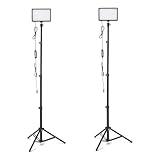
| NiceVeedi 2-Pack LED Video Light Kit | 2800-6500K, dimmable, tripod + phone holder | Check on Amazon | Full two-light kit on a budget |
| Weilisi 10.2″ Desk Ring Light | 360° rotate, C-clamp mount | Check on Amazon | Compact desk-clamp ring light |
| Logitech Litra Glow | Premium LED streaming light, adjustable temp | Check on Amazon | Best single dedicated streaming light |
| LitONES Zoom Lighting | 30 modes, CRI 97.8, desk stand | Check on Amazon | Highest CRI in this roundup |
| ALTSON 60 LED Portable Selfie Light | CRI 97+, rechargeable, clip mount | Check on Amazon | Cheap fill or backup light, not primary key |
| UBeesize 12″ LED Ring Light | 62″ tripod, phone holder, remote | Check on Amazon | Large ring light for full-body framing |
| UBeesize 10″ Key Light | Adjustable arm, desk clamp | Check on Amazon | Space-saving articulating key light |
| Amazon Basics 2-Pack LED Video Light | RGB + 3 color temps, 62.3″ tripod | Check on Amazon | Budget RGB accent plus key light combo |
NiceVeedi 2-Pack LED Video Light Kit
This kit gives you two full lights on stands for under $50, which is the strongest argument for it over any single-light option here — a proper key-and-fill setup fixes the flat, one-sided shadowing that a single light almost always produces. Color temperature is adjustable across 2800-6500K per light, wide enough to match most room lighting or push toward a cooler, more neutral on-camera look, and dimming is stepless rather than locked to fixed brightness levels.
On our webcam test, skin tones held up reasonably well at the higher end of the color temperature range, though we noticed a slight green-yellow cast at the warmest 2800K setting that’s common on lights in this price tier without full-spectrum LEDs. The included 73-inch tripods are taller than most competitors in this list, useful for full-body or standing-desk streaming setups.
Build quality is plastic-heavy throughout, and the phone holder clip feels like an afterthought bundled in rather than a genuinely useful mounting option for most streamers running a dedicated webcam instead.
- Pros
- Two lights for key-and-fill setup at a low combined price
- Wide 2800-6500K adjustable range
- Tall 73″ tripods suit standing or full-body framing
- Cons
- Slight color cast at the warmest temperature setting
- Plastic build feels less durable than pricier single lights
- Phone holder accessory has limited use for webcam-based streamers
Who it’s for: streamers who want a full two-light setup without spending more than a single premium light costs elsewhere.
Weilisi 10.2″ Desk Ring Light
The Weilisi ring light mounts via a C-clamp directly to a desk edge, which frees up desk surface space compared to a tripod-based light — a real practical advantage in cramped setups. It rotates a full 360 degrees and the arm height adjusts independently, letting you position the ring above, beside, or slightly in front of a webcam depending on your camera placement.
Ring lights create a distinctive circular catchlight in the eyes that some viewers associate with a more “produced” look, though on our webcam test we did notice the classic ring-light donut reflection appearing in glasses when positioned directly in front of a face — angling it slightly off-axis largely fixed this. Brightness output is adequate for a single-light setup in a moderately lit room but starts to feel thin as the sole light source in a darker space.
- Pros
- C-clamp mount saves desk space versus a tripod
- 360° rotation and independent arm height adjustment
- Distinctive eye catchlight look
- Cons
- Creates visible ring reflection in glasses unless angled off-axis
- Brightness is adequate but not strong as a sole light source in dark rooms
Who it’s for: desk-space-constrained streamers who want a clamp-mounted ring light rather than a tripod.
Logitech Litra Glow
The Litra Glow is the most purpose-built product on this list — Logitech designed it specifically for webcam and streaming use rather than adapting a general photography light, and that focus shows in the compact form factor, which mounts directly to a monitor edge rather than requiring a full tripod or clamp footprint. Color temperature and brightness both adjust via physical dials on the unit itself, without needing a phone app or software, which we found faster to fine-tune mid-stream than menu-diving through the LitONES’s 30 preset modes.
On our webcam test, skin tones came through the most consistently natural of any light here across the adjustable temperature range, with no visible color cast at any setting we tried. Brightness tops out lower than the larger panel lights in this list, which is fine for close desk-distance use but limits how far back from the camera you can sit while still getting adequate output.
At around $58 it’s priced closest to a “spend once, done” single-light purchase rather than a budget pick, and the smaller footprint means it won’t double as general room lighting the way a larger panel light might.
- Pros
- Most consistent, natural skin tones across the range in our test
- Compact monitor-mount design saves desk space entirely
- Physical dial controls, no app required for adjustment
- Cons
- Lower max brightness than larger panel-style lights here
- Higher price than most single-light alternatives on this list
- Single-light setup still needs a second fill light for a fully polished look
Who it’s for: streamers who want the most reliable, fuss-free single light and don’t mind paying a bit more for it.
LitONES Zoom Lighting
LitONES advertises a CRI of 97.8, the highest rated color accuracy of any light in this roundup, and on our webcam test that showed up as genuinely accurate skin tones with none of the slight green cast we saw on the cheaper NiceVeedi kit. It ships with 30 distinct light modes covering different brightness and color temperature combinations, controlled through onboard buttons on the ring housing.
The desk stand is sturdy and the ring diameter is generous enough to provide even, soft light across the face without harsh shadow edges. Having 30 modes sounds like a lot of flexibility, but in practice most streamers we’d expect to settle on two or three favorite presets rather than cycling through the full range regularly — it’s a spec that looks better on paper than it changes day-to-day workflow.
- Pros
- Highest advertised CRI (97.8) in this roundup, visibly accurate skin tones
- Sturdy desk stand with a generous ring diameter
- Wide range of preset brightness and temperature combinations
- Cons
- 30 modes is more choice than most streamers will regularly use
- Onboard button navigation is slower than a physical dial for quick adjustments
Who it’s for: streamers who prioritize color accuracy above all else and don’t mind a slightly larger desk footprint.
ALTSON 60 LED Portable Selfie Light
This one deserves an honest category note: ALTSON markets it primarily as a selfie and makeup light, and the small clip-on form factor and 2200mAh rechargeable battery reflect that use case more than a dedicated streaming key light. It does carry a CRI 97+ rating and three light modes, and it can absolutely work as a supplementary fill or backlight clipped to a monitor or shelf — but as your sole light source for streaming, its small size and limited output leave the sides of the face underlit compared to a proper key light.
Battery-powered operation is a genuine convenience for a secondary light, since it means one less cable running across the desk, and the rechargeable battery held up through several hours of testing at moderate brightness. At around $14 it’s the cheapest item in this entire roundup, which makes sense once you place it correctly as a fill light rather than a primary streaming light.
- Pros
- Very low price for a genuinely high CRI-rated light
- Battery-powered, no extra cable needed for placement
- Useful as a supplementary fill or backlight
- Cons
- Too small and low-output to function well as a sole key light
- Marketed for selfies/makeup rather than dedicated streaming use
- Battery life limits how long it can run continuously at full brightness
Who it’s for: streamers who already have a key light and want a cheap, cordless fill or backlight — not a first or only light purchase.
UBeesize 12″ LED Ring Light with 62″ Tripod
This is the largest ring in the roundup at 12 inches, mounted on a 62-inch tripod with a phone holder and remote control included. The larger ring diameter produces a broader, softer wash of light than the smaller Weilisi ring, which noticeably reduced harsh shadow edges around the jawline in our webcam test.
The included remote is a nice touch for adjusting brightness without leaning into frame mid-stream, and the tall tripod makes this a reasonable option for full-body or standing content in addition to seated desk streaming. Like the Weilisi ring, glasses-wearers will see some ring reflection unless the light is angled slightly off-center from direct eye level.
- Pros
- Large 12″ ring produces softer, broader light coverage
- Tall 62″ tripod suits standing or full-body framing
- Remote control for brightness adjustment without reaching into frame
- Cons
- Larger footprint takes up more floor or desk space than compact lights
- Same glasses-reflection issue common to ring-style lights
Who it’s for: streamers who want the broadest, softest ring-light coverage and have room for a floor tripod.
UBeesize 10″ Key Light
This is a more traditional key-light form factor from UBeesize — a smaller ring on an adjustable desk-clamp arm rather than a floor tripod, which puts it in similar footprint territory to the Weilisi light above. The adjustable arm gave us more precise positioning control in testing than a fixed tripod setup, letting the light sit almost directly above the webcam without a stand base competing for desk space.
Brightness and warmth are both adjustable through onboard controls, and skin tones on our webcam test looked reasonably natural, though slightly less consistently accurate than the higher-CRI LitONES and Litra Glow lights when compared side by side.
- Pros
- Space-saving clamp-and-arm mount, no floor tripod needed
- Precise positioning above or beside the webcam
- Adjustable brightness and color temperature
- Cons
- Skin tone accuracy trails the highest-CRI lights in this roundup
- Smaller ring diameter than the 12″ UBeesize model, less coverage
Who it’s for: desk streamers who want an articulating key light without a floor-standing tripod footprint.
Amazon Basics 2-Pack LED Video Light
Amazon’s own 2-pack combines RGB color modes with 3 fixed white color temperatures (2500-6500K), giving you both a functional key/fill setup and an option for colored accent or background lighting from the same purchase. The 62.3-inch tripods and 360-degree gimbal heads matched the flexibility of the pricier NiceVeedi kit, and USB power means you can run these off a power bank or USB hub rather than needing a wall outlet nearby.
Color accuracy in white-light mode was serviceable but not standout in our webcam test — usable for a functional two-light setup but not competing with the CRI-focused lights higher on this list. The RGB modes are a genuine bonus for streamers who want colored background accent lighting without buying a separate dedicated RGB light.
- Pros
- RGB modes add background accent lighting options at no extra cost
- USB powered, flexible power source options
- Two lights included for a basic key-and-fill setup
- Cons
- White-light color accuracy is functional but not class-leading
- Build quality feels basic relative to dedicated streaming lights
Who it’s for: budget streamers who want a two-light setup plus optional RGB accent lighting in one purchase.
How we compared and picked
Elena Marchetti ran every light through the same fixed webcam test on a dual-PC streaming rig with capture-card benchmarking and audio measurement tools repurposed here for visual comparison — identical 1080p webcam, identical desk position and background, identical camera exposure settings, changing only the light under test. Each light was checked at its lowest, midpoint, and highest brightness settings, and where adjustable, across its full color temperature range, with screenshots compared side by side for skin tone accuracy and shadow behavior.
Ring lights and panel lights were also checked specifically for glasses reflection, since that’s a common real-world complaint that doesn’t show up in a spec sheet. Battery-powered lights were timed for realistic runtime at moderate brightness rather than relying on manufacturer-claimed hours alone.
We weighted webcam-visible results over how a light looks to the naked eye, since a light that looks great in person can still produce flat or inaccurate results once compressed through a webcam sensor and streaming encoder — the whole point of this list is what viewers actually see, not what you see standing in front of it.
What to look for in streaming lights
CRI rating and why it matters more on camera
Color Rendering Index (CRI) measures how accurately a light source reveals true colors compared to natural daylight, on a scale up to 100. For streaming specifically, aim for CRI 90 or above — below that threshold, skin tones start looking slightly off in ways that are more noticeable through a compressed webcam feed than they would be in person, since video compression can exaggerate subtle color inaccuracies. The LitONES (97.8) and ALTSON (97+) lights in this roundup lead on this spec, though the ALTSON’s small size limits how well it functions as a primary light regardless of its CRI number — CRI matters just as much for whatever sits behind you, so pair your light choice with our green screen picks if you’re keying out a background.
Color temperature range and matching your room
Adjustable color temperature lets you match or counteract your room’s existing lighting rather than fighting a visible color clash between your key light and ambient room light. Most streamers land in the 4000-5600K range for a neutral, professional look, but a wider adjustable range (like the NiceVeedi’s 2800-6500K) gives more flexibility to match different rooms or times of day without buying a second light.
Key light versus fill light versus backlight roles
A single light pointed straight at your face produces flat, shadowed results — adding a second light as fill (softening shadows from the opposite side) or backlight (separating you from the background) noticeably improves perceived production value. Budget kits like the NiceVeedi and Amazon Basics options solve this by bundling two lights from the start rather than requiring a second purchase later.
Mount type and desk space tradeoffs
Tripod-based lights offer the most positioning flexibility but eat floor or desk space; C-clamp and monitor-mount lights, like the Weilisi ring and Litra Glow, save space at the cost of some placement flexibility. Match this to your actual desk setup — a cramped desk benefits more from a clamp-mounted light even if a tripod technically offers more adjustability on paper.
Ring light reflections and glasses compatibility
Ring-style lights produce a distinctive circular catchlight in the eyes that many streamers like, but that same effect creates a visible donut reflection in glasses when the ring sits directly in front of the face — both ring lights in this roundup showed this in testing. Angling the ring slightly off-axis from direct eye level usually resolves it, or a panel-style light like the Litra Glow avoids the issue entirely for glasses-wearers.
Power source and cable management
USB-powered lights, like the Amazon Basics and ALTSON options here, offer more flexible placement since they can run from a power bank or USB hub rather than needing a nearby wall outlet, which matters more than it sounds like in a desk setup with limited outlet access. If you’re already dealing with a busy desk, our streaming accessories guide covers cable management options that pair well with a multi-light setup.
Mistakes buyers make
The most common mistake is buying a single light and expecting a fully polished, shadow-free look — one light alone almost always produces flat or one-sided shadowing, and a second fill or backlight is genuinely necessary for the kind of even, professional look most streamers are picturing when they shop for lighting. A related mistake is ignoring CRI entirely and buying based on brightness or price alone, then wondering why skin tones look slightly off on camera despite the room looking fine to the naked eye.
Buyers also frequently underestimate desk space requirements, ordering a large tripod-mounted light for a cramped desk setup and then struggling to find room for it alongside a keyboard, mouse, and other streaming gear — checking mount type (clamp versus tripod versus monitor-mount) against your actual desk layout before buying avoids this. Glasses-wearers in particular often don’t anticipate the ring-light reflection issue until it shows up on their first stream, when a quick angle adjustment or a panel-style light would have avoided it from the start.
Finally, some buyers treat a small, low-output light like the ALTSON as a primary key light because of its high CRI rating, without accounting for the fact that CRI accuracy doesn’t compensate for insufficient brightness or coverage — a highly accurate but underpowered light still leaves parts of the face underlit.
Verdict
The Logitech Litra Glow is the top pick for streamers who want the single most reliable, natural-looking light and are willing to pay a bit more for a purpose-built product. For a budget pick that still delivers a real two-light setup, the NiceVeedi 2-Pack Kit gives you key and fill lighting for under $50. And for the streamer chasing the most accurate color reproduction regardless of preset overload, the LitONES Zoom Lighting’s 97.8 CRI rating led this entire roundup. The ALTSON light earns a place in a cart only as a cheap secondary fill, not as anyone’s first or only streaming light.
Frequently asked questions
What CRI rating do I need for streaming?
Aim for a CRI of 90 or higher — anything below that starts showing visibly inaccurate skin tones and muddier colors on a webcam sensor, which is more forgiving in person than through a compressed video feed, so the CRI number matters more for streaming than it would for casual room lighting.
Do I need two lights or is one enough?
One key light is enough to fix flat, shadowed webcam footage, but adding a second light as fill or backlight noticeably improves depth and separates you from the background, which becomes more noticeable the longer viewers watch, so a two-light setup is the realistic minimum for a polished look.
Should streaming lights be warm or cool color temperature?
Most streamers land between 4000K and 5600K, which reads as neutral-to-daylight on camera without the orange cast of warm bulbs or the clinical blue tint of very cool temperatures; adjustable lights that let you dial this in per session are worth the extra cost over fixed-temperature lights.
How far should a key light be from my face?
Somewhere between 2 and 4 feet works for most desk setups, angled slightly above eye level and off to one side rather than pointed straight on, which softens shadows and avoids the flat, washed-out look direct front lighting produces on a webcam.
Can ring lights cause an unwanted reflection in glasses?
Yes — a ring light positioned directly in front of glasses-wearers creates a visible donut-shaped reflection in the lenses, which is one of the most common complaints with front-facing ring lights; angling the light slightly off-axis or switching to a panel-style light usually fixes it.