
A budget wireless combo asks you to make one decision well: accept that the money goes into convenience rather than raw performance. At this level you give up mechanical switches, high-end mouse sensors and metal builds, and in return you get a tidy desk, one small receiver and two devices that simply work together out of a single box. For casual and mid-core gaming, that trade is usually worth it.
The sets below suit players building a first gaming desk, clearing cables off a shared workspace, or gaming from a couch. Every pick was chosen from its Amazon listing details: connection type, battery figures stated by the maker, key switch type and the mouse specifications printed on the page, so you can compare like for like.
Top 3 picks at a glance

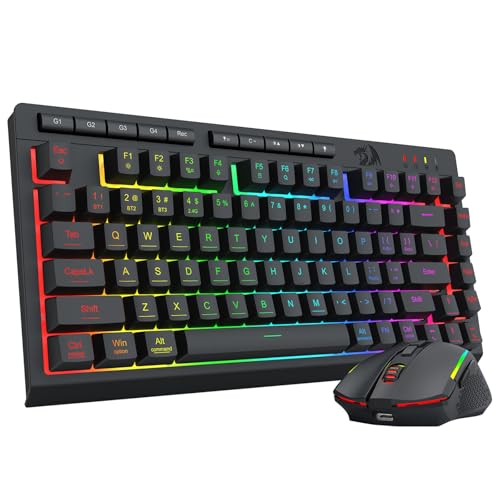

Quick Picks
As an Amazon Associate we earn from qualifying purchases
| Product | Best for | Key spec from title |
|---|---|---|
| Redragon S101M-KS Wireless Combo | Full-size desks | Tri-mode connection, 4800 DPI mouse |
| Redragon S155-PRO Wireless Combo | Compact setups | 75% layout, 4000mAh keyboard battery |
| RedThunder K10 Wireless Combo | Big-battery value | 3800mAh combined rechargeable capacity |
| RedThunder K75 Wireless Combo | Small desks with a volume knob | 80-key layout, tri-mode connection |
How to Choose
One Receiver for Both: How Shared Dongles Work
Most budget combos run the keyboard and mouse through a single 2.4GHz USB receiver. That saves a port, keeps pairing painless and means one small dongle to lose instead of two. The trade-off is flexibility: you cannot split the pair across two computers at once, and if the receiver fails, both devices go dark together. Tri-mode sets add Bluetooth and a wired fallback, which matters if you switch between a PC and a laptop. Decide first whether your desk life is one machine or several, because that answer narrows this whole category quickly.
Battery Claims: Read Them the Right Way
Headline battery figures on budget combos are almost always measured with the backlighting switched off, and RGB lighting is the single biggest drain on a wireless keyboard. A set rated for hundreds of hours dark may only manage a small fraction of that with the lights glowing through evening sessions. Look for the actual cell sizes in milliamp hours for both devices, check whether the maker states a lit runtime as well, and note the charging port. USB-C on both pieces means one cable on your desk handles everything, while older micro-USB mice add a second cable to keep track of.
Membrane Keys: Setting Honest Expectations
Nearly every keyboard in this price band uses membrane switches, sometimes described as mechanical feel. Membrane keys are quiet, soft at the bottom of the press and perfectly serviceable for movement keys and ability rotations, but they lack the crisp, separate actuation point of a mechanical switch, and fast repeated presses feel less distinct. That is not a deal-breaker for most genres. It matters most in rhythm games and high-level competitive play. If a listing promises mechanical performance at a budget combo price, treat the wording as marketing and judge the set on its other merits instead.
The Mouse: DPI Is Not the Whole Story
Combo mice advertise DPI numbers prominently, yet anything in the few-thousand range already covers the sensitivity most players actually use. More useful checks are the number of programmable buttons, whether the polling rate can be raised in software, and whether the shape suits a palm or fingertip grip. Side buttons genuinely help in shooters and MOBAs, so a seven-button mouse is a real feature, not decoration. Also confirm the mouse recharges rather than eating disposable batteries, since a rechargeable mouse and a battery-powered one change your running costs and your desk clutter.
The 4 Best Options
Redragon S101M-KS Wireless Gaming Keyboard and Mouse Combo
The S101M-KS is the full-size anchor of this group, built around a 104-key board with a number pad and a proper row of media controls. Its receiver is a two-in-one unit, so a single dongle drives both devices, and Bluetooth plus a wired mode cover laptops and cable-only moments. Redragon rates the keyboard for very long runtimes with the backlight off, and a battery indicator warns you before it runs dry. The mouse covers the sensitivity range most players use, with programmable buttons handled through Redragon’s software.
Specs
- Connectivity: 2.4GHz receiver, Bluetooth and wired USB-C
- Receiver: 2-in-1 design controls keyboard and mouse together
- Keyboard: full-size layout with 10 independent multimedia keys and 12 combination multimedia keys
- Backlighting: RGB with 8 backlight patterns, adjustable speed and brightness
- Mouse: up to 4800 DPI across 5 levels, 7 programmable buttons
- Mouse polling rate: adjustable 125-1000Hz through software
- Keyboard battery: up to 300 hours with backlight off, with battery indicator light
- Extras: splash resistance, WIN lock function, detachable 6-foot USB-C cable
Best for: players who want a complete full-size desk set with a number pad and media keys.
Watch out for: the membrane keys feel soft, and the long battery figure assumes the RGB stays off.
ASIN: B0DXTV9BGJ
Redragon S155-PRO Wireless Gaming Keyboard and Mouse Combo
Where the S101M-KS goes full-size, the S155-PRO shrinks the footprint with a 75 percent layout that keeps the function row but drops the number pad, freeing mouse room on smaller desks. Both halves are tri-mode, so the keyboard and mouse can each move between a gaming PC and a Mac or tablet without re-pairing drama. Battery transparency is this set’s strength: Redragon states both cell sizes and gives a lit runtime alongside the lights-off figure, which makes planning charges refreshingly straightforward.
Specs
- Connectivity: Bluetooth 5.0, 2.4GHz receiver and USB-C wired on both devices
- Keyboard: 75% layout, quiet membrane keys, macro programmable
- Keyboard battery: 4000mAh, up to 50 hours with RGB on and 300 hours with it off
- Mouse battery: 700mAh rechargeable
- Mouse: 7 programmable buttons, 5 preset DPI levels from 400 to 3200, up to 12800 DPI in software
- Anti-ghosting: 26-key rollover on the keyboard
- Compatibility: Windows and Mac
Best for: smaller desks and anyone splitting time between a gaming PC and a second machine.
Watch out for: no number pad, and the quiet membrane keys will not satisfy mechanical switch fans.
ASIN: B0FDG55BPG
RedThunder K10 Wireless Gaming Keyboard and Mouse Combo
The K10 keeps things simple: one 2.4GHz receiver, a full-size mechanical-feel keyboard and a seven-button mouse, with no Bluetooth pairing menus to manage. Its combined rechargeable capacity is generous for the class, split between a large keyboard cell and a smaller mouse cell, and the keyboard’s anti-ghosting is aimed at the key clusters gamers actually hold down. The backlighting offers several rainbow effects rather than per-key colour, which is typical here. For a straightforward plug-in-and-play set that favours battery size over connection options, this is the group’s traditionalist pick.
Specs
- Connectivity: 2.4GHz wireless through one shared USB receiver
- Keyboard battery: 3000mAh rechargeable
- Mouse battery: 800mAh rechargeable
- Keyboard: mechanical-feel keys with anti-ghosting, LED backlit with multiple modes
- Mouse: 7 buttons, up to 3200 DPI
- Backlight behaviour: several rainbow effect groups with adjustable brightness
- Runtime note: around 8 hours of continuous use with lights on, per the listing details
Best for: buyers who want the biggest batteries and the simplest possible setup.
Watch out for: no Bluetooth or wired fallback, so a lost receiver sidelines the whole set.
ASIN: B09BR46F63
RedThunder K75 Wireless Gaming Keyboard and Mouse Combo

The K75 is the compact option with a party trick: a CNC metal knob on the keyboard that handles volume and lighting without reaching for function shortcuts. The 80-key layout keeps a small footprint while side-engraved characters stay legible in a dark room. Both devices share one receiver in 2.4GHz mode, with Bluetooth and a wired mode for other machines, and the listing’s one-key Windows and macOS switch suits mixed households. Battery sizes are strong for a compact set, and sleep timers stretch them further between charges.
Specs
- Connectivity: Bluetooth 5.0, 2.4GHz wireless and wired modes
- Keyboard: 80-key 75% layout with side-engraved characters
- Control knob: CNC metal multi-function knob for volume and lighting
- Keyboard battery: 4000mAh rechargeable
- Mouse battery: 800mAh rechargeable
- Receiver: keyboard and mouse share a single USB receiver
- Keyboard: membrane keys, quiet typing, one-key Windows/macOS switching
- Power saving: automatic standby and sleep on both devices
Best for: compact desks where a hardware volume knob and tri-mode switching both earn their keep.
Watch out for: the listing advises a long first charge before use, and it is not compatible with PlayStation.
ASIN: B0FYCVNG84
Which One Fits Your Situation
Your First Gaming Desk
Start with the Redragon S101M-KS. The full-size layout, number pad and dedicated media keys make it the easiest set to live with beyond gaming, covering homework, work calls and spreadsheets without compromise. Its three connection modes also future-proof the purchase if a laptop joins the desk later, and the battery indicator removes the guesswork that frustrates first-time wireless owners.
Gaming From the Couch
A shared 2.4GHz receiver is the couch gamer’s friend, since one dongle in the PC or mini console box connects everything across the room. The RedThunder K10 suits this role well: big batteries forgive forgotten charges, and there is no Bluetooth pairing to redo when the set wakes. Keep the charging cable near the sofa, because a wireless set that sleeps mid-session usually just needed a top-up.
One Set, Two Computers
Tri-mode sets earn their premium here. The Redragon S155-PRO and RedThunder K75 both move between a 2.4GHz connection on one machine and Bluetooth on another, so the same keyboard and mouse serve a gaming rig and a work laptop. Check which device hosts the receiver before buying, and remember the mouse and keyboard switch independently on some sets, which takes a session to get used to.
Late-Night and Shared Rooms
Quiet membrane keys matter when someone sleeps in the next room. The S155-PRO’s keyboard is built around quiet typing, and the K75’s membrane board is similarly subdued. Turn the backlight brightness down rather than off to preserve night vision without draining the battery at full tilt, and prefer the wired mode for marathon sessions so a dimming keyboard never interrupts a late run.
Common Mistakes
- Expecting mechanical switches: budget combo keyboards are membrane almost without exception, so judge them on layout, battery and connection instead of switch feel.
- Trusting the biggest battery number: headline runtimes assume the backlight is off, so look for a stated lit runtime or the cell sizes before comparing sets.
- Losing the shared receiver: one dongle runs both devices on most of these sets, so store the spare in the mouse or keyboard compartment when travelling.
- Buying for DPI alone: a huge maximum DPI figure says little, while button count, polling rate and grip shape decide how the mouse actually plays.
- Ignoring the charging ports: a set that mixes USB-C and micro-USB means two cables on the desk, which quietly undoes the tidy wireless setup you paid for.
Frequently Asked Questions
Can a budget wireless combo keep up with fast-paced shooters?
For casual and mid-level play, yes. A 2.4GHz receiver connection on these sets is responsive enough for shooters, battle royale matches and MOBAs, especially with the mouse polling rate raised in software where supported. Ranked specialists chasing the lowest possible latency still belong on wired or dedicated gaming gear, but most players will not feel held back by a shared-dongle combo.
Do the keyboard and mouse really share one USB receiver?
On most budget combos, yes. The receiver is a two-in-one unit paired to both devices at the factory, so a single USB port runs the whole set. That convenience has a flip side: the pair cannot be split across two computers simultaneously, and losing the dongle usually means contacting the maker for a replacement rather than pairing a generic one.
How often will I actually need to recharge?
It depends almost entirely on backlighting. With RGB running, expect to charge the keyboard every week or two of evening play on the larger cells here; with lights off, the same sets can stretch to months between charges. The mouse typically needs attention more often than the keyboard. Building a habit of plugging both in on the same night keeps surprises away.
Is a membrane keyboard good enough for gaming?
For most genres, absolutely. Membrane keys handle movement, ability rotations and chat without issue, and their quiet press suits shared spaces. The gaps show in games demanding rapid repeated inputs or precise actuation timing, and in the softer, less defined feel under your fingers. If you mostly play strategy, RPG, simulation or casual shooter sessions, membrane will not be your bottleneck.
Related guides
More from Amazon
Programs that pair well with the guide above. Offers and eligibility are set by Amazon and may change.
Free shipping on eligible items, Prime Video and more. Eligible new members can start with a free trial.
Start a Prime free trialAd-free music streaming. Eligible new subscribers can start with a free trial.
Try Music Unlimited freeA Prime membership for ages 18-24 with a trial period. Eligibility is set by Amazon.
See Prime for Young AdultsAudiobooks and podcasts to listen to on the go. Eligible new members can start with a free trial.
Try Audible freeAs an Amazon Associate we earn from qualifying purchases.









