A combo locks you into the maker’s pairing, so the real decision is which compromise you accept in exchange for one box and matched gear. Most sets trade mechanical switches for quieter membrane keys, a flagship sensor for a mid-range one, or two separate connections for a single shared receiver. Choose the trade that matches how you play and the set feels like a shortcut; choose badly and you end up replacing both halves within a year.
This guide serves four kinds of buyer: first-time PC gamers who want everything in one box, players who want macro keys and software control, desk users planning long sessions with wrist support, and anyone cutting cables with a wireless set. The picks are the Redragon S101-3 PRO, the MSI Forge GK110 Combo, the RedThunder K10 Wired and the Redragon S101M-KS, selected from their listed switch types, sensor ranges and connection options.
Top 3 picks at a glance


Quick Picks
As an Amazon Associate we earn from qualifying purchases.
| Product | Best for | Key spec from title |
|---|---|---|
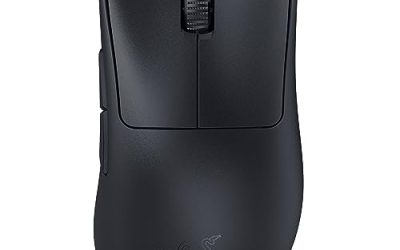
| Redragon S101-3 PRO Gaming Keyboard and Mouse Combo | A first gaming PC built on a budget tier | Programmable mouse up to 3200 DPI with macro record keys |
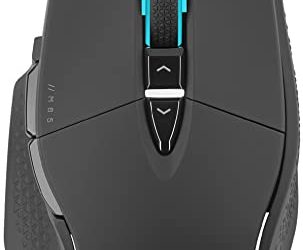
| MSI Forge GK110 Combo | A brand-name set for a compact desk | GM320 mouse with 12,800 DPI optical sensor |
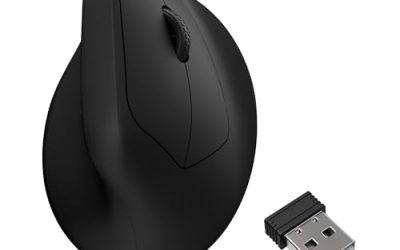
| RedThunder K10 Wired Gaming Keyboard and Mouse Combo | Long sessions with a wrist rest in the box | 7D mouse up to 7200 DPI with detachable wrist rest |
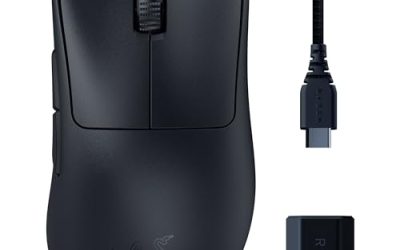
| Redragon S101M-KS Wireless Gaming Keyboard and Mouse Combo | A cable-free desk or couch setup | Tri-mode connection with one shared 2-in-1 receiver |
How to Choose
Switch Feel Decides Daily Comfort
Nearly every combo in this tier uses membrane keys or a mechanical-feel design rather than true mechanical switches, and that shapes noise, key travel and lifespan. Membrane boards like the MSI Forge GK110 stay quiet enough for shared rooms, while mechanical-feel sets such as the RedThunder K10 add a firmer, more defined press. If you type as much as you play, prioritise the feel you can live with for hours, because the keyboard half is the part you will notice on every single press.
Connection Type Shapes Your Desk
Wired sets plug in and never need charging, which suits a fixed desk and keeps input delay at the floor. A tri-mode set like the Redragon S101M-KS adds Bluetooth and a 2.4 GHz receiver, and its single 2-in-1 receiver runs both devices, freeing a USB port on a laptop. The trade is battery management: a wireless combo needs regular charging, and losing that one shared receiver disables both halves at once, so check what the box includes before you buy.
The Mouse Half Carries the Gaming Load
Keyboards in combos differ modestly, but mouse sensors differ a lot. Compare the listed DPI range and how it adjusts: the Redragon S101-3 PRO steps through 800, 1600, 2400 and 3200 DPI, while the MSI GM320 reaches 12,800 DPI. Programmable buttons matter for shooters and MMO play, and a weight tuning set, included with the S101-3 PRO, lets you change how the mouse glides. Match the sensor steps to the sensitivity you actually use rather than chasing the biggest number.
Layout and Extras Fill the Remaining Gap
Full-size boards keep the number pad and dedicated media keys, which helps if you also work at the same desk, while compact layouts free mouse room on a small surface. Wrist rests change long-session comfort more than lighting does: the Redragon S101-3 PRO builds one in, and the RedThunder K10 includes a detachable leather rest. Also confirm software support for your operating system, because macro recording and button remapping on several of these sets depend on a Windows utility. That check takes a minute and saves a return later.
The 4 Best Options
Redragon S101-3 PRO Gaming Keyboard and Mouse Combo
This is the set for a first gaming PC or a spare desk where one box has to cover everything. The keyboard pairs an integrated wrist rest with independent macro record keys and software control, which is rare at the budget tier, and the spill-resistant build suits desks that double for meals and homework. The mouse adds a weight tuning set, so you can adjust its feel instead of accepting a fixed weight. Mac users should note the listing promises only limited keyboard support, so this is mainly a Windows pick.
Specs
- Keyboard: full-size, 114 keys including 10 dedicated multimedia keys
- Rollover: 25 conflict-free keys
- Backlight: RGB with 7 lighting modes and 4 brightness levels
- Wrist rest: integrated into the keyboard
- Mouse: up to 3200 DPI, adjustable at 800, 1600, 2400 and 3200
- Mouse buttons: 6 total, 5 programmable through software
- Extras: weight tuning set and 30G acceleration on the mouse
- Connection: wired USB with gold-plated connector
- Compatibility: Windows 10, 8, 7, Vista and XP, limited Mac OS keyboard support
Best for: a first gaming PC that needs macros, a wrist rest and matched RGB in one box.
Watch out for: the keyboard backlight is full RGB, but the listing states the mouse is backlit in red only.
ASIN: B00NLZUM36
MSI Forge GK110 Combo
Pick the Forge GK110 if you want a known brand and a smaller footprint. The keyboard is a compact 97-key US layout with media hotkeys and a volume wheel, so everyday control sits on the board instead of inside a menu. Its GM320 mouse is the sensor highlight of this group, reaching 12,800 DPI with switches rated for 20 million clicks. At 540 g for the keyboard and 126 g for the mouse, the set also travels well between a desk and a laptop bag, and the symmetrical mouse shape suits either hand.
Specs
- Keyboard: membrane switches, 97 keys in US layout
- Anti-ghosting: 26 keys
- Controls: media hotkeys and a volume wheel on the keyboard
- Lighting: RGB on keyboard and mouse
- Mouse: GM320 with 12,800 DPI optical sensor
- Mouse buttons: 7
- Mouse switches: rated for 20 million clicks
- Connection: wired USB 2.0
- Dimensions: keyboard 389 x 145 x 39 mm, mouse 126 x 66 x 40 mm
- Weight: keyboard 540 g, mouse 126 g
Best for: a compact or shared desk where a volume wheel and a high-range sensor matter.
Watch out for: anti-ghosting covers 26 keys rather than the full board, so check your usual key combinations fit inside that limit.
ASIN: B0FP7CL37H
RedThunder K10 Wired Gaming Keyboard and Mouse Combo
The K10 Wired suits players who sit for long sessions and want comfort gear included rather than bought later. Its detachable soft leather wrist rest supports the full width of the 104-key board, and you can remove it when you want a cleaner desk. The mouse is the quicker half of this pairing, with seven buttons, up to 7200 DPI and a 1000 Hz polling rate. The mechanical-feel keys give a firmer press than plain membrane boards, which some typists prefer, though they also make more noise in a quiet room.
Specs
- Keyboard: 104 keys, full-size layout
- Anti-ghosting: 26 keys
- Key feel: mechanical-feel membrane design
- Backlight: RGB
- Wrist rest: detachable soft leather rest included
- Mouse: 7 buttons, up to 7200 DPI
- Polling rate: 1000 Hz
- Connection: wired USB
Best for: long gaming or study sessions where wrist support is part of the purchase.
Watch out for: the wrist rest adds depth to the board, so measure your desk front-to-back before ordering.
ASIN: B09N9FR2FH
Redragon S101M-KS Wireless Gaming Keyboard and Mouse Combo

Choose the S101M-KS when cables are the problem: a couch setup, a laptop that moves rooms, or a desk you also use for work calls. Its tri-mode design connects by cable, Bluetooth or the 2.4 GHz receiver, and one 2-in-1 receiver controls both devices, which keeps a spare port free. The full-size board keeps 10 independent multimedia keys, and the mouse reaches 4800 DPI, the middle ground of this group. Because both halves share one receiver and rechargeable power, it is the only pick here that needs a charging routine.
Specs
- Connection: tri-mode, wired, Bluetooth and 2.4 GHz wireless
- Receiver: single 2-in-1 receiver controls keyboard and mouse together
- Keyboard: full-size with RGB backlight and 8 backlight patterns
- Multimedia: 10 independent multimedia keys
- Mouse: up to 4800 DPI
- Compatibility: Windows PC and laptops
Best for: a cable-free desk, a couch gaming corner or a laptop that moves between rooms.
Watch out for: both devices depend on the one shared receiver, so keep it in a safe port or dock where it will not get knocked loose or lost.
ASIN: B0DXTV9BGJ
Which One Fits Your Situation
Your First Gaming PC
Go with the Redragon S101-3 PRO. It covers the widest ground in one box: macro record keys, software for the mouse buttons, an integrated wrist rest and a spill-resistant board. The 3200 DPI ceiling is enough for the sensitivity most new players settle on, and the wired connection means nothing needs charging before a session.
A Tidy Desk With a Brand You Know
The MSI Forge GK110 Combo fits a smaller desk and a buyer who values tidy controls. The volume wheel handles media without leaving the game, the compact board leaves more room for mouse movement, and the GM320 sensor gives the most DPI headroom here if your sensitivity climbs later. The wired link also means no batteries to manage between sessions.
Long Sessions at One Desk
The RedThunder K10 Wired is the comfort pick. The detachable leather wrist rest supports marathon sessions, the full-size layout keeps the number pad for work between games, and the 7200 DPI mouse with a 1000 Hz polling rate keeps up when you move from strategy titles to shooters. Everything arrives in one box, ready for the evening.
Gaming Away From a Fixed Desk
Take the Redragon S101M-KS if the setup moves. Bluetooth covers a tablet or laptop on the go, the 2.4 GHz receiver handles gaming at the desk, and the cable mode backs you up when the battery runs low, all through one matched pair instead of two separate purchases. It also packs neatly for travel between home and office desks.
Common Mistakes
- Judging a combo by the keyboard alone and ignoring the mouse sensor steps, button count and weight system.
- Assuming both halves share the same lighting, when some sets pair an RGB keyboard with a single-colour mouse.
- Buying a compact combo for a desk that also handles work, then missing the number pad every day.
- Treating a shared wireless receiver as a minor detail, when losing it disables both the keyboard and the mouse.
- Expecting true mechanical switches at the combo tier instead of checking whether the listing says membrane or mechanical-feel.
Frequently Asked Questions
Are keyboard and mouse combos good enough for competitive play?
They can be, if the mouse half matches your sensitivity and grip. A listed range such as 800 to 3200 DPI with on-the-fly switching covers most shooter settings, and a 1000 Hz polling rate keeps wired input responsive. The bigger limit is usually switch feel and shape, so treat a combo as a solid foundation and upgrade one half later if your play outgrows it.
Can I replace just one half of a combo later?
Yes for wired sets, because each device connects on its own cable and works independently. Wireless combos that share one receiver are different: the keyboard and mouse are paired to that receiver, so swapping in a different mouse usually means giving it its own port or connection. Check how a set connects before assuming both halves can be replaced separately.
Do wireless combos add input delay?
A 2.4 GHz receiver connection is designed for gaming and feels close to wired in normal play, while Bluetooth can add a little more delay and is better saved for work or casual titles. Tri-mode sets let you pick per situation: receiver for gaming, Bluetooth for a second device, cable when charging. That flexibility is the main reason to choose one over a wired-only set.
What should I check before buying a combo for a laptop?
Count your free ports first, because a wired combo needs two USB connections while a shared-receiver wireless set needs one. Then check the layout: a full-size board can crowd a small laptop desk, and software for macros may be Windows-only. Finally, confirm the mouse size suits your hand, since combo mice are rarely sold in multiple sizes.
Related guides
More from Amazon
Programs that pair well with the guide above. Offers and eligibility are set by Amazon and may change.
Free shipping on eligible items, Prime Video and more. Eligible new members can start with a free trial.
Start a Prime free trialAd-free music streaming. Eligible new subscribers can start with a free trial.
Try Music Unlimited freeA Prime membership for ages 18-24 with a trial period. Eligibility is set by Amazon.
See Prime for Young AdultsAudiobooks and podcasts to listen to on the go. Eligible new members can start with a free trial.
Try Audible freeAs an Amazon Associate we earn from qualifying purchases.