Disclosure: As an Amazon Associate, this site may earn from qualifying purchases made through links on this page.
Finding the best Corsair gaming mouse means matching one brand’s wide lineup to the way you actually play. Corsair builds mice for first-person shooters, MMO players who want a wall of thumb buttons, and people who want one mouse for gaming and everyday work. The four mice below cover those needs without leaving the Corsair lineup, and each one brings a different shape, sensor, and connection style to the desk. This guide compares them on the details that decide comfort and control: sensor ceiling, weight, button layout, battery life, and how the mouse connects. Use it to narrow the field before you check a listing.
Top 3 picks at a glance

At a Glance
| Mouse | Standout feature | Best for |
|---|---|---|
| Corsair M65 RGB Ultra | 26,000 DPI sensor with tunable weights | FPS players who like a solid, adjustable mouse |
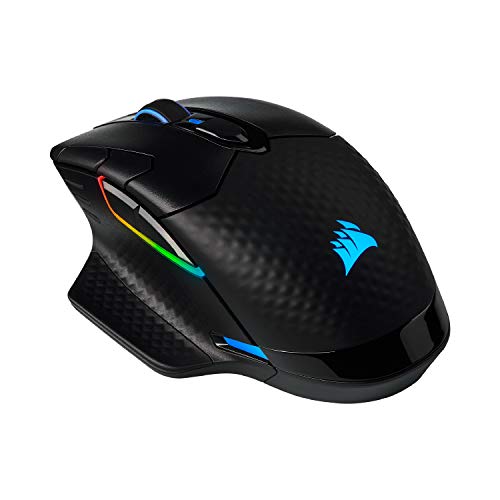
| Corsair Dark Core RGB Pro SE | Slipstream wireless with Qi charging | Wireless play with a palm-friendly shape |
| Corsair Scimitar RGB Elite | 17 programmable buttons | MMO and MOBA players with many commands |
| Corsair M75 Air Wireless | 60 g symmetrical wireless body | Light, quick movement in any grip |
How to Choose for Corsair Gaming Mice
Begin with grip. Corsair’s shapes split into two camps: right-handed ergonomic shells such as the M65 RGB Ultra, Dark Core RGB Pro SE, and Scimitar RGB Elite, and symmetrical shells such as the M75 Air Wireless. A palm grip favors a longer, taller shell with a thumb rest, while a claw or fingertip grip favors a shorter, lighter body that moves with the fingers. If your hand is on the large side, the Scimitar RGB Elite and Dark Core RGB Pro SE give you more shell to hold. If your hand is small or medium, the M75 Air Wireless and the M65 RGB Ultra sit easier under the fingers.
Next, weigh the sensor against the games you play. All four mice here use optical sensors with high DPI ceilings, and for most players the difference between 18,000 DPI and 26,000 DPI matters less than tracking stability and the DPI steps the software allows. What matters more is polling rate and connection: the M65 RGB Ultra uses a wired connection with AXON hyper-processing for an 8,000 Hz polling rate, while the wireless models use Corsair Slipstream for a sub-1 ms link. Wired removes battery from the equation entirely. Wireless removes the cable and suits players who move the mouse across a wide pad.
Button count comes third. FPS players usually need six to eight buttons: primary clicks, a scroll wheel, a DPI switch, and two thumb buttons. MMO and MOBA players need far more, and that is where the Scimitar RGB Elite makes its case with a 12-button side panel. The Dark Core RGB Pro SE sits in the middle with eight programmable buttons and two swappable side grips that change the thumb area. Count the commands you use in a typical session and match the mouse to that number rather than buying buttons you will never press.
Weight is the fourth decision. The M75 Air Wireless weighs 60 g and suits fast, low-sensitivity movement. The M65 RGB Ultra carries a tunable weight system, so you can add or remove small weights to change how the mouse feels in the hand. The Dark Core RGB Pro SE and Scimitar RGB Elite are heavier by design, which suits players who want a planted, steady feel and a shape that fills the palm. There is no right weight, only the weight that lets your aim stay smooth across a long session.
Finally, think about software and charging. All four mice work with Corsair iCUE software for button remapping, DPI stages, lighting, and profiles stored on the mouse. The Dark Core RGB Pro SE adds Qi wireless charging, so it can sit on a compatible charging pad between sessions. The wireless models run on rechargeable batteries, so check the listing for the battery figure that matches your play pattern, and keep the charging cable within reach on long days.
The Picks
Corsair M65 RGB Ultra

The M65 RGB Ultra is the wired FPS pick in this guide, and its defining idea is adjustability. The mouse uses a 26,000 DPI Marksman optical sensor with optical switches and AXON hyper-processing, which the maker lists with an 8,000 Hz polling rate over a wired connection. That combination gives the mouse a direct, immediate feel, with no battery to manage and no wireless link to think about. The anodized aluminum frame gives the shell a rigid feel, and the tunable weight system lets you add or remove small weights to shift the balance toward the front or the rear. Eight programmable buttons cover primary clicks, a scroll wheel, a DPI switch, two thumb buttons, and the red sniper button that drops sensitivity while held for careful aiming. The shape is right-handed with a thumb rest and textured side grips, which suits palm and claw grips on medium and large hands. Lighting runs through the scroll wheel, logo, and side accents, and iCUE software handles remapping, DPI stages, and on-board profiles. The wired connection suits players who keep one desk setup and want the same feel every session. The trade-off is the cable, which needs a bungee or careful routing to stay out of the way, and the weight, which is higher than the ultralight wireless models in this guide. For FPS players who want a solid, adjustable mouse with a high polling rate and a sniper button, the M65 RGB Ultra is a strong and easy-to-understand choice. The braided cable is long enough for a full desk setup, and the on-board memory keeps your DPI stages and button assignments with the mouse when you move it to another computer.
Corsair Dark Core RGB Pro SE
The Dark Core RGB Pro SE is the wireless all-rounder in this guide, built for players who want a full-size ergonomic mouse without a cable. It uses an 18,000 DPI optical sensor with Slipstream wireless, Bluetooth, and a wired mode over USB-C, so it covers a desktop, a laptop, and a console setup with the same mouse. The listing puts battery life at up to 50 hours, and the SE version adds Qi wireless charging, so the mouse can charge on a compatible pad between sessions instead of needing a cable every time. Eight programmable buttons cover the usual FPS and MOBA needs, and two interchangeable side grips let you change the thumb area from a smooth rest to a textured grip. The contoured right-handed shape fills the palm and suits medium and large hands, with a thumb rest that keeps the hand relaxed across long sessions. At 142 g it is the heaviest mouse in this guide, which gives it a planted feel that some players prefer for steady aiming and for work between games. Lighting runs through the scroll wheel, logo, and side zones, and iCUE software handles remapping, DPI stages, and profiles. The trade-off is the weight, which can tire a fingertip grip, and the size, which can feel large for small hands. For players who want a comfortable wireless mouse with flexible charging and a shape that supports the whole hand, the Dark Core RGB Pro SE is a practical and well-rounded choice. The two side grips swap without tools, and the USB-C cable in the box handles both charging and wired play when the battery runs low.
Corsair Scimitar RGB Elite
The Scimitar RGB Elite is the MMO and MOBA pick in this guide, and its case rests on one feature: a 12-button side panel that puts a full set of commands under the thumb. The mouse carries 17 programmable buttons in total, built around an 18,000 DPI optical sensor and switches rated for 50 million clicks. The side panel slides on a Key Slider control, so you can move the whole 12-button grid forward or back to match your thumb reach, which matters because every hand lands on the panel differently. Four-zone RGB lighting runs through the scroll wheel, logo, side panel, and palm area, and iCUE software maps each button to a skill, item, macro, or DPI step, with profiles stored on the mouse. The right-handed ergonomic shape is long and full, which suits palm grips on medium and large hands, and the textured side grips keep the mouse steady while the thumb works the panel. The wired connection keeps the link simple and removes battery from the equation, which suits players who sit at one desk for long sessions. The trade-off is size and weight: this is a large mouse, and players with small hands or a fingertip grip may find the side panel hard to reach. It is also more mouse than an FPS-only player needs. For MMO and MOBA players who want every ability within thumb reach, the Scimitar RGB Elite is the most direct choice in the Corsair lineup. The braided cable is long enough for a full desk setup, and the on-board memory keeps your button map with the mouse when you move between computers.
Corsair M75 Air Wireless

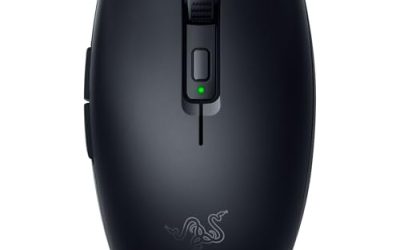
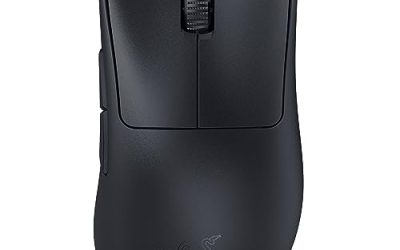
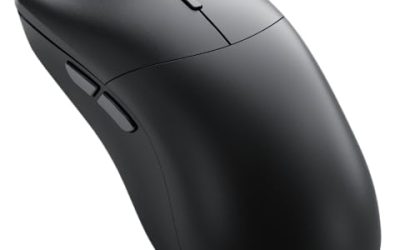
The M75 Air Wireless is the ultralight pick in this guide, and it shows how far Corsair’s wireless lineup has moved toward competitive FPS play. The mouse weighs 60 g, uses a 26,000 DPI Marksman optical sensor, and connects over Slipstream wireless or Bluetooth, with a wired mode over USB-C when you want it. The maker lists battery life at up to 100 hours, which covers long stretches of play between charges, and the symmetrical shape suits left and right hands in claw and fingertip grips. Quickstrike buttons use a spring-loaded design with no gap between the button and the switch, which the maker describes as a zero-gap feel, and optical switches sit underneath for a consistent click. The shell is smooth and uncluttered, with two side buttons and a DPI switch, which keeps the mouse simple and easy to pick up. The USB-C cable in the box handles charging and wired play, and the on-board memory keeps your DPI stages and button assignments with the mouse on any computer. PTFE feet sit underneath for a smooth glide across cloth and hard pads. Lighting is minimal compared with the other mice here, which fits the ultralight focus. iCUE software handles remapping, DPI stages, and profiles, and the mouse stores settings on board. The trade-off is the button count: with only a handful of controls, it is not the pick for MMO players who need a side panel, and the symmetrical shape gives less palm support than the ergonomic models. For players who want a light, quick wireless mouse that moves with the fingers, the M75 Air Wireless is the clearest choice in this guide.
Comparison Table
| Feature | M65 RGB Ultra | Dark Core RGB Pro SE | Scimitar RGB Elite | M75 Air Wireless |
|---|---|---|---|---|
| Sensor | 26,000 DPI Marksman | 18,000 DPI optical | 18,000 DPI optical | 26,000 DPI Marksman |
| Connection | Wired USB | Slipstream, Bluetooth, wired | Wired USB | Slipstream, Bluetooth, wired |
| Weight | Tunable weight system | 142 g | Check the listing for weight | 60 g |
| Buttons | 8 programmable | 8 programmable | 17 programmable | Check the listing for button count |
| Battery | None, wired | Up to 50 hours, Qi charging | None, wired | Up to 100 hours |
| Shape | Right-handed ergonomic | Right-handed ergonomic | Right-handed ergonomic | Symmetrical |
Which One Fits Your Situation
If you play FPS games at one desk and want a solid mouse you can tune to your hand, the M65 RGB Ultra fits, since its weight system, sniper button, and wired 8,000 Hz polling rate are built for careful aiming. If you want a wireless mouse with a comfortable palm shape and flexible charging, the Dark Core RGB Pro SE fits, since its Qi charging and three connection modes cover a desktop, a laptop, and a console setup. If you play MMO or MOBA games and need a full set of abilities under your thumb, the Scimitar RGB Elite fits, since its sliding 12-button panel and 17 programmable buttons are built for exactly that. If you want the 60 g mouse here and you play with a claw or fingertip grip, the M75 Air Wireless fits, since its 60 g body and symmetrical shape move with the fingers. Whatever you choose, match the shape to your grip first and the button count to your games second, and check the listing for current availability before ordering.
FAQ
Which Corsair mouse is best for FPS games?
The M65 RGB Ultra and the M75 Air Wireless are the two FPS-leaning picks here. The M65 RGB Ultra suits players who want a wired mouse with a sniper button and tunable weight, while the M75 Air Wireless suits players who want a 60 g wireless mouse for fast, low-sensitivity movement. Your grip decides between them: palm and claw grips suit the M65 RGB Ultra, while claw and fingertip grips suit the M75 Air Wireless.
Which Corsair mouse is best for MMO games?
The Scimitar RGB Elite is the MMO pick in this guide. Its 12-button side panel slides to match your thumb reach, and its 17 programmable buttons cover a full set of abilities, items, and macros. If you play MMO games only occasionally, the Dark Core RGB Pro SE covers the same games with eight buttons and a more general shape.
Do Corsair wireless mice work with Bluetooth?
Yes. The Dark Core RGB Pro SE and the M75 Air Wireless both connect over Slipstream wireless for gaming and Bluetooth for laptops and other devices, with a wired mode over USB-C as well. Slipstream is the connection to use for games, since it gives a sub-1 ms link, while Bluetooth suits everyday use and travel.
What is the difference between the Dark Core RGB Pro and the SE version?
The SE version adds Qi wireless charging to the Dark Core RGB Pro design, so it can charge on a compatible wireless charging pad. The sensor, button layout, and shape are otherwise the same, so choose the SE version if you already use a Qi charging pad or want to add one to your desk.
Can I use these mice with iCUE software?
Yes. All four mice in this guide work with Corsair iCUE software for button remapping, DPI stages, lighting, and profiles stored on the mouse. Install iCUE from the Corsair site, connect the mouse, and set up a profile for each game so your buttons and DPI stages change with what you play.
Final Take
The best Corsair gaming mouse depends on your grip and your games. The M65 RGB Ultra suits FPS players who want a tunable wired mouse, the Dark Core RGB Pro SE suits players who want a comfortable wireless mouse with Qi charging, the Scimitar RGB Elite suits MMO and MOBA players who need a full side panel, and the M75 Air Wireless suits players who want a 60 g wireless mouse for fast movement. Pick the shape that fits your hand first, count the buttons your games need second, and check the listing for current availability before you order.
Related guides
More from Amazon
Programs that pair well with the guide above. Offers and eligibility are set by Amazon and may change.
Free shipping on eligible items, Prime Video and more. Eligible new members can start with a free trial.
Start a Prime free trialAd-free music streaming. Eligible new subscribers can start with a free trial.
Try Music Unlimited freeA Prime membership for ages 18-24 with a trial period. Eligibility is set by Amazon.
See Prime for Young AdultsAudiobooks and podcasts to listen to on the go. Eligible new members can start with a free trial.
Try Audible freeAs an Amazon Associate we earn from qualifying purchases.