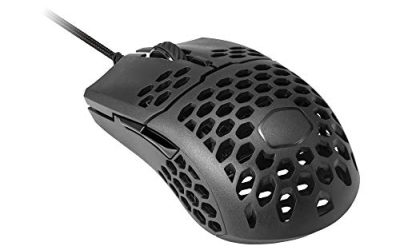
Osu rewards a mouse that moves exactly when a hand moves, and stops exactly when a hand stops. Long streams punish heavy shells, jump maps punish slow or inconsistent tracking, and a cable or wireless link that hesitates can break a play before accuracy even matters. This guide compares five lightweight gaming mice whose listing specs suit rhythm play, covering wireless and wired shapes for different grips and hand sizes.


As an Amazon Associate, we earn from qualifying purchases.
Our Top Picks
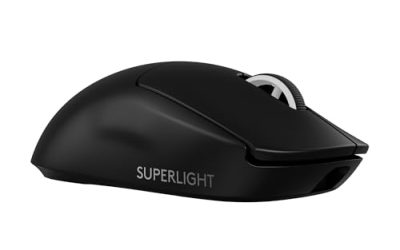
- Logitech G Pro X Superlight 2 Lightspeed WirelessClassic1.57 x 2.5 x 4.92 inches0.1 poundsCheck on Amazon
Top 3 picks at a glance

Quick answer
For most osu players, the Logitech G PRO X Superlight 2 is the safest starting point, with a 60 gram shell, a 44K DPI sensor and an 8kHz report rate. Players who want the lowest possible weight can look at the Pulsar X2 Crazylight at 35 grams, while claw grip players who prefer a cable can consider the wired ENDGAME GEAR OP1 8k v2.
How to choose
Weight is the first filter for osu. A lighter mouse takes less effort to start and stop, which matters during fast streams where the cursor changes direction constantly and during jumps that demand a single clean flick. Every mouse in this guide lists a lightweight design, but the spread still matters. A shell near 35 grams feels very different from one near 63 grams over a long session, and players with smaller hands often control a lighter, shorter mouse more easily than a larger ergonomic shape.
Sensor figures come next. The listings here cite maximum DPI figures from 30K up to 44K, but the headline number alone does not decide tracking quality. What matters for osu is steady tracking at the moderate sensitivity most players actually use, with no listing mention of smoothing or acceleration getting in the way. Tracking speed figures, where a listing states them, give a second clue. The Pulsar X2 Crazylight, for example, lists 750 IPS tracking alongside its XS-1 sensor, which describes how fast the mouse can move while the sensor keeps reading the surface accurately.
Polling rate shapes how often the mouse reports its position. Standard gaming mice report at 1000Hz, while several picks here list 8K or 8000Hz polling. A higher report rate means position updates reach the game more often, which can make fast cursor movement look and feel smoother on a high refresh display. It is not a substitute for a good sensor or a shape that fits, and some high polling modes need a wired connection or a specific receiver setup described on the listing, so check the product page for how each model reaches its top rate.
Connection type is a genuine split. Wireless picks remove cable drag entirely, which helps during wide jumps across a large play area. Wired picks remove charging from the routine and keep polling consistent without a receiver. Battery figures on the wireless listings here range up to 90 and 95 hours, which describes how often charging interrupts play rather than how the mouse aims.
Finally, match the shape to a grip. Symmetrical shells suit fingertip and claw grips and let either hand position feel neutral, while an ergonomic shell fills the palm and suits palm grip players who move from the arm. Button count matters less in osu than in other genres, since most play uses two main clicks or keyboard keys for tapping, so a clean five or six button layout is usually enough.
Logitech G PRO X Superlight 2 Wireless Gaming Mouse
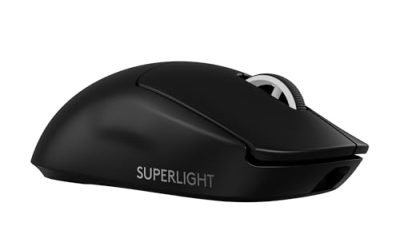
The Logitech G PRO X Superlight 2 anchors this list because its listing balances low weight, a high ceiling sensor and high polling in a symmetrical shell that suits the fingertip and claw grips common in osu. The listing states a 60 gram weight, which keeps flicks light without reaching the extreme end of the scale where some players feel a mouse becomes hard to stop precisely. For stream heavy maps, that middle ground can help the cursor settle at the end of a movement instead of drifting past a circle.
The sensor listing reaches 44K DPI, and the mouse lists an 8kHz report rate, so position updates can be sent far more often than a standard 1000Hz connection allows. In practice for osu, the useful part of those figures is headroom. A player running a moderate in game sensitivity still benefits from a sensor working well inside its range and from frequent reports during the fastest parts of a map, where the cursor crosses the play area in a fraction of a second.
The listing also states five programmable buttons and USB-C charging. Five buttons keep the shell clean, with two main clicks, a wheel click and two side buttons, which covers osu play and everyday desktop use without extra buttons crowding the grip area. USB-C charging means the same cable used for many current phones and keyboards can top up the mouse, reducing cable clutter around a desk setup.
This is the pick to start with when no strong shape preference exists. Players who already know they want an ergonomic shell, or the absolute lightest shell available, will find better matches further down this list, but as a single default recommendation for osu, the combination of a 60 gram symmetrical body, a 44K DPI sensor and an 8kHz report rate is difficult to argue against on listing specs alone.
Razer Viper V3 Pro Wireless Esports Gaming Mouse
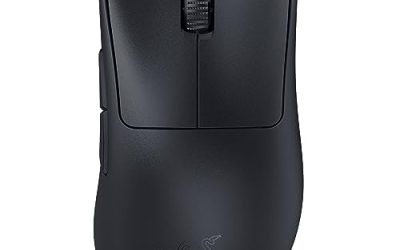
The Razer Viper V3 Pro is the symmetrical alternative for players who want a slightly lighter shell than the Logitech pick. The black version listing states a 54 gram weight, an 8K polling rate and a 35K DPI optical sensor. That pairing suits osu directly. The lighter body reduces the effort in repeated direction changes during streams, and the high polling rate keeps reported positions frequent during jumps.
Razer lists Gen-3 optical switches for this model. Optical switches register a click with light rather than a metal contact, and the listing presents them as part of the esports specification of the mouse. For osu players who tap with the mouse buttons instead of keyboard keys, switch feel and consistency matter on every note, so a listed optical switch design is a relevant detail rather than a decorative one. Players who tap on a keyboard can treat the switches as a secondary point and focus on the shell and sensor instead.
Battery life on the listing reaches 95 hours, the longest figure among the wireless picks in this guide. Longer battery life means fewer mid week charging breaks and less need to keep a cable routed to the desk for top ups, which suits players who keep a clean play area. The listing states eight programmable controls, which is more than osu needs, but the extra inputs can serve desktop shortcuts or media control outside the game without changing the in game setup.
Choose the Viper V3 Pro when a symmetrical shape, a weight in the mid 50 gram range and long battery life are the priorities. Players with larger hands who prefer a filled palm shape should compare it with the DeathAdder V3 Pro below, since the two Razer models share a sensor class and switch generation while asking the hand to work in quite different ways.
Pulsar X2 Crazylight Wireless Gaming Mouse
The Pulsar X2 Crazylight is the extreme lightweight option in this guide. Its listing states a weight of 1.23 ounces, or 35 grams, which is far below every other pick here. For osu, that figure changes how the mouse behaves in the hand. Starting a flick takes very little force, and stopping the mouse at a circle relies more on finger pressure and pad friction than on the momentum of the shell itself. Fingertip grip players, who steer almost entirely with the fingers, are the most likely to enjoy that behaviour.
The sensor is the Pulsar XS-1, and the listing states up to 32,000 DPI, 750 IPS tracking and 50g acceleration. Those figures describe a sensor built for fast movement, which matches the way osu cursors travel during jump sections. The listing also describes the mouse as 8K compatible, referring to polling support, and states optical switches rated for 100 million clicks in the product description. A high click rating is a durability figure rather than an aim figure, but for a game where a single session can involve thousands of taps, it is a sensible figure to compare.
This Uyuni White version is sold by Pulsar Gaming Gears and ships from Amazon, per the listing. The symmetrical shape and small footprint suit small to medium hands, and the very low weight can feel less controlled for palm grip players who rest the whole hand on the shell and move from the shoulder.
Pick the X2 Crazylight when low weight is the top priority and a fingertip or claw grip is already the habit. Players who find ultralight mice hard to stop precisely, or who play long sessions where an extremely light mouse makes the hand do all the stabilising work, may prefer the steadier feel of the 54 to 63 gram picks in this guide.
ENDGAME GEAR OP1 8k v2 Wired Gaming Mouse
The ENDGAME GEAR OP1 8k v2 is the wired pick in this guide, in the Dark Frost version. Its listing describes an esports gaming mouse with cable, a 30K DPI optical sensor and 8000Hz polling, built around a claw grip design. For osu, a wired connection removes two variables at once. There is no battery to charge before a session, and the polling rate does not depend on a wireless receiver or its placement on the desk.
Hot-swappable switches are the unusual detail on this listing. The ability to change the main switches means a player who prefers a lighter or heavier click feel can adjust the mouse rather than replace it, and a worn switch can be swapped without retiring the whole device. For osu players who tap with mouse buttons, click feel is part of timing, so a mouse that treats switches as replaceable parts addresses a real wear point in rhythm play.
The claw grip shape is the other defining choice. The listing presents the shell as a claw grip design, which suits players who arch the fingers and steer with a mix of finger and wrist movement. That grip style is common in osu because it keeps the fingers ready to tap while the wrist handles smaller cursor corrections. A palm grip player who wants full hand contact will likely find a claw focused shell less natural, and should look at the ergonomic pick below instead.
Cable management is the trade off to accept. A wired mouse needs a cable that does not drag across the pad edge during wide jumps, so desk layout matters more with this pick than with any wireless option here. Choose the OP1 8k v2 when a wired connection, 8000Hz polling and changeable switches sound more valuable than wireless freedom.
Razer DeathAdder V3 Pro Wireless Gaming Mouse

The Razer DeathAdder V3 Pro is the ergonomic option for osu players who aim with a palm grip or who simply have larger hands. Its listing states a 63 gram weight, which is light for a full size ergonomic shell, so the mouse keeps the low effort movement this guide favours while filling the palm in a way symmetrical mice do not. Arm aimers who move the whole forearm across a large pad often prefer that filled shape, because the hand stays planted on the shell through long streams.
The sensor listing is the Focus Pro 30K optical sensor, paired with Gen-3 optical switches and HyperSpeed wireless. The 30K figure is the maximum DPI on the listing, and as with the other picks, the practical point is stable tracking at ordinary sensitivities rather than the ceiling itself. HyperSpeed is the name Razer gives its low latency wireless connection on this listing, and the mouse lists five programmable buttons, which keeps the layout simple for a game that mainly needs two reliable clicks.
Battery life reaches 90 hours on the listing, close to the Viper V3 Pro figure, so charging stays an occasional task rather than a daily one. The ergonomic shape is right handed, which is the main exclusion to note. Left handed players, and fingertip players who like to lift a small mouse with the fingers alone, will be better served by the symmetrical picks above.
Choose the DeathAdder V3 Pro when hand size and grip comfort come first and a symmetrical shell has never felt secure. It is also the natural step for players moving from an older ergonomic mouse who want to keep the same general shape while dropping to a 63 gram wireless design with a modern sensor and optical switches.
Who should skip
Skip this entire category upgrade if the current mouse already tracks cleanly and the shape fits the hand. In osu, sensitivity settings, pad surface and practice time change accuracy more than a spec sheet does, and a new mouse will not fix a play area that is too small or a sensitivity that forces constant wrist strain.
Players who mainly play osu with a tablet should also skip these picks, since a pen replaces the mouse for cursor control and only the clicks come from a keyboard. Palm grip players with small hands may find even the ergonomic pick here too large, and anyone who needs many side buttons for other games will find these esports layouts, with five to eight controls, too plain. Finally, players on a tight setup budget should note that a worn mousepad can undo the glide of any lightweight mouse, so a pad in poor condition is worth replacing before a mouse in working condition.
Frequently Asked Questions
Is a lighter mouse always better for osu?
No. A lighter mouse is easier to start and stop, which helps with jumps and fast streams, but control still depends on grip, hand size and pad friction. Some players stop a 35 gram mouse less precisely than a 60 gram one. The listings in this guide span 35 to 63 grams, so the right choice is the weight a hand can control, not simply the lowest figure.
Does 8K polling make a visible difference in osu?
It can make fast cursor movement feel smoother, because the mouse reports its position more often than a 1000Hz connection does. The benefit shows most on high refresh displays and during the fastest jumps. It does not change accuracy on its own, and a good sensor with a shape that fits the hand matters more than polling alone when choosing between the picks here.
Should osu players choose wired or wireless?
Both can work well. Wireless picks remove cable drag, which helps during wide jumps, and the listings here state battery life up to 90 or 95 hours. A wired mouse such as the OP1 8k v2 removes charging and keeps 8000Hz polling without a receiver. The better choice depends on desk layout and on whether keeping a battery charged feels like a burden.
What DPI should an osu player use on these mice?
Most players use a moderate sensitivity rather than the maximum figures on these listings, which reach 30K, 32K, 35K and 44K DPI. Those ceilings describe sensor range, not a recommended setting. A sensible approach is to set sensitivity so a full pad sweep crosses the screen comfortably, then adjust in small steps. Exact settings depend on screen resolution, play area size and personal habit.
Final verdict
The Logitech G PRO X Superlight 2 is the default recommendation for most osu players, pairing a 60 gram symmetrical shell with a 44K DPI sensor and an 8kHz report rate. The Razer Viper V3 Pro suits players who want a lighter 54 gram body and 95 hour battery life, while the Pulsar X2 Crazylight serves fingertip players chasing the lowest listed weight at 35 grams. Claw grip players who prefer a cable should look at the ENDGAME GEAR OP1 8k v2, and larger handed palm grip players are best matched by the 63 gram Razer DeathAdder V3 Pro. Match the shape to the grip first, then let weight and polling settle the final choice.
Product and ASIN Reference
| Product | ASIN |
|---|---|
| Logitech G PRO X Superlight 2 Wireless Gaming Mouse | B09NBWL8J5 |
| Razer Viper V3 Pro Wireless Esports Gaming Mouse | B0CW25XR5R |
| Pulsar X2 Crazylight Wireless Gaming Mouse | B0DVXD49L8 |
| ENDGAME GEAR OP1 8k v2 Wired Gaming Mouse | B0FB8VYSGN |
| Razer DeathAdder V3 Pro Wireless Gaming Mouse | B0B6XZLNHQ |
Related guides
More from Amazon
Programs that pair well with the guide above. Offers and eligibility are set by Amazon and may change.
Free shipping on eligible items, Prime Video and more. Eligible new members can start with a free trial.
Start a Prime free trialAd-free music streaming. Eligible new subscribers can start with a free trial.
Try Music Unlimited freeA Prime membership for ages 18-24 with a trial period. Eligibility is set by Amazon.
See Prime for Young AdultsAudiobooks and podcasts to listen to on the go. Eligible new members can start with a free trial.
Try Audible freeAs an Amazon Associate we earn from qualifying purchases.