Most ergonomic gaming mice are drawn around medium and large hands, so a smaller hand ends up stretched along a long shell: fingertips overshoot the main buttons, the thumb strains to reach the side keys, and the palm hump pushes against the wrong part of the hand. The answer is not a flat symmetrical mini mouse. It is a right-handed ergonomic shell that was genuinely cut shorter and narrower, with the hump, thumb curve, and button layout scaled down together.


This guide is for right-handed players with hands around 17 cm or less from wrist crease to middle fingertip, who want shaped support rather than a shrunken ambidextrous board. Each mouse below is the small size in its own line, picked from its Amazon listing: the listing names, dimensions, and feature text all point at smaller hands. One is wired and feather-light, one is a honeycomb claw shape, and one is a wireless palm shell.
Quick Picks
As an Amazon Associate we earn from qualifying purchases.
| Product | Best for | Key spec |
|---|---|---|
| Razer DeathAdder V2 Mini | Palm and claw players who want the classic DeathAdder curve in a short shell | 62 g with an 8,500 DPI optical sensor |
| Glorious Model D- (Minus) | Fingertip and claw players who like a honeycomb shell and a paracord-style cable | 61 g with a Pixart 3360 sensor |
| Pulsar Xlite V3 Mini | Wireless players who want the lightest compact ergonomic shell here | 52 g with a PAW3395 sensor |
How to Choose
Shell Length and Width Come First
Measure your hand from wrist crease to the tip of your middle finger, then compare it with the shell length in the listing. Hands under about 17 cm usually pair best with shells between 105 and 121 mm long. Width matters just as much: a narrow grip width lets your thumb and ring finger close around the mouse instead of splaying outward. All three mice here sit in that compact band, while their full-size siblings run 5 to 10 mm longer and suit bigger hands.
Match the Hump to Your Grip
Ergonomic shells earn their name from the hump and the sloped right side. A taller rear hump fills the palm and suits palm grip, giving the hand a ledge to rest on during long sessions. A lower, flatter back suits claw and fingertip grips, where the fingers do the steering and the palm barely touches. Look at where the listing places the hump: the DeathAdder V2 Mini keeps a palm-friendly curve, the Model D- sits lower for claw play, and the Xlite V3 Mini splits the difference.
Keep the Weight in the Compact Band
Small hands move a mouse with shorter lever arms, so extra grams show up faster as wrist ache and overshoot on quick flicks. Every mouse in this guide weighs 62 g or less, and the lightest is 52 g. Weight distribution matters too: a shell that carries its mass near the middle feels steadier than one that is nose-heavy. If you are coming from a 90 g office mouse, expect a short adjustment period while your aim recalibrates to the lighter glide.
Decide on Cable, Battery, and Buttons
Two of these mice are wired with soft paracord-style cables that barely tug, while the Pulsar runs on 2.4 GHz wireless with a listed 70-hour battery life and a USB-C cable for play while charging. Count the buttons you actually use: all three carry two side buttons and a DPI control, and on a short shell those side buttons sit closer to the thumb. Check the listing photos for button placement, because a thumb key that sits too far forward is the most common small-hand complaint.
The 3 Best Options
Razer DeathAdder V2 Mini
The DeathAdder shape is the ergonomic benchmark for a generation of players, and this Mini trims that shell down for smaller hands while keeping the sloped right side and the thumb curve intact. At 62 g it stays light enough for claw play, yet the hump still fills a small palm better than most compact mice. The listing bundles anti-slip grip tape, which helps a narrow hand hold the smooth shell securely during fast swipes across the pad.
Specs
- Shape: right-handed ergonomic, the mini size of the DeathAdder V2 line
- Weight: 62 g
- Sensor: optical, up to 8,500 DPI with on-the-fly adjustment buttons
- Switches: Razer optical switches with light-beam actuation, listed for 70 million clicks
- Buttons: 6 programmable through Razer Synapse 3
- Cable: Razer Speedflex, wired USB
- Lighting: Chroma RGB with 16.8 million colors
- Included extra: anti-slip grip tape in the box
Best for: Palm and relaxed claw players with small hands who want the classic DeathAdder curve in a shorter shell.
Watch out for: It is wired only, and the sensor ceiling is 8,500 DPI, so confirm both fit your setup on the listing before ordering.
ASIN: B08B3K9K6P — View on Amazon
Glorious Model D- (Minus) Wired Gaming Mouse
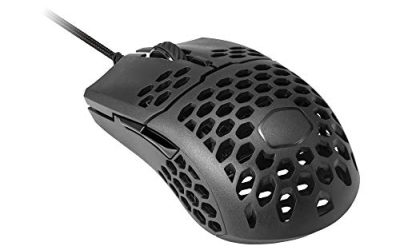
Glorious built the Model D- as the small size of its ergonomic Model D line, and the listing copy says plainly that this size targets medium to small hands in palm or claw grip. The honeycomb shell drops the weight to 61 g, the Ascended cord is a soft braided paracord style that adds almost no drag, and the pure PTFE G-Skates keep the glide smooth. It is the wired pick here for players who aim mostly with their fingers.
Specs
- Shape: right-handed ergonomic, the Minus (small) size of the Model D line
- Weight: 61 g in the matte finish
- Sensor: Pixart 3360 optical
- Polling: 1,000 Hz, with a lift-off distance under 0.7 mm
- Switches: Omron mechanical switches
- Buttons: 6, with macro support
- Feet: G-Skates made from 100% pure virgin PTFE
- Cable: Ascended braided paracord-style cord, wired USB
Best for: Claw and fingertip players with small hands who want a wired honeycomb shell that keeps real ergonomic shaping.
Watch out for: The open honeycomb shell lets dust in over time, and the size field on the listing must read Model D- (Minus), not the full-size Model D.
ASIN: B088C4X4HP — View on Amazon
Pulsar Xlite V3 Mini Wireless Gaming Mouse
Pulsar shrank its right-handed Xlite ergonomic shape into a Mini that measures about 116 mm long, the shortest shell in this guide, and kept the weight at 52 g. The PAW3395 sensor and optical switches match the bigger versions, so small-handed players are not asked to accept a cut-down spec sheet. With 2.4 GHz wireless and a listed battery life of up to 70 hours, it suits palm and relaxed claw grips on compact hands that still want a filled palm.
Specs
- Shape: right-handed ergonomic, Mini size at 115.6 x 63.4 x 40.7 mm
- Weight: 52 g
- Sensor: PixArt PAW3395 optical, up to 26,000 DPI
- Switches: optical switches
- Encoder: Pulsar blue encoder wheel
- Buttons: 5 total
- Connection: 2.4 GHz wireless, USB-C wired mode for charging and play
- Battery: up to 70 hours listed average life
Best for: Wireless players with small hands who palm or relaxed-claw and want the lightest ergonomic shell here.
Watch out for: The listing tied to this ASIN is an Amazon Renewed listing, so check the condition grade and seller shown on the page before ordering.
ASIN: B0G2F4RK1C — View on Amazon
Which One Fits Your Situation
You Palm Grip Through Long Sessions
Choose the Pulsar Xlite V3 Mini if your whole palm rests on the mouse and sessions run for hours. Its hump fills a small palm without forcing your fingers to stretch, the 52 g weight keeps wrist strain low, and the wireless link removes cable drag from slow, wide aim movements in story games and MOBAs alike.
You Claw Grip in Fast-Paced Shooters
Pick the Glorious Model D- if your fingers stay arched and your palm hovers. The lower back leaves room for fingertip steering, the 61 g honeycomb shell snaps across the pad with little effort, and the paracord-style cable adds almost no pull. It rewards players who reset their aim with quick, short lifts between fights.
You Want Tuning and Grip Tape in the Box
Go with the DeathAdder V2 Mini if you like the idea of shaping the fit after purchase. The bundled grip tape lets a narrow hand lock onto the shell, the optical switches keep clicks crisp at any hand size, and Synapse 3 stores your button layout. It is the most adjustable package here for a small palm or claw grip.
You Split Time Between Desk and Laptop Bag
Take the Pulsar Xlite V3 Mini for a setup that moves. At 52 g and roughly 116 mm long it drops into a laptop sleeve pocket, the receiver-based wireless link needs no cable on the desk, and the USB-C port lets you play wired while it charges between sessions at home, at school, or at a friend’s place.
Common Mistakes
- Ordering the full-size sibling by mistake: Model D and Model D-, or Xlite V3 Medium and Mini, sit on nearby listings, so read the size field twice before checkout.
- Judging fit by weight alone; a light mouse with a long shell still forces a small hand to stretch for the side buttons.
- Buying a symmetrical mini mouse when the goal was ergonomic support; a flat profile gives the palm and thumb nothing shaped to rest against.
- Assuming every color or finish shares one listing; variants can carry different ASINs and even different weights, like the matte and glossy Model D- finishes.
- Skipping the condition notes on the listing page; a Renewed unit can be a fine buy, but only when the grade and seller are checked first.
Frequently Asked Questions
What hand length counts as small for a gaming mouse?
Most mouse makers treat hands under roughly 17 to 18 cm, measured from wrist crease to the tip of the middle finger, as small. At that size, shells longer than about 121 mm tend to push the fingers past the main buttons. The three mice in this guide all stay at or under that length, which is why they anchor this list.
Is an ergonomic shape better than a symmetrical shape for small hands?
It depends on grip. An ergonomic shell slopes down to the right and carves a rest for the thumb, which supports palm and relaxed claw grips and can ease wrist strain over long sessions. A symmetrical shell gives the fingers more freedom and suits fingertip play. For the shaped support this keyword asks about, ergonomic is the safer default.
Does lighter always mean better for a small hand?
Not always. A lighter mouse is easier to move with the shorter strokes a small hand makes, and all three picks here weigh 62 g or less. But a shell that is too light for your grip can feel twitchy at low sensitivity. Match the weight to your grip first, then let the scale settle the tie between two finalists.
Can left-handed players use the mice in this guide?
No. All three are right-handed ergonomic shells, with the thumb buttons and the sloped side built for a right hand only. Left-handed players who need shaped support should look at the small number of true left-hand ergonomic models, or pick a symmetrical compact mouse with side buttons on both sides so the ring finger can reach them.
Related guides
More from Amazon
Programs that pair well with the guide above. Offers and eligibility are set by Amazon and may change.
Free shipping on eligible items, Prime Video and more. Eligible new members can start with a free trial.
Start a Prime free trialAd-free music streaming. Eligible new subscribers can start with a free trial.
Try Music Unlimited freeA Prime membership for ages 18-24 with a trial period. Eligibility is set by Amazon.
See Prime for Young AdultsAudiobooks and podcasts to listen to on the go. Eligible new members can start with a free trial.
Try Audible freeAs an Amazon Associate we earn from qualifying purchases.