
Top 3 picks at a glance
Introduction
If you’re streaming from a spare bedroom, an apartment next to a busy street, or a living room with bare walls and a tile floor, you already know the problem: condenser microphones pick up everything. The refrigerator hum, the traffic outside, the echo off your ceiling — all of it rides straight into your stream. That’s why the answer for noisy rooms is almost always a dynamic microphone. Dynamics have a tighter cardioid pattern and lower sensitivity, so they capture your voice when you’re talking a few inches away while rejecting the room around you.
The good news is that XLR dynamic microphones have gotten dramatically cheaper. In 2026, you can get a genuine dynamic mic with USB fallback, a mute button, and even RGB lighting for between $30 and $80 — a fraction of what broadcast-style mics cost a few years ago. We ranked eight budget options, all in that price band, and broke down which one fits your room, your interface (or lack of one), and your budget.
As an Amazon Associate we earn from qualifying purchases at no extra cost to you. Product prices and availability are accurate as of the date shown and are subject to change.






Quick Picks
| Product | Best for | Price |
|---|---|---|
| FIFINE AmpliGame AM8 USB/XLR Dynamic Microphone | Best overall for noisy-room streaming | $56.99 |
| FIFINE AmpliGame AM8T XLR/USB Gaming Microphone Set | Best complete starter kit | $67.99 |
| Dynamic USB XLR Gaming Microphone with AI Noise Canceling | Best AI noise cancellation | $34.99 |
| FIFINE AmpliTank K688 Dynamic Microphone | Best for podcast-grade voice | $67.99 |
| FIFINE AmpliTank K688CT Podcast Microphone Kit | Best full kit with accessories | $79.99 |
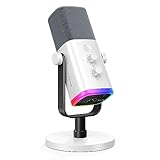
| FIFINE AmpliGame AM8W XLR/USB Gaming Microphone | Best white aesthetic build | $58.99 |
| Dynamic USB-C/XLR Podcast Microphone with RGB | Best ultra-budget pick | $29.99 |
| PUPGSIS XLR/USB Dynamic Podcast Microphone | Best under-$40 hybrid mic | $35.99 |
How We Picked
Every microphone on this list is a dynamic model, because dynamics are the correct tool for untreated rooms. We filtered for hybrid USB/XLR operation so you can start on USB today and upgrade to an audio interface later without replacing the mic. We capped the price at $80, with most picks between $30 and $70, because that’s where the value is for streamers who don’t want to gamble on gear.
Beyond that, we prioritized features that matter specifically in noisy rooms: tight cardioid pickup patterns, onboard gain control and mute buttons for quick fixes mid-stream, headphone jacks for zero-latency monitoring, and included shock mounts or boom-arm compatibility to cut desk thumps. We deliberately did not invent lab measurements — instead, we focused on the spec sheets, build features, and use-case fit that a buyer can verify before purchase. Products are ranked by overall value for noisy-room streaming, not by price alone.
The 8 Best Picks
1. FIFINE AmpliGame AM8 USB/XLR Dynamic Microphone — $56.99
The AM8 is our top pick because it nails the fundamentals for a noisy room: a dynamic capsule with a cardioid pattern that favors close talking, plus both USB and XLR outputs so it survives your next gear upgrade. The tap-to-mute sensor on top is genuinely useful mid-stream, and the built-in headphone jack lets you monitor your voice with zero latency. RGB lighting is there if you want it, and it can be switched off if you don’t.
- Pros: Hybrid USB/XLR design means no re-buying when you add an interface
- Pros: Tap-to-mute and gain control are right on the mic body
- Con: The included tripod desk stand is basic; a boom arm is a worthwhile add-on
Skip it if you want a full kit with cables and arm included — the AM8T below covers that for $11 more.
2. FIFINE AmpliGame AM8T XLR/USB Gaming Microphone Set — $67.99
The AM8T is the AM8’s bundle: the same dynamic capsule and USB/XLR flexibility, packaged with the accessories you’d otherwise buy separately, including a boom arm and the cabling to run either connection type. For a first-time streamer setting up in a loud bedroom, that matters — you get a proper off-desk mounting position, which alone reduces keyboard and desk noise in your mix. It’s the least frustrating way to go from box to broadcast in one afternoon.
- Pros: Bundle includes the mounting and cabling most buyers need day one
- Pros: Same close-talk dynamic rejection that makes the AM8 great in untreated rooms
- Con: Costs $11 more than the standalone AM8 if you already own an arm
Skip it if you already have a boom arm and XLR cable — the plain AM8 is the smarter buy.
3. Dynamic USB XLR Gaming Microphone with AI Noise Canceling — $34.99
This is the budget pick with a trick: built-in AI noise cancellation aimed directly at the noisy-room problem. In USB mode, the onboard processing works to suppress background noise before it reaches your stream software, which is handy if your room has a fan, an AC unit, or street noise you can’t eliminate. You still get the XLR output for later, plus a headphone jack for monitoring, all under $35.
- Pros: AI noise canceling directly addresses untreated-room background sound
- Pros: XLR output keeps your upgrade path open at a very low price
- Con: Noise processing can slightly color your voice; purists may prefer to disable it
Skip it if you’ll run XLR through an interface immediately — the AI processing is a USB-mode feature.
4. FIFINE AmpliTank K688 Dynamic Microphone — $67.99
The K688 leans more podcast than gaming: a broadcast-style dynamic capsule tuned for rich vocal pickup at close range, with both USB-C and XLR outputs and onboard gain control. If your stream is talk-heavy — interviews, commentary, podcast episodes that double as livestreams — this mic’s voice-first character is worth the premium over the gaming-styled options. It’s also a sensible choice if your “noisy room” issue is mostly reverb, since close-miking a dynamic tames room reflections effectively.
- Pros: Broadcast-style tuning flatters spoken voice at 2–4 inches
- Pros: Onboard gain knob makes dialing in levels without software easy
- Con: Plain styling; no RGB or gaming-oriented extras
Skip it if you want visual flash for a gaming setup — the AM8 fits that brief better.
5. FIFINE AmpliTank K688CT Podcast Microphone Kit — $79.99
The K688CT is the K688 turned into a complete kit at the top of our price range. You get the same USB/XLR dynamic microphone plus the supporting accessories — stand, shock mounting, and cabling — so it’s a single-purchase solution for someone whose streaming and podcasting ambitions are merging. It’s the most expensive pick here, but it’s also the one that most resembles a traditional studio starter package, scaled down to a streamer’s budget.
- Pros: Everything-in-one-box convenience with no separate accessory shopping
- Pros: Same strong vocal-focused dynamic capsule as the K688
- Con: Highest price on the list at $79.99 — $50 over our budget pick
Skip it if you’re strictly a gamer who wants RGB and a low price; the AM8T is the better fit.
6. FIFINE AmpliGame AM8W XLR/USB Gaming Microphone — $58.99
The AM8W is the AM8 platform in a white finish, priced $2 higher. Functionally it offers the same things that made our top pick: dynamic cardioid capsule, USB and XLR outputs, tap-to-mute, gain control, and a headphone jack. The difference is purely aesthetic, but aesthetics sell streaming setups — if your battlestation is white-themed, matching gear genuinely matters, and white microphones are still rare at this price.
- Pros: Clean white finish that matches white-themed builds
- Pros: All the AM8’s noisy-room-friendly dynamic performance
- Con: White finish shows dust and scuffs more than the black version
Skip it if color doesn’t matter — save the $2 and get the black AM8.
7. Dynamic USB-C/XLR Microphone with RGB, Mute Button and Desktop Stand — $29.99
At $29.99, this is the cheapest way into a hybrid dynamic microphone on our list, and it doesn’t feel like a toy. You get USB-C and XLR connectivity, a cardioid dynamic capsule, an onboard mute button, a headphone jack for monitoring, RGB lighting, and a desktop stand in the box. For a student or a first-time streamer testing the waters in a noisy dorm or bedroom, it covers every base the pricier picks do — just with simpler construction and fewer refinements.
- Pros: Full hybrid feature set for under $30
- Pros: Mute button and headphone jack included at this price is rare
- Con: Lighter build quality; expect more handling and desk vibration to manage
Skip it if you can stretch to $57 — the AM8’s build and gain control are meaningfully better.
8. PUPGSIS XLR/USB Dynamic Podcast Microphone — $35.99
The PUPGSIS sits just above our budget floor and plays the same hybrid card: a dynamic capsule with both XLR and USB outputs, positioned for streaming, recording, and gaming. It’s a straightforward microphone for talkers — point it at your mouth from a few inches away and let the cardioid pattern ignore the room. For shoppers who want the dynamic-on-a-budget formula with a bit more cash than the $29.99 pick but nowhere near $60, this is the middle path.
- Pros: Dynamic noise rejection and dual connectivity at under $40
- Pros: Podcast-oriented voicing suits commentary-heavy streams
- Con: Fewer onboard controls than the FIFINE options at this price
Skip it if one-touch mute on the mic body is a must — look at the AM8 instead.
Buying Guide
Why Dynamic Beats Condenser in a Noisy Room
Condenser microphones are more sensitive by design — that’s why studios love them and why they’re a disaster in an untreated bedroom. A dynamic capsule needs you to speak close (roughly 2–4 inches), and that proximity, combined with a cardioid pickup pattern that rejects sound from the sides and rear, is what keeps your fan, your window, and your neighbors out of the mix. Every mic on this list is dynamic for exactly this reason. If you currently own a condenser and your viewers complain about room noise, swapping to a dynamic will do more than any software plugin.
USB, XLR, or Both?
USB plugs straight into your PC and gets you streaming tonight; XLR requires an audio interface (typically $80–$150 for a competent entry-level unit) but gives you cleaner gain stages and upgrade headroom. Hybrid mics — which is all eight picks here — let you run USB now and move to XLR later without buying a new microphone. If you’re confident you’ll stay USB-only forever, the cheapest hybrid still beats a USB-only mic on resale value. If you already own an interface, prioritize the mics with better onboard build and voicing, like the K688 at $67.99.
Features That Actually Matter for Streamers
Three features earn their keep on a live stream. First, a tap-to-mute or physical mute button: coughing, sneezing, or taking a call mid-stream without fumbling through software is invaluable. Second, a built-in headphone jack with zero-latency monitoring, so you hear exactly what viewers hear — critical when you’re fighting room noise and need to verify your gain is right. Third, gain control on the mic body for quick level fixes. RGB lighting is fun but does nothing for audio; treat it as a tiebreaker, not a requirement. And budget roughly $20–$30 for a boom arm if your pick doesn’t include one — getting the mic off your desk eliminates a surprising amount of thump and clatter.
Our Verdict
For most streamers in noisy rooms, the FIFINE AmpliGame AM8 at $56.99 is the pick: hybrid USB/XLR, tap-to-mute, monitoring, and dynamic noise rejection in one package. If you want everything in the box, spend the extra $11 on the AM8T kit. If budget is the constraint, the $29.99 USB-C/XLR dynamic gets you surprisingly far, and the $34.99 AI noise-canceling model adds electronic backup for rooms you truly can’t tame. Podcast-leaning streamers should look at the K688 family instead. Whichever you choose, going dynamic is the single biggest upgrade you can make to a noisy-room stream — and in 2026 it no longer costs a fortune.
FAQ
Do I need an audio interface for an XLR microphone?
For the XLR connection, yes — XLR mics need an interface or mixer to supply power and preamplification. But all eight mics here also run over USB directly to your PC, so you can start without an interface and add one later. That’s the core advantage of the hybrid designs on this list.
Will a dynamic mic completely eliminate room noise?
No microphone eliminates noise entirely, but a dynamic used correctly — 2 to 4 inches from your mouth, speaking across the cardioid pattern — reduces background room sound dramatically compared to a condenser. Combining a dynamic mic with software noise suppression gets most noisy rooms to broadcast-clean levels.
How close should I sit to a dynamic streaming mic?
Aim for 2–4 inches, slightly off-axis from your mouth to reduce plosives. Closer positioning means you can turn the gain down, which further reduces how much room noise the mic picks up. A pop filter or foam windscreen helps at these distances.
Is RGB lighting worth paying for on a microphone?
It’s purely cosmetic — RGB has zero effect on audio quality. If it fits your setup and the price difference is a few dollars, enjoy it. But if you’re choosing between RGB and a better capsule, included accessories, or onboard mute, always take the audio-focused features first.

