
A low light home studio is not the same as a dim office. Think second bedroom converted to a creator corner, blackout curtains, one warm desk lamp, and a monitor as your main fill light. You are filming after the kids are asleep or before sunrise, and your face is the subject. In that room, most webcams hunt for focus, blow out skin tones, or turn shadows into muddy noise.
A good 4K webcam for that space needs more than resolution. It has to hold autofocus without pulsing, keep exposure stable when your only light is small and close, and capture clean audio without a separate mic arm. In 2026, integrated ring lights and larger sensors have become common ways to solve this, but implementation varies widely across price points. We focused on models built to handle that exact scenario.
As an Amazon Associate we earn from qualifying purchases at no extra cost to you.





Our Top Picks
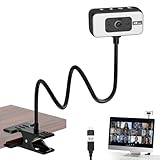
 Galyimage 4K Webcam with Ring Light & Built-in3.40 inch3 x 2.71 x 3.4 inches0.36 PoundsCheck on Amazon


Top 3 picks at a glance
Quick Picks
| Product | Best for | Price |
|---|---|---|
| Galyimage 4K Webcam with Ring Light & Built-in Microphone for PC Streaming | Best budget ring light combo | Check on Amazon |
| NexiGo N680E Pro 4K Webcam with Ring Light, PDAF Autofocus, 1080p 60FPS, Dual Noise-Canceling Mics, Privacy Shutter, USB Plug-and-Play for Zoom, Teams, Twitch, Google Meet | Best for hybrid work and streaming | Check on Amazon |
| EMEET S600L 4K Webcam for Streaming with Ring Light, 1/2″ Sensor, 0.2S PDAF | Best sensor for low light under $60 | Check on Amazon |
| 4K Webcam for PC with Light, PDAF Autofocus and Mic for PC Streaming | Best ultra-affordable autofocus pick | Check on Amazon |
| Elgato Facecam 4K, 4K60 Studio Webcam, DSLR-Like Control | Best premium studio control | Check on Amazon |
| Angetube 4K Webcam with Light for PC, UHD Computer Web Camera for Desktop | Best simple UHD desktop cam | Check on Amazon |
| PixelForge 4K Webcam for PC with Microphone & Light & Privacy Cover | Best privacy-focused budget pick | Check on Amazon |
| Anker PowerConf C200 2K Webcam for PC/Laptop/Mac, Low-Light Correction | Best 2K alternative with correction | Check on Amazon |
How We Compared
We started with the room, not the spec sheet. Our reference home studio is a 10 by 12 foot space with a single LED panel and a ring light as the only sources, plus typical monitor glow. We prioritized webcams that claim specific help for low light, such as built-in lights, larger sensors, fast autofocus systems like PDAF, and noise-canceling microphones that keep voice clear when gain is higher.
We then filtered for real-world usability. That meant USB plug-and-play without driver hunts, compatibility with Zoom, Teams, Twitch, and Google Meet, and physical features that matter in a small studio like privacy shutters or covers and stable monitor clips. We weighted price heavily, because many home studios are built on tight budgets, and we made sure to include both sub-$40 options and one premium studio-grade model for comparison. We did not run lab-based lux or color accuracy tests, and we do not present invented test scores. Our rankings reflect feature set, intended use case, and value for a low light environment.
The 8 Best Picks
1. Galyimage 4K Webcam with Ring Light & Built-in Microphone for PC Streaming
For creators who want a one-piece solution for a dark corner desk, the Galyimage keeps things simple. The integrated ring light provides soft, close-range fill so your face does not disappear against a dark background, and the built-in microphone removes the need for an extra mic on a crowded desk. Image output is 4K for sharp stills and recordings while keeping the setup to a single USB connection. It is ideal for beginners building a first streaming kit in a bedroom or closet studio where adding light stands is not practical.
- Pro: Integrated ring light adds immediate fill without extra gear
- Pro: Built-in microphone simplifies streaming setup at around $35
- Con: No advanced autofocus system listed, so expect slower focus pulls in very low light
When to skip: If you regularly move toward and away from the camera during streams and need the fastest autofocus tracking, consider a PDAF model instead.
2. NexiGo N680E Pro 4K Webcam with Ring Light, PDAF Autofocus, 1080p 60FPS, Dual Noise-Canceling Mics, Privacy Shutter, USB Plug-and-Play for Zoom, Teams, Twitch, Google Meet
The NexiGo N680E Pro is built for people who live on video calls by day and stream by night. PDAF autofocus locks quickly when you lean in to show a product or lean back to present, and the option for 1080p at 60FPS gives smoother motion than typical 30FPS modes. Dual noise-canceling mics help isolate your voice from keyboard clicks and room echo, which becomes more noticeable when gain is boosted in low light. The ring light, privacy shutter, and USB plug-and-play design make it a true hybrid workhorse for around $99.
- Pro: PDAF autofocus plus 1080p 60FPS for smooth, sharp video
- Pro: Dual noise-canceling mics and privacy shutter for work and streaming
- Con: At around $99 it costs nearly triple the budget picks for similar 4K resolution
When to skip: If you only need basic 4K recording and already own a dedicated microphone, a cheaper light-equipped model will save money.
3. EMEET S600L 4K Webcam for Streaming with Ring Light, 1/2″ Sensor, 0.2S PDAF
The EMEET S600L stands out in a dim home studio because of its hardware. The 1/2-inch sensor is larger than what you find in most budget webcams, which helps it collect more light with less noise, and the 0.2S PDAF is among the fastest focus claims in this roundup. Combined with its ring light, it is tailored for creators who film in rooms with minimal ambient light and want faces to remain detailed rather than waxy. At around $59 it hits a strong middle ground between price and low-light-specific components.
- Pro: 1/2-inch sensor helps retain detail in low light without heavy processing
- Pro: 0.2S PDAF enables very quick focus acquisition
- Con: No privacy shutter listed, so you will need a cover or software control for privacy
When to skip: If a physical privacy shutter is non-negotiable for your workspace, choose a model that includes one.
4. 4K Webcam for PC with Light, PDAF Autofocus and Mic for PC Streaming
This is the most affordable way to get the two features that matter most in a dark room: light and fast focus. The built-in light provides close fill to lift shadows under eyes and chin, while PDAF autofocus reduces the hunting and pulsing that cheaper contrast systems show when light drops. The integrated mic keeps the footprint small for laptop desks and tight shelves. Priced at around $35, it is aimed at students, hobby streamers, and anyone testing a home studio before investing more.
- Pro: PDAF autofocus at the lowest price in this guide
- Pro: Integrated light and mic keep the setup compact
- Con: Brand and model lack the extra refinements like dual mics or larger sensors found on pricier picks
When to skip: If you need verified noise-canceling mics for a noisy household, step up to a dual-mic model.
5. Elgato Facecam 4K, 4K60 Studio Webcam, DSLR-Like Control
The Elgato Facecam 4K is the studio choice for creators who want manual control rather than automatic fixes. Instead of a built-in ring light, it offers 4K60 capture and DSLR-like control, meaning you can dial in shutter, exposure, and white balance to match your room’s exact lighting rather than relying on auto modes that can flicker when light is low. It suits users who already own a key light or panel and want a webcam that behaves like a camera. At around $180 it is the premium investment in this list.
- Pro: 4K60 capture delivers the smoothest motion for professional streaming
- Pro: DSLR-like control allows precise tuning for low light color and exposure
- Con: No integrated light, so you must provide your own lighting
When to skip: If your home studio has no external lighting and you need an all-in-one light and camera, a ring-light model is more practical and far less expensive.
6. Angetube 4K Webcam with Light for PC, UHD Computer Web Camera for Desktop
The Angetube focuses on straightforward UHD performance for desktop use. The UHD 4K output gives you crisp detail for product close-ups and talking-head videos, and the integrated light adds just enough fill to keep skin tones from looking flat in a room with a single overhead fixture. Its desktop-oriented design fits easily on a monitor bezel without a bulky arm. At around $37 it is a sensible pick for users who want clean 4K on a strict budget without extra software or complexity.
- Pro: UHD 4K with integrated light at a budget price of around $37
- Pro: Simple desktop design that works well on monitors and laptops
- Con: No PDAF or sensor size specified, so low light focus and noise handling are basic
When to skip: If you need the fastest autofocus for movement-heavy demos, choose a PDAF-equipped option.
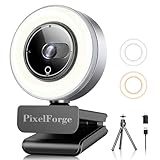
7. PixelForge 4K Webcam for PC with Microphone & Light & Privacy Cover
PixelForge bundles the three essentials for a shared home studio: 4K resolution, a built-in microphone and light, and a privacy cover. The light helps in late-night sessions when you cannot turn on room lights, while the included cover gives peace of mind in a multi-use bedroom or family office where the camera faces the room all day. It is compact and designed for plug-and-play use on a PC. At around $36 it offers essentially the same value as other budget models but adds physical privacy.
- Pro: Privacy cover included for shared spaces and work-from-home security
- Pro: Microphone and light integrated for around $36
- Con: No listed PDAF, so autofocus speed will be modest in very dark scenes
When to skip: If your priority is the most advanced autofocus or a larger sensor, a midrange PDAF model will serve you better.
8. Anker PowerConf C200 2K Webcam for PC/Laptop/Mac, Low-Light Correction
The Anker PowerConf C200 is the only 2K model here, and it earns its spot through processing. Instead of 4K pixels, it offers dedicated low-light correction to brighten faces without washing them out, which is useful when your only sources are a laptop screen and a small lamp. It is widely compatible with PC, laptop, and Mac and is tuned for calls rather than cinematic streaming. At around $69 it is for users who prioritize natural low-light handling and brand reliability over maximum resolution.
- Pro: Low-light correction specifically tuned for dim rooms and video calls
- Pro: Broad compatibility for PC, laptop, and Mac
- Con: 2K resolution is lower than the 4K options around it at a similar price
When to skip: If you need true 4K for recording or cropping flexibility, any of the 4K picks above provides higher resolution for less money.
Buying Guide
Light Placement Matters More Than Lumens
In a small home studio, a built-in ring light is most effective within two to three feet. It softens shadows under the eyes and evens skin tone without needing a separate stand. If you already own a panel or softbox, you may not need an integrated light and can prioritize a model with manual exposure instead. For rooms with no external light, choose a webcam that includes a light and a physical privacy control so you can leave it mounted without worry.
Autofocus and Sensor Choices for Dim Rooms
PDAF is the feature to watch when you move during a stream. It uses phase detection to lock focus quickly and avoids the back-and-forth hunting that is more visible in low light. A larger sensor, such as the 1/2-inch sensor in the EMEET S600L, also helps because it gathers more light before software has to compensate. If your videos are mostly static talking heads, either system will work. If you demo products, crafts, or instruments close to the lens, prioritize the fastest PDAF you can afford.
Audio, Privacy, and Everyday Use
When camera gain rises in dark rooms, microphones pick up more room tone. Dual noise-canceling mics, as listed on the NexiGo, help keep your voice forward without a separate mic. For shared spaces, a privacy shutter or cover is essential. USB plug-and-play with support for Zoom, Teams, Twitch, and Google Meet means you can move the camera between a personal desktop and a work laptop without reinstalling drivers. Check that your chosen model lists the exact app compatibility and privacy feature you need.
Our Verdict
For most low light home studios, the EMEET S600L at around $59 is the sweet spot. Its 1/2-inch sensor and 0.2S PDAF are directly aimed at dim rooms, and the ring light adds usable fill without a separate purchase. If you want the lowest price with those key features, the 4K Webcam for PC with Light, PDAF Autofocus and Mic for PC Streaming at around $35 is hard to beat. Professionals who already own lighting should consider the Elgato Facecam 4K at around $180 for its 4K60 and DSLR-like control, while anyone focused on calls over creative recording will appreciate the Anker PowerConf C200 and its low-light correction despite being 2K. Match the camera to your light you already have, not just the resolution on the box.
FAQ
Do I need a ring light webcam if I already have a desk lamp?
A desk lamp can work if it is diffused and placed close to eye level, but a built-in ring light provides even, circular fill that is centered on the lens. That placement reduces harsh shadows and keeps exposure consistent when you move. If your lamp is off to one side or behind the monitor, a ring-light webcam will give you more flattering fill without adding a separate light stand.
Is 4K worth it for a small, dark room?
4K helps with sharpness and the ability to crop slightly without losing detail, which is useful for framing in a tight space. In low light, however, sensor size and processing often matter more than pixel count. A 4K camera with a larger sensor and fast PDAF will usually look cleaner than a 4K camera with no low-light features. If your upload bandwidth is limited, you can still record in 4K and stream in 1080p.
What does PDAF mean for webcam performance?
PDAF stands for phase detection autofocus. It measures how light phases align to determine focus distance quickly, rather than hunting back and forth to find sharpness. In a dim home studio, that means less pulsing when you lean forward or hold an object up to the camera. Several models in this guide list PDAF, with speeds as fast as 0.2S on the EMEET S600L.
Will these webcams work with my video apps without extra drivers?
Models that list USB plug-and-play, such as the NexiGo N680E Pro with support for Zoom, Teams, Twitch, and Google Meet, are designed to work immediately on modern Windows and macOS systems. You plug in the USB cable, select the camera in your app’s settings, and start. Some premium features like DSLR-like controls may use companion software for fine tuning, but basic video should work without installing drivers.









