
Setting up a live stream in a typical home office or spare bedroom often presents severe acoustic challenges. Hardwood floors, drywall, glass windows, and minimalist furniture create reflective surfaces that amplify ambient sound. When sound waves bounce around an untreated room, sensitive microphones capture mechanical keyboard clacks, PC cooling fan whine, nearby traffic, and air conditioning hums. This results in hollow, echo-prone audio that distracts viewers and detracts from the professional quality of your broadcast.
A dynamic microphone is the ultimate solution for sound isolation in problematic room environments. Unlike condenser mics that register faint background noises across a wide radius, dynamic capsules feature heavier moving coils and tight cardioid pickup patterns that require close proximity to the speaker’s mouth. By rejecting off-axis reflections and requiring higher sound pressure levels to trigger response, these microphones insulate your voice against room acoustics. Looking toward 2026, dual USB and XLR dynamic microphones offer the best balance of plug-and-play convenience and long-term upgrade options for noisy streaming spaces.
As an Amazon Associate we earn from qualifying purchases at no extra cost to you.






Our Top Picks


Top 3 picks at a glance
Quick Picks
| Product | Best For | Price |
|---|---|---|
| FIFINE AmpliGame AM8 USB/XLR Dynamic Microphone for Gaming Streaming | Best Entry-Level Dual-Output | Check on Amazon |
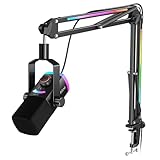
| FIFINE AmpliGame AM8T XLR/USB Gaming Microphone Set, Dynamic PC Mic | Best Value Boom Arm Kit | Check on Amazon |
| Dynamic USB XLR Gaming Microphone, AI Noise Canceling PC PS5 Streaming MIC | Best Ultra-Budget Pick | Check on Amazon |
| FIFINE AmpliTank K688 Dynamic Microphone, XLR/USB Podcast Recording PC Mic | Best Warm Broadcast Tone | Check on Amazon |
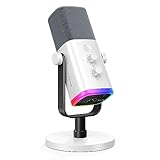
| FIFINE AmpliGame AM8W XLR/USB Gaming Microphone for Streaming Podcasting | Best for White/Light Desk Setups | Check on Amazon |
| FIFINE AmpliGame AM8PROT Gaming Microphone Kit, XLR/USB Dynamic PC Mic | Best Heavy-Duty Arm Bundle | Check on Amazon |
| FIFINE AmpliTank K688CT Podcast Microphone Kit, USB/XLR Dynamic Vocal Mic | Best Studio Vocal Kit | Check on Amazon |
| RØDE PodMic Cardioid Dynamic Broadcast Microphone, XLR | Best All-Metal Studio XLR Build | $85 |
How We Compared
Selecting the best dynamic microphone for noisy streaming room applications requires evaluating factors beyond brand name. We analyzed capsules for off-axis rejection capability, prioritizing cardioid polar patterns that naturally attenuate background sound originating from behind and to the sides of the capsule. We focused heavily on functional design features, including built-in shock mounts, gain controls, touch-to-mute switches, and dual USB/XLR interface support. physical desktop stability, boom arm extension reach, and weight distribution were evaluated to ensure each unit remains stably positioned within 2 to 4 inches of your mouth without blocking line-of-sight to monitors.
The 8 Best Picks
1. FIFINE AmpliGame AM8 USB/XLR Dynamic Microphone for Gaming Streaming
The FIFINE AM8 is a versatile entry point for streamers fighting severe room reverb. Its cardioid dynamic capsule focuses strictly on audio directly in front of the grille, rejecting peripheral PC fan noise and keypresses. Equipped with both USB-C for immediate plug-and-play use and an XLR output for future interface upgrades, it adapts as your setup evolves. Integrated touch-sensitive controls make muting instantaneous, while bottom-mounted RGB lighting adds subtle visual flair without creating harsh camera glare. Measuring roughly 6.3 x 2.4 inches, its compact physical profile keeps desk clutter to a minimum.
- Pro: Direct dual USB-C and XLR output connection versatility.
- Pro: Convenient touch-to-mute switch with LED status indicator.
- Con: Included base stand offers limited height positioning.
When to skip: Skip if you already own a dedicated studio boom arm and prefer a purely traditional studio aesthetic without lighting.
2. FIFINE AmpliGame AM8T XLR/USB Gaming Microphone Set, Dynamic PC Mic
The AM8T takes the acoustically isolating AM8 capsule and pairs it with a full-motion C-clamp suspension boom arm. Elevating the microphone off the desk surface is crucial in untreated rooms, as it eliminates low-frequency thumps caused by typing, mouse flicks, or desk bumps. The boom arm provides up to 31.5 inches of reach, allowing you to position the dynamic capsule directly near your mouth without leaning forward or compromising posture. This proximity maximizes the proximity effect, giving your voice rich bass clarity while leaving background keyboard noise in the background.
- Pro: Included suspension boom arm isolates mechanical desk vibration.
- Pro: Flexible dual-interface connectivity works across PC, Mac, and consoles.
- Con: Desk clamp requires at least 0.6 inches of clear rear table lip.
When to skip: Skip if your desk setup lacks a rear overhang or glass edge suitable for mounting C-clamps.
3. Dynamic USB XLR Gaming Microphone, AI Noise Canceling PC PS5 Streaming MIC
For creators on a strict budget, this dynamic microphone combines hardware off-axis rejection with integrated digital signal processing. Operating via USB or XLR, it incorporates an onboard AI noise-reduction chip that selectively filters out steady-state ambient sounds like computer fans, indoor space heaters, and HVAC hums. Weighing under 1.2 pounds, its lightweight chassis makes it easy to position on light-duty desktop stands. While it lacks the dense alloy feel of high-end studio models, its active noise suppression provides clear vocal transmission in reflective, noisy rooms.
- Pro: Integrated AI noise-reduction processing filters background fan hums.
- Pro: Exceptional budget-friendly price point for a dual-output mic.
- Con: Plastic housing feels less rugged than metal alternatives.
When to skip: Skip if you prefer pure analog signal path processing without digital noise suppression filtering.
4. FIFINE AmpliTank K688 Dynamic Microphone, XLR/USB Podcast Recording PC Mic
The AmpliTank K688 features a classic pill-shaped broadcast geometry designed to deliver deep, broadcast-ready vocal tones while isolating your voice from reflective room acoustics. Its metal housing houses an internal shock mount that reduces handling rumble, while a thick, high-density foam windscreen cuts plosive pops from close-up speech. The physical gain knob positioned on the capsule bottom allows micro-adjustments to input volume without tabbed software menus. USB and XLR outputs make it an exceptional bridge microphone for home streaming workstations.
- Pro: Internal shock-mounting suppresses low-end structural vibrations.
- Pro: Smooth onboard gain dial and quick tap-to-mute control.
- Con: Matte finish shows finger smudges during active adjustment.
When to skip: Skip if you want bright RGB illumination for an animated, gamer-focused background look.
5. FIFINE AmpliGame AM8W XLR/USB Gaming Microphone for Streaming Podcasting
The AM8W delivers identical dynamic capsule performance and dual USB/XLR functionality as the standard AM8, but comes clad in an all-white housing tailored for clean, light-colored desk environments. In rooms with bright walls or light interior decor, dark gear can stand out harshly on camera. The cardioid dynamic pickup pattern ignores ambient echoes bouncing off bare walls, ensuring vocal focus stays crisp. The built-in headphone jack allows zero-latency sidetone monitoring so you can hear your actual voice level against background room noise.
- Pro: Clean white aesthetic matches modern, bright desktop color palettes.
- Pro: Zero-latency direct headphone monitoring port built into capsule base.
- Con: White chassis requires periodic cleaning to prevent visible scuffs.
When to skip: Skip if your room theme utilizes dark wood or black industrial furniture where white components clash.
6. FIFINE AmpliGame AM8PROT Gaming Microphone Kit, XLR/USB Dynamic PC Mic
The AM8PROT is an upgraded broadcast bundle engineered for creators needing maximum position flexibility in tight or noisy spaces. It combines the AM8 dynamic mic with an upgraded, heavy-duty suspension boom arm capable of supporting up to 3.3 pounds of gear. By positioning the mic inches from your mouth, you can keep overall gain settings low, drastically reducing the capture of room echoes and room modes. The reinforced spring mechanism ensures the microphone stays firmly at your set angle without slipping during long broadcasts.
- Pro: Upgraded heavy-duty boom arm offers precise, sag-free positioning.
- Pro: Cardioid pattern combined with low sensitivity effectively blocks off-axis sounds.
- Con: Larger arm assembly occupies more visual camera space.
When to skip: Skip if you stream in an extremely cramped corner where a broadcast boom arm cannot fully articulate.
7. FIFINE AmpliTank K688CT Podcast Microphone Kit, USB/XLR Dynamic Vocal Mic
Combining the broadcast-style dynamic capsule of the K688 with an articulated desktop boom arm, the K688CT kit provides an all-in-one broadcast rig for untreated rooms. The capsule’s tuned frequency response emphasizes warm low-mids while rolling off harsh upper frequencies where room reflections usually distort sound quality. With the included C-clamp arm, you elevate the microphone off resonant wooden or glass desk surfaces, preventing physical keystroke impacts from traveling up into your stream’s audio feed.
- Pro: Rich, radio-style vocal tuning ideal for podcasting and long streams.
- Pro: Complete bundle eliminates the need for third-party boom arm accessories.
- Con: Top-mounted mute sensor can be accidentally touched during re-positioning.
When to skip: Skip if you already possess a high-end studio arm mount or prefer a desktop base stand.
8. RØDE PodMic Cardioid Dynamic Broadcast Microphone, XLR
The RØDE PodMic is an industrial-grade broadcast microphone built specifically for vocal rejection of harsh ambient environments. Constructed with a solid zinc-alloy housing weighing 2.06 pounds, it features an end-address dynamic capsule shielded by an internal pop filter and internal shock mounting. Its tight cardioid polar pattern isolates the voice effectively, making it ideal for rooms with hard tile or uncarpeted floors. Note that the PodMic is a pure XLR microphone that requires a dedicated audio interface or mixer capable of delivering roughly +50dB to +55dB of clean gain.
- Pro: Ultra-durable, solid metal construction built for long-term daily broadcast use.
- Pro: Excellent off-axis rejection isolates voice against hard-surface room echoes.
- Con: XLR-only connection requires purchase of a separate audio interface/preamp.
When to skip: Skip if you need simple, direct plug-and-play USB connectivity without buying additional audio hardware.
Buying Guide
Dynamic Capsules vs. Condenser Microphones in Domestic Spaces
Dynamic microphones rely on a physical diaphragm attached to a wire coil suspended inside a magnetic field. This mechanical design requires higher sound pressure levels (SPL) to move the diaphragm compared to ultra-sensitive condenser microphones. In a room with bare walls, hard floors, and active HVAC systems, a condenser mic will pick up acoustic reflections and ambient noise across a wide radius. A dynamic mic ignores these low-energy sound waves, capturing only sound produced directly in front of the grille.
USB Flexibility vs. XLR Expansion Capabilities
Selecting between USB and XLR depends on your growth plans. USB microphones plug directly into PCs or consoles without external hardware, making them cost-effective for beginners. However, XLR microphones connect via balanced cables to external audio interfaces, mixers, or hardware processors. Dual-output models allow you to start with simple USB connectivity today and migrate to professional XLR hardware later without replacing your microphone.
Ergonomics, Desk Mounting, and Surface Vibration Control
To maximize the performance of a dynamic microphone in a noisy room, proximity is essential. Dynamic capsules sound best when positioned 2 to 4 inches from your mouth. Using a desk stand forces you to lean down or increase gain, which reintroduces background room noise. A suspension boom arm brings the capsule directly to you while decoupling the mic frame from desk vibrations caused by mechanical keyboard typing and mouse movement.
Our Verdict
For most creators battling ambient noise in untreated rooms, the FIFINE AmpliGame AM8T provides the best combination of audio performance, room rejection, and value thanks to its included suspension arm kit. If you prefer a sleeker broadcast appearance with a warmer vocal tone, the FIFINE AmpliTank K688 stands out as a top-tier choice. For traditionalists who own an audio interface and demand rock-solid metal durability, the RØDE PodMic delivers unmatched broadcast rejection and audio clarity.
FAQ
Why is a dynamic microphone better than a condenser mic for a noisy room?
Dynamic microphones feature heavier, less sensitive diaphragms that require higher sound pressure levels to capture audio. This physical characteristic, combined with a directional cardioid pickup pattern, allows them to reject distant background noises like computer fans, room echo, and keyboard clicks far better than sensitive condenser mics.
Do I need an inline preamp or Cloudlifter for these dynamic microphones?
If you use USB mode, no external preamp is needed as gain is handled internally. When using XLR mode with low-output dynamic mics like the RØDE PodMic, a modern audio interface providing +50dB or more of gain will drive the mic cleanly without introducing system hiss. Inline preamps are generally unnecessary unless using older legacy audio interfaces.
How close should I speak to a dynamic microphone while streaming?
For optimal noise isolation and voice richness, stay between 2 and 4 inches away from the capsule. Speaking close to a dynamic microphone engages the proximity effect, boosting warm low frequencies while allowing you to keep input gain low enough to eliminate background room reflections.
Can USB dynamic microphones block keyboard noise completely?
While dynamic microphones reject a significant portion of off-axis keystroke noise, proper positioning is critical. Placing the back of the microphone directly toward the keyboard utilizes the cardioid null point, blocking maximum mechanical key clack sound from entering your stream.









