
Streaming from a tiny bedroom is a specific kind of logistical puzzle. Your bed might be three feet from your desk, your closet door swings into frame, and the one wall that’s actually visible behind you is covered in laundry hooks and a poster you’ve had since college. A full studio setup with a stand-mounted backdrop simply doesn’t fit, which is why collapsible, chair-mounted, and fabric green screens have become the go-to solution for streamers working in tight quarters.
The good news: you don’t need a studio budget to get a clean chroma key. We compared eight options priced from around $8 to around $220, evaluating each for footprint, keying performance through a webcam, setup speed in a cramped space, and how easy it is to stash away when you’re done. Whether you’re a Twitch streamer, a Zoom regular, or a content creator filming talking-head videos, there’s a pick here that fits your room — and your budget.
As an Amazon Associate we earn from qualifying purchases at no extra cost to you.


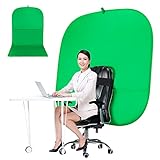


Our Top Picks
 Cosmos 1 Pc Green Screen Backdrop 43 in43 inches diameter43 x 43 x 0.1 inches0.7 PoundsCheck on Amazon
 UTEBIT 3.3x5ft Photography Backdrop Wrinkle Resistant Screen Background3.3x5ft70.86 x 110.23 x 0.1 inches0.42 poundsCheck on Amazon
 Blue Green Screen Backdrop Double Sided Collapsible Greenscreen39.4*59.1"(No stand)2.1 PoundsCheck on Amazon


Top 3 picks at a glance
Quick Picks
| Product | Best for | Price |
|---|---|---|
| Cosmos 43 in Foldable Green Screen | Desk-level video calls | Check on Amazon |
| Portable Chair Green Screen, 57 in | Most tiny bedrooms overall | Check on Amazon |
| Portable Chair Green Screen, 59 in | Taller chairs and fuller framing | Check on Amazon |
| UTEBIT 3.3×5 ft Backdrop | Ultra-budget wall-hung setups | Check on Amazon |
| Double-Sided Blue/Green Collapsible Screen | Streamers who also wear green | Check on Amazon |
| Green Screen Kit with T-Shape Stand | Corners with a little floor space | Check on Amazon |
| RAUBAY 78.7 x 82.7 in Collapsible Screen | Dedicated studio corners | Check on Amazon |
| 5×7 ft Muslin Chromakey Backdrop | Cheap full-wall coverage | Check on Amazon |
How We Compared
We focused this roundup on products that solve the tiny-bedroom problem specifically: they either collapse small enough to slide behind a door, mount to a chair instead of the floor, or hang from hardware you already own. Every candidate was judged on four criteria. First, chroma key performance through a typical 1080p webcam, because that’s what most bedroom streamers actually use. Second, deployed and stored footprint — a 78-inch backdrop is useless if you can’t open it in a 9×10 room. Third, setup and teardown time, since nobody wants a five-minute ritual before every call. Fourth, value at the listed price. We avoided fabric-only options that require stands sold separately where a beginner would be stuck, and we made sure at least half the list came in under $45. No product here required tools more complicated than a spring clamp to get working.
The 8 Best Picks
1. Cosmos 43 in Foldable Green Screen (around $19)
This 43-inch (110 cm) diameter pop-up disc is the definition of a desk-side solution. It clips or leans behind your chair and covers exactly what a webcam sees at head-and-shoulders framing — nothing more, nothing less. For streamers and remote workers whose camera never moves, it’s a surprisingly complete answer for twenty bucks. The foldable design collapses down to a fraction of its deployed size, so it tucks behind a door or under a bed between sessions.
- Pro: Folds small enough to store in a closet shelf or under the bed.
- Pro: At around $19, it’s the cheapest truly portable keying option here after bare fabric.
- Con: The 43-inch circle won’t cover wide-angle framing or a standing shot.
Skip it if you stream full-body, use a wide field of view, or move your camera around. This is a sit-down-only tool.
2. Portable Green Screen Chair, 57 in (around $44)
This is the sweet spot for most tiny bedrooms. The 57-inch double-sided backdrop (green on one side, a second color on the other) mounts directly to the back of your chair, meaning it consumes essentially zero floor space — the single most valuable currency in a cramped room. Setup is a matter of unfolding and hooking it over the chair back, and the included stand frame keeps the fabric taut enough for a clean key. It also packs flat for storage.
- Pro: Chair-mounted design uses no floor space at all.
- Pro: Double-sided fabric gives you a backup color if your keying software struggles.
- Con: At 57 inches, taller streamers or raised camera angles may see over the top edge.
Skip it if you’re over six feet tall and your webcam sits at eye level — check the 59-inch version below instead.
3. Portable Green Screen Chair, 59 in (around $59)
This is the same chair-mount concept as our around $44 pick, sized up. The extra two inches of height sounds marginal on paper, but in practice it’s the difference between a clean key and your headphone tops bleeding through the backdrop during animated streaming moments. If your camera sits high or you lean back in a tall gaming chair, this is the version to buy. The double-sided foldable construction and included stand are identical in spirit, and it works equally well for Zoom meetings and gaming streams.
- Pro: The 59-inch height covers tall chairs and higher camera angles.
- Pro: Doubles as a video-meeting backdrop, so work and streaming share one purchase.
- Con: The around $14 premium over the 57-inch model is steep for two inches.
Skip it if you’re under five-foot-ten and sit in a standard office chair — the cheaper 57-inch model will do the same job.
4. UTEBIT Green Screen Backdrop, 3.3×5 ft (around $8)
Sometimes the answer is a piece of good fabric and a couple of spring clamps. The UTEBIT’s 3.3 x 5 foot (roughly 40 x 60 inch) panel is large enough to cover a bedroom wall section or hang from a tension rod, curtain rod, or two clamps on a shelving unit. For under nine dollars, it’s the lowest-risk entry into chroma keying on this list. The fabric is thin enough to fold into a drawer but dense enough to block most background light spill when hung properly.
- Pro: At around $8, it costs less than a pizza — an easy experiment for keying beginners.
- Pro: Hangs from hardware you already own: rods, clamps, even command hooks.
- Con: Zero structure of its own; wrinkles and sag will ruin your key without proper mounting.
Skip it if you want a grab-and-go solution. This requires a mounting plan before it’s usable.
5. Blue/Green Double-Sided Collapsible Screen, 39.4 x 59.1 in (around $34)
Here’s a smart workaround for a common tiny-bedroom problem: green objects. If your streaming setup includes green lighting, plants, or you simply like wearing green, a pure green screen will chew holes in your key. This 39.4 x 59.1 inch pop-up offers blue on the reverse side, letting you flip the color story instantly. The included carrying bag makes it genuinely portable, and the pop-up design deploys in seconds. It’s a strong middle-price pick for streamers whose setups fight green.
- Pro: The blue reverse side saves you when green props or clothing leak into frame.
- Pro: Carrying bag included — rare at around $34.
- Con: At 39.4 inches wide, it’s one of the narrower panels here; wide shots will spill past the edges.
Skip it if you need full head-to-waist coverage with arms raised — check the chair-mounted picks instead.
6. Green Screen Backdrop Kit with 6.5×5 Ft T-Shape Stand (around $37)
If your bedroom has even one corner with breathing room, this complete kit deserves a look. The 6.5 x 5 foot backdrop is the widest panel on this list under $50, and the included T-shape stand means you’re not improvising with clamps and curtain rods. Five feet of height covers seated and most standing framings, and the whole thing disassembles into poles that slide into a closet. It’s the most “real studio” you can build in a small room at this price.
- Pro: Stand included — no separate hardware purchase needed.
- Pro: 6.5 feet of width handles wider webcam fields of view with room to spare.
- Con: The stand’s footprint will eat into a genuinely tiny room; measure before buying.
Skip it if your usable floor space is under about three square feet — a chair-mounted option is the better call.
7. RAUBAY 78.7 x 82.7 in Large Collapsible Green Screen (around $220)
This is the splurge, and it’s priced accordingly for a reason. At 78.7 inches wide by 82.7 inches tall — nearly seven feet in both directions — the RAUBAY covers essentially any framing a bedroom streamer could want, including standing full-body shots. The collapsible design means it still stows away, which is remarkable at this size. For creators whose tiny bedroom is a serious studio and who plan to grow into wider lenses and more ambitious setups through 2026, this is the endgame purchase.
- Pro: Nearly seven square feet of coverage eliminates edge spill in almost any framing.
- Pro: Collapses despite its huge size — storage remains possible in a small room.
- Con: At around $220, it costs more than the other seven picks combined several times over.
Skip it if you’re a casual streamer or your camera never leaves a seated webcam angle. You’d be paying for capability you won’t use.
8. 5×7 ft Muslin Chromakey Backdrop (around $9)
This 5 x 7 foot muslin panel is the classic budget backdrop: a large rectangle of keyable fabric for ten dollars. Compared to the UTEBIT above, you get roughly a foot more of width and two feet more of height, which matters if your camera drifts wide. Muslin’s heavier weave hangs flatter than thin synthetics, meaning fewer wrinkles to fight, though it does benefit from a quick steam or a few days hanging to relax the fold creases out of the box.
- Pro: Big 5 x 7 ft coverage for around $9 is outstanding value per square foot.
- Pro: Heavier muslin weave hangs with fewer wrinkles than thinner budget fabrics.
- Con: No stand, rod, or clamps included — budget another $10–15 for mounting hardware.
Skip it if you want a true all-in-one; this is fabric-only, full stop.
Buying Guide
Footprint Beats Features in a Tiny Room
In a small bedroom, the honest question isn’t “which screen is best” but “which screen fits my life when it’s not in use.” Chair-mounted options like our 57- and 59-inch picks consume zero floor space and disappear when you stand up. Pop-up discs fold to a fraction of their size. Fabric panels take a drawer. The only category that demands a standing footprint is the T-stand kit, and even that disassembles into closet-friendly poles. Before buying anything, measure your open floor area and your storage space — a technically superior screen you can’t deploy daily is worse than a modest one that’s always ready.
Size to Your Camera, Not Your Room
A webcam at seated head-and-shoulders framing needs to cover maybe 36 x 48 inches behind you — which is why the 43-inch Cosmos disc works so well for meetings. Streamers who gesture or lean need 55 to 60 inches of height. Full-body or wide-angle creators need 70 inches or more. Buying too small causes the classic keying failure where your shoulders or hands drift off the green and your software fills the gap with garbage. Buying too big costs money and floor space you didn’t need to spend. Match the panel to your widest realistic framing, then stop.
Fabric, Pop-Up, or Mounted: Know Your Keying Tradeoffs
Hung fabric is cheapest and keys beautifully when taut, but wrinkles and sag create shadow lines that software struggles with — budget for clamps and, ideally, a steaming session. Pop-up panels hold themselves taut by construction, giving the most consistent key for the least effort, at the cost of storage bulk. Chair-mounted screens split the difference: taut, fast, and floor-free, but height-limited. If your keying software offers edge refinement and spill suppression (OBS and most streaming suites do), fabric becomes far more forgiving. If you’re relying on automatic keying, pay for the structural rigidity of a pop-up.
Our Verdict
For most people streaming from a tiny bedroom, the 57-inch chair-mounted green screen at around $44 is the right answer: zero floor footprint, fast setup, and enough height for typical seated framing. Spend the extra around $14 on the 59-inch version only if you’re tall or your camera sits high. Budget buyers should grab the around $8 UTEBIT panel and a pair of spring clamps, while the around $9 muslin is the better fabric value if you need more coverage. Streamers with green-heavy setups should pick the double-sided blue/green pop-up at around $34. And if this bedroom is genuinely your studio and money is no object, the RAUBAY at around $220 is the only pick here that covers any framing you’ll ever attempt.
FAQ
Will a green screen work with just a webcam?
Yes. Modern keying in OBS, Streamlabs, Zoom, and similar software is designed with webcams in mind. The bigger variables are even lighting on the screen itself and enough separation between you and the backdrop — aim for at least a foot if your room allows, and add even, indirect light to the screen to eliminate shadows. A $20 panel with good lighting will out-key a $200 panel in a dim room.
How small does a green screen fold for storage?
Pop-up discs like the 43-inch Cosmos collapse to roughly a third of their deployed diameter, small enough for a closet shelf. Chair-mounted screens fold flat, like a large book. Fabric panels are the clear winners, compressing to whatever size you can roll or fold them into — a drawer, a bin, or a suitcase.
Can I use a blue screen instead of green in a small room?
You can, and sometimes you should. Blue screens generally require more light to key cleanly, which can be a challenge in a small bedroom, but they’re the better choice when your scene contains green objects — plants, LED strips, or clothing. The double-sided pick in this roundup gives you both options for around $34, which is the easiest way to hedge.
How do I stop wrinkles from ruining my key?
Three methods, in order of effectiveness: hang the fabric and let gravity work for a few days; lightly steam it (never iron directly without a cloth barrier); or tighten it with clamps so it’s drum-taut. Pop-up and chair-mounted screens sidestep the problem entirely because their frames hold the material flat by design — one reason we favor them for small rooms where you’re setting up and tearing down frequently.









