
The best karaoke machines with screen balance three things most buyers underestimate: a display readable from your singing distance, speakers loud enough for the room without distortion, and a lyric source you’ll actually keep using after week one. For most living rooms, that means a 9–14 inch screen, 40–80W RMS output, and dual wireless mics; larger basements and garages push you toward 100W+ systems or external speakers.
As an Amazon Associate we earn from qualifying purchases at no extra cost to you.


Our Top Picks
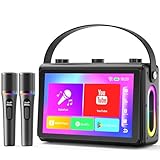
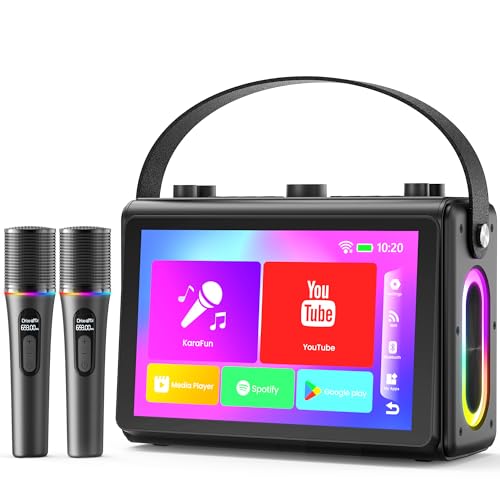
 Smart Karaoke Machine with Screen & Lyrics Display14Inch25.59 x 17.72 x 15.75 inches14 poundsCheck on Amazon

Top 3 picks at a glance
What Screen Size Actually Means for Lyric Readability
Screen size is the headline spec, but readability depends on resolution, viewing angle, and — most importantly — your distance from the machine. A useful rule of thumb: for karaoke text at typical font sizes, you need roughly 1 inch of screen diagonal per foot of viewing distance. A 7-inch screen reads fine at 7 feet but becomes squint-inducing at 12. A 14-inch display covers a 10–14 foot sing-along zone, which maps to most living rooms.
Two traps to avoid:
- Low-resolution big screens. A 15-inch panel at 800×480 shows chunky, soft text. Look for at least 1280×800 on anything over 10 inches.
- Fixed-angle screens. If the display can’t tilt, the singer stands to read it, and the mic cable forces them to block the audience. Machines with adjustable screen hinges or a tablet holder solve this.
If your room layout doesn’t work with the built-in screen’s viewing distance, every machine worth buying also has HDMI-out so you can mirror lyrics to a TV — the screen then becomes the operator’s control panel.
How Loud Is Loud Enough? A Worked Calculation
Speaker wattage claims are marketing-heavy, so calculate from the room instead. A singer in a home karaoke setup typically needs about 85–90 dB at the listening position to feel energetic without pain. A decent compact karaoke speaker achieves roughly 88–92 dB sensitivity at 1 watt/1 meter. Sound pressure drops about 6 dB each time distance doubles:
- 1 meter: ~90 dB at 1W input
- 2 meters: ~84 dB
- 4 meters: ~78 dB
To recover 90 dB at 4 meters, you need +12 dB over 1W — that’s roughly 16 watts of clean power. Add headroom for music peaks (another 3–6 dB, so 2–4× power) and you land at 30–60W RMS for a typical 250–350 sq ft living room. A 500+ sq ft open basement or garage party realistically wants 80–150W RMS, or a smaller machine fed into powered speakers via line-out. Treat “500W peak!” labels as roughly 50–80W RMS equivalents.
Microphone Quality: The Spec Everyone Skips
Most all-in-one karaoke machines ship with wired dynamic mics that are adequate but prone to handling noise and cable clutter. The meaningful upgrade paths:
- UHF wireless mics over 2.4GHz. UHF systems (common on mid-tier machines) resist dropouts and interference far better in homes crowded with Wi-Fi routers.
- Echo and volume controls on the mic itself let singers adjust mid-song instead of walking back to the unit.
- Two mic inputs minimum. Duets are half the point of karaoke. Check whether the second mic is included or a ~$30–$60 add-on.
- XLR or ¼” auxiliary mic input future-proofs the system — you can plug in a proper vocal mic later if the stock one disappoints.
Song Access: The Decision That Determines Long-Term Use
Screen karaoke machines split into three camps, and this choice matters more than any hardware spec:
- Bluetooth + app machines stream lyrics from YouTube, Karafun, or Smule on your phone or tablet. Effectively unlimited libraries, but lyric quality on YouTube karaoke varies wildly, and you’re dependent on your phone staying connected.
- Built-in streaming libraries (subscription-based, typically ~$10–$20/month after trial) offer licensed, consistent tracks with pitch control and scoring. Reliable, but it’s an ongoing cost.
- CD+G and USB/SD playback still exist on machines like the Karaoke USA GF series. Zero ongoing cost and works offline forever, but you’re limited to discs you buy, and the format’s graphics look dated on big screens.
Most households end up happiest with a Bluetooth-first machine that also accepts USB — streaming for variety, local files for songs that disappear from apps.
Model Comparison: Screen, Power, and Portability
Here’s how the mainstream options stack up for home use. Specs reflect manufacturer ratings; real-world loudness runs lower.
| Machine / class | Screen | Claimed power | Mics | Song access | Portability | Typical price |
|---|---|---|---|---|---|---|
| Karaoke USA GF846 | 7″ color TFT | ~35W peak | 2 wired (2nd often included) | CD+G, DVD, Bluetooth, USB/SD | Light, carry handle | $150–$250 |
| Singing Machine all-in-one (screen models) | 7″ color LCD | ~30–54W peak | 1–2 wired, some wireless bundles | CD+G, Bluetooth, USB, app library | Compact, tabletop | $120–$280 |
| MASINGO large-screen systems | 13–15″ touchscreen | ~100–300W peak | 2 UHF wireless | Bluetooth, USB, built-in apps | Rolling trolley, ~20–30 lbs | $300–$500 |
| Pro/box-style (VocoPro, Vonyx class) | 10–12″ screen | 150W+ peak | 2 wireless + XLR in | Bluetooth, USB/SD, HDMI out | Heavy, wheels on larger units | $350–$600 |
| Tablet-holder party speaker (Ion, JBL class) | None (holds your device) | 50–500W peak | 1–2 wireless | Bluetooth apps only | Very portable, battery-powered | $150–$400 |
Decision Matrix: Match the Machine to Your Space
| Your situation | Best fit | Why |
|---|---|---|
| Apartment, singers sit 6–8 ft away | 7″ screen, ~30W, e.g. Singing Machine or GF-series | Screen distance rule is satisfied; loudness won’t trigger neighbor complaints |
| Average living room, 10–14 ft viewing | 13–15″ screen, 60–100W | Lyrics readable from the couch; headroom for a crowd |
| Basement parties or garage, 15+ ft | Any machine + HDMI-out to TV, or 150W box system | Built-in screens fail at this distance regardless of size — let the TV show lyrics |
| Kids’ sleepovers / rotating rooms | Lightweight 7″ unit or tablet-holder speaker | Under 15 lbs, battery operation, no disc library to manage |
| Singers who want duets weekly | Dual UHF wireless mics included | A second mic bought later costs ~$30–$60 and may not pair seamlessly |
Portability vs. Sound: The Hidden Trade
Battery-powered units with big screens (typically 3–6 hours of runtime per charge) are convenient, but the battery pack adds weight exactly where the handle isn’t — most large-screen systems end up heavier than a carry-on suitcase. If your machine will live in one spot, skip battery features entirely and redirect that budget toward speaker power and mic quality. If it moves weekly, a trolley-handle design with a separate battery-powered speaker beats one giant integrated box.
FAQ
Is a built-in screen better than using my TV?
For casual use, built-in screens win on setup simplicity — no cables, no input switching. For anything over 12 feet of viewing distance or groups over eight people, output to a TV via HDMI wins on readability. The ideal machine does both.
Do I need a subscription for songs?
No. Bluetooth pairing with free YouTube karaoke channels or a USB drive of purchased tracks costs nothing ongoing. Subscriptions are worth it only if you want licensed tracks, pitch adjustment, and scoring — roughly $10–$20/month.
Can two machines or mics interfere with each other?
Bluetooth audio can lag slightly, and 2.4GHz wireless mics compete with Wi-Fi. UHF mics sidestep this; if your machine uses 2.4GHz, keep it a few feet from the router.









