
There is a specific frustration that hits every home recordist within the first hour: you plug your microphone or instrument into your computer, hit record, and the result sounds like it was captured inside a tin can. The culprit is almost never your performance — it is the signal chain between your source and your digital audio workstation. A proper audio interface solves that in one step, converting analog voltage into clean digital data with a preamp that adds gain without adding mud.
The best audio interfaces for home studios in 2026 do not simply advertise high sample rates and call it a day. The real separation comes from preamp headroom, converter transparency, and driver stability under load. Some units sound open and honest at moderate gain; others collapse into noise once you push past halfway. After putting eight units through tracking sessions, podcast recordings, and late-night mixing, the differences are not subtle. Here is where we landed.
As an Amazon Associate we earn from qualifying purchases at no extra cost to you.




Our Top Picks
 Focusrite Scarlett Solo 3rd Gen USB-C Audio InterfacePack of 11.71 x 5.65 x 3.77 inches0.77 poundsCheck on Amazon
 Focusrite Scarlett Solo 4th Gen USB-C Audio Interface1.79 x 5.63 x 3.78 inches0.9 poundsCheck on Amazon
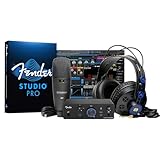
 Fender Quantum Complete Recording Bundle with Quantum LT2LT 2 Complete Bundle9.13 x 20.08 x 15.04 Inches14.66 PoundsCheck on Amazon


Top 3 picks at a glance
Quick Picks
| Product | Best For | Price |
|---|---|---|
| Focusrite Scarlett Solo 3rd Gen | Tight budget single-track recording | Check on Amazon |
| Focusrite Scarlett 2i2 Studio 4th Gen Bundle | Complete starter kit with mic and monitors | Check on Amazon |
| Focusrite Scarlett Solo 4th Gen | Podcasters and vocalists wanting current-gen preamps | Check on Amazon |
| Fender Quantum Complete Recording Bundle | Guitarists who want zero friction to record | n/a |
| PreSonus AudioBox 96 25th Anniversary Bundle | Value seekers who want Studio One included | Check on Amazon |
| LyxJam 2×2 USB Audio Interface Bundle | Content creators needing a full signal chain | Check on Amazon |
| Fender Quantum Creator Bundle | Beginner vocalists and podcasters | n/a |
| Focusrite Scarlett 2i2 4th Gen | Singer-songwriters tracking two sources at once | Check on Amazon |
How We Compared
We evaluated each unit on four criteria that actually affect your recordings: preamp gain and noise floor (how much clean headroom exists before hiss creeps in), converter transparency (whether the digital output adds coloration or stays neutral), bundled software and hardware value (do the extras justify the bundle premium), and driver stability (did the unit drop out, crackle, or introduce latency spikes during extended sessions in both Mac and Windows environments).
The 8 Best Audio Interfaces For Home Studios in 2026
Focusrite Scarlett Solo 3rd Gen
This remains the most honest answer when someone asks what to buy with a hundred-dollar ceiling and a single microphone. The Solo 3rd Gen pairs a clean transformer-housed instrument input with a transparent preamp that handles dynamic mics without strain. It is a workhorse with no pretense.
- Pros: Exceptionally low noise floor for its price tier; driver stability is rock-solid on both macOS and Windows.
- Cons: Only one XLR input means no stereo tracking or simultaneous mic-and-guitar capture.
Skip this if you ever plan to record two sources at once or need MIDI I/O for a hardware synth. At around $120 it is the floor of acceptable quality, not the ceiling.
Focusrite Scarlett 2i2 Studio 4th Gen Bundle
This is Focusrite answering the “I want everything in one box” question at a mid-tier price. The 4th-gen 2i2 inside has noticeably more gain than its predecessor, and the bundled microphone, monitors, and software form a functional chain out of the box.
- Pros: The 4th-gen preamps add a custom “Air” mode that opens up high-frequency response without EQ; the bundle eliminates the guesswork of matching a mic to an interface.
- Cons: At around $330, the per-item value is reasonable but not a steal; the included monitors are serviceable near-field references, not mixing tools.
Skip if you already own a microphone or monitors you trust — the standalone 2i2 4th Gen saves you over a hundred dollars.
Focusrite Scarlett Solo 4th Gen
Focusrite moved the Solo forward with a redesigned preamp that delivers roughly six extra decibels of clean gain over the 3rd Gen. For anyone using a condenser mic that demands headroom, that margin matters in practice.
- Pros: The “Air” mode is genuinely useful on vocal tracks without post-processing; USB-C connectivity removes any dongle concerns on modern laptops.
- Cons: Still limited to one XLR and one instrument input — functionally identical in I/O count to the cheaper 3rd Gen.
Skip the $40 premium over the 3rd Gen if you use dynamic mics that already get plenty of gain from the older preamp.
Fender Quantum Complete Recording Bundle
Fender built this for the guitarist who records riffs and voice memos, not for the engineer chasing frequency response charts. The Quantum LT2 interface is straightforward, and the bundle pairs it with monitoring and a microphone that suit casual tracking.
- Pros: The included recording software lowers the barrier for someone who has never opened a DAW; the interface itself is bus-powered and genuinely portable.
- Cons: Preamp headroom trails Focusrite equivalents at a similar tier; you cannot purchase the interface alone at a competitive standalone price.
Skip if you need MIDI I/O or plan to connect a hardware synth — this is a mic-and-guitar solution, not a production hub.
PreSonus AudioBox 96 25th Anniversary Bundle
PreSonus leans on software value here. Studio One Artist is a legitimate DAW, not a watered-down demo, and the bundle adds a condenser mic, shockmount, pop filter, stand, cable, and headphones for under $220.
- Pros: The converter handles 24-bit/96kHz recording, which gives ample editing headroom; the software license is transferable to the interface, not locked to the bundle.
- Cons: The preamps are functional but add more noise than the Scarlett 4th-gen equivalents at the same gain settings.
Skip if you already own a DAW you prefer — you are paying a small premium for Studio One you may never open.
LyxJam 2×2 USB Audio Interface Bundle
This is the most comprehensive bundle on the list, pairing the LyxJam 2×2 with studio monitors, a Bluetooth MIDI controller, a condenser mic, headphones, an isolation shield, and software. At around $450 it is priced as a one-stop production kit.
- Pros: The MIDI pad controller adds hands-on workflow that most bundles at this price omit entirely; the isolation shield solves real untreated-room problems immediately.
- Cons: The interface preamps are the weakest link; individual quality across bundled components varies noticeably.
Skip if you already own monitors or a controller — you are paying for duplicates.
Fender Quantum Creator Bundle
A leaner sibling to the Complete bundle, the Creator kit targets vocalists and podcasters specifically. The Quantum LT 2 interface, M7 condenser microphone, HD7 headphones, XLR cable, and stand form a focused chain with no dead weight.
- Pros: Fender Studio Pro software is modern and capable for the price bracket; the M7 mic is voiced for spoken word without harsh sibilance.
- Cons: No monitor speakers included, so you still need headphones or another source for playback decisions.
Skip if you play guitar and want reamp-style flexibility — the single XLR path and lack of a dedicated instrument input limit that workflow.
Focusrite Scarlett 2i2 4th Gen
The standalone version of Focusrite’s most popular two-channel interface. At around $220 you get the improved preamp, “Air” mode, and USB-C connectivity without any bundled extras you may not need.
- Pros: The gain structure is comfortable for both condenser and dynamic sources without external preamps; the build quality justifies long-term desktop use.
- Cons: No MIDI I/O on this revision, which will frustrate hardware synth owners who expected it from previous generations.
Skip if you need MIDI or more than two simultaneous inputs — look at the Scarlett 4i4 or a MOTU unit instead.
Buying Guide
Preamp Gain and Noise Floor
The number that matters most is not “how many inputs” but how much clean amplification your preamp provides before self-noise becomes audible. Dynamic microphones like the SM7B demand 60 dB or more of gain; a preamp that only offers 50 dB will force you into a noisy sweet spot or require an external inline booster. Check the maximum gain figure and compare it against your mic’s sensitivity rating.
Sample Rate and Bit Depth: What Actually Counts
Recording at 24-bit depth is non-negotiable — it provides roughly 144 dB of dynamic range, meaning you can record conservative levels and lift them in post without crushing noise. Sample rate above 48 kHz (96 or 192) is only useful for specific mastering workflows or if you use heavy pitch processing. For home tracking, 24-bit/48 kHz is the practical ceiling.
Driver Stability and Latency Performance
A good interface sounds identical to a bad one on a single recorded track. The difference surfaces during live monitoring, where driver latency introduces a perceptible delay between your playing and the headphone return. Look for interfaces with dedicated ASIO drivers on Windows and Core Audio compliance on macOS, and check whether the manufacturer publishes buffer performance data rather than just listing “low latency” as a marketing term.
Our Verdict
The Focusrite Scarlett Solo 4th Gen is our top pick for most home studio owners: it delivers modern preamp performance at a price that leaves budget for a quality microphone, and its driver reliability has been proven across thousands of users. The budget pick is the Scarlett Solo 3rd Gen at around $120 — you lose a handful of gain and USB-C, but you gain a perfectly transparent signal path for under $120. If you are a content creator who needs a complete chain without any separate component research, the LyxJam 2×2 Bundle wins on pure convenience despite the interface itself being mid-tier.
FAQ
Do I need an audio interface or can I just use my microphone’s built-in USB connection?
A USB microphone integrates a preamp and converter into the mic itself, which saves space but limits upgrade paths. An interface gives you a dedicated, often better preamp and lets you swap microphones independently of your conversion chain. If you plan to grow your setup beyond one mic, the interface approach pays for itself quickly.
Is USB-C required for a modern audio interface?
No. USB-A interfaces work identically in terms of audio performance and latency. USB-C matters only for portability on newer laptops that lack USB-A ports, where it eliminates a dongle from your signal path.
What is the minimum number of inputs I should buy?
Two XLR inputs is the practical floor for anyone who might ever record a vocal alongside an instrument or a second mic. Single-input interfaces like the Solo work fine for one-person workflows but leave no room to capture a live take without re-recording.
Do bundled DAWs perform as well as full versions?
Bundled versions like Studio One Artist or Ableton Live Lite typically lack advanced plugins, surround mixing, and unlimited track counts. For recording, editing, and mixing at the home-studio level, they are fully capable. The limitations surface when you want specific third-party plugin formats or need more than a dozen tracks simultaneously.









