
# Best XLR Microphones for Noisy Room Streaming in 2026: Compared and Ranked
If you stream from an untreated bedroom, a dorm next to a busy street, or an apartment where the refrigerator hums like a small engine, you already know the problem: most microphones don’t just pick up your voice — they pick up everything else, too. Condenser mics, which dominate the budget USB market, are so sensitive that keyboard clacks, PC fans, and hallway conversations all end up in your stream. That’s why dynamic XLR microphones have become the default recommendation for noisy rooms. Their tighter cardioid pickup pattern and lower sensitivity naturally reject off-axis sound, and routing them through an audio interface or mixer gives you gain control and processing that USB alone can’t match.
The good news is that you no longer need to spend $300 or more to get broadcast-style rejection. The eight mics below range from around $32 to around $99, and every one of them is a dynamic model designed to keep background noise out of the frame. We’ve ranked them by how well they suit real-world noisy-room setups, whether you’re buying your first XLR mic on a tight budget or building a hybrid wireless rig you can move around the house.
As an Amazon Associate we earn from qualifying purchases at no extra cost to you.





Our Top Picks


Top 3 picks at a glance
Quick Picks
| Product | Best for | Price |
|---|---|---|
| FIFINE AmpliGame AM8 USB/XLR Dynamic Microphone | Best overall for noisy-room streamers | Check on Amazon |
| FIFINE AmpliGame AM8T XLR/USB Gaming Microphone Set | Best bundle with accessories included | Check on Amazon |
| Dynamic USB XLR Gaming Microphone with AI Noise Canceling | Best budget pick under $35 | Check on Amazon |
| MAONO PD200W Hybrid Wireless Podcast Microphone | Best for recording away from your desk | Check on Amazon |
| FIFINE AmpliTank K688 Dynamic Microphone | Best for podcast-grade voice capture | Check on Amazon |
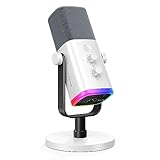
| FIFINE AmpliGame AM8W XLR/USB Gaming Microphone | Best for white/RGB streaming setups | Check on Amazon |
| FIFINE AmpliTank K688CT Podcast Microphone Kit | Best complete kit for two-person setups | Check on Amazon |
| FIFINE AmpliGame AM8PROT Gaming Microphone Kit | Best all-in-one value kit | Check on Amazon |
How We Compared
Every microphone in this roundup is a dynamic model with an XLR connection, because that combination is the most forgiving in rooms you can’t acoustically treat. We prioritized mics with tight cardioid patterns, onboard controls like gain knobs and mute buttons, and hybrid XLR/USB outputs that let you start simple and upgrade to an interface later without replacing hardware. We also weighted price heavily — nothing here breaks $100 — and favored models available as kits, since bundles that include boom arms, shock mounts, and pop filters save noisy-room streamers another $40 to $80 in separate purchases. We did not conduct laboratory acoustic measurements; rankings reflect feature sets, build quality, flexibility, and value at each price point.
The 8 Best Picks
1. FIFINE AmpliGame AM8 USB/XLR Dynamic Microphone — Best Overall
The AM8 is the mic we’d hand to most noisy-room streamers first. At around $56, it delivers the essentials that matter: a dynamic capsule tuned for close talking, a tap-to-mute button on the body, and both USB and XLR outputs so you can plug into a PC today and an interface tomorrow. The included tripod desk stand gets you recording immediately, and an RGB ring adds polish to on-camera setups without affecting audio. Because it’s a dynamic mic, it needs to sit roughly four to six inches from your mouth — which is exactly what keeps keyboard and fan noise out.
- Pros: hybrid USB/XLR output for future-proofing; onboard mute and gain controls at a budget price
- Cons: the stock desk stand picks up desk vibrations, so plan on a boom arm eventually
Skip it if: you want a condenser’s room-filling warmth for a quiet, treated space — this mic is built for the opposite situation.
2. FIFINE AmpliGame AM8T XLR/USB Gaming Microphone Set — Best Bundle
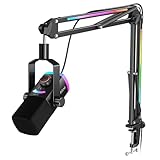
The AM8T takes the same dynamic capsule as the AM8 and packages it with the accessories noisy-room streamers actually need: a boom arm, shock mount, and pop filter in one around $67 box. Buying those three items separately typically adds $50 or more, so the math is easy. The shock mount matters most here — it isolates the mic from desk thumps and boom-arm creaks, while the boom arm positions the capsule close to your mouth, further away from your clacking keyboard. USB gets beginners going instantly; the XLR port is there when you upgrade to an interface.
- Pros: complete accessory bundle included; same proven dynamic capsule as the AM8
- Cons: the bundled boom arm is functional but lighter-duty than a $40 aftermarket option
Skip it if: you already own a boom arm and shock mount — the plain AM8 saves you $11.
3. Dynamic USB XLR Gaming Microphone with AI Noise Canceling — Best Budget Pick
At around $32, this is the cheapest credible entry point into XLR dynamic streaming, and the onboard AI noise cancellation is a genuinely useful trick for rooms you can’t quiet down. The hybrid output means the same mic works plugged straight into a PS5 or PC over USB or into an audio interface over XLR, which is rare at this price. Build quality is plasticky and the accessories are minimal, but the core capsule behaves like a proper dynamic: it wants you close and pushes room noise away.
- Pros: AI noise canceling built in; works with PS5 and PC over USB or XLR for under $35
- Cons: lighter, less refined build than the $56–$68 options above
Skip it if: you can stretch to $57 — the AM8’s controls and fit and finish are worth the difference.
4. MAONO PD200W Hybrid Wireless Podcast Microphone — Best for Moving Around
The PD200W is the most flexible mic here at around $99. It’s a dynamic XLR/USB microphone that also works wirelessly with its included receiver, letting you record up to roughly 164 feet from your computer — handy if your “studio” is wherever the room is quietest that day. Battery-powered wireless operation means you can record standing demos, walk-and-talk segments, or sit anywhere in the room without a cable run. When wireless isn’t needed, the XLR and USB connections behave like any wired dynamic mic.
- Pros: wireless, XLR, and USB modes in one microphone; long wireless range for room-to-room recording
- Cons: highest price in this roundup, and wireless mode adds battery management to your workflow
Skip it if: you always stream seated at your desk — you’re paying for mobility you won’t use.
5. FIFINE AmpliTank K688 Dynamic Microphone — Best for Voice Quality
The K688 leans podcast rather than gaming, and its tuning shows it: a warmer, fuller vocal character that flatters spoken content, narration, and talk-heavy streams. At around $67, it keeps the hybrid USB/XLR design and adds both a headphone jack for zero-latency monitoring and a physical gain knob on the body — two features streamers use daily. Its tight cardioid pattern is the same noisy-room insurance as the rest of this list, and the metal build feels a step above the AmpliGame line.
- Pros: broadcast-flavored vocal tuning with built-in headphone monitoring; sturdy metal construction
- Cons: no RGB or gaming styling, and accessories are sold separately
Skip it if: you want an all-in-one kit with a boom arm — see the K688CT below.
6. FIFINE AmpliGame AM8W XLR/USB Gaming Microphone — Best for White Setups
The AM8W is the AM8 formula in a white finish at around $58, made for the flood of white-and-pastel battlestations that have taken over streaming. The dynamic capsule, tap-to-mute, gain control, and dual USB/XLR outputs carry over unchanged, so the acoustic behavior in a noisy room is identical: close-mic your voice, reject everything behind and beside you. If your build is all-white, this is the only mic on this list that won’t clash.
- Pros: clean white finish for matching setups; same mute, gain, and dual-output feature set as the AM8
- Cons: white finish shows scuffs and desk wear more readily than black
Skip it if: color doesn’t matter — the standard AM8 is $2 cheaper with identical internals.
7. FIFINE AmpliTank K688CT Podcast Microphone Kit — Best Complete Kit
The K688CT bundles the K688’s podcast-tuned dynamic capsule with the mounting hardware that turns it into a full desk studio, all for around $79. You get the mic plus suspension mounting and accessories, which means one purchase covers voice capture, isolation, and positioning. For streamers and podcasters sharing a noisy room with a roommate or traffic, mounting the capsule close to your mouth on an isolated suspension is half the battle won before you touch a single setting. USB handles solo recording; XLR is ready for interfaces and mixers.
- Pros: podcast-grade capsule with full mounting kit included; strong value at around $79
- Cons: podcast styling will look out of place in a RGB-heavy gaming setup
Skip it if: you only game occasionally and want gaming-first aesthetics.
8. FIFINE AmpliGame AM8PROT Gaming Microphone Kit — Best All-in-One Value
The AM8PROT is the gaming-flavored counterpart to the K688CT: the AM8’s streaming-friendly dynamic capsule packaged as a full kit at around $79, complete with boom arm, shock mount, and pop filter. For anyone starting from zero in a noisy room, this is the fastest path from box to broadcast — dynamic rejection, proper positioning, and vibration isolation in one purchase, with XLR waiting for your first interface upgrade. Among kits under $80, it’s the one we’d recommend to gamers specifically.
- Pros: gaming-focused kit with all mounting accessories included; dual USB/XLR for easy upgrading
- Cons: costs $12 more than the AM8T for a similar bundle concept
Skip it if: you’d rather buy the mic alone now and choose your own boom arm later.
Buying Guide
Why Dynamic Beats Condenser in a Noisy Room
Condenser microphones are more sensitive and capture a wider, more detailed soundstage — which is exactly why they betray untreated rooms. Dynamic microphones need you to talk within four to six inches of the capsule and roll off sounds arriving from the sides and rear. In practice, that means your voice sits front and center while your mechanical keyboard, tower fans, and door noise fall away. Every mic in this roundup is dynamic for this reason. Pair one with a boom arm, position it close, and you’ll solve more noise problems than any software plugin can.
USB vs. XLR (and Why Hybrid Wins)
USB is simpler: plug in, select the device, done. XLR requires an audio interface or mixer, typically adding $80 to $200, but gives you better preamps, physical gain control, and processing like compression and noise gates. Seven of the eight mics here are hybrid models, which is the smart buy: start on USB today, and when you upgrade to an interface, keep the same microphone. True XLR-only mics lock beginners out; USB-only mics strand you when your setup grows. If you stream on a console like the PS5, confirm hybrid USB support — several of these mics advertise it explicitly.
Accessories and Room Placement Matter as Much as the Mic
A $68 kit with a boom arm and shock mount will outperform a bare $57 mic sitting on a rattling desk stand. The boom arm pulls the capsule toward your mouth and away from your keyboard; the shock mount stops desk thumps from reaching the capsule; the pop filter tames plosives. Placement does the rest: keep the mic four to six inches from your mouth, pointed at your face, with the rear of the cardioid pattern facing the noisiest part of your room. Add a noise gate in OBS and you’ll get 90 percent of a treated studio’s cleanliness for under $100.
Our Verdict
For most noisy-room streamers, the FIFINE AmpliGame AM8 at around $56 is the pick — a proper dynamic capsule, mute and gain controls, and a hybrid output that grows with your setup. If you’re starting from nothing, spend the extra $11 to $23 on the AM8T or AM8PROT kits and get the boom arm and shock mount in the box. Tight on cash? The around $32 AI noise-canceling mic is a legitimate entry point. And if your recording life involves moving around, the MAONO PD200W’s wireless mode at around $99 is worth every penny.
FAQ
Is XLR really better than USB for a noisy room?
The microphone capsule matters more than the connection, but XLR gives you access to interfaces and mixers with better preamps, gain staging, and real-time processing like gates and compression. That control is what turns a decent dynamic mic into a clean-sounding stream in an untreated room. Hybrid mics let you start on USB and add that processing later.
Do I need an audio interface to use these mics?
Not immediately. Seven of the eight picks here include USB output, so you can plug straight into a PC or, in some cases, a PS5. You’ll only need an interface — budget $80 to $200 — once you want finer gain control, headphone monitoring through an interface, or processing plugins on an XLR signal chain.
How close should I sit to a dynamic streaming microphone?
Aim for four to six inches, roughly a fist-and-a-half from your mouth. Dynamic capsules rely on proximity: the closer you are, the more your voice dominates and the more room noise the cardioid pattern rejects. Farther than a foot, and the mic starts hearing the room again — which defeats the purpose in a noisy space.
Will a dynamic mic eliminate keyboard and fan noise completely?
No microphone eliminates noise entirely, but dynamics get you most of the way. Combine close positioning, a boom arm that lifts the mic away from your desk, a shock mount, and a noise gate set around -35 to -40 dB in OBS, and stray key clacks and fan hum should drop below audible on your stream without any acoustic treatment.









