
Setting up a professional live broadcast in 2026 demands absolute reliability, ultra-low latency, and seamless multi-camera control. Whether you are running a high-end house of worship, a corporate broadcast studio, or a dynamic esports arena, the backbone of your video production relies heavily on how well your hardware communicates. Investing in pre-packaged hardware bundles simplifies this equation drastically, eliminating the compatibility headaches that often plague custom-built multi-vendor setups.
However, navigating the sheer volume of available options requires a clear understanding of your specific production workflow. Marketing terms can easily obscure the technical realities of bandwidth management, sensor capabilities, and controller ergonomics. This guide cuts through the noise to break down the critical factors you need to evaluate before purchasing your next production ecosystem, ensuring your investment delivers flawless performance for years to come.
As an Amazon Associate we earn from qualifying purchases at no extra cost to you.
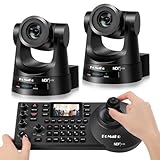
Understanding NDI Protocol Variations: Full NDI vs. NDI|HX
One of the most crucial decisions when selecting a camera and controller bundle is determining which NDI variant your network infrastructure can support. Full NDI offers visually lossless, extremely low-latency video transmission, but it demands significant network bandwidth, often requiring dedicated gigabit or 10-gigabit network switches. On the other hand, NDI|HX utilizes high-efficiency compression, making it vastly more forgiving on bandwidth-constrained or Wi-Fi-extended networks, albeit with a negligible increase in latency.
When evaluating bundles, look closely at your existing network architecture. If your studio already runs on a robust, managed IP infrastructure, investing in Full NDI hardware ensures pristine image quality and instantaneous tally and control response. If your production setup requires flexibility or spans across wide corporate campuses, NDI|HX packages might provide the practical compromise you need without requiring a complete network overhaul.
Sensor Quality and Low-Light Performance
The sensor is the literal eye of your broadcast, yet many buyers focus entirely on output resolution while ignoring sensor size and low-light capability. Premium broadcast bundles typically feature larger CMOS sensors that capture more dynamic range and handle challenging indoor lighting environments with ease. A larger sensor reduces digital noise, maintains accurate color fidelity, and prevents blown-out highlights when subjects move under harsh stage spotlights.
Always inspect the manufacturer specifications regarding minimum illumination requirements. If your broadcast space involves variable lighting, dramatic mood shifts, or dimly lit sets, prioritize bundles that explicitly highlight advanced noise reduction algorithms and wide dynamic range support. Skipping this step often results in grainy, washed-out video feeds that post-production color grading cannot fully salvage.
Controller Ergonomics and Protocol Compatibility
A joystick controller is your primary physical interface during a live broadcast, making tactile feedback and layout intuitiveness paramount. Premium controllers should offer weighted joystick mechanisms for smooth pan and tilt adjustments, alongside dedicated, tactile buttons for preset recalls, focus control, and exposure adjustments. Fumbling through menu sub-layers on a poorly designed controller during a fast-paced live event is a recipe for missed shots.
Furthermore, verify that the controller supports standard control protocols like VISCA over IP, Pelco, or native NDI control integration. Even within bundled packages, cross-brand compatibility matters if you plan to expand your camera fleet down the road. A versatile controller should easily map to multiple camera presets and allow quick switching between channels without lagging.
Power over Ethernet (PoE) and Cable Management
One of the greatest operational advantages of modern IP-based broadcast workflows is the implementation of Power over Ethernet. A high-quality NDI PTZ bundle should fully support PoE+, transmitting power, video, audio, tally signals, and PTZ control over a single Ethernet cable. This drastically simplifies installation, reduces cable clutter behind mounting brackets, and allows you to place cameras in hard-to-reach locations without running separate AC power lines.
Before purchasing, check the power budget of your network switch against the PoE requirements of the cameras in the bundle. High-end PTZ cameras with motorized zoom lenses and tally lights often demand robust PoE+ standards rather than standard PoE. Ensuring your power infrastructure matches your hardware bundle prevents unexpected reboots and stability drops during critical live transmissions.
Avoiding Common Integration Mistakes
A frequent pitfall in broadcast system deployment is underestimating network switch capabilities. NDI streaming is heavily dependent on multicast traffic and IGMP snooping configurations. Even the most expensive camera and controller bundle will stutter or drop frames if the local network switch is unmanaged or lacks adequate packet-forwarding capacity. Always budget for a dedicated, enterprise-grade managed switch designed specifically for AV-over-IP workflows.
Another common mistake is neglecting audio embedding and synchronization. While PTZ cameras primarily focus on video capture, many professional workflows require routing audio through the camera or managing intercom features via the controller. Ensure your chosen bundle handles audio inputs and lip-sync calibration cleanly to avoid frustrating delays between speech and visual movement on screen.
Determining the Right Zoom and Focal Length
Optical zoom capability dictates where you can physically place your cameras within a venue. Broadcast bundles vary significantly, with optical zoom ranges spanning standard coverage to ultra-telephoto reach. For smaller studio settings or conference rooms, a modest optical zoom is usually sufficient to frame subjects tightly without distortion. However, for large auditoriums, stadiums, or expansive houses of worship, high optical zoom ranges are essential to capture sharp details from a great distance.
Digital zoom should never be used as a substitute for optical zoom in professional broadcasts, as it severely degrades image resolution. When selecting your bundle, measure your throw distance—the space between the camera mounting position and the subject—to ensure the optical focal length matches your venue’s spatial constraints.
Balancing Budget and Future-Proofing Requirements
Investing in broadcast equipment requires a strategic balance between immediate budgetary constraints and long-term technological evolution. While it can be tempting to purchase entry-level packages to save costs upfront, production demands tend to scale rapidly once a studio goes live. Premium bundles often feature higher framerates, robust tally systems, and broader software integration capabilities that protect your investment against premature obsolescence.
Consider your growth trajectory over the next few years. If you plan to transition to higher resolutions or expand your multi-camera switching capabilities, purchasing a slightly more capable bundle now is far more cost-effective than replacing an entire ecosystem a year later. Look for manufacturers that offer regular firmware updates, as this ensures your hardware gains new features and security patches over its operational lifespan.
Related Guides
If you are ready to explore specific product configurations, check out our curated roundup of the Best Premium Ndi Ptz Camera and Controller Bundles for Broadcast to find top-tier options vetted for professional production environments.
FAQ
Do I need a physical hardware controller if I use software-based production?
While software control panels running on touchscreens or computers can manage PTZ movements, a physical hardware controller offers tactile precision, muscle memory, and zero-latency adjustments. For fast-paced live broadcasts, physical joysticks and dedicated buttons significantly reduce operational errors.
Can I mix different brands of NDI PTZ cameras with a single controller?
Many universal NDI controllers support multi-brand integration via standard IP control protocols, but seamless operation depends heavily on manufacturer firmware and protocol mapping. Sticking to a pre-matched bundle guarantees optimal compatibility and eliminates configuration hurdles.
What network switch requirements are critical for multi-camera NDI setups?
Multi-camera NDI deployments require enterprise-grade, managed network switches that support gigabit or 10-gigabit speeds, jumbo frames, and proper IGMP snooping. Unmanaged switches will quickly become saturated and cause severe video packet loss or stuttering.
Is NDI|HX sufficient for professional broadcast quality?
NDI|HX provides excellent visual fidelity and is widely used in corporate and educational broadcasts where network bandwidth is limited. However, Full NDI remains the gold standard for broadcast studios requiring absolute zero latency and uncompressed quality.









