
Our Top Picks

Top 3 picks at a glance
The Short Answer
For weekly 4K footage backups, most creators need between 4TB and 12TB of storage, depending on how much they shoot and how long they keep archives. A useful rule of thumb: one hour of 4K footage at a typical 100 Mbps bitrate consumes roughly 45GB. If you shoot 5–10 hours per week, that is 225–450GB weekly, or roughly 12–24TB per year. A pair of rotating 4TB–8TB drives covers most solo creators and small studios without breaking the budget.
On capacity alone, the WD 4TB My Passport line — available in black, red, and blue, typically $180–$230 — is the sweet spot for weekly backups of moderate 4K workloads. If your weekly output climbs past 80–100GB, step up to two drives so you can rotate them, or move to higher-capacity desktop models. Below, we break down physical sizes, capacity math, and how to match a drive to your workflow.
As an Amazon Associate we earn from qualifying purchases at no extra cost to you.



Standard Sizes
Physical size matters more than people expect, especially if your drives live on a desk shelf or travel in a camera bag. Here is how common drive categories compare, using the WD 4TB My Passport as the portable reference point:
| Drive Type | Capacity Range | Dimensions (inches) | Dimensions (cm) | Typical Weight | Typical Price |
|---|---|---|---|---|---|
| Portable 2.5″ HDD (e.g., WD My Passport 4TB) | 1–6TB | 4.22 x 2.95 x 0.85 | 10.7 x 7.5 x 2.2 | 0.46 lb (210g) | $180–$230 (4TB) |
| Portable 2.5″ HDD, slim variants | 1–5TB | 4.22 x 2.95 x 0.55 | 10.7 x 7.5 x 1.4 | 0.38 lb (170g) | $70–$150 |
| Portable SSD | 500GB–4TB | 3.74 x 1.95 x 0.35 | 9.5 x 5.0 x 0.9 | 0.11 lb (48g) | $100–$400 |
| Desktop 3.5″ HDD (external) | 4–24TB | 6.5 x 4.0 x 1.9 | 16.5 x 10.2 x 4.8 | 2.1 lb (950g) | $120–$500+ |
| Two-bay desktop RAID enclosure | 8–48TB | 7.8 x 4.9 x 6.3 | 19.8 x 12.4 x 16.0 | 3.5–4.5 lb (1.6–2.0kg) | $300–$900 |
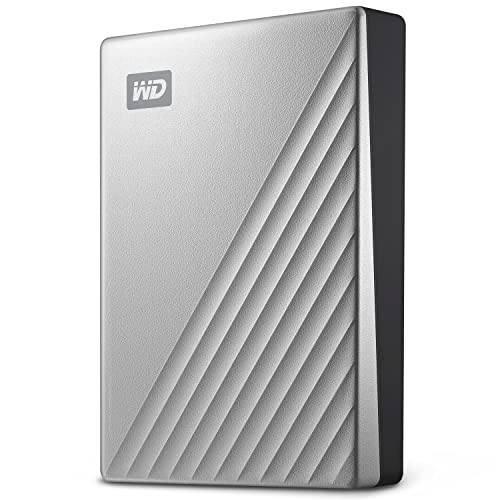
Note that the WD My Passport Ultra 4TB in silver (USB-C, around $257) shares nearly identical footprint dimensions with the standard My Passport but uses a USB-C connection, which matters if your laptop or card reader setup is USB-C only. Power draw for portable USB drives is modest — they run off bus power, typically under 5W — while desktop 3.5-inch drives need wall power and draw roughly 10–20W during active transfers.
How to Measure Your Space
- Measure your storage shelf or drawer. Use a tape measure and record width, depth, and height in both inches and centimeters. A single My Passport needs about 4.25 x 3 x 0.9 inches of clearance; three of them side by side need roughly 13 inches of shelf width.
- Check your bag or case if you travel. Portable drives slide into most camera bag accessory pockets, but padded drive cases are usually sized for drives up to 5 x 3.2 x 1 inches — verify before buying.
- Confirm your ports. Standard My Passport drives use USB 3.1/USB 3.0 (USB-A cable); the Ultra variant uses USB-C. Measure nothing here — just check your computer’s available ports and buy the matching variant or an adapter.
- Plan for rotation. A rotating backup workflow uses at least two drives. Double your shelf space estimate and label each drive’s spot so swapped drives always return to the same place.
- Leave ventilation room. Desktop 3.5-inch enclosures run warm during long transfer sessions. Allow at least 1 inch of clearance on ventilated sides.
- Weigh the practical limits. If you will hand-carry drives off-site weekly, keep each unit under about half a pound. Desktop drives over 2 pounds belong on a desk, not in a backpack.
By Room or Use Case
Home Office / Solo Content Creator
If you edit at a desk and shoot a few hours of 4K weekly, a single 4TB portable drive like the WD My Passport (about $180 in black; red and blue color variants run $227–$230) handles roughly 8–10 weeks of footage at 50GB per week before you offload. The included backup software with ransomware defense and password protection adds a layer of security for client work. Buy two and alternate weekly.
Small Studio / Frequent Shooters
Teams producing 10–20 hours of 4K weekly generate 450–900GB. Two 4TB drives fill up fast; consider two 5TB–6TB portables, or a desktop 8TB–12TB drive paired with one portable for off-site copies. A two-bay RAID enclosure (roughly $300–$600, sized near 7.8 x 4.9 x 6.3 inches) automates mirroring if you have dedicated desk space.
Travel and On-Location Work
Weight and size dominate here. At 0.46 lb, a My Passport disappears into a backpack, but consider a ruggedized portable drive or a 2TB–4TB portable SSD (about 0.11 lb, pocket-sized) for field offloads, syncing to a larger desktop drive when you return home. SSDs also survive drops better on bumpy shoots.
Archivists and Long-Term Keepers
If you never delete footage, plan by year: 1 hour weekly at 100 Mbps equals about 2.3TB annually. Keep three generations of drives in rotation — current, previous, and off-site — and expect to migrate archives to fresh drives every 4–5 years regardless of remaining capacity.
Common Sizing Mistakes
- Underestimating 4K bitrates. Footage at 400 Mbps (common in higher-end mirrorless and cinema cameras) consumes roughly 180GB per hour — four times the 100 Mbps estimate. Check your camera’s actual bitrate, not a generic figure.
- Buying one big drive instead of two smaller ones. A single 12TB drive holds more, but one drive failure or one ransomware incident wipes everything. Two smaller drives in rotation is safer and often cheaper.
- Ignoring gross vs. usable capacity. A “4TB” drive formats to about 3.6TB usable. Budget with that gap in mind.
- Forgetting physical footprint. Buyers focused purely on terabytes sometimes order a desktop 3.5-inch drive and discover it needs wall power and a permanent spot — a problem for anyone who works from cafés or travels.
- Skipping the off-site copy. Fire, theft, and flood do not care how careful your shelf organization is. One drive should always live somewhere else — a safe, a relative’s house, or a trusted office.
- Buying on price per terabyte alone. A cheap high-capacity drive without backup software or hardware encryption may cost more in risk than the $30–$50 saved up front.
FAQ
Is 4TB enough for weekly 4K backups?
For most solo creators, yes — at least for a quarter at a time. At 50–100GB of footage weekly, 4TB (about 3.6TB usable) holds 35–70 weeks of raw backups. Heavy shooters producing 400GB+ weekly will fill it in under two months and should look at 8TB or larger, or accept more frequent drive swaps in a rotation.
Should I choose the WD My Passport or My Passport Ultra?
Capacity and protection features are essentially the same; the difference is connectivity and finish. The standard My Passport (black at about $180, red at about $228, blue at about $229) uses USB 3.1/USB 3.0. The Ultra in silver runs about $257 and uses USB-C, which suits newer laptops without USB-A ports. Pick based on your computer’s ports and your preferred color.
Do I need a drive with built-in backup software?
It helps, but it is not mandatory. The ransomware defense and password protection included on My Passport drives are genuinely useful for client-sensitive footage. You can also use free tools or your operating system’s built-in backup utility on any drive, so treat software as a bonus rather than a deciding factor.
SSD or hard drive for 4K footage backups?
For archival weekly backups, spinning hard drives win on price per terabyte — a 4TB portable HDD costs around $180, while a 4TB portable SSD runs roughly $300–$400 as of 2026 market pricing. SSDs make sense for field offloads, frequent travel, or when you need faster transfer speeds over the same USB connection. Many creators use a fast SSD for working files and an HDD for weekly archives.









