
The UBeesize 2-Pack LED Video Light Kit is the best overall panel set here for most streamers: two 12-inch panels with a listed 26W and 3,000 lumens each, 3000K-6500K adjustable color, tripods that extend to 72 inches, and a wall-plug power cord so the lights never run out mid-stream. A streaming LED panel is a flat, flicker-free continuous light that sits beside or above your monitor and fills in your face evenly. If you only have desk space for one small light, or you want battery power, the NEEWER NL-116AI is the more compact choice.
Our Top Picks


Top 3 picks at a glance
Quick List
- NiceVeedi 2-Pack LED Kit – best for a two-light setup with a remote and three preset color temperatures
- UBeesize 2-Pack LED Kit – best overall for a bright, wall-powered key and fill pair
- NEEWER NL-116AI 9-inch panel – best for a single desktop key light with knob control and a built-in battery
- NEEWER Basics BP66 2-Pack – best for small bi-color panels with color filters on stands
- ALTSON 60 LED clip light – best for a pocket-sized, rechargeable fill light on a laptop or phone
- Anautin 1-Pack LED Kit – best for a single USB-powered panel with a long cable and wide color range
Which One Is Right for You?
| If you… | Choose |
|---|---|
| want two lights for a key-and-fill setup behind a monitor | UBeesize 2-Pack or NiceVeedi 2-Pack |
| sit at a small desk and need one compact key light | NEEWER NL-116AI |
| want warm and cool control plus color filters | NEEWER Basics BP66 |
| need a light that clips to a laptop and runs from a battery | ALTSON 60 LED |
| prefer one panel powered by a USB adapter or power bank | Anautin 1-Pack |
| like a handheld remote for changing brightness | NiceVeedi 2-Pack |
Think about placement first. A pair of floor stands needs floor space behind the desk, while a desktop panel or a clip light needs none. Brightness claims in these listings use different units, lumens for some and lux at 0.5 meters for others, so compare them only within the same unit.
All 6 Picks in Detail
1. NiceVeedi 2-Pack LED Kit – Best for a remote-controlled two-light setup
As an Amazon Associate we earn from qualifying purchases at no extra cost to you.

NiceVeedi’s kit gives you two panels, two tripods and a carry bag. Each panel has 356 LED beads and 15W output, with three color temperature presets at 2800K, 4800K and 6500K and brightness adjustable from 10 to 100 percent. The listing claims a CRI above 97. A remote lets you change brightness without reaching up to the panel, and the lights run from a 5V, 2A USB adapter or a power bank.
- Two panels with 356 LED beads each, 15W
- Three color temperatures: 2800K, 4800K, 6500K
- Brightness 10 to 100 percent via remote
- CRI 97+ per the listing
- Panel about 10 x 7.8 inches; stand up to 60 inches
- USB power (5V, 2A adapter not included) with USB-C adapters supplied
Pros
- Two lights and a remote make a complete starter setup
- Powers from a power bank when needed
Cons
- Only three color presets, not a continuous range
- Wall adapter is not included
Compared with the UBeesize kit, the panels are smaller and the listed output is lower, but you gain the remote. It also adds USB-C adapters, so you can run the lights from a phone charger or laptop port as the listing describes.
2. UBeesize 2-Pack LED Kit – Best overall for key and fill

This kit stands out for output. Each 12-inch panel carries 420 LED beads and is listed at 26W with up to 3,000 lumens and CRI above 97. Color temperature adjusts from 3000K to 6500K, with nine brightness levels on an in-line controller so you can change settings while recording. The tripods extend to 72 inches and fold to 15.5 inches, and a phone holder is included. Unlike the USB-powered kits, each light plugs into a wall outlet with its attached cord, so power is continuous.
- Two 12-inch panels, 420 LED beads each
- Listed 26W and up to 3,000 lumens
- CRI above 97
- 3000K to 6500K, nine brightness levels
- Aluminum tripods from 15.5 to 72 inches
- Carry bag and phone holder included
Pros
- Highest listed output of the set
- Continuous wall power for long streams
Cons
- Needs two outlets and visible cords
- Large panels take real floor space
It is the strong choice over the NiceVeedi kit if you want more output and are happy to plug into the wall. Because the listing gives the controller as in-line, you can reach brightness and mode changes from your seat, which is handy during a live stream.
3. NEEWER NL-116AI 9-inch panel – Best for a battery-powered desk key light

The NL-116AI is a single compact panel with 58 warm and 58 cool LEDs, 10W maximum output, 600 lux at 0.5 meters and a CRI of 95 or higher. Two knobs control brightness and color temperature in 1 percent steps, from 3200K to 5600K. A built-in 4000mAh battery runs the light for up to 1.5 hours per the listing and recharges in about two hours, and a mini metal tripod and cold shoe adapter are included. It suits a desk where you want the light close and small.
- 9-inch panel with 116 LEDs, 10W max
- 600 lux at 0.5m, CRI 95+
- 3200K to 5600K with 1 percent knob steps
- Built-in 4000mAh battery, up to 1.5 hours
- Desk tripod extends to 8.6 inches
- Cold shoe adapter and USB cable included
Pros
- Precise, quick adjustment with knobs
- Battery gives you cable-free placement
Cons
- Battery lasts about 1.5 hours, so plan to run it from USB power
- One small panel gives limited coverage
Next to the ALTSON clip light, it is brighter and more adjustable, but much bulkier.
4. NEEWER Basics BP66 2-Pack – Best for bi-color panels with filters

The BP66 kit is built around two small 10W panels with 66 LEDs each, a bi-color range from 3200K to 5600K, CRI above 95, and a listed 750 lux at 0.5 meters with a color filter attached. Each panel ships with two light stands that adjust from 19.7 to 53.2 inches, plus four magnetic filters, white and orange. Brightness has ten levels and the power comes from USB, 5V at 2A, with a built-in 2-meter cable. The listing suggests it is meant for short-distance fill light.
- Two panels, 66 LEDs each, 10W
- 3200K and 5600K bi-color, CRI above 95
- 750 lux at 0.5m with a color filter
- Stands 19.7 to 53.2 inches, 180-degree tilt
- Four magnetic filters
- USB-powered with a built-in 6.6-foot cable
Pros
- Filters offer easy warm or soft light
- Two stands that double as tabletop tripods
Cons
- Small panels suit close-range use
- Lower output than the big 12-inch panels
Choose it over the NL-116AI if you want two lights in a small desk footprint.
5. ALTSON 60 LED clip light – Best for a pocket fill light

The ALTSON is a small clip-on panel for phones, laptops and webcams. It has 60 LEDs, CRI above 97, three light modes spanning 2500K to 6500K and ten brightness levels. A 2200mAh rechargeable battery runs about 15 hours at 10 percent brightness and about 4 hours at 50 percent. It weighs around 95g, rotates 160 degrees, and includes a clip, USB-C cable, quarter-inch adapter and hot shoe mount.
- 60 LEDs, CRI 97+
- Three modes from 2500K to 6500K
- Ten brightness levels
- 2200mAh battery: about 15 hours at 10%, 4 hours at 50%
- About 3.9 x 2.8 x 0.78 inches and 95g
- Clip and quarter-inch mounting options
Pros
- Very portable and rechargeable
- Useful as a secondary fill or a travel light
Cons
- Too small to be a main key light for a face-camera stream
- Three modes, not a continuous color control
Compared with the NL-116AI, it is far lighter but offers much less coverage.
6. Anautin 1-Pack LED Kit – Best for a single USB-powered panel
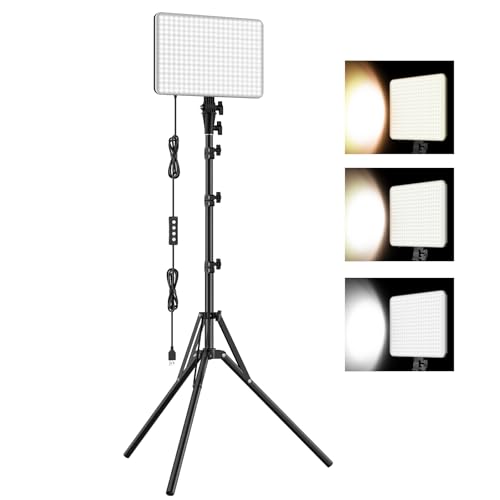
Anautin’s kit is a single 15W panel with 352 LED beads, listed at up to 1,700 lumens and powered by a USB 5V, 3A supply. It has three color temperature presets, 2500K, 4500K and 8500K, with brightness from 10 to 100 percent. The panel is about 6.85 by 10 inches, the metal tripod extends to 62 inches and folds to 16, and a 2.5-meter USB cable gives some freedom in placement. The listing describes a heat-dissipating design for long recording sessions.
- One panel, 352 LED beads, 15W
- Up to 1,700 lumens per the listing
- Three presets: 2500K, 4500K, 8500K
- Brightness 10 to 100 percent
- Tripod up to 62 inches, folded 16 inches
- 2.5m USB cable
Pros
- Wide preset range and long cable
- Compact when folded
Cons
- A single light cannot balance shadows on its own
- The 8500K preset is very cool for skin tones
It is the closest single-light alternative to the NL-116AI, trading knobs and a battery for a taller stand.
Specs Compared
| Kit | Lights | Power / LEDs | Color temperature | CRI (listed) | Output (listed) | Power source |
|---|---|---|---|---|---|---|
| NiceVeedi 2-Pack | 2 | 15W, 356 LEDs each | 2800K, 4800K, 6500K | 97+ | Confirm on listing | USB 5V 2A (adapter not included) |
| UBeesize 2-Pack | 2 | 26W, 420 LEDs each | 3000K-6500K | 97+ | Up to 3,000 lumens | Wall outlet cord |
| NEEWER NL-116AI | 1 | 10W, 116 LEDs | 3200K-5600K | 95+ | 600 lux at 0.5m | 4000mAh battery or USB |
| NEEWER Basics BP66 | 2 | 10W, 66 LEDs each | 3200K and 5600K | 95+ | 750 lux at 0.5m with filter | USB 5V 2A |
| ALTSON 60 LED | 1 | 60 LEDs | 2500K-6500K, 3 modes | 97+ | Confirm on listing | 2200mAh battery |
| Anautin 1-Pack | 1 | 15W, 352 LEDs | 2500K, 4500K, 8500K | Confirm on listing | Up to 1,700 lumens | USB 5V 3A |
How We Chose These
This is a research-based list built from current catalog listings. We looked for continuous LED panels aimed at video and streaming that state adjustable color temperature, brightness control, color rendering index and power source. We compared the number of lights per kit, panel size, listed output in lumens or lux, stand height, and whether the unit runs from USB, a battery or a wall outlet. Where a listing used different brightness units we avoided direct comparisons. We read manufacturer-style bullet points rather than running our own meter readings, so listed figures are claims, not measurements. Safety notes follow general guidance on USB and wall power.
What to Look For
Panel size and number of lights
Bigger panels produce softer light because the source is large relative to your face. A 12-inch panel placed close is noticeably softer than a 5-inch one at the same distance. A classic streaming setup uses two lights: a key light positioned about 45 degrees to one side and slightly above eye level, and a fill light on the other side at lower power to open up shadows. If you only have one light, put it just above the camera and angle it so it does not reflect off glasses.
Color temperature and CRI
Color temperature is measured in kelvin. Around 5600K matches daylight, 3200K matches tungsten bulbs. The aim is to match your room: if a window is on, use cooler light, and if you mostly stream at night with warm lamps, drop toward 4000K. CRI measures how faithfully a light renders colors, and a value of 95 or above is a good target for skin tones. Treat listed CRI numbers as manufacturer claims. Presets with only three steps are fine for most streamers, but a continuous range helps when mixing with other lights.
Brightness: lumens, lux and watts
Watts describe power draw, not light. Lumens measure total light output, and lux measures light falling on a surface at a stated distance. Light falls off quickly with distance following the inverse square law, so doubling the distance cuts the light to a quarter. As a worked example, a panel giving 600 lux at 0.5 meters would deliver roughly 150 lux at 1 meter and about 67 lux at 1.5 meters. For a desk setup where the light sits 0.7 to 1 meter from your face, that is enough if the room is dim, but it is not enough to overpower bright daylight.
Power source and safety
USB-powered panels draw 5V at 2A to 3A, so use a quality adapter that matches the listed current, and avoid cheap unbranded chargers. Wall-powered lights like the UBeesize kit need a stable outlet and tidy cabling so nobody trips over a cord. Battery-powered units should be charged in a ventilated place and not left charging unattended or covered. LED panels run cooler than old halogen lights, but they still get warm, so keep air gaps around them. Stand stability matters too: spread the legs fully and weigh down tall stands, especially around pets.
Diffusion, filters and mounting
A bare LED panel is already fairly soft, but extra diffusion helps with reflections on skin and glasses. Some kits include a built-in diffuser, as the Anautin listing describes, while the NEEWER Basics BP66 provides magnetic white and orange filters. Check the mount thread too: a quarter-inch thread on the top of a stand lets you swap in a boom arm or a monitor mount later. If your desk is shallow, a clamp or a short desk tripod can keep the light closer to the camera without taking up surface space.
Flicker and camera settings
Quality LED lights should not flicker on camera, but dimming methods and cheap power adapters can introduce banding. Set your camera shutter to roughly twice your frame rate, for example 1/60 second at 30 frames per second, and check for lines before you go live. Lock white balance to a fixed value so your skin tone does not shift during a stream.
A simple placement recipe
Place the camera at eye level on top of or just behind your monitor. Set the key light about 45 degrees to one side of the camera and slightly above eye height, aimed down at your face, roughly 60 to 100 centimeters away. Put the fill light on the opposite side at the same height but with brightness turned down to about half, or farther from you, so shadows stay gentle rather than disappearing. If you have a third source, such as a small clip light or a lamp behind you, use it to separate your shoulders from the background. Then watch your own preview, not the lights: adjust until your face looks even and the brightest area of the frame is not blown out. Many streamers leave room lights on at low level to avoid a harsh contrast between the lit face and a dark room.
Mind the small details that make a setup feel professional. Use the diffuser panel or filter supplied with the light, keep cables taped along the stand legs, and mark the position of each stand with tape so you can rebuild the same look every session. If you wear glasses, raise the lights a little higher and angle them more to the side to push reflections out of the lenses.
Questions
How many lights do I need for streaming?
Two lights, a key and a fill, give the most flattering result, but one well-placed light is better than none. A single softbox-style panel close to the camera is a solid starting point.
What color temperature should I use?
Match your room. Use around 5000K to 5600K if daylight comes through windows and around 3500K to 4500K for evening streams under warm lamps. The goal is consistent skin tones.
Are ring lights or panels better?
Panels are more flexible because you can position them off-axis for modeled light. Ring lights give even, shadow-free light that suits close-up beauty work, but they can leave a ring-shaped catchlight in glasses.
Can I power these from a laptop USB port?
Possibly, but many laptop ports supply less current than the 2A to 3A some listings request. A wall adapter or power bank rated for the stated current is the safer route.
Do I need to worry about the lights harming my eyes?
Aim lights slightly above eye level and diffuse them rather than staring into the panel. Reducing brightness and using a diffuser makes long sessions more comfortable.
Will the lights show up on camera?
Keep the panels out of frame and angle them so they do not reflect in monitors or glasses. A slight angle away from the lens usually solves it.
Update History
- October 14, 2026 – Initial publication; product set drawn from current catalog listings.
- Check the product page for current specifications and availability before buying.
Sources
- Retailer listing titles, feature bullets and specification fields for all six products
- General lighting references on color temperature, CRI and the inverse square law





