
The hardest part about going from a single-camera setup to a true multi-camera production is not the cameras themselves—it is the box in the middle that decides what your audience sees and when. A switcher has to handle multiple inputs cleanly, give you reliable transitions, and output a signal your streaming platform can actually ingest without you babysitting the encoder. Most creators discover this the expensive way: they buy the cheapest HDMI mixer on a marketplace, then find out its chroma sub-sampling wrecks their text overlays, or its audio routing makes it impossible to send program audio back to their interface.
What separates a good multi camera live streaming switcher for content creators from a mediocre one comes down to input handling, output flexibility, and whether the software ecosystem around the hardware actually saves you time during a live show. The options below range from budget-conscious quad viewers to pro-grade SDI-capable units. We compared each one in the kinds of scenarios real creators run: solo podcasting, two-person interviews, green screen keys, and multi-room events.
As an Amazon Associate we earn from qualifying purchases at no extra cost to you.





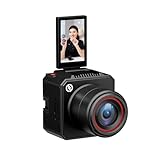
Our Top Picks

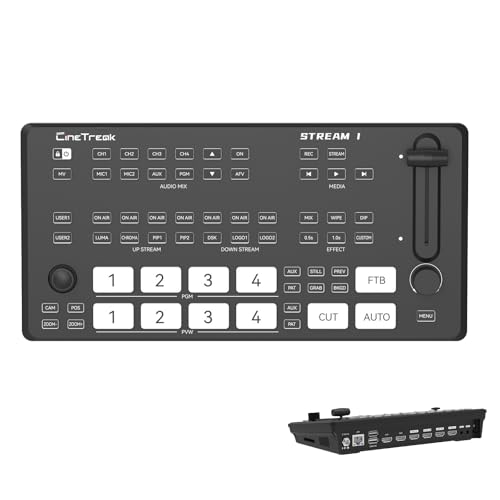




Top 3 picks at a glance
Quick Picks
| Product | Best for | Price |
|---|---|---|
| osee GoStream Deck HDMI Pro | Streamers who want an all-in-one mixer with deck-style controls | $295 |
| Cinetreak Stream 1 4K | Creators needing 4K HDMI inputs at an accessible price | $299 |
| RGBlink Mini V3 | Minimalists who want touch control and cloud customization | $199 |
| ACHAVE 4×1 Quad Multi-Viewer | Monitoring multiple cameras without a full switcher | Check on Amazon |
| Logitech Mevo Start | Wireless multi-camera coverage without cables | Check on Amazon |
| FoMaKo M1 | PTZ-heavy productions needing 4K60 input | $395 |
| RGBlink mini-Edge SDI | Pro podcasters and creators running mixed SDI and HDMI signals | $999 |
| Hollyland VenusLiv Air | Ai-tuned wireless streaming cameras built for 24/7 use | $549 |
How We Compared
We evaluated each unit on four criteria: input versatility (how many signals it accepts and at what resolution), output reliability (does it deliver a clean program feed to OBS, vMix, or a hardware encoder without dropped frames), workflow integration (touch screens, PTZ control, NDI support, audio routing), and value relative to build quality. A switcher that forces you to add a separate capture card or external audio mixer at the total price point loses ground quickly.
The 8 Best Multi Camera Live Streaming Switchers For Content Creators in 2026
osee GoStream Deck HDMI Pro
This is for the creator who wants physical deck-style buttons and a familiar workflow without the price tag of an ATEM. The HDMI Pro handles multiple camera inputs and gives you cut, fade, and keyer transitions that are responsive enough for live shows.
- Deck layout makes muscle-memory switching fast during long streams
- Solid build quality for the price bracket
- Input options are narrower than competitors with equal or more HDMI ports
Skip it if you need more than four simultaneous HDMI inputs or require SDI for longer cable runs. For a two-to-three camera YouTube studio, it is a dependable daily driver.
Cinetreak Stream 1 4K
Four HDMI inputs with 4K handling make this a strong pick for creators who want to feed high-resolution sources into a switcher without jumping to pro pricing. It works well for event coverage where you are mixing a main camera, a wide shot, and a close-up.
- Four native HDMI inputs simplify setup for multi-room productions
- Professional feature set at a sub-$300 entry point
- Software ecosystem and firmware updates are less established than major brands
Skip it if you require NDI streaming or built-in recording without external capture hardware.
RGBlink Mini V3
The Mini V3 is the switcher for people who want fewer cables and a clean desk. Its 2.1-inch touch screen and cloud-customizable controls via TAO Cloud mean you can tailor presets per show without memorizing button combinations.
- Touch screen and cloud presets speed up show preparation significantly
- Dual HDMI output plus built-in recording and PTZ control reduce add-on gear
- Touch screen is small for quick glances under stage lighting
Skip it if you need more than four inputs or prefer physical faders and buttons over touch interfaces.
ACHAVE Video Switcher 4×1 Quad Multi-Viewer
At just under $60, this is not a true switching mixer in the broadcast sense—it is a quad viewer with USB 3.0 capture. For creators who want to monitor four cameras on a single display and feed a combined picture into OBS, it is remarkably cost-effective.
- Ten display modes give flexibility for picture-in-picture and split-screen layouts
- USB 3.0 capture eliminates the need for a separate capture card
- Does not offer real-time transitions, keyers, or program preview like a proper switcher
Skip it if you need to live-switch between cameras with cuts and fades; this is a monitoring and compositing tool, not a production mixer.
Logitech Mevo Start
The Mevo Start solves a different problem: wireless multi-camera coverage. Two or three of these units can cover a room without a single cable run, and their app handles basic switching and streaming.
- True wireless setup makes it ideal for events where cabling is impossible
- App-based control and direct streaming integration are beginner-friendly
- Each unit is a camera, not a switcher—you still need software or a hub for live mixing
Skip it if you want a hardware switcher with physical controls. It is a camera-first solution that works best paired with software like vMix or OBS.
FoMaKo 4K M1
Five channels of input with 4K60 support and PTZ controller compatibility make this a solid middle-ground pick for creators building a semi-pro studio. NDI upgradeability means it can grow with your workflow.
- 4K60 input handling preserves future-proofing for higher-resolution cameras
- PTZ controller support and NDI upgrade path extend its usefulness over time
- Output is limited to 1080p60, so you cannot pass 4K program video directly
Skip it if you need native 4K output or a built-in recorder. For 1080p streaming with 4K source inputs, it performs well.
RGBlink mini-Edge SDI
This is the unit for creators who have outgrown HDMI-only workflows and need SDI alongside HDMI. With 4K input, a 5.5-inch screen, NDI and UVC support, an eight-channel audio mixer, and PTZ control, it is closest to a single-box production studio.
- Mixed SDI and HDMI input plus built-in audio mixing eliminates most rack gear
- Large 5.5-inch screen and NDI/UVC support make it genuinely versatile for podcasts and live events
- At $999, it is a significant investment for hobbyist creators not yet earning from streams
Skip it if you are a single-camera or two-camera creator; the feature set is overkill and the price reflects its pro orientation.
Hollyland VenusLiv Air
Like the Mevo Start, this is a camera rather than a switcher, but it earns its place in this roundup because creators building multi-camera setups increasingly need reliable wireless cameras that stream 4K over UVC or HDMI with built-in AI image processing.
- 1/1.3-inch CMOS sensor with F1.05 lens handles low-light rooms without adding lighting
- AI tuning, green screen, and skin beauty features reduce post-production and OBS plugin load
- Not a switcher—you must pair it with a separate mixer or software for camera switching
Skip it if your bottleneck is switching, not image quality. For wireless camera coverage in 24/7 stream environments, it is one of the strongest options available.
Buying Guide
Input Type and Resolution
Count your cameras before you buy. A two-camera interview show needs at minimum two HDMI inputs; a three-camera studio with a screen share feed needs four. Resolution matters on the input side because a 4K-capable switcher lets you plug in a Sony or Panasonic mirrorless without downconverting at the camera. On the output side, most streaming platforms still deliver 1080p, so a 4K input with 1080p60 output is a perfectly valid configuration.
Audio Routing
The most common frustration we hear is creators discovering their switcher passes video but drops audio, or forces them to route everything through a separate mixer. Built-in multi-channel audio mixing—like the eight channels on the RGBlink mini-Edge SDI—saves you a rack unit and a headache. If your switcher lacks audio processing, budget for an interface or mixer.
PTZ Control and NDI Support
If you operate cameras without a dedicated camera operator, PTZ control over the switcher means one person can run a three-camera show. NDI support lets you extend the signal over Ethernet without dedicated capture cards, which is transformative for multi-room event streaming. These features move a switcher from “convenient” to “essential” for solo creators.
Our Verdict
The best multi camera live streaming switchers for content creators depend on where you are in your journey. Our top pick is the RGBlink mini-Edge SDI: it handles SDI and HDMI, mixes audio internally, supports NDI and UVC, and has enough inputs for almost any solo or two-person production without add-on hardware.
For budget-conscious creators, the RGBlink Mini V3 at $199 offers touch control, dual output, built-in recording, and PTZ support—a genuine starting point that will not embarrass you six months later.
If your production is wireless-first and cabling is the real constraint, pairing Hollyland VenusLiv Air cameras with a software switcher will beat any hardware mixer that requires physical cable runs.
FAQ
Do I need a hardware switcher if I use OBS with a capture card?
No, and many creators start that way. Software switching in OBS works well for static setups where cameras do not move and you are comfortable managing scenes on a laptop. A hardware switcher earns its place when you need tactile control during live shows, multiple simultaneous outputs, or reduced CPU load on your streaming machine.
Can a quad multi-viewer replace a switcher for streaming?
A quad viewer displays all your camera feeds at once and can send a composited picture to OBS, but it cannot cut between sources in real time with transitions. Use it as a monitoring tool alongside a switcher or as a budget workaround for picture-in-picture formats only.
Is NDI worth paying extra for on a switcher?
If you stream across multiple rooms, use wireless cameras, or want to send program video over Ethernet to a dedicated streaming PC, NDI saves you capture cards and long HDMI runs. For a single-room studio with short cable distances, HDMI direct to a capture card is simpler and cheaper.
What is the minimum number of inputs for a multi-camera stream?
Three inputs is the practical minimum: two camera angles plus one graphics or screen-share source. Four inputs gives you room to add a wide shot or a second presenter without overloading the switcher and losing the ability to cut quickly.
Part of our creators buying guide hub.









