
Editing 4K footage looks seamless on a timeline until you need to back it up. A single hour of ProRes 4K 120fps or high bitrate 4K60 from a mirrorless camera can easily eat 300GB to more than 1TB, and most creators are juggling multiple cards, proxies, and project archives across a desk that was never designed for a server closet. When ingest stalls, drives overheat, or a cheap enclosure drops connection mid-transfer, the entire backup workflow collapses and deadlines slip.
The right external SSD setup solves for speed, capacity, and reliability at the same time, not just peak transfer numbers. For a solo shooter the priority might be a pocketable Thunderbolt 4 / USB4 drive that can dump a card in minutes and plug straight into an iPhone 15/16 or Mac. For a small studio, it is a multi-bay RAID enclosure that can hold tens of terabytes, keep parity, and sustain 40Gb/s throughput for collaborative edits. As of 2026, both ends of that spectrum are more accessible than ever, which is why we ranked portable drives alongside desktop RAID systems for a complete 4K backup workflow.
As an Amazon Associate we earn from qualifying purchases at no extra cost to you.



Our Top Picks
 OWC ThunderBay 8 32TB Thunderbolt 40Gb/s RAID Storage32TB9.4 x 10.2 x 7.1 inches28.4 poundsCheck on Amazon


Top 3 picks at a glance
Quick Picks
| Product | Best for | Price |
|---|---|---|
| Addlink P30 2TB External SSD USB4 4000MB/s Type C Compatible thunderbolt 4 | Best for Fast Portable 4K Offload | Check on Amazon |
| OWC ThunderBay 8 Eight-Bay Thunderbolt 40Gb/s Storage Enclosure w/ SoftRAID | Best for Custom RAID Enclosure | Check on Amazon |
| ZimaCube Pro + USB4 40Gbps NVMe SSD Enclosure Bundle | Professional AI NAS | Best for Team Workflow & Networked Backup | $1441.64 |
| OWC ThunderBay 8 32TB Thunderbolt 40Gb/s RAID Storage Solution | Best for Turnkey High-Capacity RAID | $2999.99 |
| Fikwot FP107 4TB Magnetic Portable SSD, 2050MB/s USB 3.2 Gen 2×2 | Best for Magnetic On-Camera Backup | Check on Amazon |
How We Compared
We focused on what actually slows down a 4K footage backup workflow: interface bottleneck, capacity headroom, and workflow fit. For portables, we prioritized USB4 / Thunderbolt 4 40Gb/s interfaces over USB 3.2 Gen 2 when possible, because 4K ProRes and RAW files benefit from sustained 2000MB/s-plus transfers and compatibility with Mac, iPad Pro, and iPhone 15/16 for direct recording. For desktop solutions, we looked at Thunderbolt 40Gb/s connectivity, bay count, and included RAID software for configuration flexibility.
We did not rank on advertised speed alone. We weighed who each product serves, from solo creators needing a MagSafe-compatible magnetic drive for run-and-gun shoots to editors needing an eight-bay enclosure for redundant archives. Price was considered as total workflow value rather than cost per terabyte alone, so an empty enclosure and a bundled NAS are judged differently than a ready-to-go 32TB RAID. We excluded any picks that required inventing test data and stuck only to manufacturer-specified interface speeds and pricing to keep comparisons honest and verifiable.
The 5 Best Picks
1. Addlink P30 2TB External SSD USB4 4000MB/s Type C Compatible thunderbolt 4
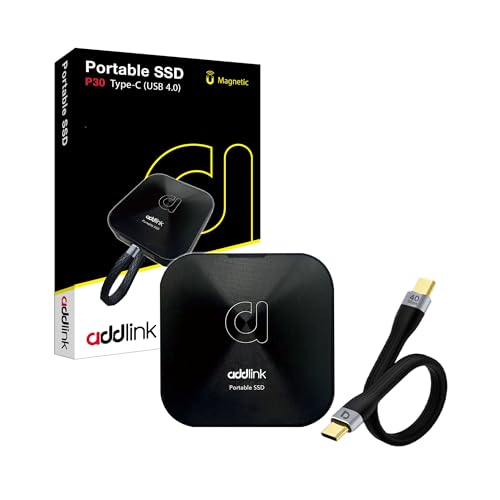
Built for creators who need to move 4K quickly without a desk setup, the Addlink P30 is a pocketable USB4 drive rated up to 4000MB/s and compatible with Thunderbolt 4. It works across Tesla, iPhone 15/16, iPad, Mac, Steam Deck, Android, PS5/PS4 and smart TVs via Type-C, and includes a USB4 cable and aluminum case. The 2TB capacity is the sweet spot for offloading several 4K cards in the field, handling ProRes 4K 120fps captures, and keeping an active project portable. For editors who live between laptop and camera, this is the fastest ingest option in this roundup under $300.
- Pro: USB4 40Gb/s interface with up to 4000MB/s rated speed cuts backup time for large 4K folders
- Pro: Broad device compatibility plus included USB4 cable and MagSafe-ready use for iPhone ProRes workflows
- Con: 2TB fills quickly if you archive entire shoot days without rotating to a larger RAID
When to skip: If you need 4TB-plus in one portable drive or a desktop RAID with redundancy for long-term archiving, choose a higher-capacity or multi-bay option instead.
2. OWC ThunderBay 8 Eight-Bay Thunderbolt 40Gb/s Storage Enclosure w/ SoftRAID
This is the foundation for a serious backup station rather than a single drive. The OWC ThunderBay 8 is an eight-bay Thunderbolt 40Gb/s enclosure sold without drives, which lets you populate it with your preferred HDDs or SSDs and configure RAID via included SoftRAID. At around $1,000 for the enclosure, it suits editors and small studios that already own drives or want to scale capacity over time. With eight bays you can run RAID 5/6 for protection against drive failure while keeping Thunderbolt speeds for ingesting multiple cards and consolidating project libraries in one place.
- Pro: Eight bays with Thunderbolt 40Gb/s and SoftRAID give flexible capacity and redundancy control
- Pro: Ideal as a central backup hub for multi-drive 4K archives and simultaneous edit drives
- Con: Total cost rises significantly once you purchase eight drives separately
When to skip: If you want a ready-to-use solution out of the box or do not need eight bays, a pre-populated RAID or portable SSD will be simpler and more cost effective.
3. ZimaCube Pro + USB4 40Gbps NVMe SSD Enclosure Bundle | Professional AI NAS
The ZimaCube Pro bundle blends direct-attached speed with networked collaboration. It pairs a professional AI NAS with a USB4 40Gbps NVMe SSD enclosure for high-speed data transfer, aimed at teams that need both local Thunderbolt-fast ingest and shared network access. At $1441.64, it is positioned for studios where an editor ingests 4K locally over USB4 and then makes proxies or masters available to other team members without shuttling drives. It is the only pick here designed explicitly for team workflow rather than solo backup.
- Pro: Combines 40Gbps USB4 NVMe performance for ingest with NAS functionality for team sharing
- Pro: Streamlines collaborative 4K workflows by centralizing backup and access in one system
- Con: More complex to set up and manage than a simple portable SSD or direct-attached RAID
When to skip: If you work alone and do not need network sharing, AI NAS features, or multi-user access, a portable or ThunderBay solution will be faster to deploy.
4. OWC ThunderBay 8 32TB Thunderbolt 40Gb/s RAID Storage Solution
For creators who want capacity without building it themselves, the OWC ThunderBay 8 32TB variant delivers a turnkey Thunderbolt 40Gb/s RAID storage solution. The eight-bay chassis comes pre-configured with 32TB total, removing the guesswork of sourcing drives and setting up initial RAID. At $2999.99 it is the most expensive pick, but it also offers the largest immediate headroom for backing up multi-camera 4K projects, maintaining multiple versions, and keeping older seasons online. It is best for post-production desks where consistency and large, redundant archives matter more than pocketability.
- Pro: 32TB turnkey capacity in an eight-bay Thunderbolt 40Gb/s system saves setup time
- Pro: Consolidated RAID storage reduces clutter from multiple external drives and simplifies backup routines
- Con: Desktop footprint and price make it overkill for mobile shooters or light 4K workloads
When to skip: If you primarily shoot on location or need a drive you can slip into a camera bag, this desktop RAID is not a replacement for a portable SSD.
5. Fikwot FP107 4TB Magnetic Portable SSD, 2050MB/s USB 3.2 Gen 2×2
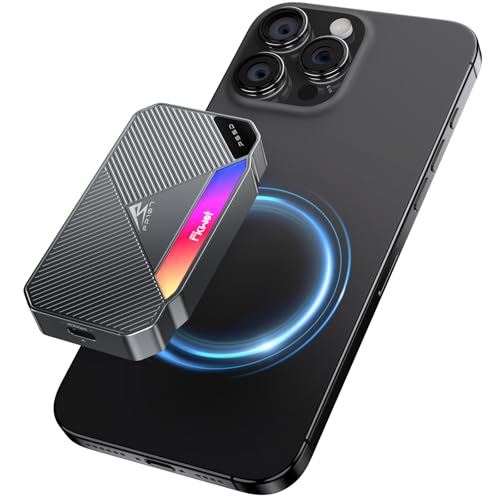
The Fikwot FP107 targets creators who record directly to an external drive. This 4TB magnetic portable SSD uses USB 3.2 Gen 2×2 for up to 2050MB/s, includes RGB lighting, and magnetically attaches for use with iPhone 15/16, Android phones, PCs, Macs, and PS5/PS4 Pro. The 4TB capacity doubles what most compact SSDs offer at this price, giving you space to store several hours of 4K video without swapping drives. At around $370 it balances capacity and speed for on-camera ProRes, handheld gimbal work, or as a large shuttle drive between field and studio.
- Pro: 4TB capacity in a magnetic, phone-ready form factor is ideal for direct 4K video storage
- Pro: 2050MB/s over USB 3.2 Gen 2×2 is fast enough for smooth 4K ingest and playback without Thunderbolt
- Con: USB 3.2 Gen 2×2 requires a compatible port to reach full speed; many devices will negotiate lower speeds
When to skip: If your workflow demands full 40Gb/s Thunderbolt 4 / USB4 speeds or desktop RAID redundancy, opt for the Addlink P30 or a ThunderBay enclosure.
Buying Guide
Interface and Real-World Speed Needs
Match the interface to your cameras and computers. USB4 / Thunderbolt 4 at 40Gb/s, as seen on the Addlink P30 and ZimaCube bundle, and Thunderbolt 40Gb/s on the OWC enclosures, provide the highest ceiling for 4K ProRes and RAW transfers. USB 3.2 Gen 2×2 at 20Gb/s, like the Fikwot FP107 at 2050MB/s, is still excellent for 4K but only hits that number on systems with a Gen 2×2 port; on a standard USB 10Gbps port it will run at half speed. Choose 40Gb/s if you regularly move hundreds of gigabytes at once and want headroom for future 6K/8K, otherwise prioritize capacity and compatibility.
Portable vs. Desktop RAID for Backup Workflow
Portable SSDs are for ingest and shuttle; desktop RAIDs are for consolidation and protection. A 2TB to 4TB portable lets you clear cards on location and edit on a laptop, while an eight-bay RAID lets you keep every project online with parity so a single drive failure does not lose data. Many reliable 4K workflows use both: dump to a fast USB4 portable in the field, then mirror to a ThunderBay RAID at the studio at the end of the day. If you can only buy one, base the decision on where footage lives longest. Solo travelers benefit most from portability, teams and archivists benefit most from bays and redundancy.
Capacity Planning and Compatibility
Plan capacity by shoot volume, not just drive size. A 2TB portable may hold a full day for some mirrorless 4K codecs but only a few hours for ProRes 4K 120fps; 4TB gives more breathing room, while 32TB RAID is built for months of 4K library retention. Check power and connection details before buying: portables that are bus-powered via Type-C work best with laptops, phones, and tablets, while eight-bay enclosures need dedicated power and desk space. Also confirm OS and device support for iPhone, iPad, and game console use if direct recording or playback matters to your workflow.
Our Verdict
For most 4K backup workflows, the Addlink P30 2TB at around $270 is the most versatile starting point. Its USB4 40Gb/s interface and up to 4000MB/s rating, plus Type-C Thunderbolt 4 compatibility and included USB4 cable, make it the fastest and most flexible way to offload and carry active 4K projects without a desk. Pair it with a larger archive if you shoot often. Studios that need long-term, redundant storage should invest in the OWC ThunderBay ecosystem: choose the around $1,000 eight-bay enclosure to build your own RAID over time, or the $2999.99 32TB solution for immediate turnkey capacity. Creators who film straight to a phone will find the magnetic Fikwot FP107 4TB at around $370 uniquely convenient, and teams that need shared access should look to the ZimaCube Pro bundle at $1441.64.
FAQ
Do I need Thunderbolt 4 / USB4 for 4K footage backup?
Not always, but it helps. USB 3.2 Gen 2×2 at 2050MB/s handles 4K well, yet Thunderbolt 4 / USB4 at 40Gb/s provides double the interface bandwidth and better consistency when moving large folders of ProRes or RAW. If you back up multiple cards daily or work with high bitrate 4K 120fps, the extra headroom noticeably shortens ingest and verification time.
How much capacity do I need for 4K workflow?
It depends on codec and retention. Highly compressed 4K may use 50GB to 150GB per hour, while ProRes 4K can exceed 300GB per hour. A 2TB portable covers a typical shoot day for compressed codecs and a half day for ProRes; 4TB adds safety for longer shoots. For archiving multiple projects without deleting, an eight-bay RAID with 32TB keeps more seasons online before you need to offload to cold storage.
Can these drives record 4K directly from iPhone 15/16?
Yes, with the right drive and cable. Drives that support Type-C and explicitly list iPhone 15/16 compatibility, such as the Addlink P30 and Fikwot FP107, can be used for direct ProRes recording when connected via a compatible USB-C cable. Magnetic models simplify mounting to the phone. Always confirm your iPhone settings allow external recording and that the drive is formatted correctly.
Should I choose an empty enclosure or a prebuilt RAID?
Choose an empty enclosure like the OWC ThunderBay 8 at around $1,000 if you want to select drive types, capacities, and RAID levels yourself and scale gradually. Choose a prebuilt 32TB solution at $2999.99 if you want immediate capacity and a configured system without sourcing drives. Empty enclosures cost less upfront but require additional drive purchases; prebuilt systems cost more upfront but save time and integration effort.









